Skype for Business

Skype for Business

ダウンロード: App Storeダウンロード: Google Play
ロゴ: Skype for Business

Skype for Business:境界のないプロフェッショナルなコミュニケーション

安全なインスタントメッセージ、高品質なビデオ会議、Microsoftエコシステムとのシームレスな統合で、オフィスをどこへでも持ち運びましょう。接続を維持し、生産性を保ち、タップ一つでどんな会議にも参加しましょう。

開発元

Microsoft Corporation

カテゴリ

Business

ダウンロード

25M+

ユーザー評価

4.2/5

評価数

65K+

対応言語

31

コラボレーションの実行

このインターフェースを利用する 25M+ 人のユーザー.

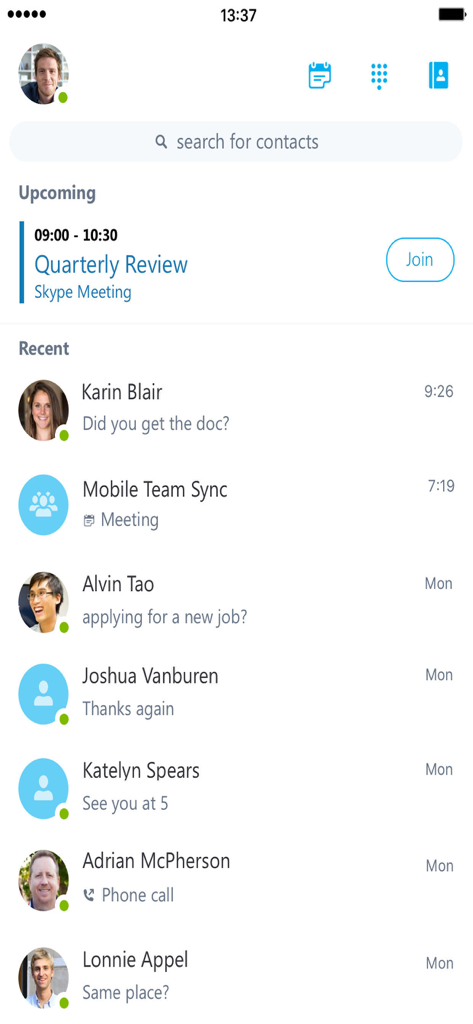
Skype for Businessモバイルアプリのインターフェイス。今後の四半期レビュー会議と最近の会話リストが表示されています。

Skype for Businessモバイルアプリのインターフェイス。今後の四半期レビュー会議と最近の会話リストが表示されています。

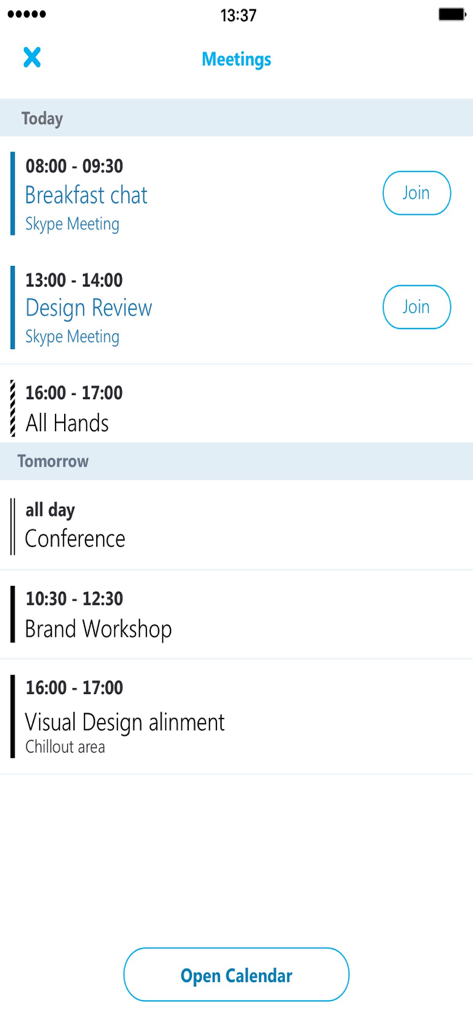
Skype for Businessの会議スケジュールインターフェイス。毎日の予定リストと参加ボタンが表示されています。

Skype for Businessの会議スケジュールインターフェイス。毎日の予定リストと参加ボタンが表示されています。

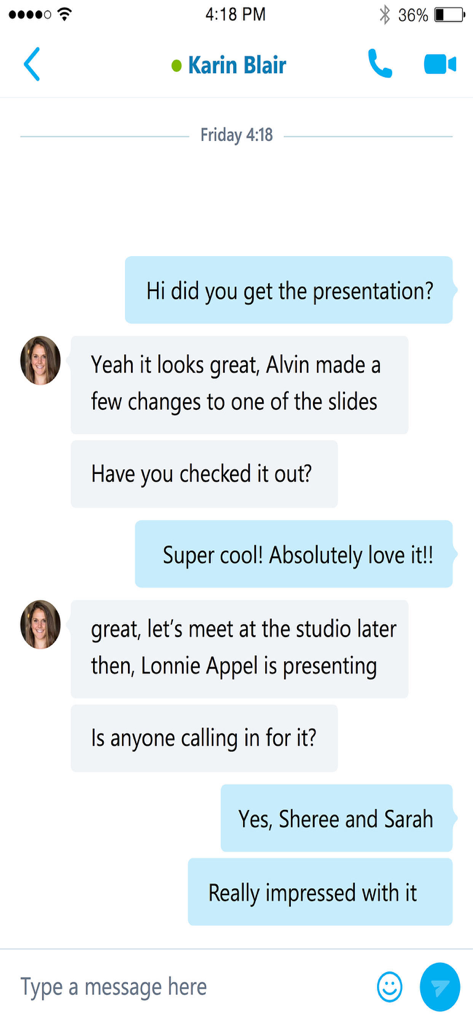
Skype for Businessのインスタントメッセージインターフェイス。プロフェッショナルなチャット会話が表示されています。

Skype for Businessのインスタントメッセージインターフェイス。プロフェッショナルなチャット会話が表示されています。

エンタープライズコラボレーションのハブ

このアプリを際立たせるツール、 25M+ 人のユーザーが選択.

📅

シームレスな会議統合

ダッシュボードからワンタップで、会議やビデオ会議に参加できます。ダイヤルインコードやIDは不要です。

👤

リアルタイムチームプレゼンス

同僚の空き状況を瞬時に把握し、コミュニケーションの障壁を減らし、IMや通話に最適なタイミングを見つけましょう。

🔒

安全な企業モビリティ

IT承認済みのセキュリティ、暗号化された会話、Active Directory認証を使用して、安心・安全にコミュニケーションを取りましょう。

レビュー分析

ユーザーレビューの分析.

感情スコア

31%
ネガティブ

概要

The app receives predominantly negative feedback, with many users experiencing critical issues like inability to log in, frequent crashes, and a lack of notifications, particularly in the background or for iOS. Several users also lament the perceived discontinuation or diminished functionality of "Skype for Personal," wishing for its return or noting the app's retirement. While a few express appreciation for Skype's historical role, common complaints include difficulties with meeting functionality, an outdated user interface, and synchronization problems. A recurring problem is the app losing connection in the background and failing to display scheduled meetings, alongside specific issues on iOS 17.4.1 causing errors and preventing updates.

主なテーマ

Login & Connection Stability(20)
Skype for Personal Legacy(10)
App Performance(7)
Meeting & Call Functionality(6)
Notification Reliability(5)
Cross-Device Synchronization(3)
User Interface(2)

アプリについて

について知っておくべきこと Skype for Business.

説明

Skype for Business, formerly Lync 2013 for iOS, extends the power of Lync and Skype to your favorite mobile device: voice & video over wireless, rich presence, instant messaging, conferencing, and calling features from a single, easy-to-use interface. Key Features: Initiate a group IM or video conversation and invite additional participants Join, rejoin and initiate a Skype for Business Meeting to communicate and collaborate on amazing ideas Simultaneously view shared content and speaker's video during a conference Control the meeting (mute or remove attendees) and know more about participants’ modalities Look at your upcoming meetings and join via one click Find your recent conversations and pick them up from where you left off Search your contacts by name, email, or phone number Enhanced security via Active Directory Authentication Library Anyone can use the Skype for Business for iOS app when invited to a Skype for Business or Lync 2013 meeting. However, you must have a Skype for Business or Lync account in order to use (and enjoy) the full capability of the Skype for Business app. Also, some functionality might require an update to Lync or Skype for Business Server or might not be available to all users. If you’re not sure about your account status, please contact your IT department. IMPORTANT: THIS SOFTWARE REQUIRES CONNECTIVITY TO VALIDLY LICENSED COPIES OF MICROSOFT LYNC OR SKYPE FOR BUSINESS SERVER OR OFFICE 365 / LYNC ONLINE / SKYPE FOR BUSINESS ONLINE AND WILL NOT WORK WITHOUT IT. UPDATES TO MICROSOFT LYNC SERVER OR SKYPE FOR BUSINESS MAY BE REQUIRED FOR PROPER PERFORMANCE. SOME FUNCTIONALITY MAY NOT BE AVAILABLE IN ALL COUNTRIES. IF YOU ARE UNSURE ABOUT YOUR COMPANY’S LICENSE TO AND/OR DEPLOYMENT OF LYNC OR SKYPE FOR BUSINESS, PLEASE CONTACT YOUR IT DEPARTMENT. SKYPE FOR BUSINESS APP IS ONLY AVAILBLE FOR iOS 8.0 OR GREATER.

最新バージョン

6.34.119

サイズ

80.1 MB

リリース日

2013年3月12日

どこからでも、シームレスなエンタープライズコミュニケーション

ワンクリックで会議に参加し、IT承認済みのセキュリティでチームとの接続を維持しましょう。Skype for Businessをダウンロードして、デスクとモバイルライフのギャップを埋めましょう。

ダウンロード: App Storeダウンロード: Google Play
FAQ

よくある質問

について知っておくべきこと Skype for Business

Skype for Businessとは何ですか?

Skype for Businessは、LyncおよびSkypeの機能をモバイルデバイスに拡張し、音声、ビデオ、インスタントメッセージ、会議、通話機能を単一のインターフェースで提供します。

iOS版Skype for Businessの主な機能は何ですか?

主な機能には、グループIMおよびビデオ通話の開始、会議への参加/開始、共有コンテンツの表示、会議の制御、今後の会議の確認、最近の会話の検索、連絡先の検索が含まれます。

Skype for Businessアプリで会議に参加できますか?

はい、ユーザーはアプリから直接Skype for Business会議に参加、再参加、開始できます。今後の会議は表示され、ワンクリックで参加できます。

Skype for Businessはインスタントメッセージをサポートしていますか?

はい、Skype for Businessはインスタントメッセージをサポートしています。ユーザーはグループIM会話を開始したり、最近の会話にアクセスして中断したところから再開したりできます。

Skype for Businessを使用するための要件は何ですか?

完全な機能を使用するには、Skype for BusinessまたはLyncアカウントが必要です。また、ライセンスされたMicrosoft LyncまたはSkype for Business ServerまたはOffice 365への接続が必要です。

Skype for BusinessはどのiOSバージョンをサポートしていますか?

Skype for Businessアプリは、iOS 8.0以降を実行しているデバイスでのみ利用可能です。これにより、必要なオペレーティングシステム機能との互換性が確保されます。

Skype for Businessで連絡先を検索できますか?

はい、ユーザーはSkype for Businessアプリケーション内で名前、メールアドレス、または電話番号で連絡先を検索できます。この機能はメインインターフェースから簡単に利用できます。

Skype for Businessはビデオ会議をサポートしていますか?

はい、Skype for Businessはビデオ会議をサポートしています。ユーザーはグループビデオ会話を開始し、会議中に共有コンテンツと話者のビデオを同時に表示できます。

Skype for Businessはセキュリティをどのように強化しますか?

Skype for Businessは、Active Directory Authentication Libraryを通じてセキュリティを強化します。これにより、ユーザーアカウントに堅牢な認証メカニズムが提供され、通信とデータが保護されます。

App information, icons, screenshots, and descriptions displayed on this page are sourced from the Apple App Store and are the property of their respective developers. Download estimates and rankings are based on MWM's proprietary models and may not reflect actual figures. This page is provided for informational and analytical purposes only.

Believe this page infringes your intellectual property? File a dispute