Slack

Slack

ダウンロード: App Storeダウンロード: Google Play
ロゴ: Slack

Slack: 現代のチームのために構築されたAI搭載生産性プラットフォーム

チームメンバー、ツール、ワークフローを1つの安全なデジタルHQに統合します。AIによる要約で会議疲れを解消し、退屈な作業を自動化し、ビジネスをより迅速に拡大します。

開発元

SLACK TECHNOLOGIES L.L.C.

カテゴリ

Business

ダウンロード

50M+

ユーザー評価

4.2/5

評価数

105K+

対応言語

10

動く生産性

このインターフェースを利用する 50M+ 人のユーザー.

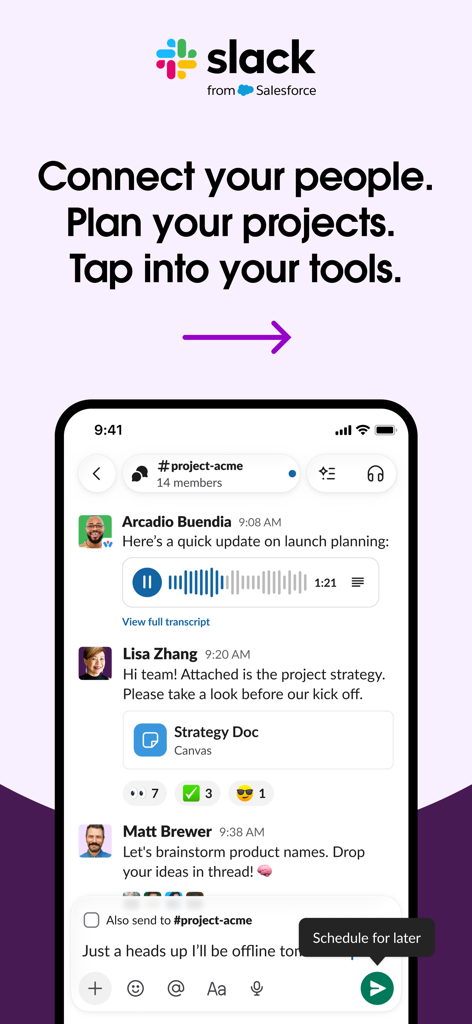
Slackモバイルアプリのインターフェース。プロジェクトコラボレーションメッセージとボイスノートを表示。

Slackモバイルアプリのインターフェース。プロジェクトコラボレーションメッセージとボイスノートを表示。

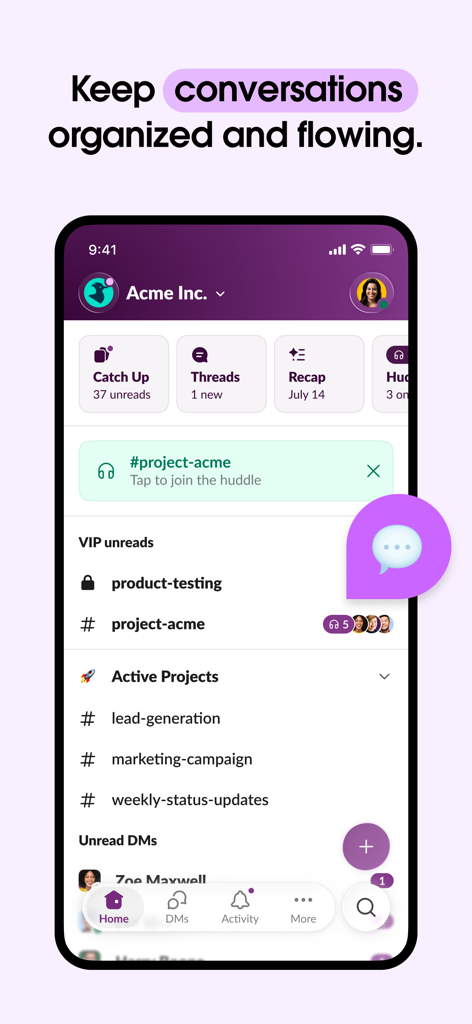
Slackモバイルアプリのインターフェース。Acme Inc.の整理されたビジネスチャンネルと会話の要約を表示。

Slackモバイルアプリのインターフェース。Acme Inc.の整理されたビジネスチャンネルと会話の要約を表示。

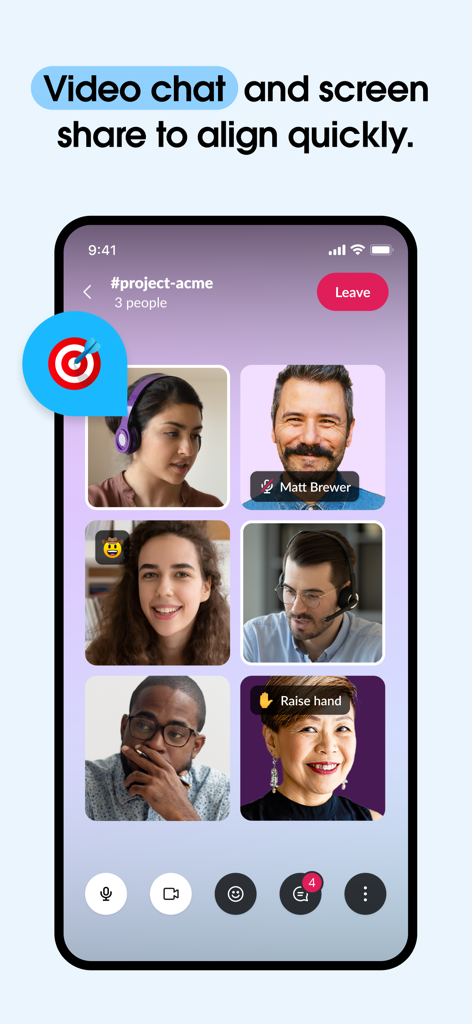
Slackモバイルアプリのスクリーンショット。複数のチームメンバーがグリッドレイアウトで表示されたグループビデオ通話を表示。

Slackモバイルアプリのスクリーンショット。複数のチームメンバーがグリッドレイアウトで表示されたグループビデオ通話を表示。

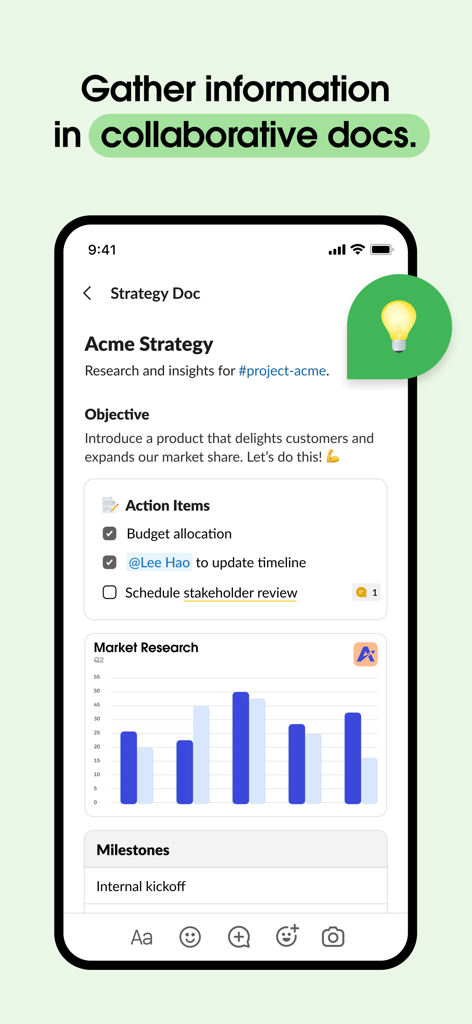
Slackモバイルインターフェース。チェックリストとチャートを含む共同作業戦略ドキュメントを表示。

Slackモバイルインターフェース。チェックリストとチャートを含む共同作業戦略ドキュメントを表示。

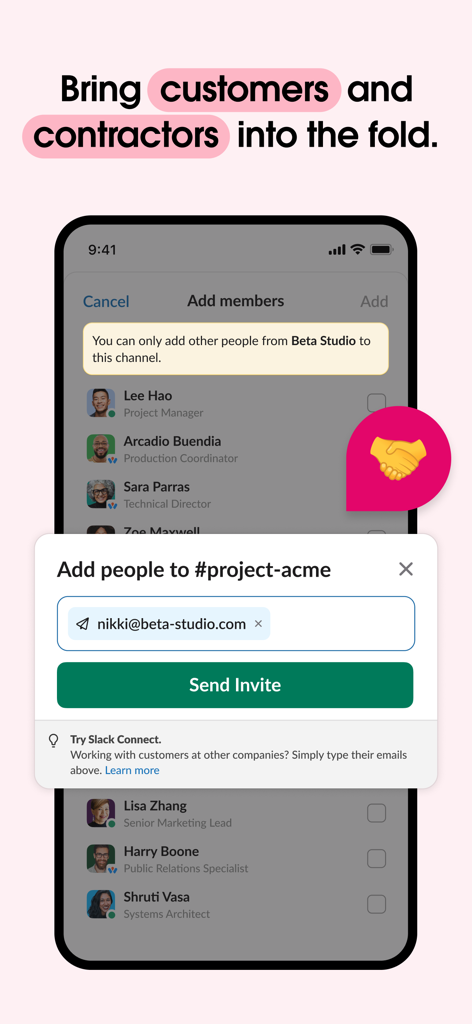
Slackモバイルアプリのインターフェース。プロジェクトチャンネルに外部パートナーを招待するウィンドウを表示。

Slackモバイルアプリのインターフェース。プロジェクトチャンネルに外部パートナーを招待するウィンドウを表示。

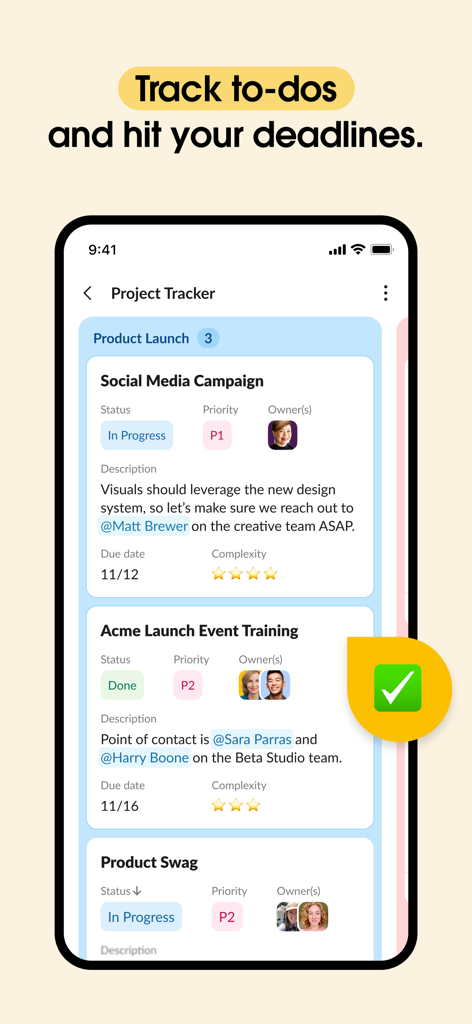
Slackモバイルアプリのインターフェース。タスクのステータスと期日を含むプロジェクトトラッカー機能を表示。

Slackモバイルアプリのインターフェース。タスクのステータスと期日を含むプロジェクトトラッカー機能を表示。

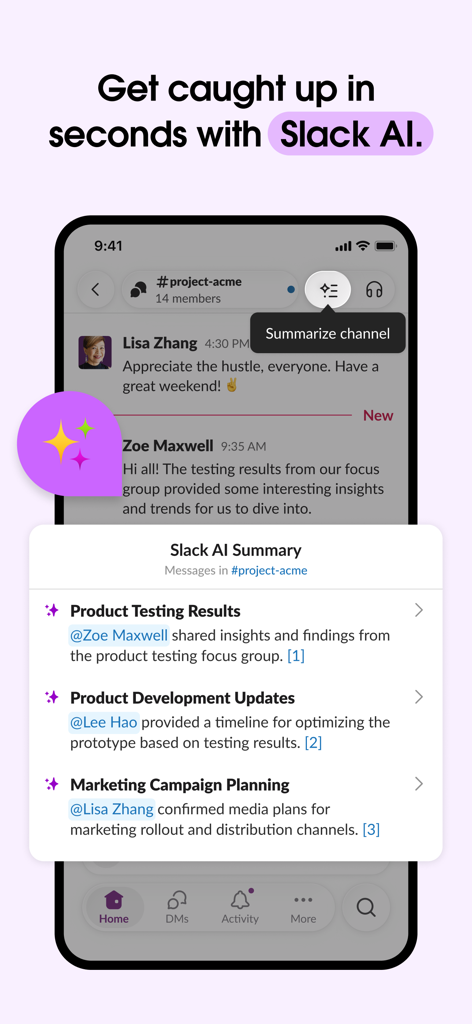
Slackモバイルアプリのインターフェース。プロジェクトチャンネルの会話に対するAI生成要約を表示。

Slackモバイルアプリのインターフェース。プロジェクトチャンネルの会話に対するAI生成要約を表示。

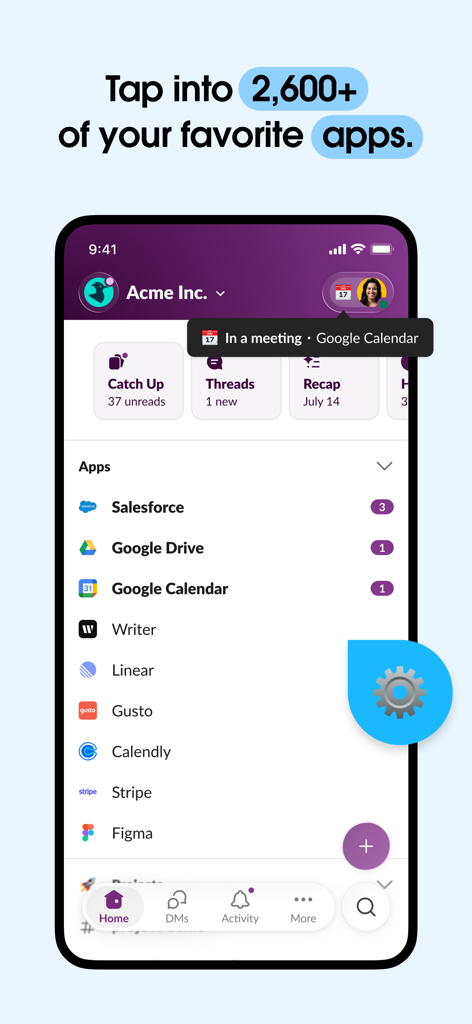
Slackモバイルアプリのインターフェース。SalesforceやGoogle Driveなどの統合されたビジネスアプリケーションのリストを表示。

Slackモバイルアプリのインターフェース。SalesforceやGoogle Driveなどの統合されたビジネスアプリケーションのリストを表示。

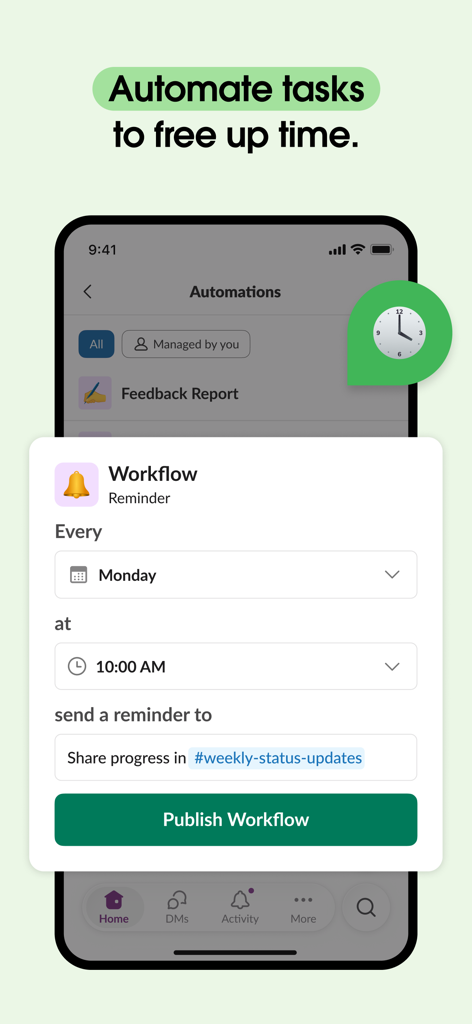
Slackのモバイルインターフェース。毎週月曜日の午前10時にタスクを自動化するワークフローリマインダー設定を表示。

Slackのモバイルインターフェース。毎週月曜日の午前10時にタスクを自動化するワークフローリマインダー設定を表示。

workdayを簡単にマスターする

このアプリを際立たせるツール、 50M+ 人のユーザーが選択.

決して機会を逃さない

会話や会議のAI駆動型要約を即座に取得できるため、延々とスクロールすることなく、常に最新情報を把握できます。

🧩

あらゆるツールに対応する1つのアプリ

Jira、Figma、Google Driveなどの2,600以上のアプリを接続し、単一のインターフェースでプロジェクトライフサイクル全体を管理できます。

🎧

アドホックコラボレーション

カレンダー疲れはもう不要です。クイックボイスまたはビデオハドルを開始して、画面共有を簡単に行い、リアルタイムでブロッカーを解決します。

アプリについて

について知っておくべきこと Slack.

説明

Companies in every industry around the world grow their business in Slack because it gets busywork off their plates and wasteful meetings off their calendars. Slack brings everyone from coworkers, customers, and contractors into one secure place, so you don’t have to chase approvals or wait around on emails. Slack even has AI that can search to find the information you need instantly and summarize conversations to catch you up with a click. Better yet, Slack makes it easy for anyone on your team to automate the small stuff, giving everyone more time to focus on the big picture. AKA, growing your business. COLLABORATE QUICKER. Work alongside teammates and external partners securely in Slack. • Connect with everyone: Invite vendors, customers, and contractors to work with you and your coworkers — all in one place. • Video chat face-to-face, from anywhere: Meet with teammates instantly through video conferencing, and discuss work live with screen sharing. • Crystal-clear communication: Use voice notes when text alone doesn’t cut it, ensuring complicated messages are better understood. • Stay organized: Keep project, customer, and product conversations in dedicated channels and documents. ACCESS YOUR KNOWLEDGE. Slack is where you can find every file, message, and decision. • Find anything, instantly: Our intelligent, AI-powered search understands context and saves you from digging around to find the answers you need to do your job.** • Collaborate on deliverables: Co-create marketing plans, product specs, and more in shared documents that live right next to your team’s conversations. • Streamline project execution: Track tasks, owners, and priorities with project management tools and lists that connect seamlessly to the rest of your work.* • Create consistent processes: Make sure every new project is set up to succeed with Slack-generated or custom-created* templates. • Capture meeting notes automatically: Let AI transcribe and summarize meeting notes for you in Slack, so you can focus on the conversation.** PERFECT EVERY PROCESS. Let Slack automations do your busywork for you. • Centralize your work: Connect to 2,600+ apps and focus just on Slack, including Google Drive, Dropbox, Asana, Zapier, Figma, Zendesk, and more. • Manage routine tasks: Approve PTO requests, manage your calendar, or update file permissions — all in one place (talk about convenient). • Stay on top of your to-dos: Manage your to-do list from your notepad to where you’re getting the rest of your work done. • Bring the power of Agentforce to your team: Access AI agents to respond to HR tickets, set team reminders, resolve IT issues, and much more.*** *Requires an upgrade to Slack Pro, Business+, or Enterprise. **Requires Slack AI add-on ***Requires Agentforce license from Salesforce

最新バージョン

26.01.10

サイズ

411.3 MB

リリース日

2013年3月20日

より少ない労力で、より多くのことを達成する準備はできていますか?

Slackを利用して、退屈な作業を自動化し、ノイズを要約し、どこからでもチームを接続し続ける5000万人以上のプロフェッショナルに加わりましょう。

ダウンロード: App Storeダウンロード: Google Play
FAQ

よくある質問

について知っておくべきこと Slack

Slackチャンネルに外部のクライアントやパートナーを招待できますか?

はい、Slackではベンダー、顧客、請負業者をチームと安全に連携するために招待できます。この機能により、外部パートナーとのコラボレーションが1つの統合されたスペースで一元化されます。

Slackはビデオ会議と画面共有機能を提供していますか?

はい、Slackは対面会議のためのインスタントビデオ会議を提供しています。ユーザーは画面を共有して作業をライブで議論することもでき、リアルタイムのコラボレーションを強化します。

Slackで利用できるAI機能は何ですか?

Slack AIは、情報を即座に見つけるためのインテリジェントな検索機能を提供し、会話を要約します。これにより、ユーザーは議論にすばやく追いつくことができ、Slack AIアドオンが必要です。

Slackと連携できるサードパーティアプリはいくつありますか?

Slackは2,600以上のアプリケーションと連携しています。この豊富な連携リストには、Google Drive、Salesforce、Figmaなどの人気アプリが含まれており、さまざまなワークフローをSlack内で一元化します。

Slack内でタスクやワークフローを自動化できますか?

はい、Slackでは定型タスクやワークフローの自動化が可能です。ユーザーはPTOリクエストやカレンダーを管理したり、カスタムワークフローを作成して時間を節約し、プロセスを最適化したりできます。

Slackはプロジェクト管理やタスク追跡のためのツールを提供していますか?

はい、Slackはタスク、担当者、優先順位を追跡するためのプロジェクト管理ツールを提供しています。この機能はプロジェクト実行を効率化し、Slack Pro、Business+、またはEnterpriseへのアップグレードが必要です。

Slackは、整理されたコミュニケーションやドキュメント共有をどのように促進しますか?

Slackは、プロジェクトや顧客などの特定のトピックに関する専用チャンネルを通じてコミュニケーションを整理します。また、チームの会話内で直接、共同でのドキュメント作成や共有もサポートしています。

App information, icons, screenshots, and descriptions displayed on this page are sourced from the Apple App Store and are the property of their respective developers. Download estimates and rankings are based on MWM's proprietary models and may not reflect actual figures. This page is provided for informational and analytical purposes only.

Believe this page infringes your intellectual property? File a dispute