Slideshow Maker Video & Photo
ダウンロード: App Store

このページはアプリまたはその開発者の公式ページではなく、情報提供および論評を目的として作成された独立した編集出版物です。明示的に別段の記載がない限り、アプリおよびその開発者は、MWM、Apple、Google Play、アプリのパブリッシャー、またはアプリの開発者と提携、承認、後援、認可、またはその他の公式的な関係はなく、このページのいかなる内容も、アプリがMWMのサービスを使用して開発されたことを意味するものではありません。すべての商標、ロゴ、スクリーンショット、その他のコンテンツはそれぞれの所有者の財産です。


ロゴ: Slideshow Maker Video & Photo
ダウンロード: App Store

Slideshow Maker Video & Photo

お気に入りの思い出をカメラロールに眠らせたままにしないでください。最大200枚の写真を、Instagram、Facebook、その他のプラットフォームで家族や友人を喜ばせるためにデザインされた音楽、トランジション、テーマを備えた素晴らしい動画に変換しましょう。

主要数値

ダウンロード

1M+

ユーザー評価

4.8/5

評価数

28K+

開発元

Honk Honk Punch Pty Ltd

カテゴリ

Photo & Video

対応言語

15

最新バージョン

1.42.0

サイズ

106.7 MB

リリース日

2019年10月7日
機能

人生の最高の瞬間を祝う

カメラロールを息をのむような映画体験に変えましょう。200枚以上の写真スロットと使いやすいテーマで、あなたの物語を共有することが、これほど簡単で美しくなったことはありません。

無制限のストーリーテリング

結婚式、卒業式、家族旅行のあらゆるディテールを捉えるのに最適な、最大200枚の写真や動画を1つのプロジェクトに組み合わせることができます。

専門的に作られたテーマ

誕生日、ビーチ、ロマンチックなどの26種類のユニークなテンプレートテーマから選択して、数秒で映画にプロフェッショナルなタッチを与えましょう。

以下のスクリーンショットと説明は、アプリの公式ストアリスティングから直接取得されたものであり、アプリ開発者の所有物です。

アプリストア

スクリーンショット
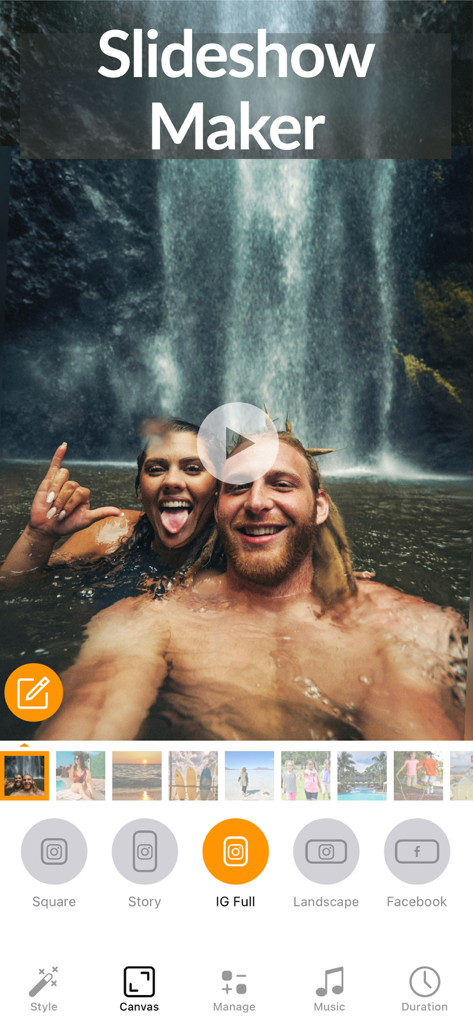
Slideshow Maker Video & Photo - InstagramやFacebookの投稿用のキャンバスサイズオプションを表示するスライドショーメーカーアプリのインターフェース
InstagramやFacebookの投稿用のキャンバスサイズオプションを表示するスライドショーメーカーアプリのインターフェース

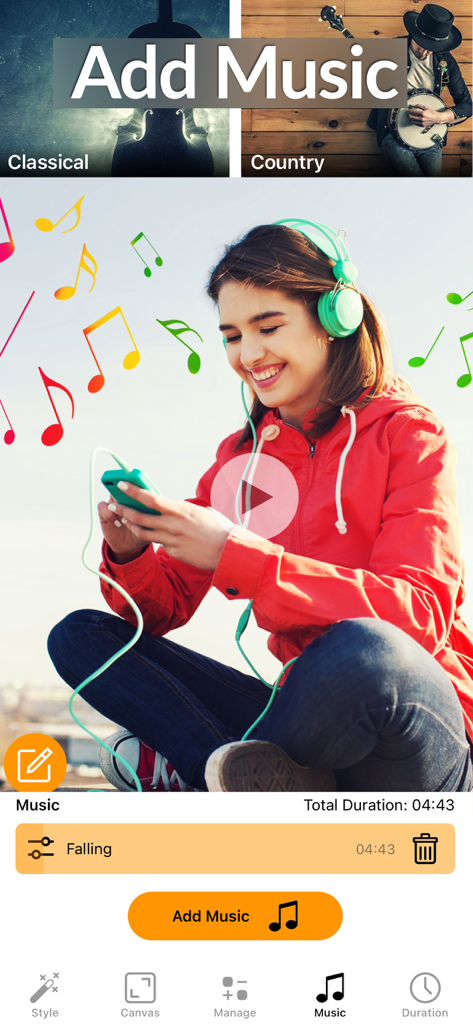
Slideshow Maker Video & Photo - 写真動画に背景音楽を選択して追加するためのスライドショーメーカーアプリのインターフェース
写真動画に背景音楽を選択して追加するためのスライドショーメーカーアプリのインターフェース

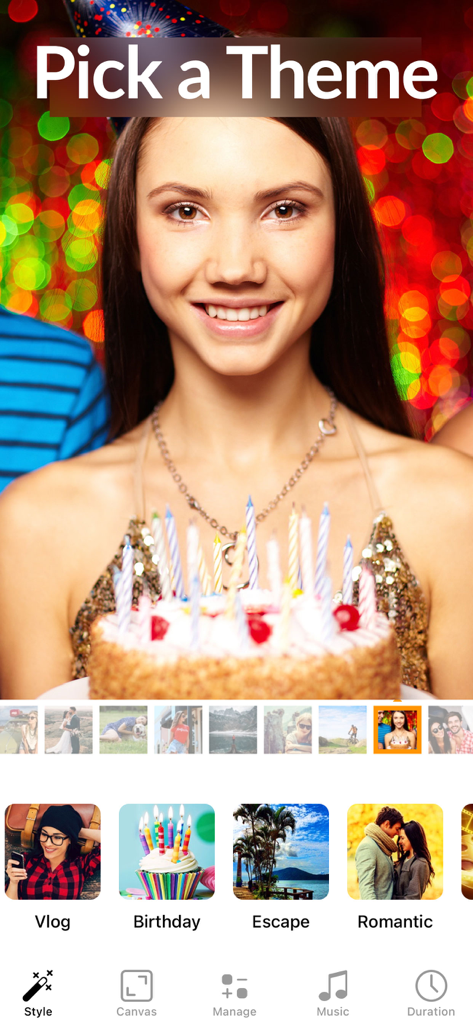
Slideshow Maker Video & Photo - 誕生日テーマのプレビューとテンプレート選択オプションを表示するスライドショーメーカーのモバイルアプリインターフェース
誕生日テーマのプレビューとテンプレート選択オプションを表示するスライドショーメーカーのモバイルアプリインターフェース

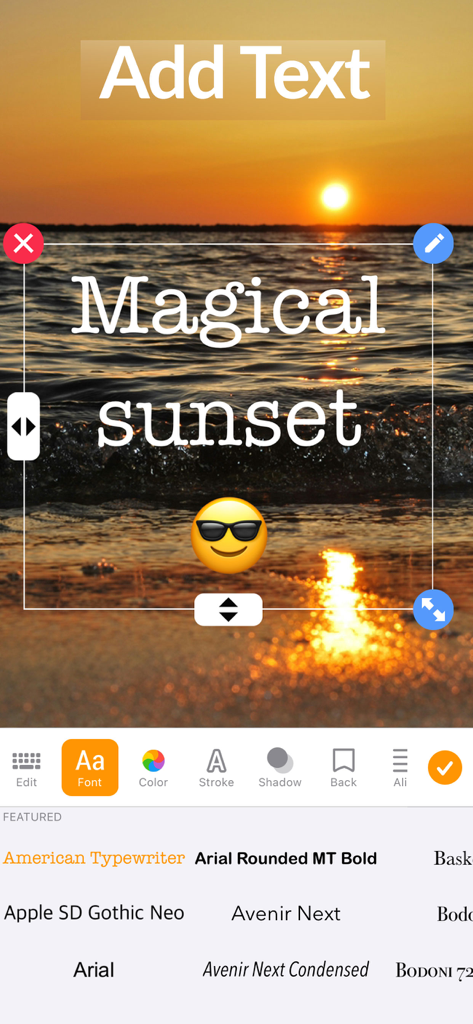
Slideshow Maker Video & Photo - 夕日の背景とさまざまなフォントオプションを備えたテキストエディタツールを示すスライドショーメーカーアプリのインターフェース

夕日の背景とさまざまなフォントオプションを備えたテキストエディタツールを示すスライドショーメーカーアプリのインターフェース

説明

Create unforgettable slideshows in seconds with photo & video! Combine media to make a movie with beautiful transitions, music, filters and effects and watch your pictures come alive. Delight your friends and family when you share these special moments. Choose your own style from 26 fantastic template themes including halloween, birthday, beach, chill, jolly and romantic! Features: - Pick photos & videos (up to 200 photos) - Set your own music or use the music from the included styles - Add Text - tons of fonts and styles - Manage & reorder photo & video easily - Canvas sizes : Square, IG Story, IG Full, IG Landscape, Facebook & Pinterest - Fit or Fill canvas with blur background - Trim & Cut Video (Basic & Advanced) - Flip, rotate photo or video - Set photo duration - Mute video audio - Landscape support for iPad Slideshow Premium Subscription Info: - 3 day free trial, then charged yearly - You'll be able to use all features for the duration of your subscription - You can subscribe for unlimited access to premium content, including: Unlocking all Features, Unlimited Photos / Videos and No Ads - Payment will be charged to your iTunes Account at confirmation of purchase - The subscription renews automatically unless auto-renewal is turned off for at least 24-hours before the end of the current period - The account will be charged for renewal within 24-hours prior to the end of the current period at the cost of the chosen package - Subscriptions may be managed by the user and auto-renewal may be turned off by going to the user's Account Settings after purchase - Any unused portion of a free trial period, if offered, will be forfeited when the user purchases a subscription You can read our privacy policy and terms of use at http://cushwayapps.com/app-privacy/slideshow/privacy.html http://cushwayapps.com/app-privacy/slideshow/terms.html Have you found a bug, got a suggestion, or want a new feature? Email us at: support@honkhonkpunch.com

Download

ダウンロード: App Store

このページはアプリまたはその開発者の公式ページではなく、情報提供および論評を目的として作成された独立した編集出版物です。明示的に別段の記載がない限り、アプリおよびその開発者は、MWM、Apple、Google Play、アプリのパブリッシャー、またはアプリの開発者と提携、承認、後援、認可、またはその他の公式的な関係はなく、このページのいかなる内容も、アプリがMWMのサービスを使用して開発されたことを意味するものではありません。すべての商標、ロゴ、スクリーンショット、その他のコンテンツはそれぞれの所有者の財産です。