
このページはアプリまたはその開発者の公式ページではなく、情報提供および論評を目的として作成された独立した編集出版物です。明示的に別段の記載がない限り、アプリおよびその開発者は、MWM、Apple、Google Play、アプリのパブリッシャー、またはアプリの開発者と提携、承認、後援、認可、またはその他の公式的な関係はなく、このページのいかなる内容も、アプリがMWMのサービスを使用して開発されたことを意味するものではありません。すべての商標、ロゴ、スクリーンショット、その他のコンテンツはそれぞれの所有者の財産です。


ダウンロード
25k+ユーザー評価
評価数
3.4K開発元
カテゴリ
Music対応言語
9最新バージョン
16.0サイズ
8.7 MBリリース日
2016年1月29日テックアナリストによる詳細な評価
Smart Metronome & Tuner + の機能分析
高精度メトロノーム機能
本アプリは、ハードウェアを完全に活用してCPU時間を使用せずに完璧なビートを生成し、44.1kHzのサンプリングレートによる極めて高い精度(±20µs)を提供します。リアルな振り子アニメーションと実物のメトロノームから録音された自然なサウンドが、従来のメトロノーム体験を再現します。
リピートモード
この機能は、困難なパッセージ、スケール、アルペジオの反復練習に不可欠です。本アプリは、練習する小節数をプログラムし、各繰り返しで自動的にテンポを段階的に増加させることで、演奏能力の向上を促します。
プログラムモード
テンポと拍子記号の変更を詳細に制御できます。小節数とテンポシーケンスをプログラム可能で、アチェレランド(だんだん速く)やリタルダンド(だんだん遅く)も利用可能です。プログラムに従ってテンポが自動的に増減し、複雑な楽曲のパフォーマンス精度を高めます。
チューナー機能
楽器の正確なチューニングを可能にするチューニングメーターを備えており、演奏前に適切なピッチに調整できます。シンプルなチューニングトーンも利用可能です。
タップテンポ設定
BPM番号をタップするだけで、ユーザーはリズムに合わせて直感的にテンポを設定できます。これにより、素早く練習を開始し、効率的なワークフローを実現します。
テンポプログラムの保存と読み込み
作成した複雑なテンポプログラムを保存し、必要に応じて迅速に呼び出すことができます。これにより、異なる楽曲や練習ルーティンへの切り替えが容易になり、時間を節約できます。
ボイスオーバー完全互換
視覚障害を持つユーザーを含むすべてのユーザーが、ボイスオーバー機能を利用してアプリの全機能を操作できます。これにより、アクセシビリティが保証され、より幅広い層のユーザーが利用可能です。
練習ログ記録
練習の進捗状況を記録できます。ユーザーは自身のパフォーマンスを追跡・分析することで、目標達成に向けた効果的な練習計画を立てるのに役立てることができます。
ドラムマシン機能
このアプリにはドラムマシン機能が搭載されており、ユーザーは様々なドラムパターンを利用して、よりリズミカルで表現豊かな練習環境を構築できます。
多様な音色と背景
ユーザーは、4種類のサウンドセットからメトロノームの音色を選択でき、さらに10種類の背景色のバリエーションからアプリの見た目をカスタマイズできます。これにより、快適でパーソナライズされた利用体験を享受できます。
以下のスクリーンショットと説明は、アプリの公式ストアリスティングから直接取得されたものであり、アプリ開発者の所有物です。
アプリストア
スクリーンショット

本アプリは、リアルな振り子アニメーションと大きなBPM表示を備え、直感的な操作でテンポ設定が可能です。
シンプルなメトロノーム
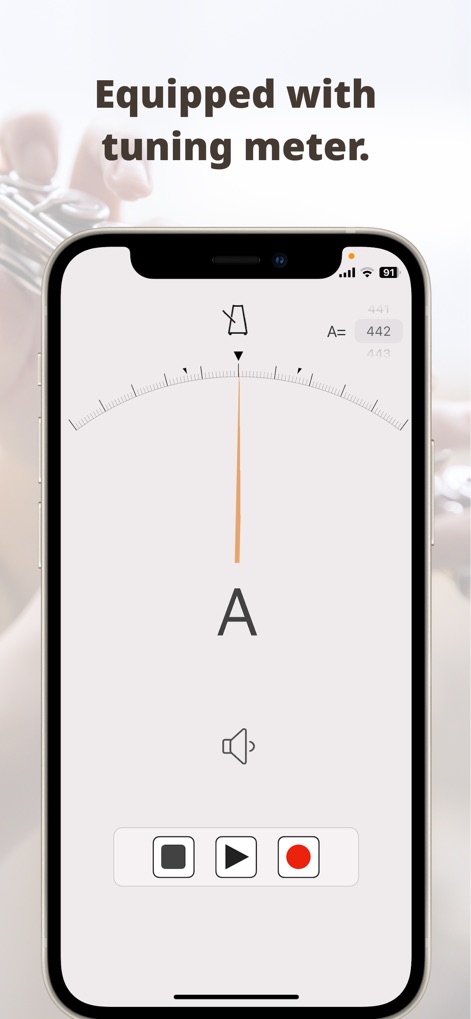
この画面では、視覚的な針のインジケーターと正確なA=442Hzの周波数表示により、楽器を完璧にチューニングできます。
正確なチューナー機能

ユーザーは15種類の異なるテーマカラーから選択でき、画面に表示されたモダンなカラーパレットで自分だけのアプリデザインを作成できます。
豊富なカラーテーマ

この入力画面では、シンプルな数字キーパッドとタップ機能を使用して、BPMを迅速かつ正確に設定できます。
直感的なテンポ設定

難易度の高いパッセージの練習では、開始テンポと目標テンポを設定し、繰り返し回数と小節数を細かくプログラムできます。
繰り返し練習モード

ユーザーは拍子記号と小節数を詳細に設定できる表形式のインターフェースで、テンポシーケンスや曲の構成を自由にプログラムできます。
プログラムモード
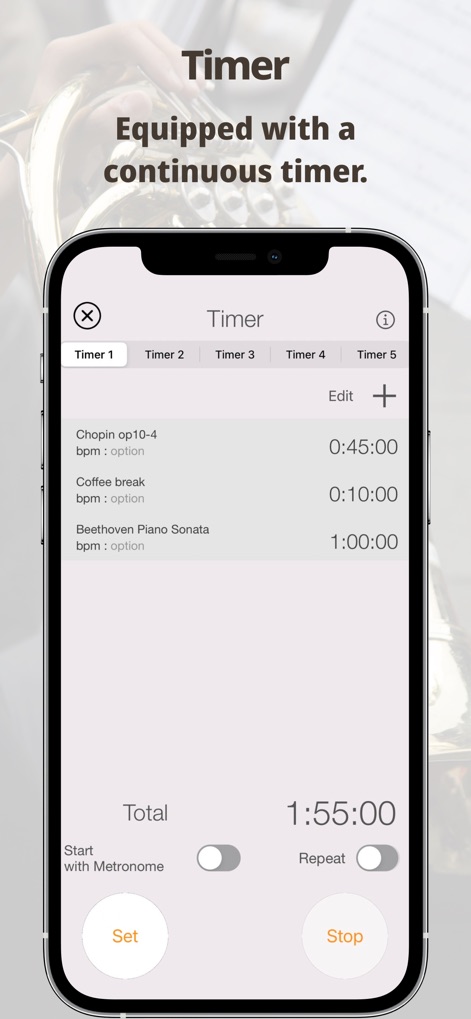
練習時間の管理を支援するこのタイマー機能は、曲ごとのプリセットと合計時間表示により、効率的な練習スケジュールをサポートします。
集中練習タイマー

ユーザーは棒グラフで練習時間の推移を視覚的に把握でき、個別楽曲の練習時間もリスト形式で詳細に記録・追跡できます。
練習履歴の記録
説明
Download
類似アプリ
同じカテゴリのトップランクアプリ

Spotify: Music and Podcasts
Spotify

YouTube Music
Google LLC

Shazam: Find Music & Concerts
Apple Inc.

SoundCloud: The Music You Love
SoundCloud Global Limited & Co KG

Suno - AI Songs & Music
Suno Inc.

QQ音乐 - 听我想听
Tencent Technology (Shenzhen) Company Limited

Audiomack - Play Music Offline
Audiomack, Inc.

GuitarTuna: Tune & Play Guitar
Yousician Ltd

BandLab – Music Maker & Beats
BandLab Singapore Pte Ltd
このページはアプリまたはその開発者の公式ページではなく、情報提供および論評を目的として作成された独立した編集出版物です。明示的に別段の記載がない限り、アプリおよびその開発者は、MWM、Apple、Google Play、アプリのパブリッシャー、またはアプリの開発者と提携、承認、後援、認可、またはその他の公式的な関係はなく、このページのいかなる内容も、アプリがMWMのサービスを使用して開発されたことを意味するものではありません。すべての商標、ロゴ、スクリーンショット、その他のコンテンツはそれぞれの所有者の財産です。