SmartPlaylist: Professional-Grade Curation for the Digital Music Power User
Reclaim your library from the algorithm. Build complex, rule-based playlists with Boolean logic, deep metadata filtering, and desktop-level precision—directly on your iPhone and iPad.
Publisher
Daniel Habluetzel-Laville
Category
Music
Downloads
0
User Rating
4.2/5
Total Ratings
0
Locales
3
Precision at a Glance
Discover the interface used by 0 users.
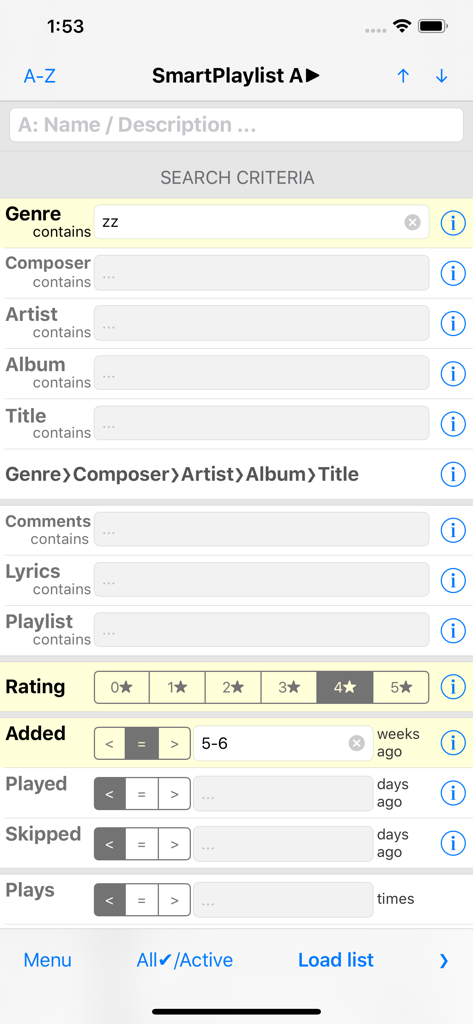
SmartPlaylist app screen showing advanced music search filters for genre rating and history
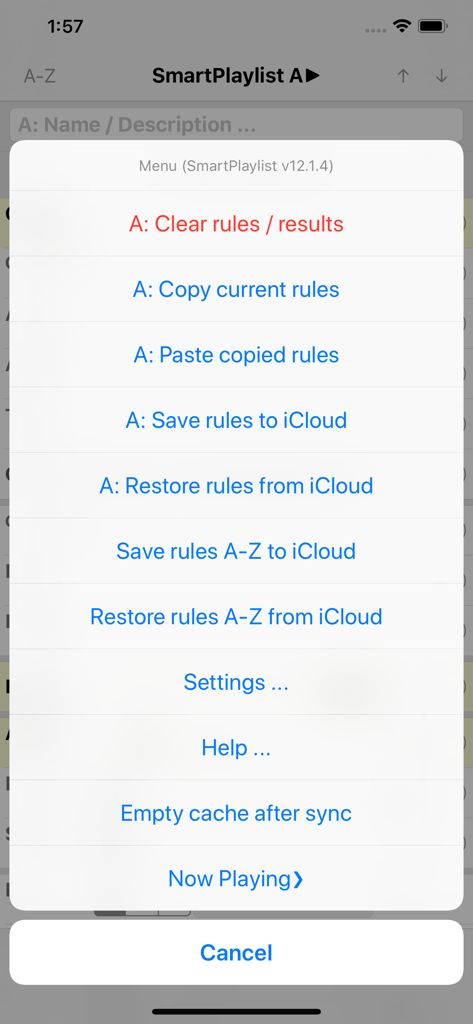
SmartPlaylist app menu showing options to manage rules and sync with iCloud
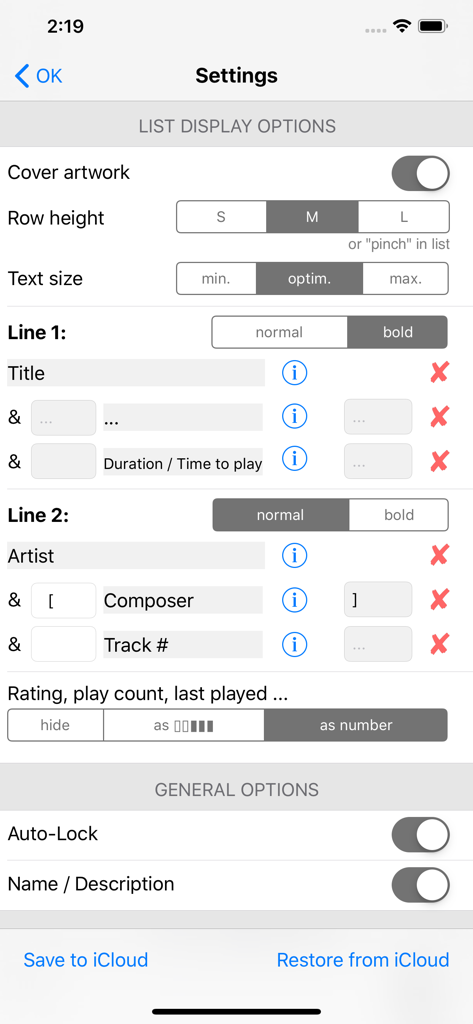
SmartPlaylist app settings screen showing display options for customizing metadata like title artist and rating in the song list
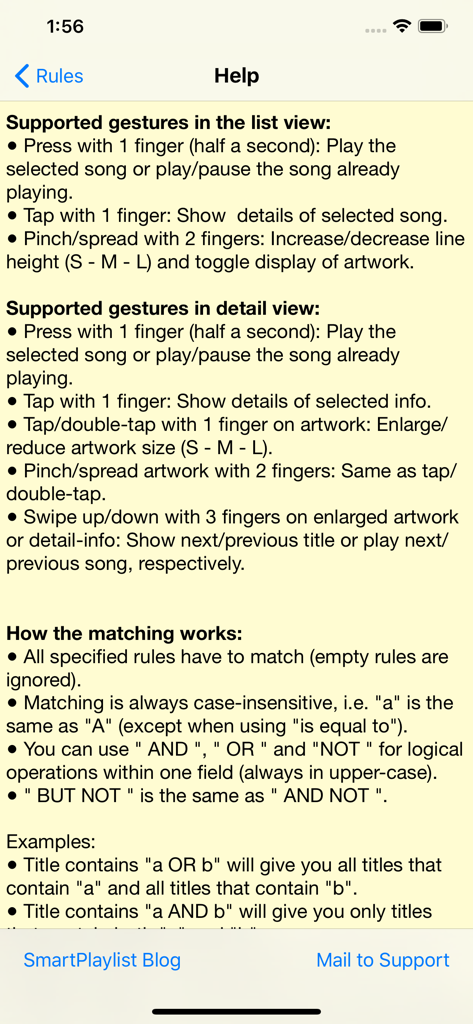
Help screen of the SmartPlaylist app displaying supported gestures and Boolean logic rules for matching songs
Take Command of Your Music Library
The tools that make this app stand out, trusted by 0 users.
🧩
Boolean Logic Precision
Use advanced AND, OR, and NOT operators with wildcards to filter your library with the surgical accuracy of a desktop database.
📊
Data-Driven Discovery
Surface forgotten gems by filtering through play counts, skip history, BPM, and specific release windows to keep your library fresh.
☁️
Cross-Device Rule Sync
Craft your perfect search rules once and sync all 26 custom smart playlist templates across your iPhone and iPad via iCloud.
About the app
Everything you need to know about SmartPlaylist.
Description
SmartPlaylist is the most advanced playlist generator for iPod/iPhone/iPad with many unique features.
SmartPlaylist uses the titles stored in your Music library on your device.
There are 26 smart playlists (SmartPlaylist A-Z) which you can use and name as you wish.
In each SmartPlaylist you can combine more than 20 search rules to filter and sort your iTunes music library. These rules can be saved in iCloud.
Available search criteria:
● Text search: Genre, Grouping, Composer, Artist, Album-Artist, Album, Title, Comments, Lyrics and/or iTunes-Playlist
Search for exact matches („is equal to“), for any partial matches („contains“) or use wildcards („is like“ ?/*).
Use logical operators to unite (" OR “), intersect (" AND “) or exclude (“ NOT “) certain songs
Example: The rule "Genre contains blu OR zz" will give you all your blues and jazz songs in 1 playlist.
● Numerical search: Rating, Play Count, Skip Count, Duration, Track Number, BPM and/or Year.
● Date search: Added, Last Played, Last Skipped, Released (how many days, weeks, months or years ago)
You can search for values less than, equal to / from-to (=) or more than the limit you set
● Property search: is in compilation, is in iCloud, is music video (all/yes/no)
The titles loaded in SmartPlaylist also become the playback queue of the Music app and the now playing title is also shown in the lock screen and the control center, where you can play/pause, fast-forward, skip, etc.
There are many settings to configure, e.g. what search rules you want to use and what info you want to see in the list of titles.
General procedure:
1. Select a smart playlist (a)
2. Set the search rules (a)
3. Tap „Load titles“ (a)
4. Scroll through the list of matching titles (b)
5. Press on a title in the list to play it or tap to see all its details (c).
a) THE MAIN SCREEN: The search rules of a smart playlist (e.g. „SmartPlaylist A“)
● Use „Menu“ to open the settings and help, copy/paste rules and backup/restore with iCloud
● Use „(i)“ to open the details of a search rule (there, use „(+)“ to open the pick list for genre, artist, etc.)
● Use „All/Active“ to toggle between showing all search rules and showing only the active rules (yellow)
● Browse your music collection hierarchically by Genres > Composers > Artists > Albums > Titles
● Use list operations to add, subtract or intersect the results of SmartPlaylists
● Limit the number of titles per artist or per album, or limit the list to x minutes, hours or titles
● Sort with multiple criteria, e.g. 1. by Artist, 2. by Rating (per artist), 3. by playCount (per rating)
● With „Show only“ you can load another SmartPlaylist while the previous list is still playing in the background
● If you do not set any search rules „Load titles“ will load all titles in your music library
b) THE LIST VIEW: The list of titles matching the search rules
● Long-press on a title to play/pause
● Pinch in/out to change the row height (S-M-L) and toggle the display of the artwork
● Use quick-search to search within the loaded list or mark certain titles
● Scroll to the now playing song in the list with „Now playing“
c) THE DETAIL VIEW: All the details/infos for the selected song
● If you have selected a song which is not being played, you can scroll up and down through the title list with „^“ / „v“
● When you are in the „Now playing mode“, „^“ / „v“ will play the previous or next song, respectively.
● Enlarge the cover artwork up to full screen (tap/double-tap or pinch in/out)
● Tap on a line to open the values in a text view where you can copy the text or look up the definition of words, etc. (e.g. in the lyrics)
● Add the selected song to another smart playlist or remove it from the current one (i.e. make exceptions to the rules, which can also be edited in the corresponding search rule)
● Load all songs with the same genre, artist, year, etc. as the selected song
Latest Version
v13.4.0
Size
1.3 MB
First Released
Sep 22, 2009
Take Full Command of Your Music Collection
Stop letting generic algorithms decide what you hear. Leverage Boolean logic and advanced metadata filters to build the perfect listening experience on your iOS device today.
App information, icons, screenshots, and descriptions displayed on this page are sourced from the Apple App Store and are the property of their respective developers. Download estimates and rankings are based on MWM's proprietary models and may not reflect actual figures. This page is provided for informational and analytical purposes only.
Believe this page infringes your intellectual property? File a dispute