SonoPhone for Sonos
SonoPhone for Sonos
ダウンロード: App Store

このページはアプリまたはその開発者の公式ページではなく、情報提供および論評を目的として作成された独立した編集出版物です。明示的に別段の記載がない限り、アプリおよびその開発者は、MWM、Apple、Google Play、アプリのパブリッシャー、またはアプリの開発者と提携、承認、後援、認可、またはその他の公式的な関係はなく、このページのいかなる内容も、アプリがMWMのサービスを使用して開発されたことを意味するものではありません。すべての商標、ロゴ、スクリーンショット、その他のコンテンツはそれぞれの所有者の財産です。

ロゴ: SonoPhone for Sonos
ダウンロード: App Store

SonoPhone for Sonos

公式アプリの複雑さにうんざりしていませんか?よりクリーンで安定した、スピード重視のインターフェースで、再びコントロールを取り戻しましょう。S1とS2デバイスを1つの画面で、より少ないタップ数と完全な信頼性で、楽に管理できます。

主要数値

ダウンロード

124K+

ユーザー評価

4.3/5

評価数

700

開発元

Stefan Hansel Solutions UG (haftungsbeschraenkt)

カテゴリ

Music

対応言語

4

最新バージョン

1.8.11

サイズ

13.2 MB

リリース日

2014年2月18日
機能

Sonosシステムを再びコントロール

スピードと信頼性を追求したSonoPhoneは、熱心なSonosオーナーが待ち望んでいた、合理化された高性能インターフェースを提供します。

瞬時再生、少ないタップ数

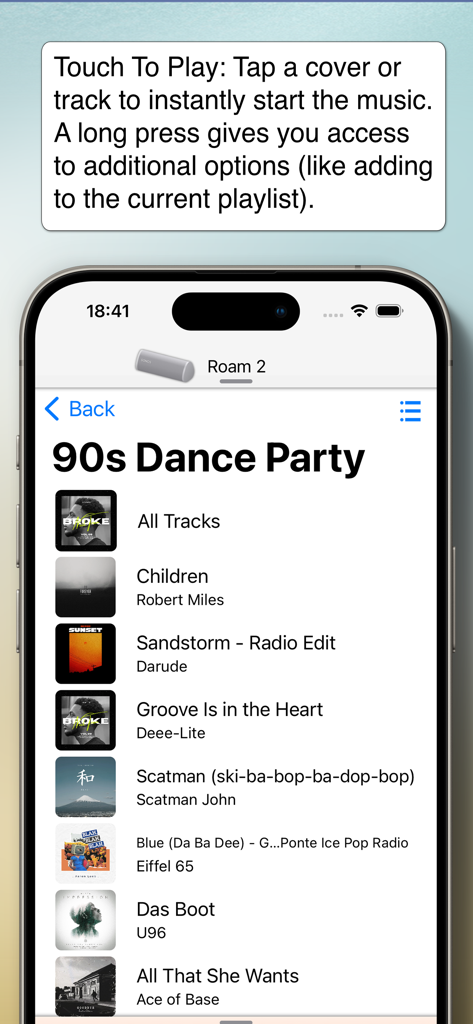
メニューを深く探る必要はありません。「タッチして再生」と集約された検索機能により、クリックの連続ではなく、ワンタップでお気に入りのアルバムやプレイリストを開始できます。

S1とS2の統合サポート

古いアプリを切り替えるのはやめましょう。古いS1ハードウェアと最新のS2デバイスを、1つの統合されたリストからコントロールし、マルチルームエコシステム全体を指先で管理できます。

以下のスクリーンショットと説明は、アプリの公式ストアリスティングから直接取得されたものであり、アプリ開発者の所有物です。

アプリストア

スクリーンショット
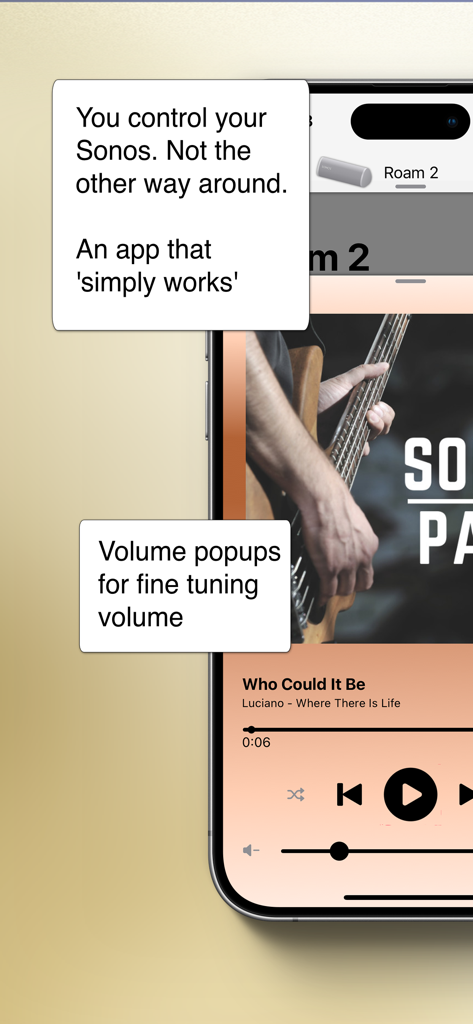
SonoPhone for Sonos - Sonos用SonoPhoneアプリ。Roam 2スピーカーの音楽再生コントロールと音量微調整ポップアップを表示。
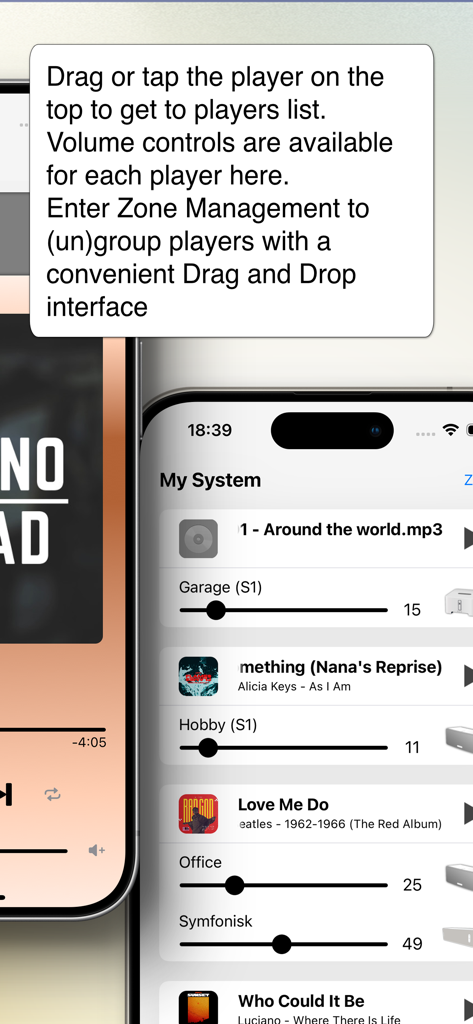
Sonos用SonoPhoneアプリ。Roam 2スピーカーの音楽再生コントロールと音量微調整ポップアップを表示。

SonoPhone for Sonos - Sonos用SonoPhoneアプリのインターフェース。個別の音量スライダーを備えたSonosスピーカーのリストを表示し、マルチルーム管理を行う。
Sonos用SonoPhoneアプリのインターフェース。個別の音量スライダーを備えたSonosスピーカーのリストを表示し、マルチルーム管理を行う。

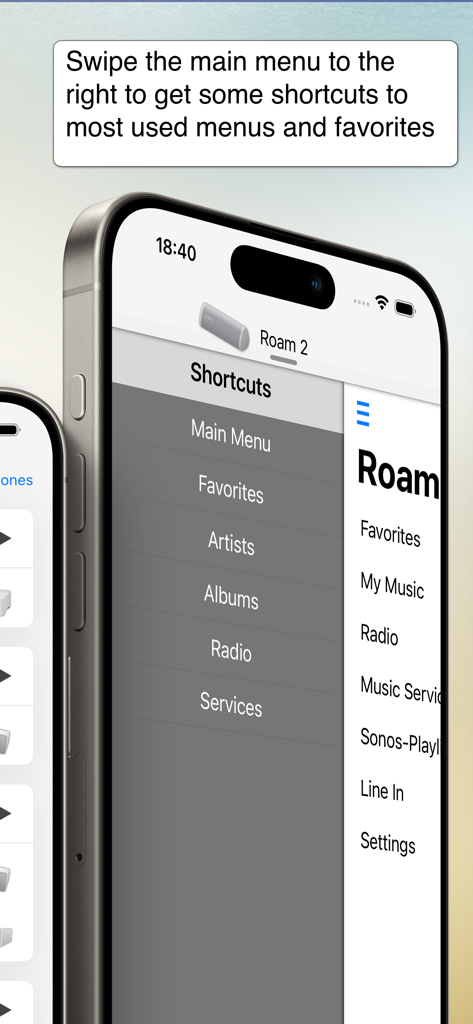
SonoPhone for Sonos - Sonos用SonoPhoneアプリ。簡単なナビゲーションのためのショートカットサイドバーメニューを表示。
Sonos用SonoPhoneアプリ。簡単なナビゲーションのためのショートカットサイドバーメニューを表示。

SonoPhone for Sonos - Sonos用SonoPhoneアプリ。90年代ダンスパーティープレイリストと「タッチして再生」機能を表示。
Sonos用SonoPhoneアプリ。90年代ダンスパーティープレイリストと「タッチして再生」機能を表示。

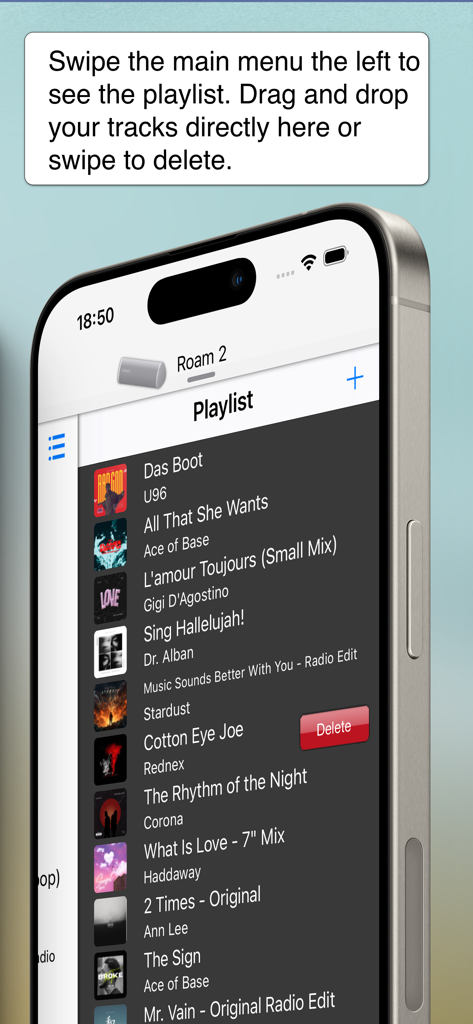
SonoPhone for Sonos - Sonos用SonoPhoneアプリのインターフェース。スワイプで削除できるプレイリスト管理を表示。

Sonos用SonoPhoneアプリのインターフェース。スワイプで削除できるプレイリスト管理を表示。

説明

Yes. There's a better way to control your Sonos system. - Speeds up most common tasks (less taps) - Cleaner, more stable and fast interface. - Backward compatibility is king (we support Sonos S1 firmware and also iOS15 devices) - Manage zones and music sources. You control your Sonos. Not the other way around. See the features in action on YouTube (https://youtu.be/aMEuaZPUH58) or read more below. This application is a third party app and not endorsed by or associated with Sonos, Inc. (which is why it is not free) ◆◆◆ A new, intuitive and concise user interface ◆◆◆ SonoPhone is designed to leverage the latest iOS design principles: - Tap or drag the player on the top and you'll find the players view to select a new player and with volume controls for all players. From here you can also enter Zone Management, where you can group and ungroup players with drag and drop. - Tap or drag the Track infos on the bottom and you'll be at the big covers screen - Drag the main menu from any place to the left or right to have instant access to playlist or shortcuts - volume + progress popups: when changing volume or progress of a song, you get popups telling you the actual values. Stop guessing your desired values today! ◆◆◆ less taps for common tasks ◆◆◆ SonoPad tries to optimize most often used tasks to have the least taps needed. In the end you are able to navigate and control your players much more fluently. - Touch To Play: are you sick of always beeing asked what to do when you tap a track or album? SonoPhone defaults to just starting an album or song. A long press still gives you access to all options - you can also change the tap default in the settings menu. Want to build a playlist fast? Just set the default to 'always add to end' and off you go ... - tap an album cover image and the whole album starts to play immediately - aggregated search: search results are collapsed into one view, so you see immediately in what category you have the best results, without switching back and forth - shortcuts to most used functions: drag the main menu to the right to get shortcut buttons for artist, albums, radio and musicservices. - you can control the volume of every player directly from the player selection screen. No need to switch players anymore. ◆◆◆ S1 and S2 devices in one app ◆◆◆◆ - If you still have old S1 devices, the time of always having to change apps is over. We simply display all existing players in the network in one list. Grouping is unfortunately not possible, this is prevented by Sonos. ◆◆◆ Limitations ◆◆◆ - all music services except YouTube Music are supported - no support for administrative features (adding/removing players, music service, ...). You need the official Apps for initial setup of your system, SonoPad will pick up all changes automatically. - no options to set alarms or sleep settings - no playing of music stored on iPhone - no support for discontinued WD100 dock ◆◆◆ Other stuff ◆◆◆ - Sonos is registered trademark of Sonos, Inc.

Download

ダウンロード: App Store

このページはアプリまたはその開発者の公式ページではなく、情報提供および論評を目的として作成された独立した編集出版物です。明示的に別段の記載がない限り、アプリおよびその開発者は、MWM、Apple、Google Play、アプリのパブリッシャー、またはアプリの開発者と提携、承認、後援、認可、またはその他の公式的な関係はなく、このページのいかなる内容も、アプリがMWMのサービスを使用して開発されたことを意味するものではありません。すべての商標、ロゴ、スクリーンショット、その他のコンテンツはそれぞれの所有者の財産です。







