
このページはアプリまたはその開発者の公式ページではなく、情報提供および論評を目的として作成された独立した編集出版物です。明示的に別段の記載がない限り、アプリおよびその開発者は、MWM、Apple、Google Play、アプリのパブリッシャー、またはアプリの開発者と提携、承認、後援、認可、またはその他の公式的な関係はなく、このページのいかなる内容も、アプリがMWMのサービスを使用して開発されたことを意味するものではありません。すべての商標、ロゴ、スクリーンショット、その他のコンテンツはそれぞれの所有者の財産です。

Soundboard Studio
ポッドキャスターやAVのプロに信頼されている、スマートで低遅延な再生アプリ。音楽、SFX、ナレーションを、完璧なライブ実行のために設計されたカスタマイズ可能なグリッドで整理しましょう。
ダウンロード
625K+ユーザー評価
評価数
4K+開発元
カテゴリ
Music対応言語
1最新バージョン
2.6.1サイズ
30.0 MBリリース日
2016年5月5日プロフェッショナルなオーディオ操作を指先ひとつで
精度と信頼性を重視して設計されたSoundboard Studioは、ポッドキャスターやライブパフォーマーに、サウンド、音楽、エフェクトを自信を持って再生するための究極のツールを提供します。
低遅延のライブトリガー
ラグのない瞬時の再生を体験してください。複数のトラックを同時にトリガーして、ライブ配信やステージパフォーマンス中に複雑な音景を作り出せます。
視覚的なグリッド整理
トラックを色分けし、カスタムアイコンを追加して簡単に識別。大きなボタンレイアウトは周辺視野でも認識しやすく、キューを逃すことはありません。
よくある質問
について知っておくべきこと Soundboard Studio
Soundboard Studioとは何ですか?
Soundboard Studioは、アドリブサウンド、音楽、効果音用に設計されたプロフェッショナルなサウンド再生アプリです。さまざまなオーディオニーズに対応するために、カスタマイズ可能なトラックレイアウトと詳細な設定を提供します。
Soundboard Studioは複数のトラックを同時に再生できますか?
はい、Soundboard Studioでは複数のトラックを同時に再生できます。この機能は、ライブ使用中にさまざまなサウンドをミキシングするための基本となります。
Soundboard Studioでトラックをカスタマイズするにはどうすればよいですか?
Soundboard Studioでは、個別の音量レベル、開始/終了ポイントのトリム、フェードイン/フェードアウトエフェクト、画像追加オプション、色割り当てなど、広範なトラックカスタマイズが可能です。
Soundboard Studioはどのオーディオファイル形式をインポートできますか?
Soundboard Studioは、.mp3、.wav、.aiff、.m4aなどのオーディオファイルのインポートをサポートしています。デバイスのミュージックライブラリ、クラウドサービス、またはiTunesファイル共有からインポートできます。
Soundboard Studio Proは無制限のボードとトラックを提供しますか?
はい、Soundboard Studio Proは無制限のボードとトラックを提供します。Proアップグレードがない場合、ユーザーは4つのボードと24のトラックに制限されます。
Soundboard Studioはバックグラウンドオーディオ再生をサポートしていますか?
はい、Soundboard Studio Proはバックグラウンドオーディオ再生を可能にします。この機能により、アプリが閉じられてもトラックは再生され続けます。
Soundboard Studio Proの価格はいくらですか?
Soundboard Studio Proは、サブスクリプションまたは一括購入で利用できます。サブスクリプションオプションには7日間の無料トライアルが含まれています。価格の詳細はiTunesアカウント設定で管理されます。
Soundboard Studio Proには無料トライアルがありますか?
はい、Soundboard Studio Proのサブスクリプションには7日間の無料トライアルが含まれています。トライアル期間終了後、サブスクリプションはiTunesアカウントに適用されます。
Soundboard Studioは誰向けですか?
Soundboard Studioは、ポッドキャスト、ライブシアター、イベント、礼拝、ワークショップのプロフェッショナル向けに設計されています。ボイスプレゼンター、ウェディングプランナー、振付師にも役立ちます。
Soundboard Studioでトラックを自動化できますか?
はい、Soundboard Studio Proは強力なトラック自動化機能を提供します。ユーザーは、トラックの開始、停止、または終了時に他のトラックを再生したり音量を変更したりするアクションをトリガーするイベントをプログラムできます。
Soundboard Studioにはサウンドビジュアライザーがありますか?
はい、Soundboard Studio Proはリアルタイムサウンドビジュアライザーを備えています。ユーザーはデバイスを外部ディスプレイに接続し、WavesやSpace Fireworksなどの3つのビジュアライザーオプションから選択できます。
Soundboard Studioはトラックのドラッグ&ドロップをサポートしていますか?
はい、Soundboard Studioはドラッグ&ドロップ機能をサポートしています。ユーザーは、簡単なドラッグ&ドロップ操作でトラックを簡単に並べ替えたり編集したりでき、効率的な整理が可能です。
Soundboard Studioでトラックのデフォルト設定を設定できますか?
はい、Soundboard Studioではトラックのデフォルト設定を割り当てることができます。これらの設定は、新しくインポートされたすべてのトラックに自動的に適用され、セットアッププロセスが効率化されます。
Soundboard Studio Proのサブスクリプションをキャンセルするにはどうすればよいですか?
ユーザーは、現在の期間が終了する24時間前までにSoundboard Studio Proのサブスクリプションをキャンセルできます。キャンセルは、アプリの設定メニューまたはiTunesアカウント設定から可能です。
以下のスクリーンショットと説明は、アプリの公式ストアリスティングから直接取得されたものであり、アプリ開発者の所有物です。
アプリストア
スクリーンショット
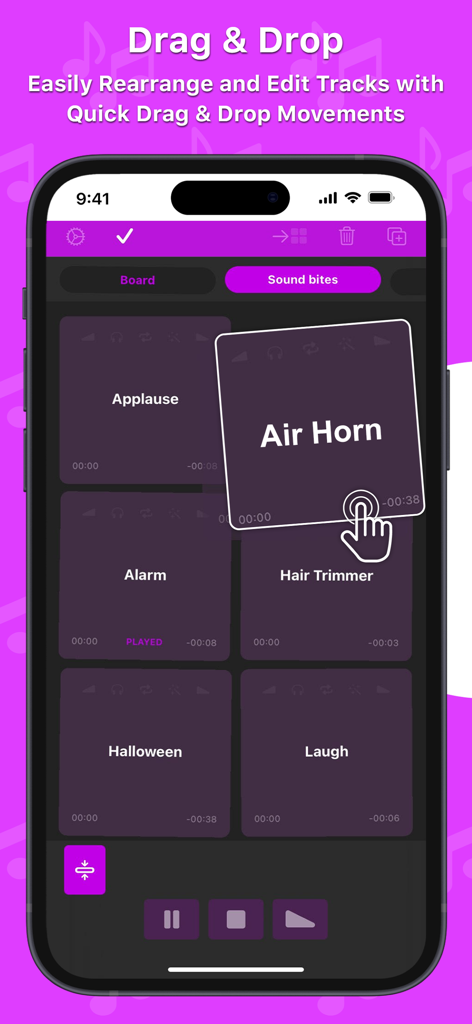
Air Horn(エアホーン)やApplause(拍手)などのサウンドタイルを並べ替えるドラッグ&ドロップ機能を示す、手のアドバイスアイコンが表示されたSoundboard Studioアプリのスマートフォン画面
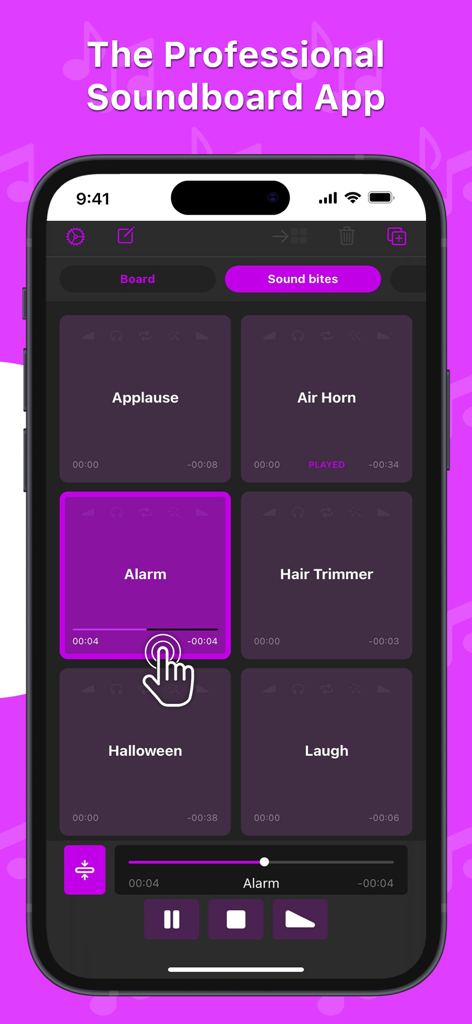
拍手やアラームなどの効果音ボタンと再生コントロールを備えた、プロ仕様のサウンドボードアプリのグリッド
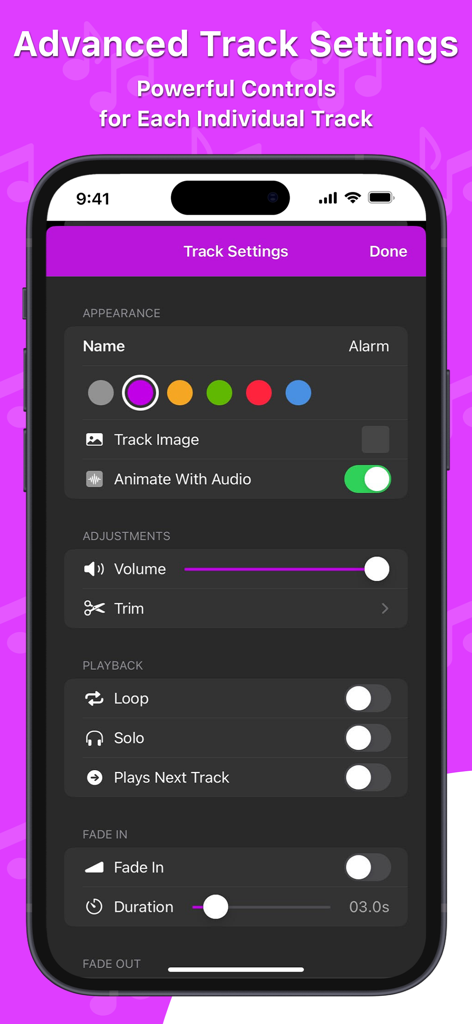
iPhone上の詳細なトラック設定とオーディオコントロールを表示したSoundboard Studioのインターフェース。
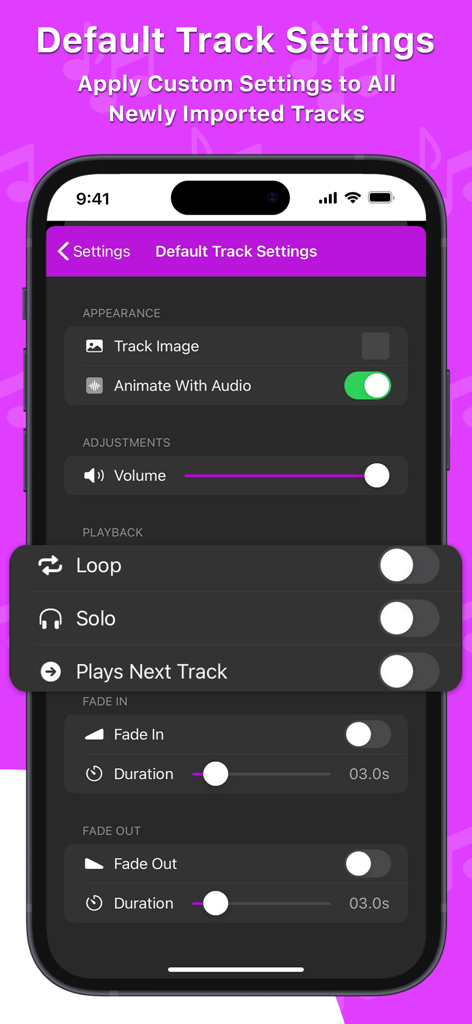
スマートフォンのSoundboard Studioアプリでオーディオ再生のデフォルトトラック設定を表示したインターフェース
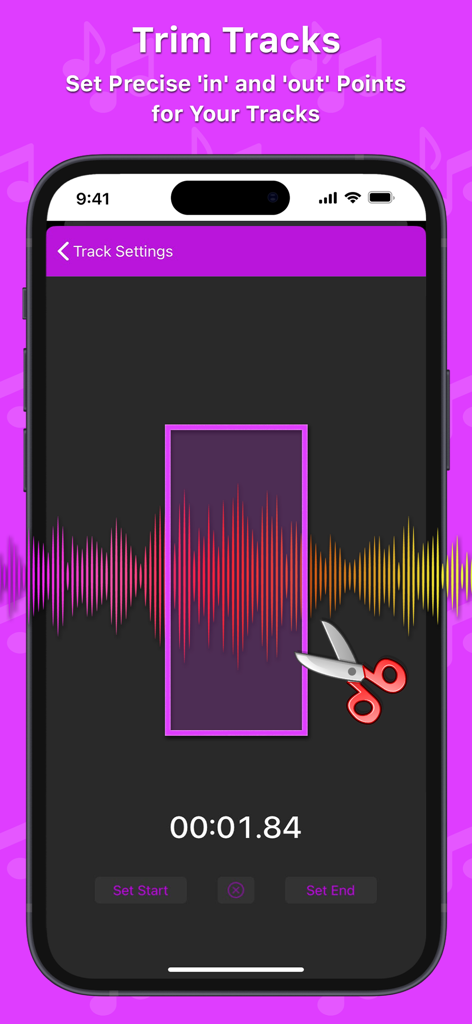
波形可視化と正確な開始・終了ポイントを備えたオーディオトリミング機能を表示したSoundboard Studioアプリのインターフェース。
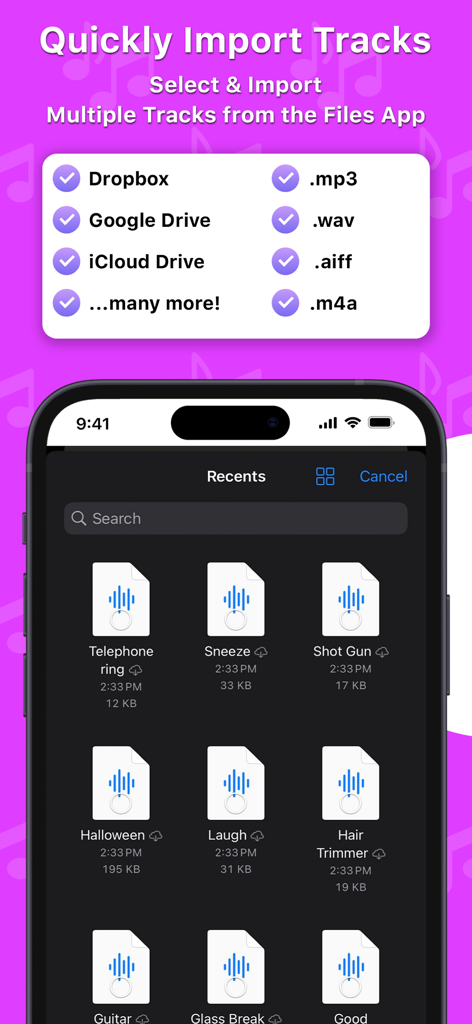
ファイルアプリやクラウドストレージからSoundboard Studioに複数のオーディオトラックをインポートできる機能を表示したインターフェース。
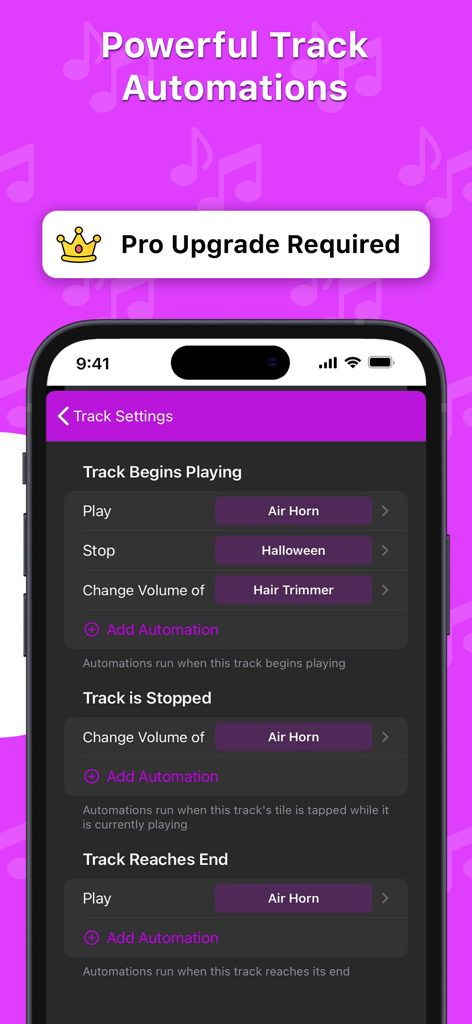
トラックの再生開始や停止などのトリガーに対するプロ仕様のトラック自動化設定を表示したSoundboard Studioアプリのインターフェース
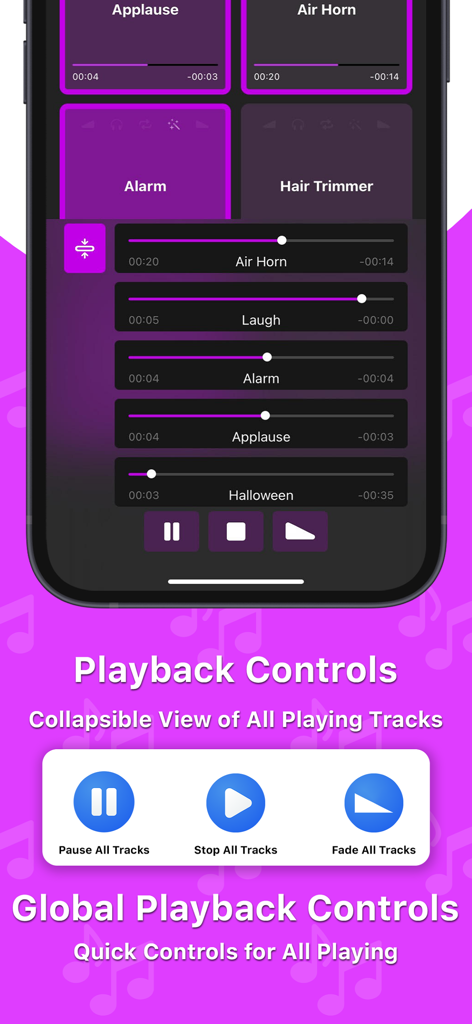
グローバル再生コントロールと、プログレスバー付きのアクティブなサウンドトラックリストを表示したSoundboard Studioアプリのインターフェース
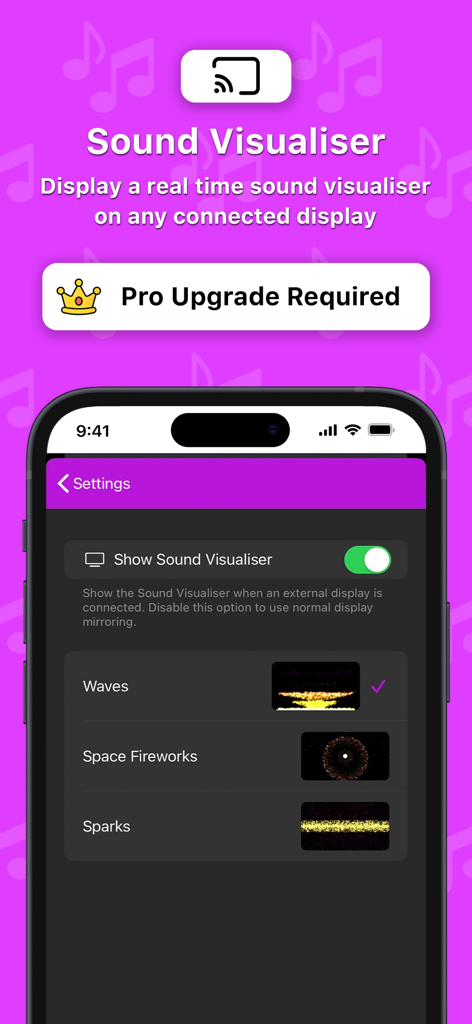
外部ディスプレイでのリアルタイム・サウンドビジュアライザー用のSoundboard Studioアプリ設定
説明
Download
類似アプリ
似た機能とユーザー体験を持つアプリ

Whoop Triggerz Plus
The C-Dub Brand, LLC

Worship Backing Tracks
XME Inc.

Stage Traxx 3
Peter Dikant
OND - طبلة وعود
Essam Salah

Loops & Clicks - LiveTrackz
Four-Four Software Inc

XME LOOPS
XME Inc.
XME TRIGGERS
XME Inc.

Playback
MULTITRACKS.COM, LLC

Easy Performer
RV Applications B.V.
このページはアプリまたはその開発者の公式ページではなく、情報提供および論評を目的として作成された独立した編集出版物です。明示的に別段の記載がない限り、アプリおよびその開発者は、MWM、Apple、Google Play、アプリのパブリッシャー、またはアプリの開発者と提携、承認、後援、認可、またはその他の公式的な関係はなく、このページのいかなる内容も、アプリがMWMのサービスを使用して開発されたことを意味するものではありません。すべての商標、ロゴ、スクリーンショット、その他のコンテンツはそれぞれの所有者の財産です。