Stagehand: PRO DJ LINK Manager
ダウンロード: App Store

このページはアプリまたはその開発者の公式ページではなく、情報提供および論評を目的として作成された独立した編集出版物です。明示的に別段の記載がない限り、アプリおよびその開発者は、MWM、Apple、Google Play、アプリのパブリッシャー、またはアプリの開発者と提携、承認、後援、認可、またはその他の公式的な関係はなく、このページのいかなる内容も、アプリがMWMのサービスを使用して開発されたことを意味するものではありません。すべての商標、ロゴ、スクリーンショット、その他のコンテンツはそれぞれの所有者の財産です。

ロゴ: Stagehand: PRO DJ LINK Manager
ダウンロード: App Store

Stagehand: PRO DJ LINK Manager

CDJ-3000およびDJM-A9セットアップのリモートハードウェアコントロール、リアルタイムステータスモニタリング、正確なライティング同期により、プロダクションワークフローを効率化します。

主要数値

ダウンロード

1K+

ユーザー評価

1.0/5

評価数

0

開発元

AlphaTheta Corporation

カテゴリ

Entertainment

対応言語

12

最新バージョン

1.0.4

サイズ

8.9 MB

リリース日

2023年4月17日
機能

会場のどこからでも、ブースを完全にコントロール

FOHエンジニアやプロダクションチームがPRO DJ LINK経由でPioneer DJハードウェアをリモート管理、監視、同期できる業界初のiPadソリューション。

サウンドチェックの効率化

ダンスフロアからトラックをトリガーしたり、ユーティリティ設定を管理したり、音響をテストしたりできます。2人体制の必要がなくなり、セットアップ時間を半分に短縮します。

リアルタイムヘルスモニタリング

ブースから離れた場所から、マスターレベルやデバイスステータスを監視できます。セットを台無しにする前に、レッドライニングや技術的な問題を特定します。

以下のスクリーンショットと説明は、アプリの公式ストアリスティングから直接取得されたものであり、アプリ開発者の所有物です。

アプリストア

スクリーンショット
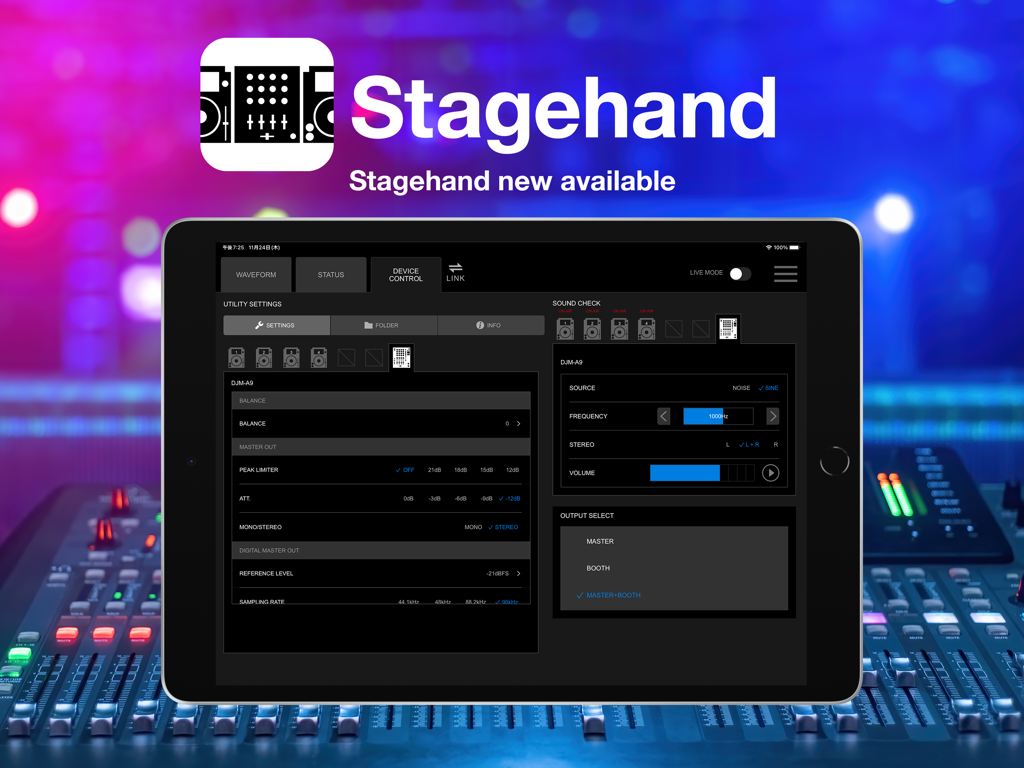
Stagehand: PRO DJ LINK Manager - Stagehand PRO DJ LINK ManagerインターフェースをiPadに表示し、DJ機器のリモートコントロールを行う様子
Stagehand PRO DJ LINK ManagerインターフェースをiPadに表示し、DJ機器のリモートコントロールを行う様子

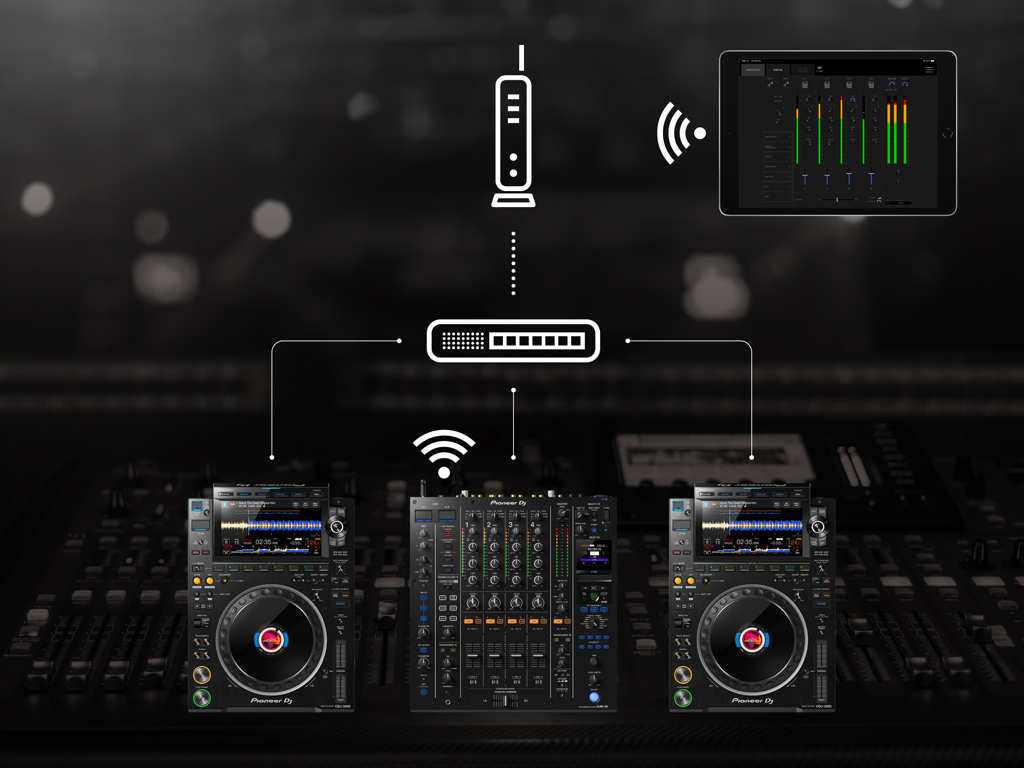
Stagehand: PRO DJ LINK Manager - ネットワーク経由でPioneer DJミキサーとマルチプレーヤーをワイヤレスで監視・制御するためにStagehandアプリを使用しているiPad
ネットワーク経由でPioneer DJミキサーとマルチプレーヤーをワイヤレスで監視・制御するためにStagehandアプリを使用しているiPad

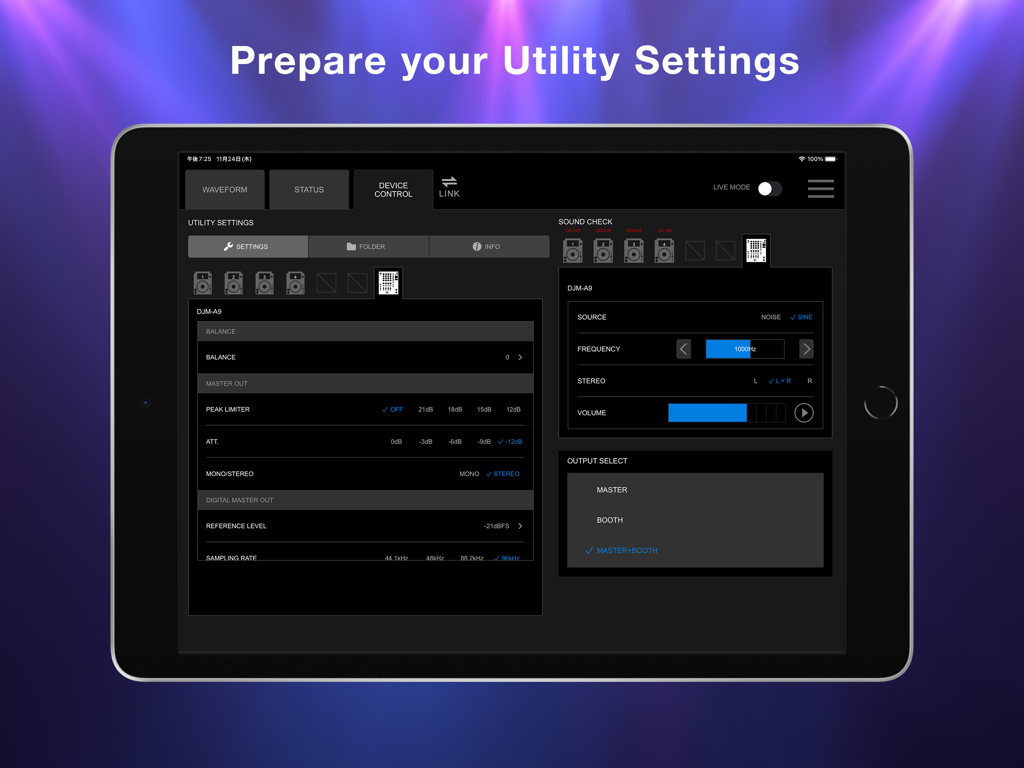
Stagehand: PRO DJ LINK Manager - DJM-A9ミキサーのユーティリティ設定とサウンドチェックコントロールを表示するStagehandアプリのiPad画面
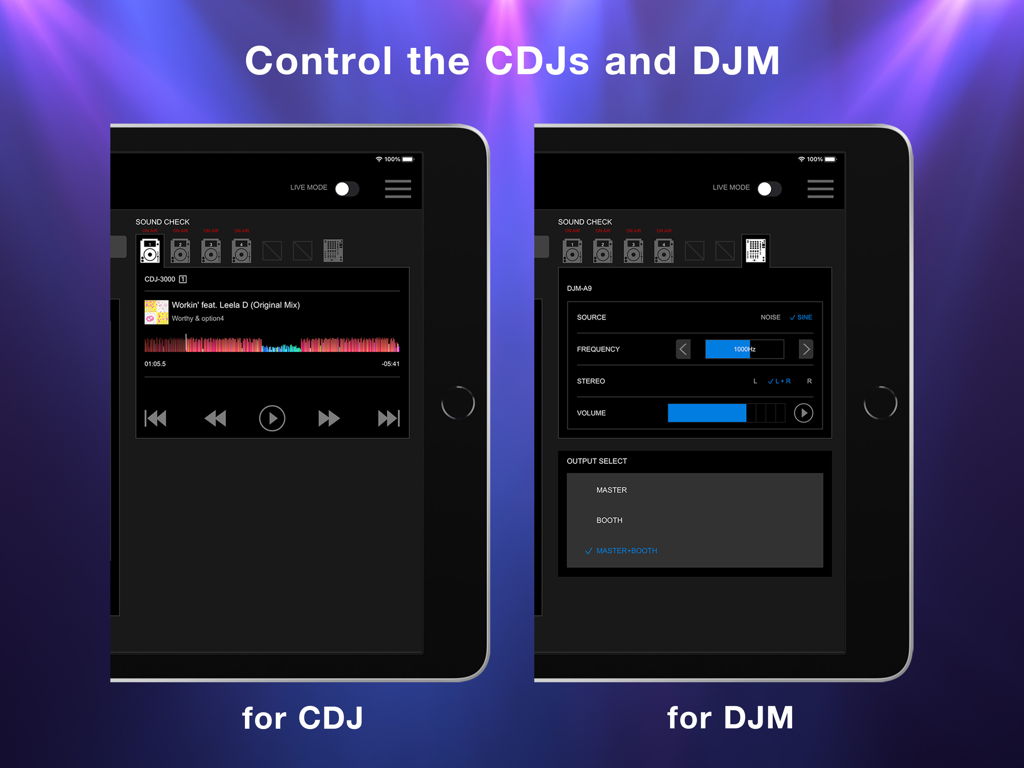
DJM-A9ミキサーのユーティリティ設定とサウンドチェックコントロールを表示するStagehandアプリのiPad画面

Stagehand: PRO DJ LINK Manager - CDJプレーヤーとDJMミキサーのリモートコントロール用のStagehandアプリインターフェースを表示するiPad画面
CDJプレーヤーとDJMミキサーのリモートコントロール用のStagehandアプリインターフェースを表示するiPad画面

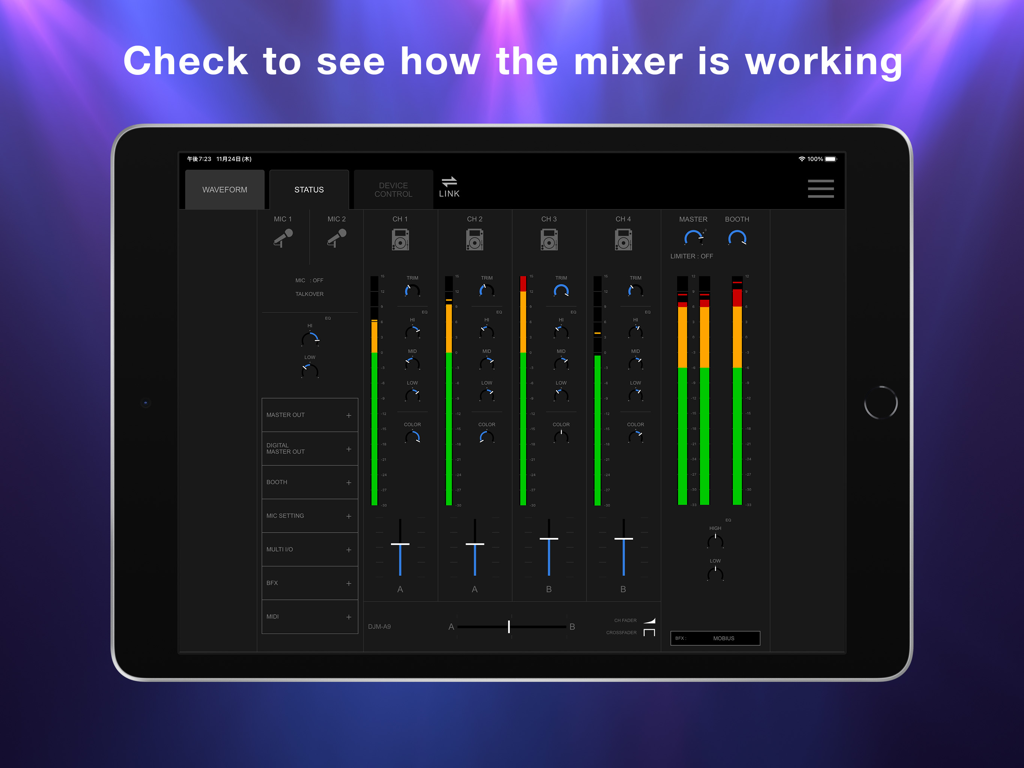
Stagehand: PRO DJ LINK Manager - リアルタイムDJミキサーチャンネルレベルとフェーダーポジションを表示するStagehandアプリのステータス画面を表示するiPad
リアルタイムDJミキサーチャンネルレベルとフェーダーポジションを表示するStagehandアプリのステータス画面を表示するiPad

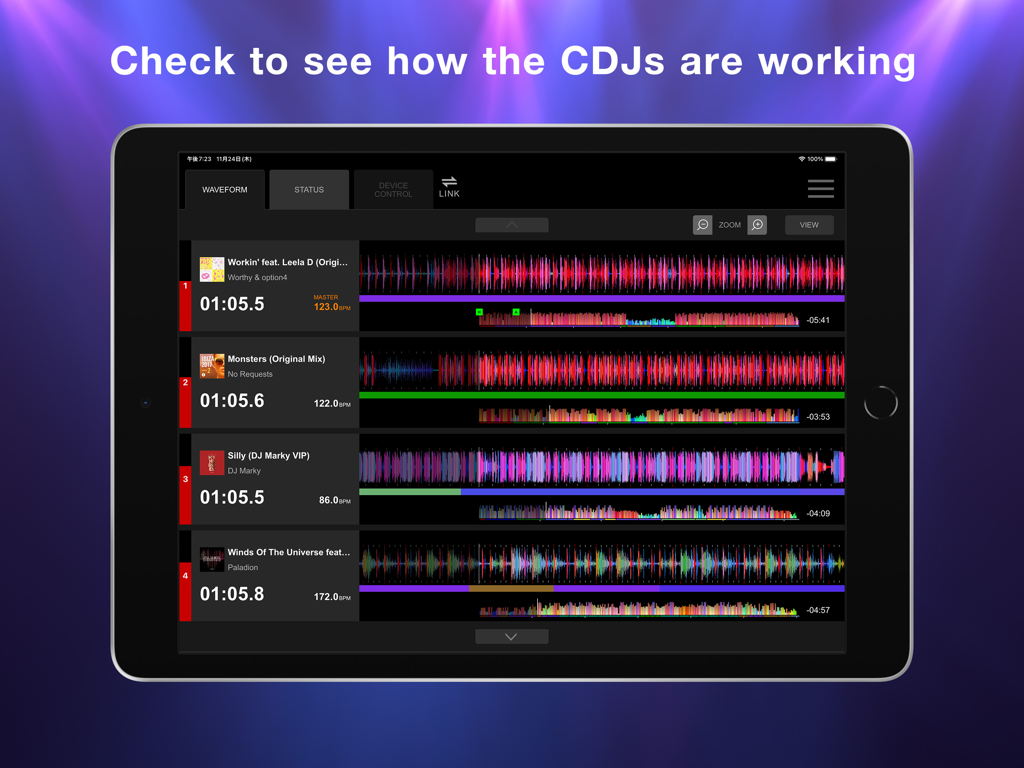
Stagehand: PRO DJ LINK Manager - 複数のCDJユニットを監視するためのStagehandアプリの波形表示を表示するiPad画面

複数のCDJユニットを監視するためのStagehandアプリの波形表示を表示するiPad画面

説明

This indispensable new app, the first of its kind, enables you to keep an eye on a host of information and remotely adjust settings on DJM-A9 and CDJ-3000, CDJ-3000X units in a PRO DJ LINK network, all from your iPad. By managing the mixer and multi players via Stagehand, you can run smoother shows and produce more exciting lighting in sync with sound. Before your event begins, you can use Stagehand to remotely check and change the Utility settings of the DJM-A9 and CDJ-3000, CDJ-3000X units for quicker setup. Stagehand is also useful once a gig is underway as you can monitor the DJ’s use of the mixer and players without needing to enter the booth. The app enables you to keep an eye on volume levels and settings, and use beatgrid, BPM, and time information to help create effective lighting displays. There’s a Live mode too, which disables many of the app’s features so you can’t accidentally stop the music during the show. You can try Stagehand free for 60 days. Download the app from App Store to use it with an iPad. To use Stagehand, update the mixer and player's firmware to the latest version via our support page [https://www.pioneerdj.com/support/software/]. A device with the A12 Bionic chip or later is recommended. [Key Features] - Device Control If you’re the designated Admin user of the system, you can easily check and change the Utility settings of the DJM-A9 and CDJ-3000, CDJ-3000X units in the PRO DJ LINK network via the Device Control screen. You can create multiple settings files in advance, giving you the option to apply multiple changes in one go if you need to, and you can share them in numerous ways, including via AirDrop or email to make event preparations run smoother. Speed up sound checks with remote control of the CDJ-3000, CDJ-3000X. There’s no need to go back and forth between the booth and the dancefloor; simply use Sound Check in Stagehand to play, stop, fast-forward, and rewind tracks. You can also control sine waves and noise from the DJM-A9 to make sure the sound system is set up correctly for the room’s acoustics. When the gig starts, turn on Live mode to disable Device Control functions so you can’t accidentally interrupt the music in the middle of a DJ’s set. - Status Keep an eye on a host of information without needing to look over the DJ’s shoulder – or even enter the booth. The Status screen gives you a remote view of almost everything happening on the DJM-A9, including the status of Utility settings, enabling you to quickly spot problems such as excessive volume from the trim and master levels so you can troubleshoot effectively. You can also check the playing information on the CDJ-3000, CDJ-3000X units from here. - Waveform Remotely view various elements of track information from your iPad to help you create exciting lighting sequences in sync with sound. From the Waveform screen, you can view not only the waveforms of tracks playing on CDJ-3000, CDJ-3000X units in real time but also the beatgrid, BPM, and time information. DJs have a choice of public and private settings in their own rekordbox account for sharing most of the music information, and settings made in advance will be reflected in Stagehand.

Download

ダウンロード: App Store

このページはアプリまたはその開発者の公式ページではなく、情報提供および論評を目的として作成された独立した編集出版物です。明示的に別段の記載がない限り、アプリおよびその開発者は、MWM、Apple、Google Play、アプリのパブリッシャー、またはアプリの開発者と提携、承認、後援、認可、またはその他の公式的な関係はなく、このページのいかなる内容も、アプリがMWMのサービスを使用して開発されたことを意味するものではありません。すべての商標、ロゴ、スクリーンショット、その他のコンテンツはそれぞれの所有者の財産です。








