System Status Pro: hw monitor
ダウンロード: App Store

このページはアプリまたはその開発者の公式ページではなく、情報提供および論評を目的として作成された独立した編集出版物です。明示的に別段の記載がない限り、アプリおよびその開発者は、MWM、Apple、Google Play、アプリのパブリッシャー、またはアプリの開発者と提携、承認、後援、認可、またはその他の公式的な関係はなく、このページのいかなる内容も、アプリがMWMのサービスを使用して開発されたことを意味するものではありません。すべての商標、ロゴ、スクリーンショット、その他のコンテンツはそれぞれの所有者の財産です。


ロゴ: System Status Pro: hw monitor
ダウンロード: App Store

System Status Pro: hw monitor

リアルタイムのパフォーマンス追跡で、表面を超えた情報にアクセスしましょう。CPU負荷、メモリページ統計、バッテリーの状態、詳細なネットワークルーティングを、パワーユーザー向けに設計された1つの高度なダッシュボードで監視します。

主要数値

ダウンロード

446K+

ユーザー評価

4.7/5

評価数

7K+

開発元

Jiri Techet

カテゴリ

Utilities

対応言語

1

最新バージョン

7.0.1

サイズ

6.9 MB

リリース日

2010年11月13日
機能

ハードウェアの完全な制御

System Status Proは、iPhoneまたはiPadをプロの診断ワークステーションに変え、Appleが隠しているデータとパフォーマンスを最適化するために必要な洞察を提供します。

リアルタイム パフォーマンス追跡

ライブインタラクティブグラフを通じてCPU負荷平均とRAMページ統計を監視し、バックグラウンドのボトルネックを即座に特定します。

精密バッテリー分析

正確な稼働時間推定と調整可能な状態設定により、デバイスのバッテリー寿命を最大化し、監視します。

以下のスクリーンショットと説明は、アプリの公式ストアリスティングから直接取得されたものであり、アプリ開発者の所有物です。

アプリストア

スクリーンショット
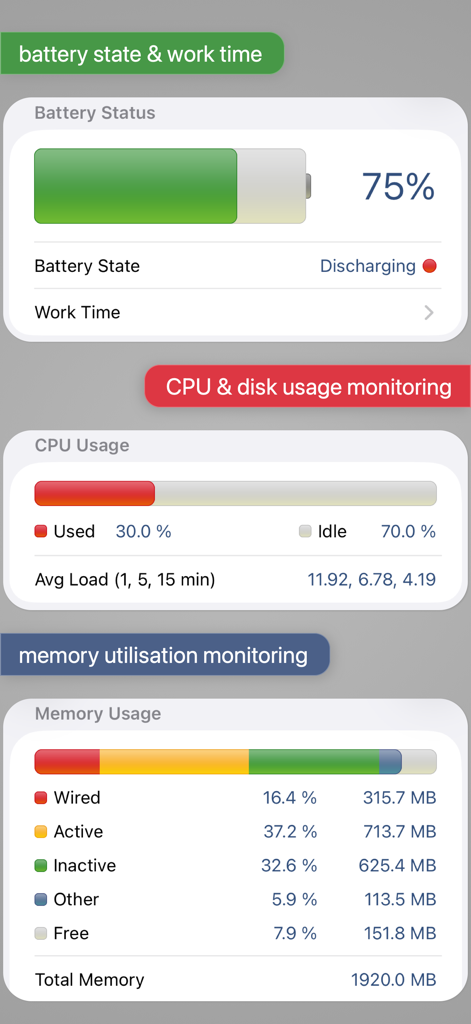
System Status Pro: hw monitor - バッテリーステータス、CPU使用率、メモリ使用量統計を表示するダッシュボード
バッテリーステータス、CPU使用率、メモリ使用量統計を表示するダッシュボード

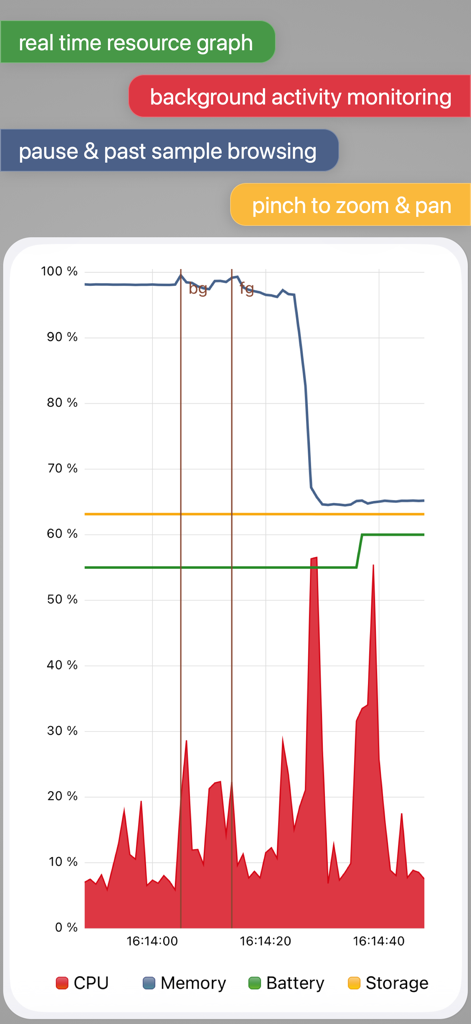
System Status Pro: hw monitor - System Status ProアプリでCPU、メモリ、バッテリー、ストレージの監視を示すリアルタイムシステムリソースグラフ
System Status ProアプリでCPU、メモリ、バッテリー、ストレージの監視を示すリアルタイムシステムリソースグラフ

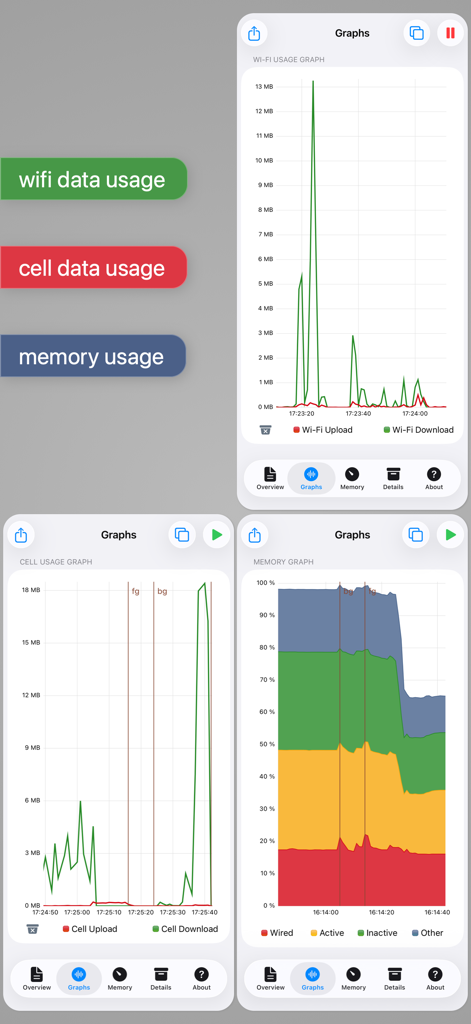
System Status Pro: hw monitor - iOSでのWi-Fi使用量、セルラーデータ、メモリ使用量のリアルタイムグラフ監視
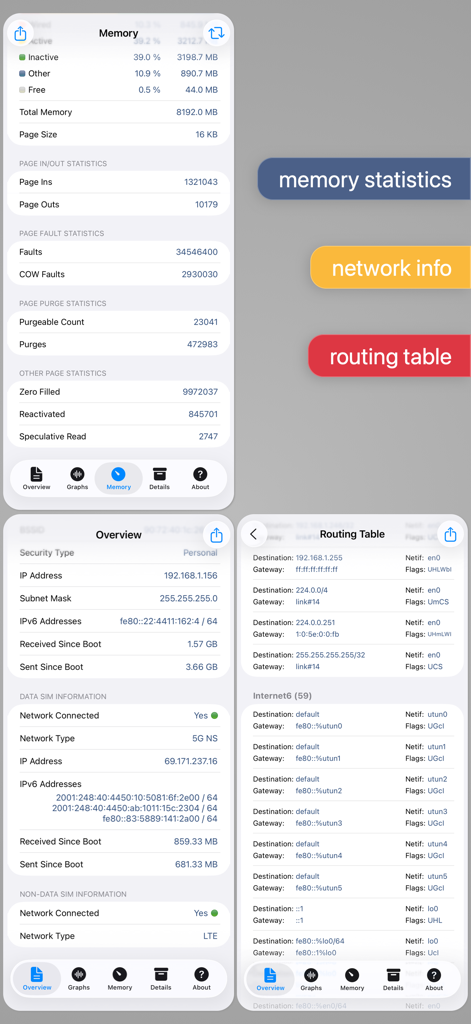
iOSでのWi-Fi使用量、セルラーデータ、メモリ使用量のリアルタイムグラフ監視

System Status Pro: hw monitor - System Status Proアプリのメモリ統計、ネットワーク情報、ルーティングテーブルデータが表示された画面
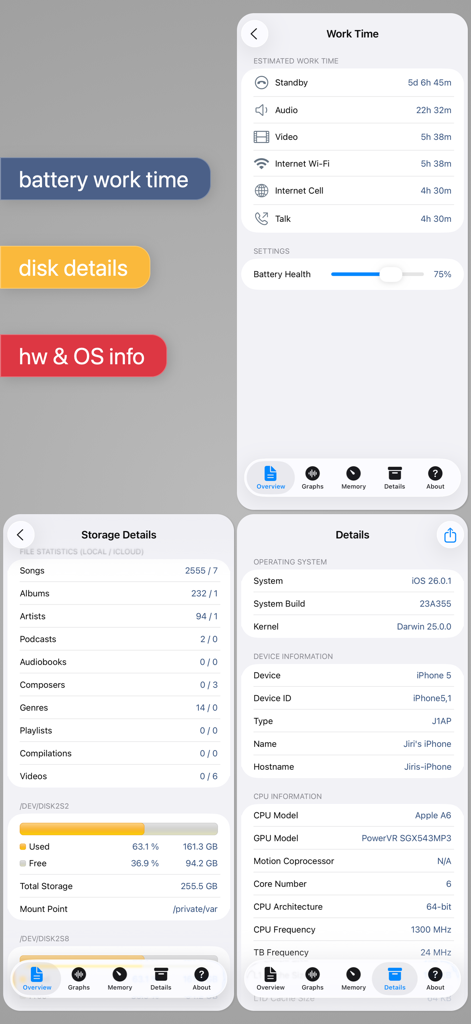
System Status Proアプリのメモリ統計、ネットワーク情報、ルーティングテーブルデータが表示された画面

System Status Pro: hw monitor - System Status Proアプリのインターフェースで、バッテリー稼働時間推定値、ディスクストレージ詳細、ハードウェアシステム情報が表示されています
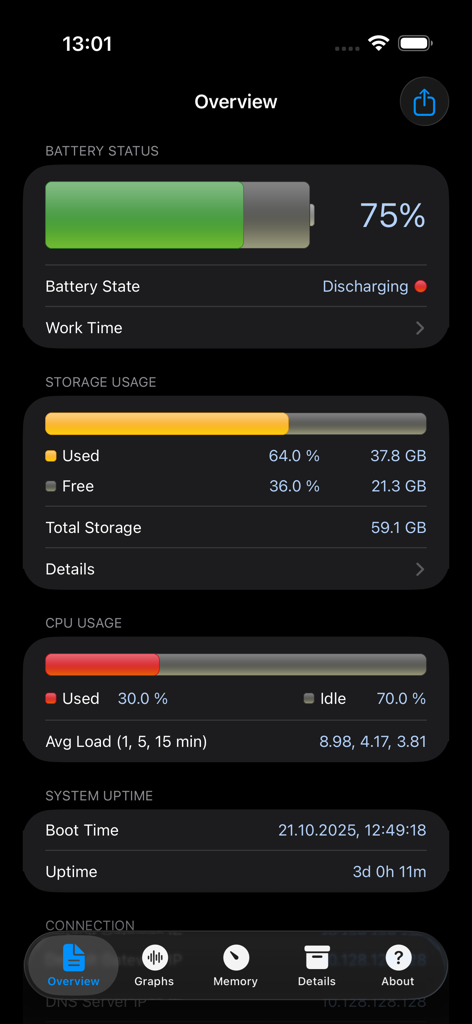
System Status Proアプリのインターフェースで、バッテリー稼働時間推定値、ディスクストレージ詳細、ハードウェアシステム情報が表示されています

System Status Pro: hw monitor - System Status Proの概要ダッシュボードで、リアルタイムのバッテリー、ストレージ、CPUパフォーマンスメトリクスを表示
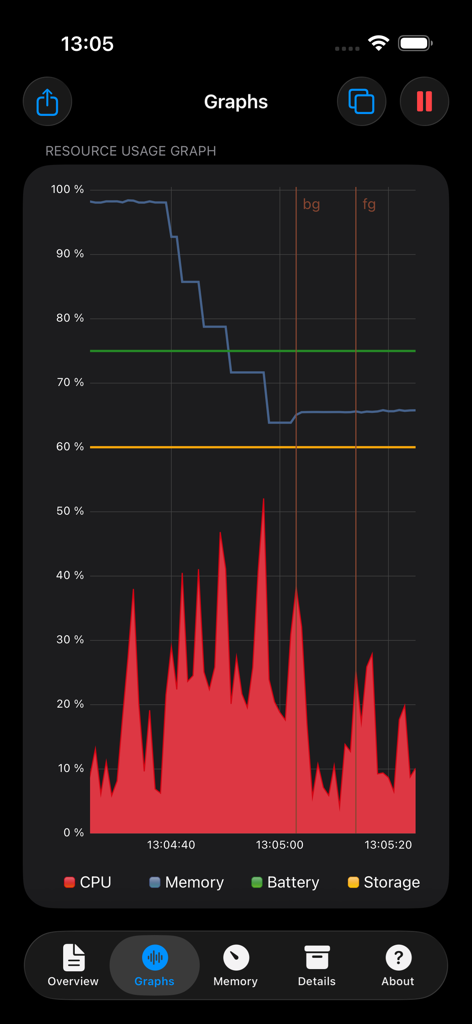
System Status Proの概要ダッシュボードで、リアルタイムのバッテリー、ストレージ、CPUパフォーマンスメトリクスを表示

System Status Pro: hw monitor - ダークインターフェースでCPU、メモリ、バッテリー、ストレージの使用状況を表示するリアルタイムパフォーマンスグラフ
ダークインターフェースでCPU、メモリ、バッテリー、ストレージの使用状況を表示するリアルタイムパフォーマンスグラフ

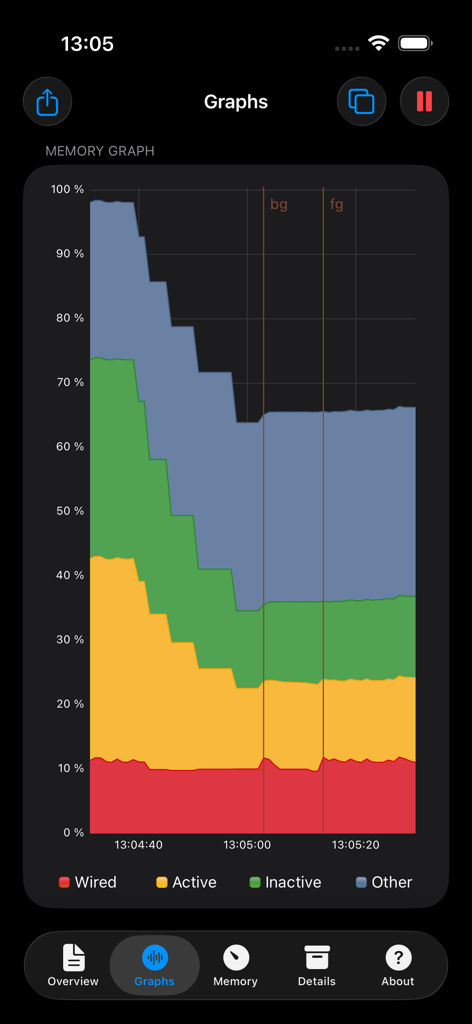
System Status Pro: hw monitor - System Status Proアプリのリアルタイムメモリ使用量グラフで、ワイヤード、アクティブ、非アクティブRAMを表示
System Status Proアプリのリアルタイムメモリ使用量グラフで、ワイヤード、アクティブ、非アクティブRAMを表示

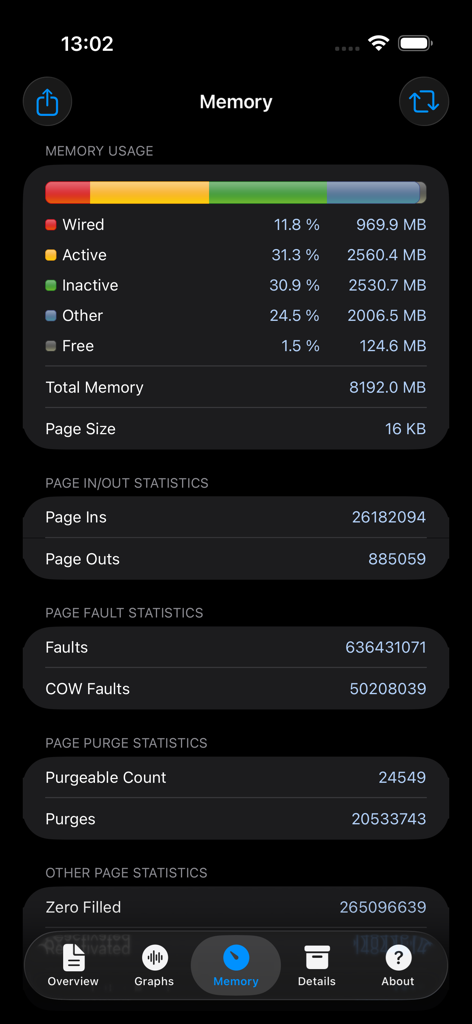
System Status Pro: hw monitor - 詳細なページ統計とワイヤードメモリデータを含むリアルタイムiOSメモリ使用量ダッシュボード

詳細なページ統計とワイヤードメモリデータを含むリアルタイムiOSメモリ使用量ダッシュボード

説明

An advanced tool for monitoring your iPhone and iPad performance. System Status provides graphical monitoring of all the device's resources such as CPU, memory, disk, battery and wifi/cell data usage. Further, it shows network-related info such as wifi/cell connection details and the routing table. Finally, System Status displays operating system details such as kernel version, memory page statistics and shows various hardware-related data. BATTERY • Graphical battery level display • Battery state monitoring (discharging, charging, full) • Estimated battery work time for different usage patterns (standby, audio and video playback, Wi-Fi and 3G browser usage, talk time) • Adjustable battery health to make the estimated work times usable for older batteries MEMORY & DISK • Real time memory usage monitoring - graphical display of wired, active, inactive, and free memory • Detailed page statistics including page ins and outs, page faults, page lookups, page purges and others • Used and free disk capacity monitoring • File statistics (number of songs, videos, podcasts, artists, genres, etc.) • Mounted file system list CELL & NETWORK • Cell and Wi-Fi network connection information • IP address of the current connection • Carrier information such as network technology used • External IP address • DNS server, default gateway • Received and sent wifi/cell data since last boot • Routing table CPU • CPU usage updated in real time • Average load over the last 1, 5, and 15 minutes OPERATING SYSTEM & HARDWARE INFORMATION • System boot time and uptime • Operating system and kernel version • Device model and user name • Detailed CPU and GPU information - model, core number, CPU and BUS frequency, L1, L2 cache sizes, and others • Hardware features of the device including display resolution, pixel density, battery voltage, battery capacity, front and rear camera resolution and many more RESOURCE GRAPHS • Possibility to record up to 3 minutes of background activity • Pinch to zoom & pan • Play/pause to see real-time or history data MORE • Real time updates of the display every time the monitored parameters change • Export by email, AirPrint, and AirDrop for most info • Light/dark theme • Copy/paste support • Detailed help • Regular updates

Download

ダウンロード: App Store

このページはアプリまたはその開発者の公式ページではなく、情報提供および論評を目的として作成された独立した編集出版物です。明示的に別段の記載がない限り、アプリおよびその開発者は、MWM、Apple、Google Play、アプリのパブリッシャー、またはアプリの開発者と提携、承認、後援、認可、またはその他の公式的な関係はなく、このページのいかなる内容も、アプリがMWMのサービスを使用して開発されたことを意味するものではありません。すべての商標、ロゴ、スクリーンショット、その他のコンテンツはそれぞれの所有者の財産です。