TempTale App
TempTale App
ダウンロード: App Store

このページはアプリまたはその開発者の公式ページではなく、情報提供および論評を目的として作成された独立した編集出版物です。明示的に別段の記載がない限り、アプリおよびその開発者は、MWM、Apple、Google Play、アプリのパブリッシャー、またはアプリの開発者と提携、承認、後援、認可、またはその他の公式的な関係はなく、このページのいかなる内容も、アプリがMWMのサービスを使用して開発されたことを意味するものではありません。すべての商標、ロゴ、スクリーンショット、その他のコンテンツはそれぞれの所有者の財産です。

ロゴ: TempTale App
ダウンロード: App Store

TempTale App

タッチレス温度読み取りと即時承認/拒否の決定で、ロジスティクス専門家に力を与えます。自動化されたクラウド同期とワンタップPDFレポート作成により、コンプライアンスを合理化します。

主要数値

ダウンロード

6K+

ユーザー評価

5.0/5

評価数

0

開発元

Sensitech Inc.

カテゴリ

Reference

対応言語

9

最新バージョン

3.5.2

サイズ

185.5 MB

リリース日

2019年5月21日
機能

コールドチェーンコンプライアンスを合理化する

TempTale®アプリは、スマートフォンを強力な検査ツールに変え、温度に敏感な輸送品のインスタントデータ取得と実行可能な洞察を可能にします。

インスタント承認/拒否の決定

即時視覚的インジケーターで推測を排除します。簡単なチェックマークまたはXで、輸送品が温度制限内に収まっていたかどうかを即座に確認できます。

タッチレスデータ取得

Bluetooth®経由で最大30フィート離れた場所から、またはNFCをすばやくタップして、パッケージを通過してデータを収集し、貨物の熱的完全性を維持します。

以下のスクリーンショットと説明は、アプリの公式ストアリスティングから直接取得されたものであり、アプリ開発者の所有物です。

アプリストア

スクリーンショット
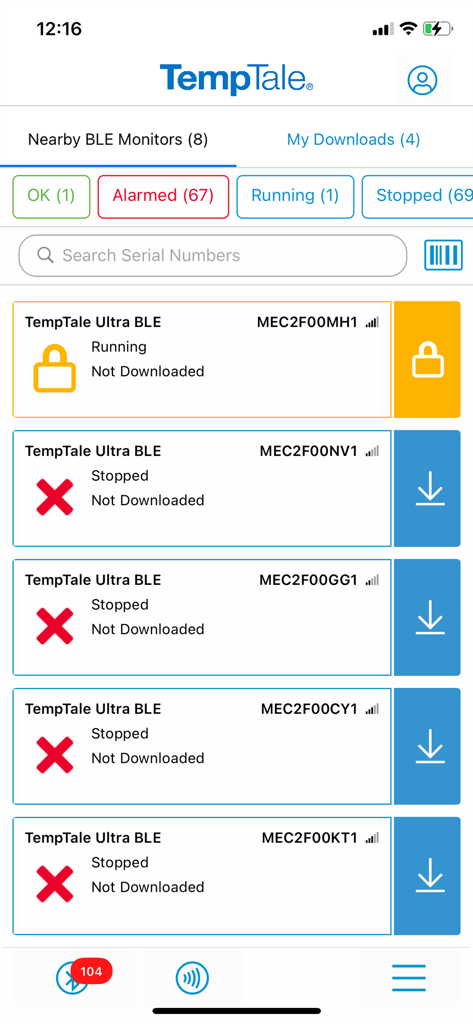
TempTale App - TempTaleアプリのインターフェース。ステータスアラートが表示された近くのBLE温度モニターのリストを表示。
TempTaleアプリのインターフェース。ステータスアラートが表示された近くのBLE温度モニターのリストを表示。

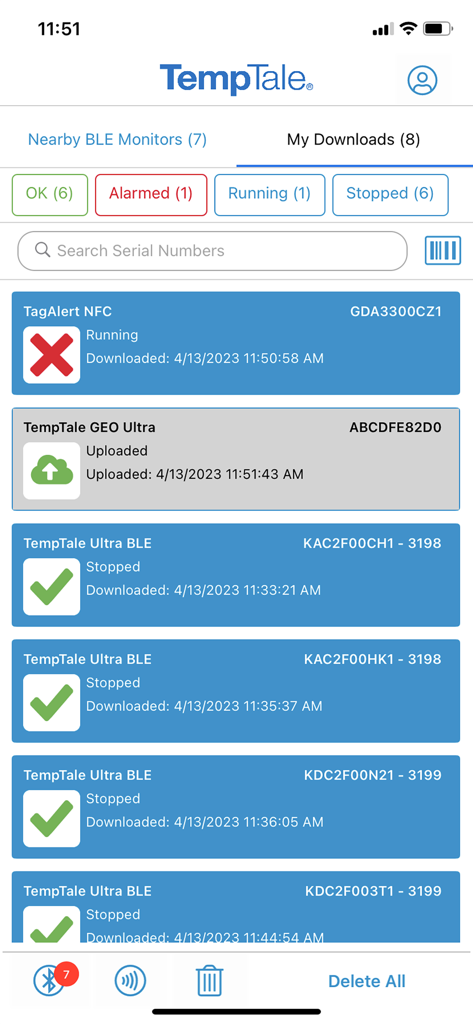
TempTale App - TempTaleアプリのダッシュボード。緑色のチェックマークと赤色のアラームアイコンで温度モニターのステータスを表示。
TempTaleアプリのダッシュボード。緑色のチェックマークと赤色のアラームアイコンで温度モニターのステータスを表示。

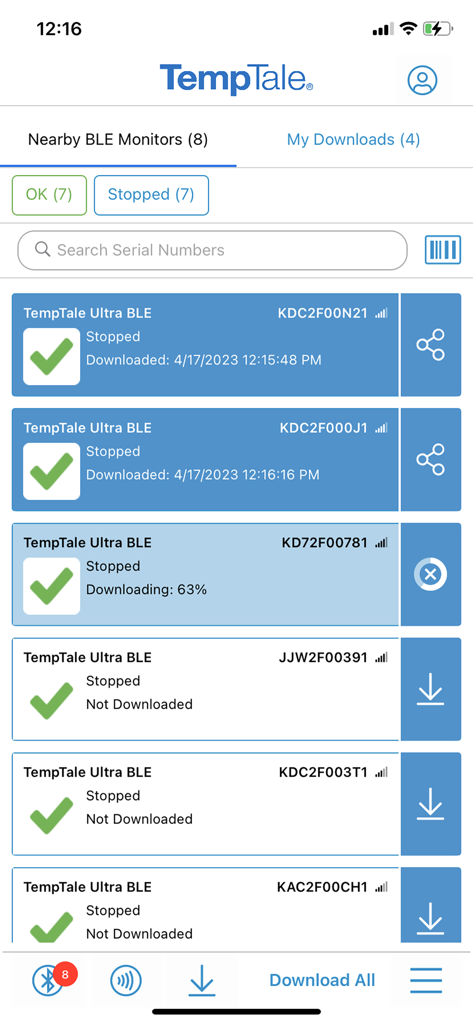
TempTale App - TempTaleアプリのスクリーンショット。ステータスインジケーターとダウンロードオプションが表示された近くのBluetooth温度モニターのリストを表示。
TempTaleアプリのスクリーンショット。ステータスインジケーターとダウンロードオプションが表示された近くのBluetooth温度モニターのリストを表示。

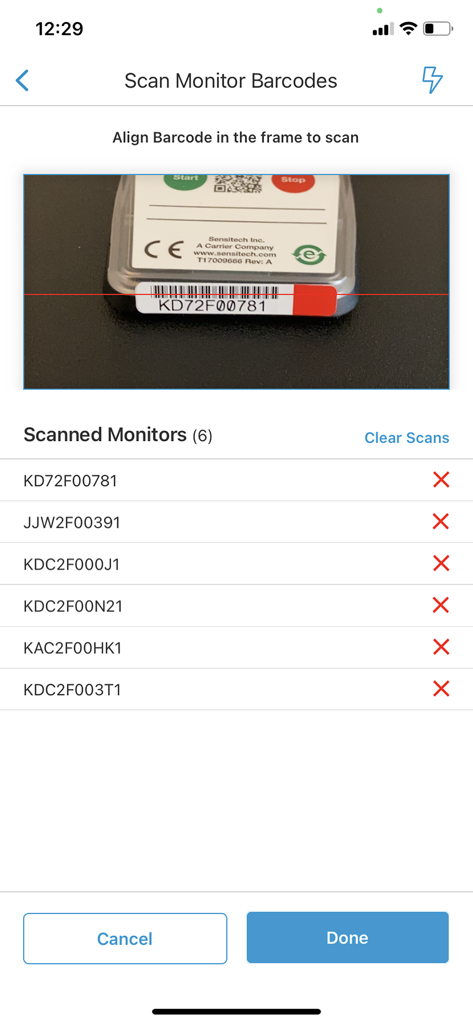
TempTale App - TempTaleアプリのバーコードスキャナー画面。カメラファインダーとアラームステータスが表示されたスキャン済みモニターIDのリストを表示。
TempTaleアプリのバーコードスキャナー画面。カメラファインダーとアラームステータスが表示されたスキャン済みモニターIDのリストを表示。

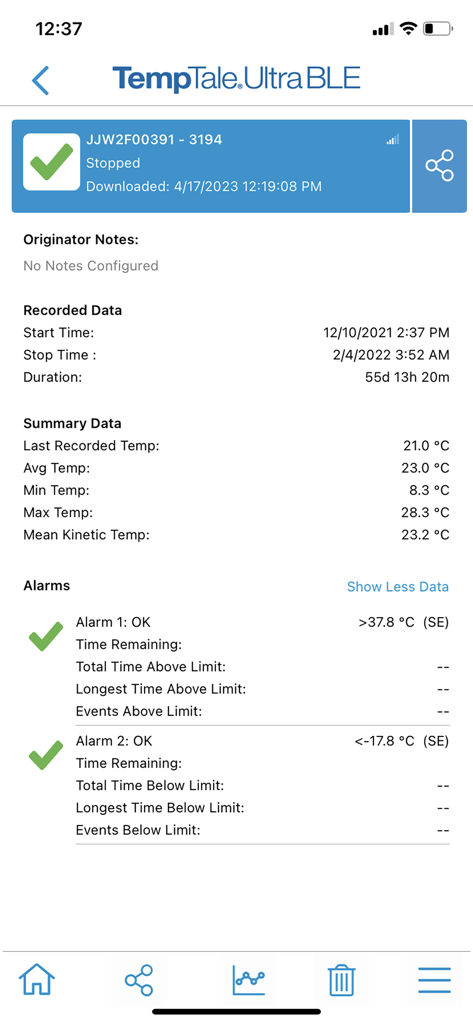
TempTale App - TempTaleアプリの温度サマリーレポート。アラームステータスと記録されたデータを表示。
TempTaleアプリの温度サマリーレポート。アラームステータスと記録されたデータを表示。

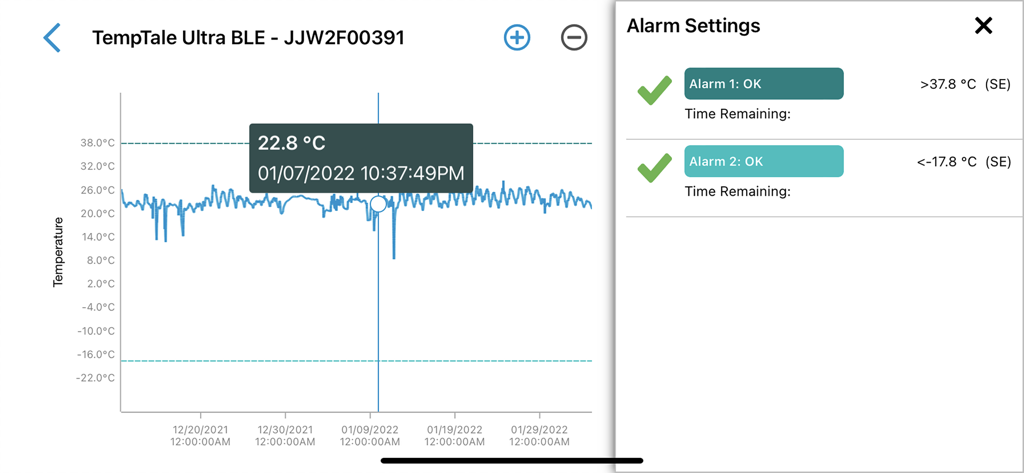
TempTale App - TempTaleアプリのインターフェース。温度ロググラフとアラーム設定を表示。
TempTaleアプリのインターフェース。温度ロググラフとアラーム設定を表示。

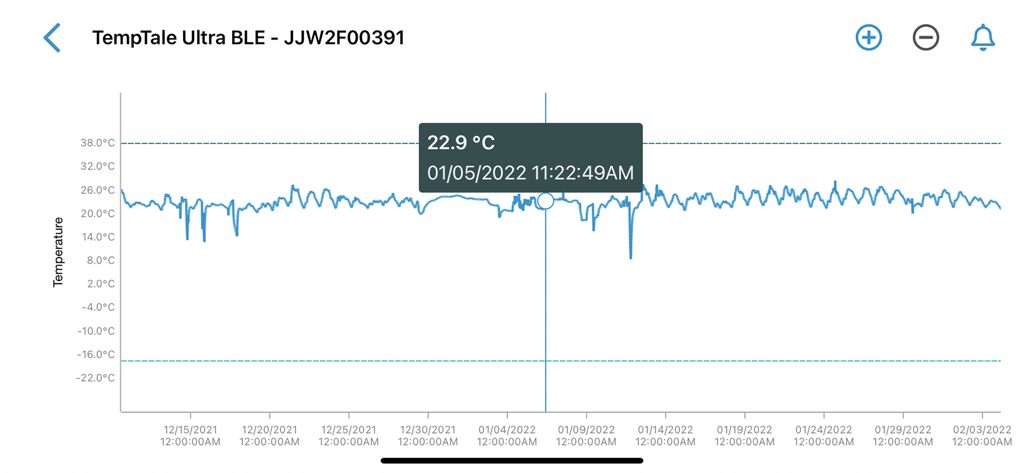
TempTale App - TempTaleアプリの詳細な温度グラフ。時間の経過に伴う変動を、摂氏22.9度で強調表示された特定のデータポイントとともに表示。
TempTaleアプリの詳細な温度グラフ。時間の経過に伴う変動を、摂氏22.9度で強調表示された特定のデータポイントとともに表示。

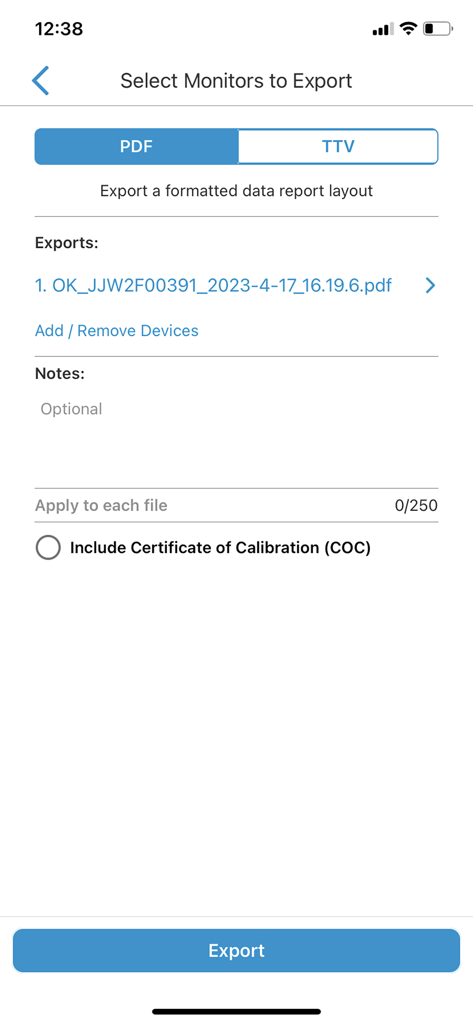
TempTale App - PDFまたはTTVレポートとしてエクスポートするモニターを選択するためのTempTaleアプリ画面。
PDFまたはTTVレポートとしてエクスポートするモニターを選択するためのTempTaleアプリ画面。

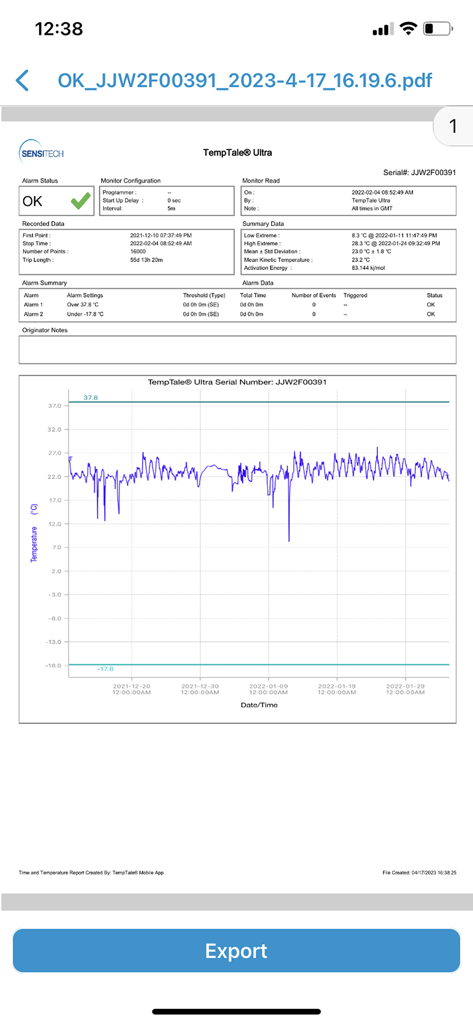
TempTale App - TempTaleアプリの詳細な温度モニタリングレポート。データグラフと緑色のOKアラームステータスを表示。
TempTaleアプリの詳細な温度モニタリングレポート。データグラフと緑色のOKアラームステータスを表示。

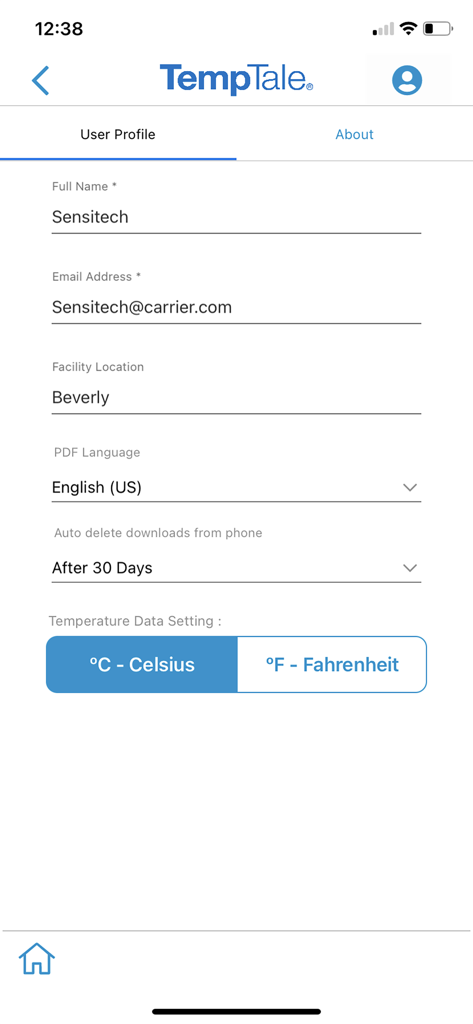
TempTale App - TempTaleアプリのユーザープロファイル設定画面。名前、メール、施設、場所、温度設定を表示。

TempTaleアプリのユーザープロファイル設定画面。名前、メール、施設、場所、温度設定を表示。

説明

TempTale® Mobile App supports reading temperature from these Sensitech wireless devices used in temperature-sensitive supply chain shipments: TempTale® BLE (Bluetooth) monitor: Provides a touchless Bluetooth read of the temperature of a package and determines if a package is alarmed for accept/reject decisions. Once the app is installed on your smartphone, simply open the app and the Bluetooth monitor will broadcast data within 9m or 30 ft (no pairing required). Tap to download the temperature data to your phone. Data automatically uploads to the cloud into ColdStream® Select once downloaded to the phone. Quickly export a PDF or TTV file—send using your smartphone file sharing options. TempTale® GEO X Real-time/cellular monitor: Provides an easy way to upload data to the cloud as a secondary method if no cellular connection is available at the final destination. “APP” will display on the LCD of the monitor. Press the start and stop buttons for 3 sec. to activate the Bluetooth connection. Once the app is installed on your smartphone, simply open the app and the Bluetooth monitor will broadcast data within 9m or 30 ft (no pairing required). Tap to download the temperature data to your phone. Data automatically uploads to the cloud once downloaded to the phone. Quickly export a PDF or TTV file—send using your smartphone file sharing options. TempTale® GEO Ultra Real-time/cellular monitor: Provides an easy way to upload data to the cloud as a secondary method if no cellular connection is available at the final destination. Once the app is installed on your smartphone, simply open it and tap the device to scan the TempTale® GEO Ultra using the NFC wireless connection to upload monitor data to the cloud and stop the monitor. Login to ColdStream® Select / SensiWatch® Platform to check for shipment alarm status information. TagAlert® NFC monitor: Provides an easy-to-understand temperature status of your package. The read out indicates if the product has stayed within acceptable limits or if any temperature alarms have triggered. Once the app is installed on your smartphone, simply open it and tap the device to scan and read the TagAlert® NFC to check alarm statuses. Once data is downloaded using the app, feel confident in your accept/reject decision. Quickly export data reports in PDF format and send them using your smartphone file sharing options. Selective Access: Upon launching the TempTale App, users may need to login to obtain Selective Access with their SensiWatch® Platform credentials or continue as a Guest. Guest mode allows use of the app without login, for certain TempTale BLE programs. Monitors configured with Selective Access are set up in SensiWatch Platform. Please contact your administrator to receive a login set up email. Easy to use: Once the app is installed on your smartphone, • Simply launch the app and the TempTale® BLE (Bluetooth) monitor will broadcast to the app (no pairing required). Click download arrow to download to your phone. Use the app for near field communication (NFC) to scan the TagAlert® NFC or TempTale® GEO Ultra by holding your smartphone and tapping the monitor—it will be read automatically. TempTale® GEO X, TempTale® BLE and TagAlert® NFC monitors can be programmed with up to six (6) temperature alarms and displayed in the app. TempTale® GEO Ultra alarms display in the software, login to ColdStream® Select / SensiWatch® Platform to check for shipment alarm status information. If the time/temperature of your package has exceeded its limits, you will see the X icon, indicating an alarm (up to 6) has triggered. Follow the standard operating procedures (SOPs) set by your organization. If your package has stayed within the time/temperature limits, you will see the √ icon (check mark), which means you can accept the shipment.

Download

ダウンロード: App Store

このページはアプリまたはその開発者の公式ページではなく、情報提供および論評を目的として作成された独立した編集出版物です。明示的に別段の記載がない限り、アプリおよびその開発者は、MWM、Apple、Google Play、アプリのパブリッシャー、またはアプリの開発者と提携、承認、後援、認可、またはその他の公式的な関係はなく、このページのいかなる内容も、アプリがMWMのサービスを使用して開発されたことを意味するものではありません。すべての商標、ロゴ、スクリーンショット、その他のコンテンツはそれぞれの所有者の財産です。







