The Framery
The Framery
ダウンロード: App Store

このページはアプリまたはその開発者の公式ページではなく、情報提供および論評を目的として作成された独立した編集出版物です。明示的に別段の記載がない限り、アプリおよびその開発者は、MWM、Apple、Google Play、アプリのパブリッシャー、またはアプリの開発者と提携、承認、後援、認可、またはその他の公式的な関係はなく、このページのいかなる内容も、アプリがMWMのサービスを使用して開発されたことを意味するものではありません。すべての商標、ロゴ、スクリーンショット、その他のコンテンツはそれぞれの所有者の財産です。


ロゴ: The Framery
ダウンロード: App Store

The Framery

次の眼鏡やVRヘッドセットに、臨床グレードの精度を手に入れましょう。スマートフォンだけで、数分で瞳孔間距離を測定し、現在のレンズの詳細を抽出できます。

主要数値

ダウンロード

663K+

ユーザー評価

4.9/5

評価数

11K+

開発元

1-800 CONTACTS, Inc.

カテゴリ

Medical

対応言語

1

最新バージョン

6.0.1

サイズ

80.8 MB

リリース日

2019年11月13日
機能

数分で新しい眼鏡に必要なすべて

診療所や費用をスキップしましょう。自宅で快適に、医療グレードのAIを使用して処方箋を抽出し、PDを測定します。

インスタントPD測定

自撮りだけで60秒以内に正確な瞳孔間距離を取得—眼鏡の注文やVRヘッドセットのキャリブレーションに最適です。

マジックレンズスキャナー

書類を紛失しましたか?現在の眼鏡をスキャンするだけで、10分以内に度数、乱視度数、乱視軸の詳細を抽出できます。

以下のスクリーンショットと説明は、アプリの公式ストアリスティングから直接取得されたものであり、アプリ開発者の所有物です。

アプリストア

スクリーンショット
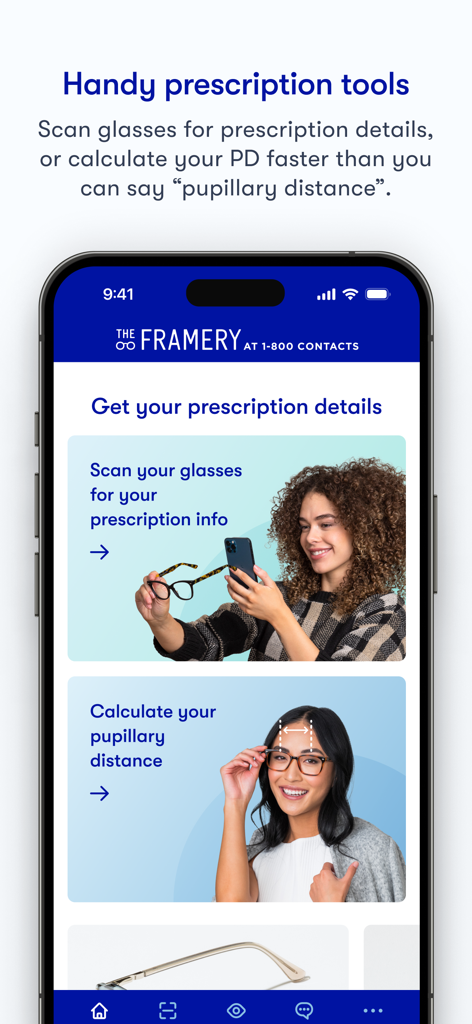
The Framery - The Frameryアプリのホーム画面。処方箋のスキャンと瞳孔間距離の測定オプションが表示されます。
The Frameryアプリのホーム画面。処方箋のスキャンと瞳孔間距離の測定オプションが表示されます。

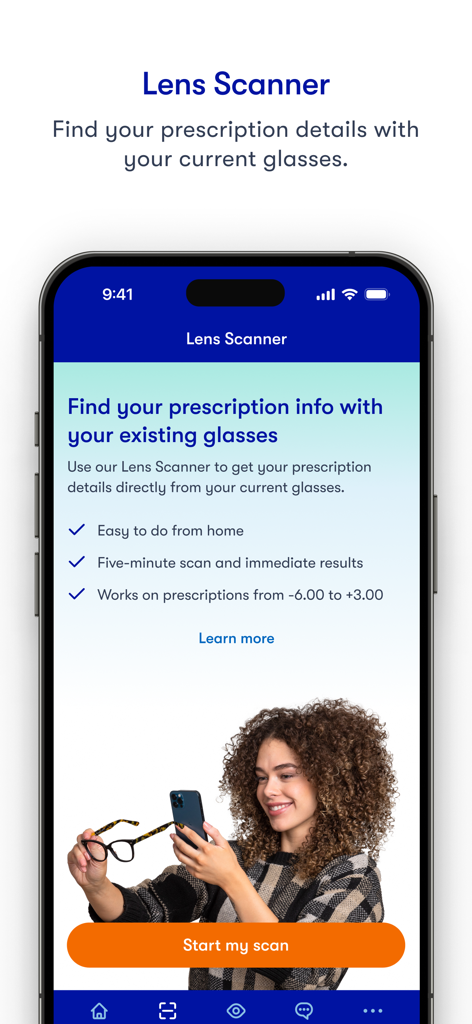
The Framery - The Frameryアプリのレンズスキャナー画面。女性がスマートフォンを使用して眼鏡の処方箋の詳細をスキャンしています。
The Frameryアプリのレンズスキャナー画面。女性がスマートフォンを使用して眼鏡の処方箋の詳細をスキャンしています。

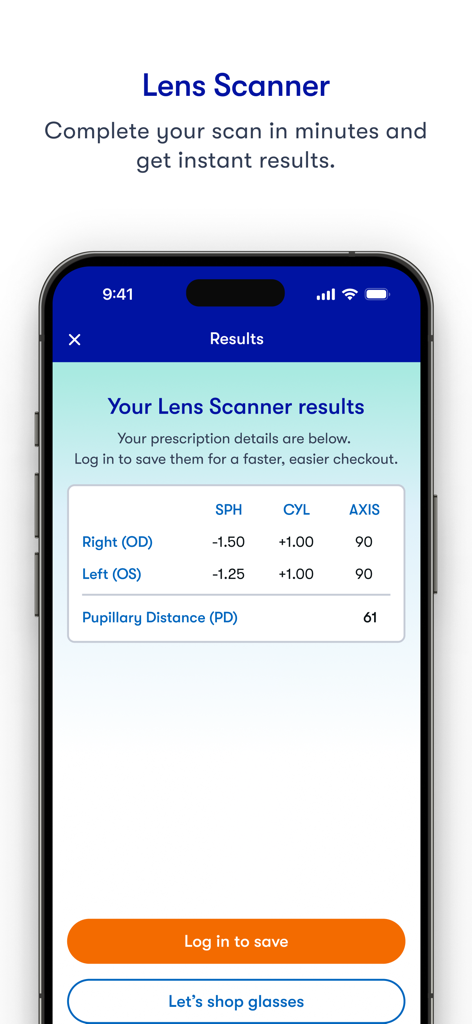
The Framery - The Frameryアプリのレンズスキャナーの結果画面。視力処方箋と瞳孔間距離が表示されています。
The Frameryアプリのレンズスキャナーの結果画面。視力処方箋と瞳孔間距離が表示されています。

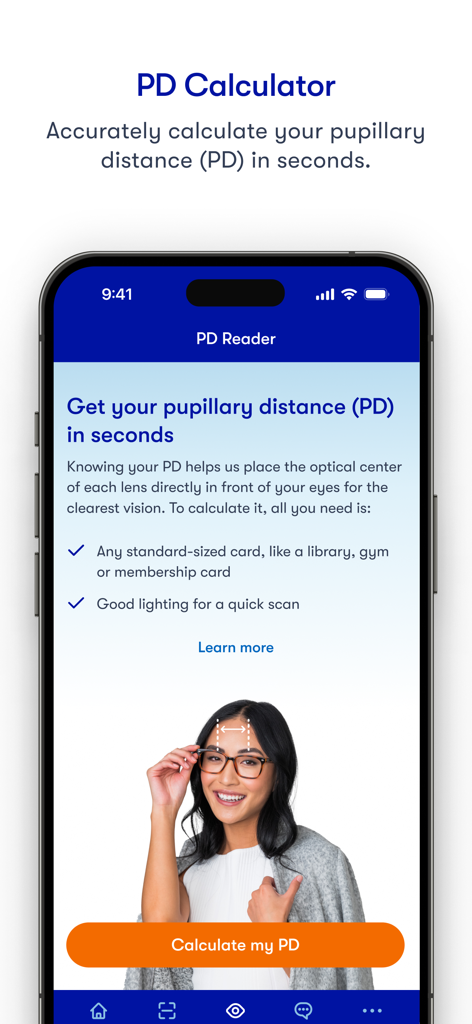
The Framery - The Frameryアプリのインターフェース。瞳孔間距離計算機とPD測定の手順が表示されます。
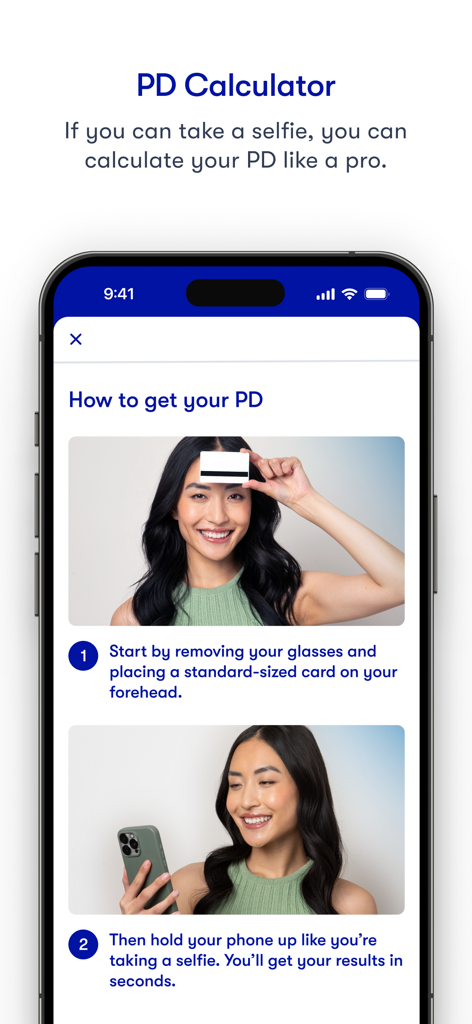
The Frameryアプリのインターフェース。瞳孔間距離計算機とPD測定の手順が表示されます。

The Framery - The Frameryアプリを使用した瞳孔間距離の測定方法に関するステップバイステップの手順。
The Frameryアプリを使用した瞳孔間距離の測定方法に関するステップバイステップの手順。

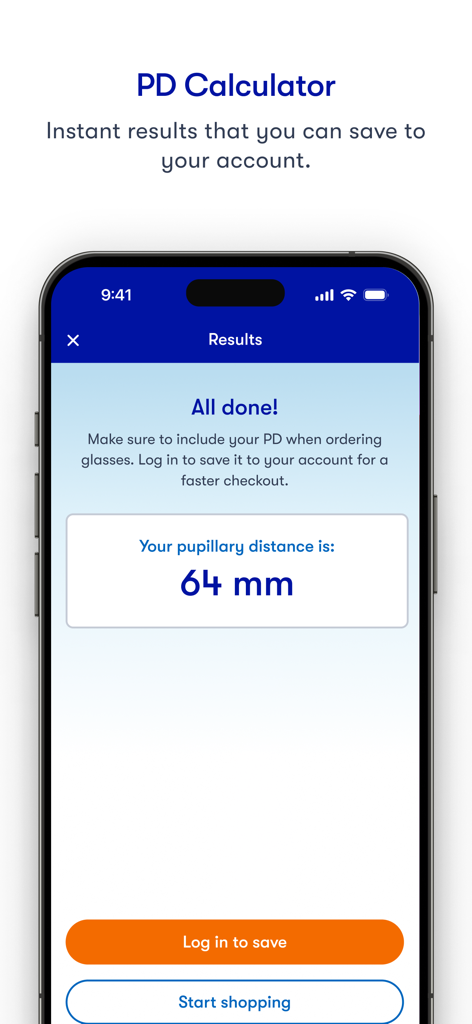
The Framery - The Frameryアプリのスクリーンショット。64mmの瞳孔間距離測定結果が表示されています。
The Frameryアプリのスクリーンショット。64mmの瞳孔間距離測定結果が表示されています。

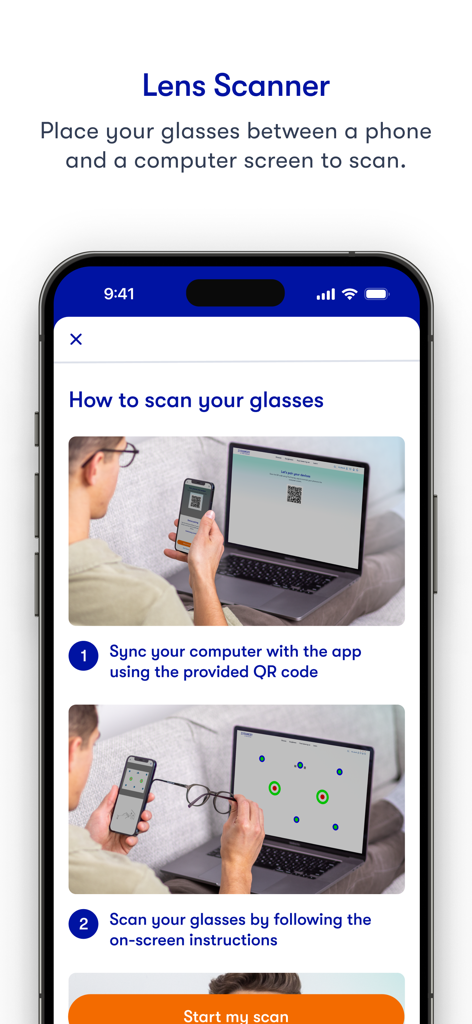
The Framery - The Frameryアプリのステップバイステップチュートリアル。電話をコンピューター画面と同期してレンズスキャナーを使用する方法を示しています。

The Frameryアプリのステップバイステップチュートリアル。電話をコンピューター画面と同期してレンズスキャナーを使用する方法を示しています。

説明

1 Ranked App for measuring Pupillary Distance. The only medical grade app that lets you measure your PD (Pupillary Distance) and get your glasses details! Finding your glasses parameters has never been easier! Get everything you need to buy new glasses or AR / VR headset from the comfort of your home. Measure your PD (Pupillary Distance) in less than a minute and get your glasses Rx details in less than 10 minutes!!! The Framery uses cutting-edge computer vision to scan your glasses and extract their optical parameters, to provide you with your complete prescription details including sphere (power), cylinder (astigmatism), axis, and PD (Pupillary Distance). Learn how to measure your pupillary distance (PD) for glasses. What does PD mean for prescription glasses? Pupillary distance (PD) measures the distance between the centers of your pupils in millimeters. It helps fine tune your glasses lenses to your eyes. Measuring your PD is as easy as taking a selfie. Key features: Free PD (Pupillary Distance) measurement Free glasses scan Fast and easy to use Clinically tested; Meets industry guidelines for accuracy (ANSI-80.17): Rx within 0.25D, PD within 2mm. FDA, CE and TGA listed How it works: To use The Framery app to measure your PD you will need any standard magnetic card (e.g. a library card), light colored cards work best To use GlassesOn to extract your glasses parameters you will need: A 12"-27" flat computer screen Your current pair of glasses Any standard magnetic card (e.g. a library card), light colored cards work best How to measure your PD (pupillary distance)? -Tap "Start PD" on the home page and follow the voice instructions. The Framery app will do the rest, it's that easy! No ruler, No mirrors and no manual adjustments needed :) Who can use The Framery? -Anyone can use The Framery app to get their PD and glasses prescription for FREE! Use The Framery Lenses Scanner to extract your glasses details if you: Are a healthy individual, 18 or older Have stable vision, and are happy with your current prescription Have a Single Vision prescription between -6.00 and +3.00 Have a cylinder measurement up to - 2.50 You should not use GlassesOn to extract your Rx details if you: Have multifocals/bifocals/progressives eyeglasses Have a prescription that includes a prism measurement Have a high single vision distance, reading, and/or astigmatism power Take any medication that affects your vision Have any illness or condition that affects ocular health (ask your doctor) We respect your privacy. Our privacy policy clearly states what information we collect when you visit our website and/or use our app. See our full privacy policy here: https://www.glasseson.com/privacy ** Note: The Framery (formerly GlassesOn) is a registered Class 1 Exempt Medical Device on the FDA Medical Device Listings, CE (EU) self-declared Class 1 and a registered Class 1 Medical Device on the TGA Medical Device Listings. However, The Framery does not provide medical advice and does not replace a full eye health exam. We encourage you to visit your eye doctor periodically. Manufactured by 6over6 Vision Ltd. For more details go to 6over6.com

Download

ダウンロード: App Store

このページはアプリまたはその開発者の公式ページではなく、情報提供および論評を目的として作成された独立した編集出版物です。明示的に別段の記載がない限り、アプリおよびその開発者は、MWM、Apple、Google Play、アプリのパブリッシャー、またはアプリの開発者と提携、承認、後援、認可、またはその他の公式的な関係はなく、このページのいかなる内容も、アプリがMWMのサービスを使用して開発されたことを意味するものではありません。すべての商標、ロゴ、スクリーンショット、その他のコンテンツはそれぞれの所有者の財産です。