
このページはアプリまたはその開発者の公式ページではなく、情報提供および論評を目的として作成された独立した編集出版物です。明示的に別段の記載がない限り、アプリおよびその開発者は、MWM、Apple、Google Play、アプリのパブリッシャー、またはアプリの開発者と提携、承認、後援、認可、またはその他の公式的な関係はなく、このページのいかなる内容も、アプリがMWMのサービスを使用して開発されたことを意味するものではありません。すべての商標、ロゴ、スクリーンショット、その他のコンテンツはそれぞれの所有者の財産です。

ダウンロード
25M+ユーザー評価
評価数
607.0K開発元
カテゴリ
Utilities対応言語
25最新バージョン
4.13.3サイズ
293.5 MBリリース日
2013年5月17日TP-Link Tether アプリ機能分析
直感的で強力なネットワーク管理機能の評価
ペアレンタルコントロール
スケジュール設定やURLベースのアクセス管理により、お子様のインターネット利用時間を制限し、不適切なウェブサイトへのアクセスをブロックすることが可能です。保護者にとって非常に重要な機能を提供します。
不正アクセスブロック
ネットワークに不正にアクセスしているユーザーを特定し、その接続を簡単にブロックすることが可能です。これにより、ユーザーは自宅ネットワークのセキュリティを強化できます。
ネットワーク設定の管理
本アプリを通じて、SSID、パスワード、インターネット接続設定(VDSL/ADSL設定を含む)を簡単に行うことが可能です。ユーザーはルーターやエクステンダーの初期設定や変更を直感的に操作できます。
レンジエクステンダー最適配置アシスト
レンジエクステンダーの設置に最適な場所を検出するサポートを提供し、ユーザーはWi-Fiカバレッジを最大限に広げることができます。電波状況の最適化に貢献します。
デバイスとクライアントの監視
接続されているデバイスのステータスや、ネットワークに接続しているクライアントデバイスの一覧とその権限をリアルタイムで確認することが可能です。ネットワークの状態を包括的に把握できます。
複数デバイスの一元管理
複数のTP-Link製ルーター、xDSLルーター、レンジエクステンダーを一つのアプリから同時に管理することが可能です。複数のデバイスを持つユーザーの利便性を高めます。
よくある質問
について知っておくべきこと TP-Link Tether
What is the TP-Link Tether app used for?
TP-Link Tether is a mobile application that allows users to access and manage their TP-Link Router, xDSL Router, and Range Extender devices. It provides a simple interface for device status, client management, and network settings.
How does TP-Link Tether facilitate the setup of my TP-Link router?
TP-Link Tether facilitates setup by guiding users to connect their TP-Link router to a modem's WAN port via an Ethernet cable. The app then provides an easy, straightforward configuration process for network settings like SSID and passwords.
Does the TP-Link Tether app include parental control features?
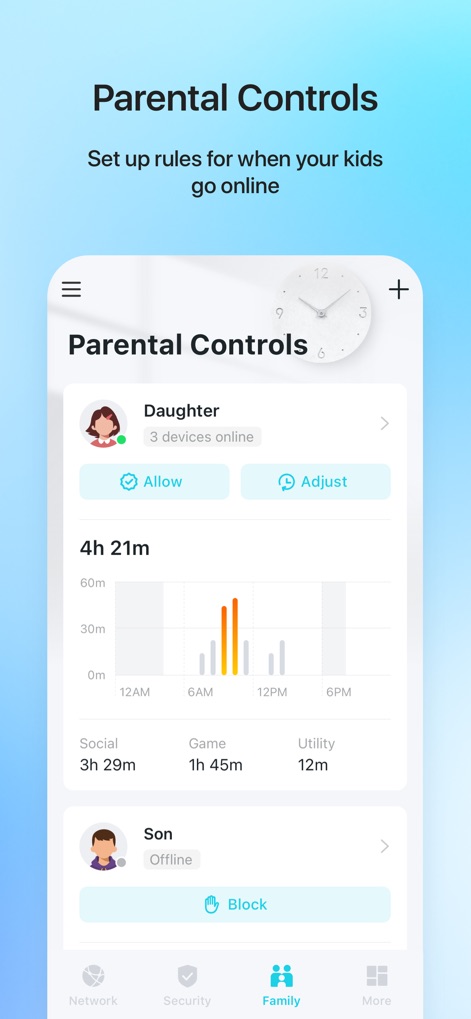
Yes, TP-Link Tether includes parental control functionality. Users can manage schedules and apply URL-based internet access restrictions for client devices, as well as block or adjust access for specific family members.
How can I view connected devices using the TP-Link Tether app?
Yes, TP-Link Tether allows users to view all online client devices. The app displays a list of connected devices, including their online status, upload/download rates, and connection types like Wi-Fi bands (5G, 6G).
What network security features does the TP-Link Tether app provide?
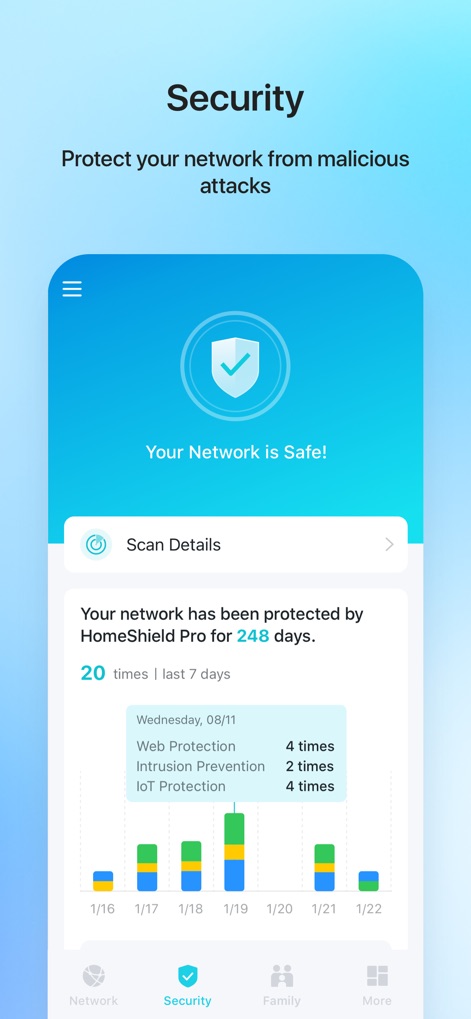
TP-Link Tether includes network security features, enhanced by HomeShield Pro. This protection encompasses web protection, intrusion prevention, and IoT protection, safeguarding the network from malicious attacks.
Can I block unauthorized users from my network using TP-Link Tether?
Yes, TP-Link Tether allows users to block unauthorized devices accessing their network. It provides tools to manage permissions of client devices and control who connects to the network.
Does TP-Link Tether require a firmware upgrade for my device?
Yes, a firmware upgrade is required for TP-Link Tether to function correctly. Users must visit the TP-Link download page to choose and install the correct, latest firmware version for their specific device.
Can the TP-Link Tether app manage multiple TP-Link devices simultaneously?
Yes, the TP-Link Tether app allows users to manage most of their compatible TP-Link devices simultaneously. This includes various routers, xDSL routers, and range extenders.
Where can I find a list of devices compatible with TP-Link Tether?
A list of compatible routers for TP-Link Tether is available on the TP-Link website. The app's description provides a direct link to this product list for user reference.
Does the TP-Link Tether app function when connected to a guest network?
No, TP-Link Tether does not work when connected to a guest network. For proper functionality, the mobile device running the app must be connected to the main network managed by the TP-Link device.
How does TP-Link Tether help optimize range extender placement?
TP-Link Tether helps users find the optimal location to place their range extender. This feature guides users to ensure maximum Wi-Fi coverage and performance for their entire network.
Can I get network activity reports from TP-Link Tether?
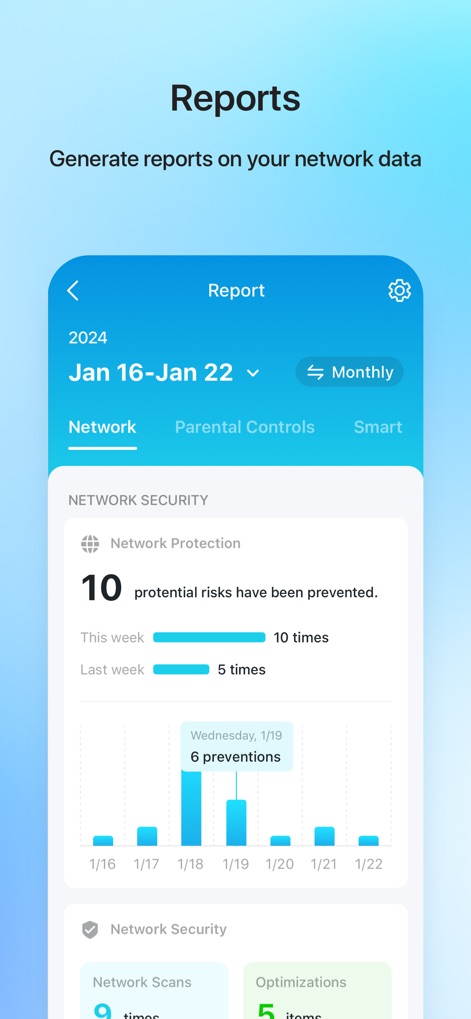
Yes, TP-Link Tether generates reports on network data. These reports can include network protection summaries, detailing potential risks prevented, network scans, and optimizations over specified periods.
以下のスクリーンショットと説明は、アプリの公式ストアリスティングから直接取得されたものであり、アプリ開発者の所有物です。
アプリストア
スクリーンショット
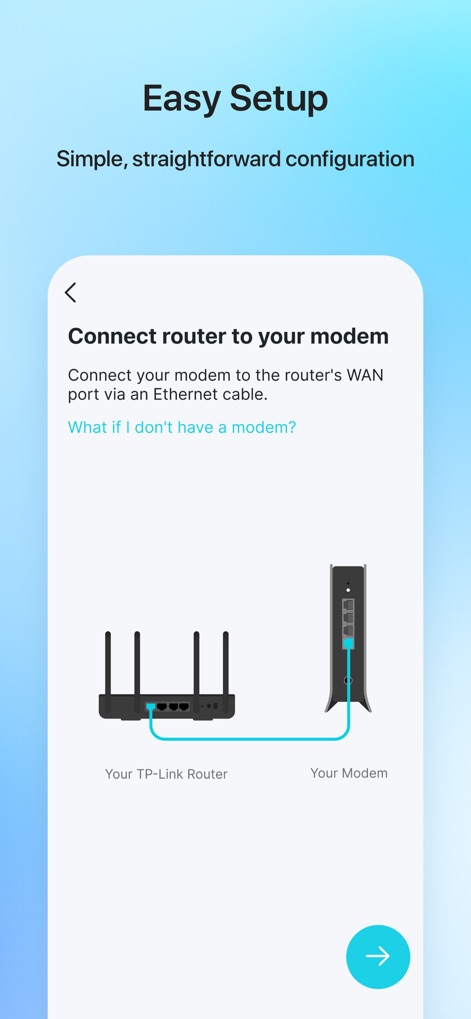
簡単設定ガイド
ユーザーは、ルーターとモデムの接続を視覚的に示した図と、イーサネットケーブルを使った具体的な配線方法の指示により、スムーズな初期設定が可能です。
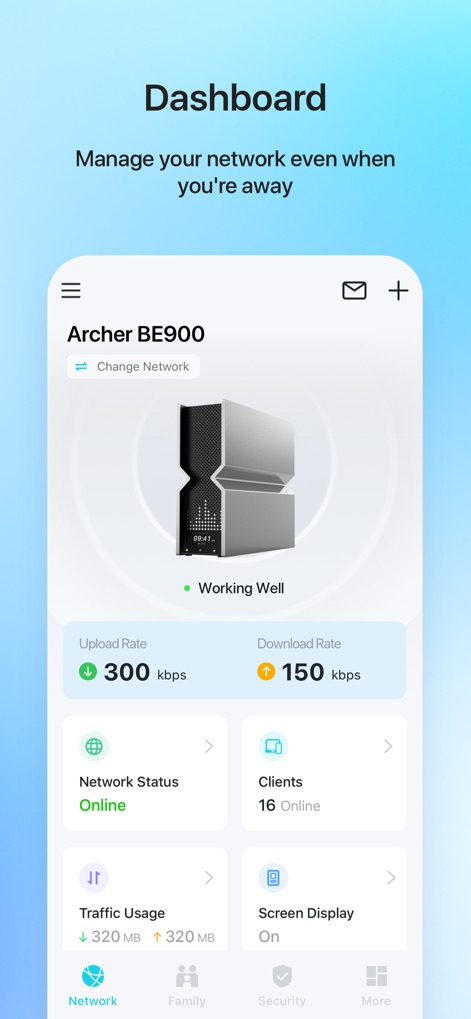
ネットワーク概要
このダッシュボードでは、ルーターのモデル名(例: Archer BE900)やリアルタイムのアップロード・ダウンロード速度を明確に表示し、現在のネットワーク状況とオンライン中のクライアントデバイス数を一目で確認できます。
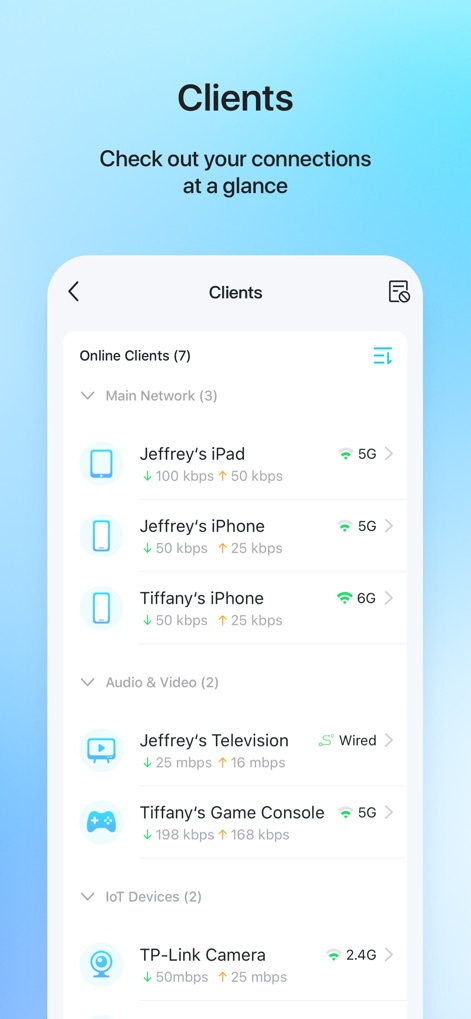
接続デバイス一覧
アプリは、接続中の各デバイス(例: Jeffrey's iPad、Tiffany's iPhone)のリストを表示し、それぞれのデバイスのアップロード・ダウンロード速度と、接続しているWi-Fiバンド(例: 5G、6G)を示します。
高度なセキュリティ
このツールは、ネットワークの安全性を保証するメッセージ(例: Your Network is Safe!)を表示し、ウェブ保護や侵入防止といったHomeShield Proによる過去7日間のセキュリティイベント数を棒グラフで可視化します。
ペアレンタルコントロール
ユーザーは、「Daughter」や「Son」といったプロファイルごとにデバイスの利用状況を把握し、ソーシャル、ゲーム、ユーティリティといったカテゴリ別の利用時間グラフを確認しながら、個別のインターネットアクセスルールを設定できます。
詳細レポート
本アプリは、選択した期間内のネットワークセキュリティに関するレポートを生成し、防止された潜在的なリスクの総数と、日ごとの防御イベント(例: 6 preventions)を棒グラフで表示します。
説明
Download
類似アプリ
似た機能とユーザー体験を持つアプリ

Smart Home Manager
AT&T Services, Inc.

TP-Link Deco
TP-Link Systems Inc.

eero wifi system
eero LLC

MERCUSYS
MERCUSYS Technologies Co., Ltd.

TP-Link Aginet
TP-Link Systems Inc.

T-Mobile Fiber: eero
eero LLC

NETGEAR Nighthawk - WiFi App
NETGEAR, Inc.

UniFi
Ubiquiti Inc.

Freebox Connect
Freebox
このページはアプリまたはその開発者の公式ページではなく、情報提供および論評を目的として作成された独立した編集出版物です。明示的に別段の記載がない限り、アプリおよびその開発者は、MWM、Apple、Google Play、アプリのパブリッシャー、またはアプリの開発者と提携、承認、後援、認可、またはその他の公式的な関係はなく、このページのいかなる内容も、アプリがMWMのサービスを使用して開発されたことを意味するものではありません。すべての商標、ロゴ、スクリーンショット、その他のコンテンツはそれぞれの所有者の財産です。