Vocal Tune Studio
Vocal Tune Studio
ダウンロード: App Store

このページはアプリまたはその開発者の公式ページではなく、情報提供および論評を目的として作成された独立した編集出版物です。明示的に別段の記載がない限り、アプリおよびその開発者は、MWM、Apple、Google Play、アプリのパブリッシャー、またはアプリの開発者と提携、承認、後援、認可、またはその他の公式的な関係はなく、このページのいかなる内容も、アプリがMWMのサービスを使用して開発されたことを意味するものではありません。すべての商標、ロゴ、スクリーンショット、その他のコンテンツはそれぞれの所有者の財産です。

ロゴ: Vocal Tune Studio
ダウンロード: App Store

Vocal Tune Studio

デスクトップクラスのボーカルプロダクションをモバイルセットアップにもたらしましょう。詳細なノート編集やフォルマントシフトから完璧なタイムストレッチまで、お気に入りのAUv3ホストまたはスタンドアロンで直接スタジオ品質の結果を得られます。

主要数値

ダウンロード

26K+

ユーザー評価

3.7/5

評価数

0

開発元

Davy Wentzler

カテゴリ

Music

対応言語

1

最新バージョン

1.4.4

サイズ

17.3 MB

リリース日

2023年3月28日
機能

どこでもスタジオ品質のボーカル

現代のインディーズアーティスト向けに調整された詳細なピッチ、タイム、フォルマント補正で、iPhoneまたはiPadを強力なボーカルプロダクションスイートに変えましょう。

プログレードのピッチ補正

微妙な自然な修正から象徴的なハードチューンエフェクトまで、自動スケール検出または外科的な手動制御で完璧なボーカルを実現します。

シームレスなAUv3統合

GarageBand、Cubasis、またはお気に入りのモバイルDAWに直接接続し、プロジェクトを離れることなくリアルタイムでトラックを編集します。

以下のスクリーンショットと説明は、アプリの公式ストアリスティングから直接取得されたものであり、アプリ開発者の所有物です。

アプリストア

スクリーンショット
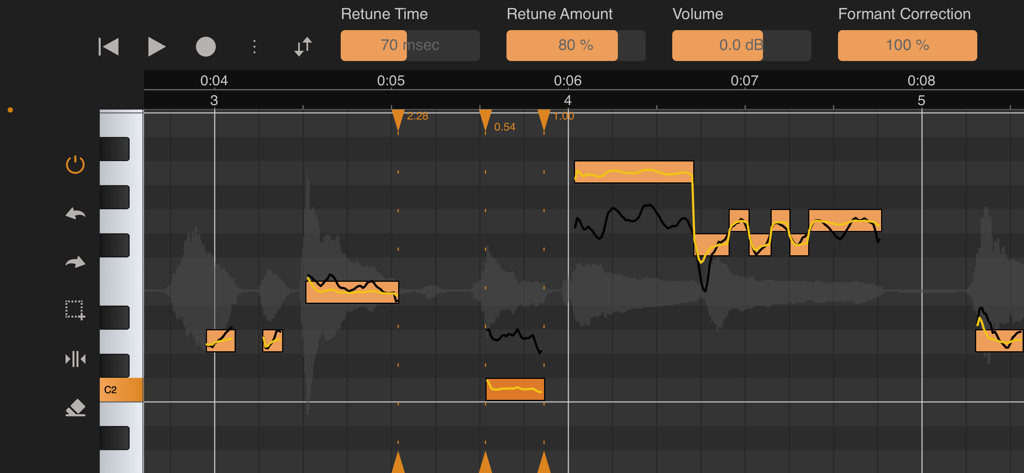
Vocal Tune Studio - ピッチとフォルマント補正ツールを示すVocal Tune Studioのインターフェイス
ピッチとフォルマント補正ツールを示すVocal Tune Studioのインターフェイス

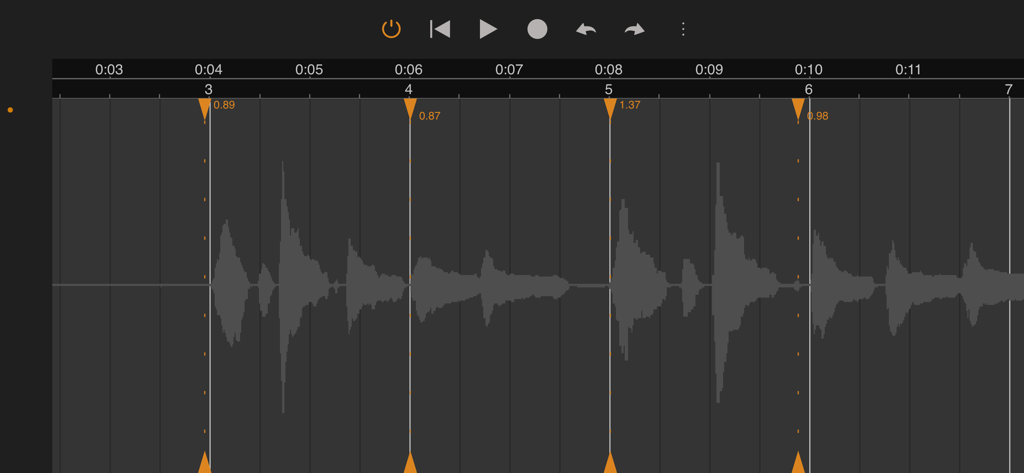
Vocal Tune Studio - プロの音楽制作のためにタイム補正とストレッチマーカーを示すVocal Tune Studioのオーディオ波形インターフェイス
プロの音楽制作のためにタイム補正とストレッチマーカーを示すVocal Tune Studioのオーディオ波形インターフェイス

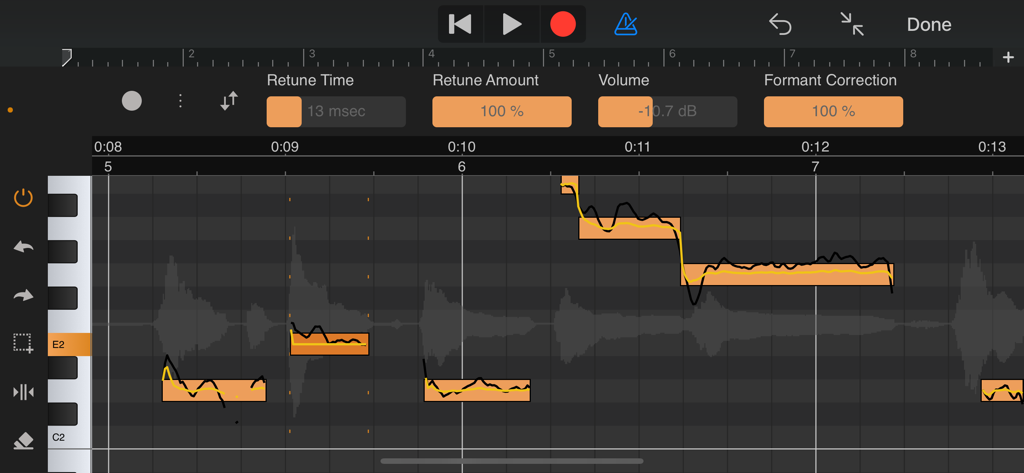
Vocal Tune Studio - モバイルデバイスで詳細なノート編集を示すVocal Tune Studioのプロフェッショナルピッチとフォルマント補正インターフェイス

モバイルデバイスで詳細なノート編集を示すVocal Tune Studioのプロフェッショナルピッチとフォルマント補正インターフェイス

説明

With Vocal Tune Studio, pitch and time correction of vocal recordings is now finally possible on your iPhone or iPad! Use it as an Audio Unit effect inside your favourite DAW or in standalone mode. From popular effects to subtile correction: Retune notes to achieve the popular auto tune effect or apply a more subtile correction. Besides pitch correction, notes can be corrected for timing and volume level as well. Deep editing: Each individual note can be adjusted for retune time, retune amount, volume and the amount of formant correction. Artificial vibrato can also be added and adjusted to taste using the vibrato depth and rate controls and settings to adjust the time when the vibrato kicks in and the time in which it reaches the full vibrato depth to obtain a natural sounding vibrato. Key and scale detection: Vocal Tune Studio can detect the key and scale of a vocal recording automatically or a key and scale can be manually chosen. Two workflows: Choose between two workflows similar to popular desktop vocal tune software: start with either all notes quantised (corrected) or non-quantised. When choosing non-quantised, an additional Pitch Quantisation slider lets you move notes between their original sung pitch and the target pitch within the selected key and scale. Time correction as a bonus for all audio material: Aside from vocal pitch correction, Vocal Tune Studio also features a generic time correction/stretching mode which works on any type of audio material (not only vocals, but also guitars etc.). In this mode, any part of a recording that was played off-beat can be time corrected without affecting parts that were recorded in time. Export MIDI: Besides the host's ability to render the effect to an audio file, the identified notes can also be exported as standard MIDI file. Standalone mode: Besides being a AUv3 plug-in, you can also run the app standalone. Record audio directly, import an audio file or paste an audio file from the iOS clipboard. Auto or manually tune your vocals and correct them for timing errors or apply time correction for any audio material. When finished, export the result to a WAV file. Note: Vocal Tune Studio is also available within our DAW, Audio Evolution Mobile Studio and offers much higher integration there, not requiring to 'record' the audio first into Vocal Tune Studio. User manual: You can find the user manual in PDF and HTML formats here: https://www.audio-evolution.com/manual/vtsau/index.html Tutorial video: Vocal Tune Studio being used inside Audio Evolution Mobile Studio https://www.youtube.com/watch?v=st75zBB4lds PLEASE NOTE: due to a bug in Auria, Vocal Tune Studio stops working when mixing down or freezing tracks. A work-around is to create a new audio track and select the master bus as input to perform bouncing.

Download

ダウンロード: App Store

このページはアプリまたはその開発者の公式ページではなく、情報提供および論評を目的として作成された独立した編集出版物です。明示的に別段の記載がない限り、アプリおよびその開発者は、MWM、Apple、Google Play、アプリのパブリッシャー、またはアプリの開発者と提携、承認、後援、認可、またはその他の公式的な関係はなく、このページのいかなる内容も、アプリがMWMのサービスを使用して開発されたことを意味するものではありません。すべての商標、ロゴ、スクリーンショット、その他のコンテンツはそれぞれの所有者の財産です。







