
このページはアプリまたはその開発者の公式ページではなく、情報提供および論評を目的として作成された独立した編集出版物です。明示的に別段の記載がない限り、アプリおよびその開発者は、MWM、Apple、Google Play、アプリのパブリッシャー、またはアプリの開発者と提携、承認、後援、認可、またはその他の公式的な関係はなく、このページのいかなる内容も、アプリがMWMのサービスを使用して開発されたことを意味するものではありません。すべての商標、ロゴ、スクリーンショット、その他のコンテンツはそれぞれの所有者の財産です。

Walbum™ - Watch Faces Gallery
Apple Watchは単なる時計ではない。それは自分の延長だ。このアプリは、そのパーソナルな表現力を解き放つ鍵を提供する。退屈な文字盤に別れを告げ、ウォッチを真に自分のものにする。
ダウンロード
2.5M+ユーザー評価
評価数
31.2K開発元
カテゴリ
Lifestyle対応言語
6最新バージョン
4.2.0サイズ
114.9 MBリリース日
2019年4月4日Apple Watchユーザーのためのパーソナライズと機能強化
Walbum™ - Watch Faces Gallery アプリの分析
ウォッチフェイス&壁紙ギャラリー
ユーザーは、数千ものスタイリッシュでカスタマイズ可能なデザインから、Apple Watchの表示をリフレッシュできます。ライブ壁紙、写真フェイス、厳選されたコレクションなどが含まれます。
DIYウォッチフェイス作成
ユーザーは、自分の写真、ステッカー、テキスト、ウィジェットを使用して、独自のApple Watchフェイスを簡単に作成できます。自動ローテーション設定やカウントダウン追加も可能です。
コンテキスト適応型SmartShiftウィジェット
本アプリは、時間、活動、状況に基づいて表示内容を自動的に調整するスマートウィジェットを提供し、ユーザーの日常に合わせた最適な情報をタイムリーに表示します。
ライフスタイル特化型Smart Faces
このアプリは、妊娠、仕事、フィットネスなど、特定のライフスタイルに合わせてパーソナライズされた、リアルタイムデータに基づくスマートフェイスを提供し、ユーザーのニーズに合わせた情報を提供します。
ヘルスケア・アクティビティデータ連携
本アプリは、ヘルスケアおよびアクティビティデータと連携し、歩数、心拍数、活動リングなどの重要な情報をウォッチフェイスウィジェットに直接表示できます。
無料およびプレミアムコンテンツへのアクセス
本サービスは、毎日更新される無料のウォッチフェイスや壁紙に加え、サブスクリプションを通じてすべてのプレミアムなウォッチフェイス、ウィジェット、および高度な機能へのフルアクセスを提供します。
よくある質問
について知っておくべきこと Walbum™ - Watch Faces Gallery
What is Walbum and what does it offer?
Walbum is an Apple Watch application providing a gallery of watch faces and wallpapers. It offers live watch faces, DIY photo faces, smart widgets, and curated albums to personalize your Apple Watch display.
How many watch faces are available in Walbum?
Walbum boasts a vast gallery of nearly 3,000 watch faces. This collection includes various watch wallpapers, background packs, live-style watch faces, and themed albums for diverse styles and seasons.
Can users create custom watch faces with Walbum?
Yes, Walbum allows you to create personalized DIY watch faces in seconds. You can add photo watch face collections that auto-rotate, and customize them with stickers, text labels, widgets, and countdowns for special dates.
What are SmartShift widgets in Walbum?
SmartShift widgets in Walbum automatically adapt their content based on time, activity, and context. Examples include showing countdowns before work ends, displaying weekend weather forecasts, or presenting live stats for steps and activity rings.
Does Walbum offer free watch faces and wallpapers?
Yes, Walbum provides free watch faces and wallpapers through its "Today Free" section. The application continuously updates and adds more free watch faces and recommended content for users.
What is the price of Walbum's Gold Membership?
Walbum's Gold Membership costs $2.99 per month or $13.99 per year, though prices may vary by location. This membership unlocks all premium watch faces, widgets, and advanced features within the app.
What features are included with Walbum's Gold Membership?
Gold Membership in Walbum unlocks all premium watch faces, premium widgets, and advanced features. This includes access to exclusive albums and comprehensive customization options not available in the free version.
What permissions does Walbum require to function?
Walbum requires Health and Activity permissions for steps, heart rate, and activity widgets. It also needs Location access for weather data and Photos permission to save and sync wallpapers to your device.
Does Walbum support Always On Display for Apple Watch?
Yes, Walbum supports the "Always On" display feature for Apple Watch. This ensures that the selected watch face remains visible on your Apple Watch screen, even when your wrist is lowered.
Can custom widgets be added to Walbum watch faces?
Yes, Walbum allows you to add various widgets to watch faces. Available widgets include off-work countdowns, fitness activity trackers, HRV, steps, stickers, holiday countdowns, and news, enabling extensive customization.
以下のスクリーンショットと説明は、アプリの公式ストアリスティングから直接取得されたものであり、アプリ開発者の所有物です。
アプリストア
スクリーンショット

このアプリは、350万以上のダウンロード数を誇る洗練されたウォッチフェイスを提供し、時刻や日付に加えて歩数や消費カロリーといった豊富な情報を表示します。
卓越したデザイン
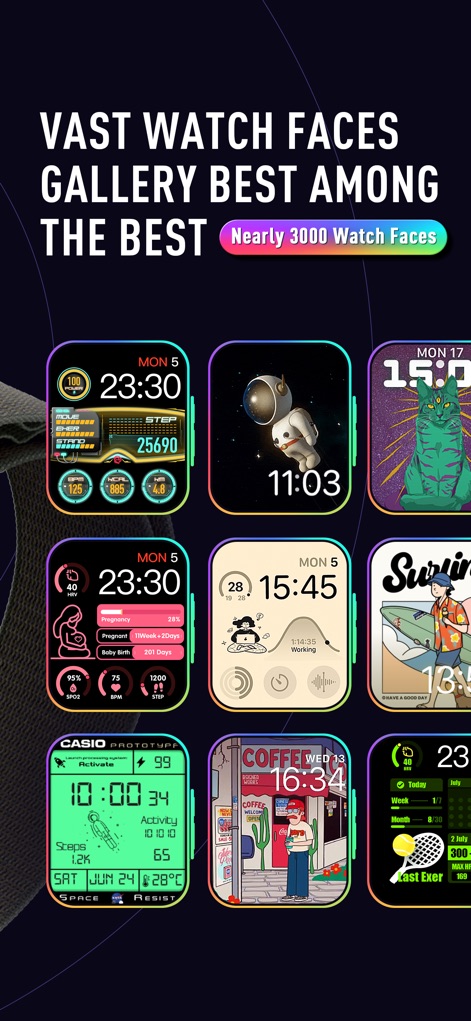
ユーザーは、ほぼ3000種類ものウォッチフェイスが揃う広大なギャラリーを探索でき、多様なキャラクターデザインや詳細な活動データ表示スタイルから選択できます。
圧倒的なギャラリー
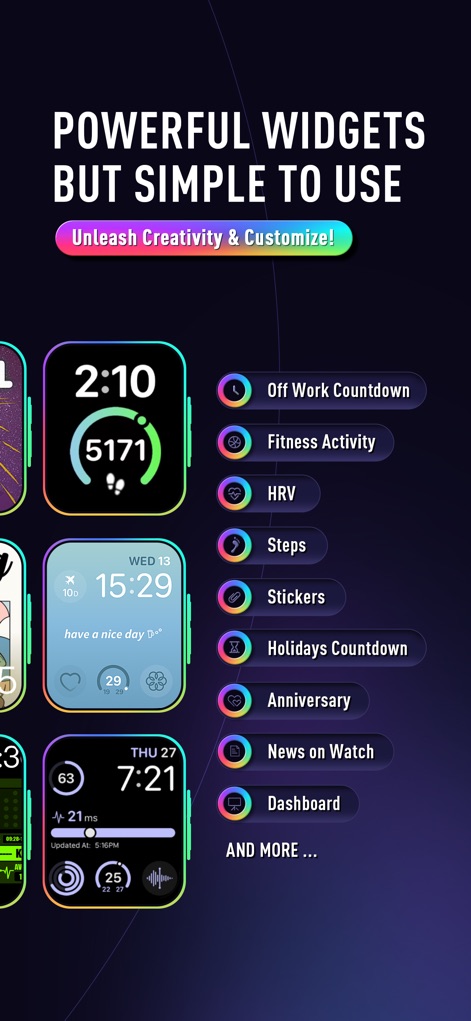
本アプリは、退勤カウントダウンやフィットネスアクティビティ追跡など、ユーザーの創造性を解き放つ多様で強力なウィジェット機能を提供します。
強力なウィジェット
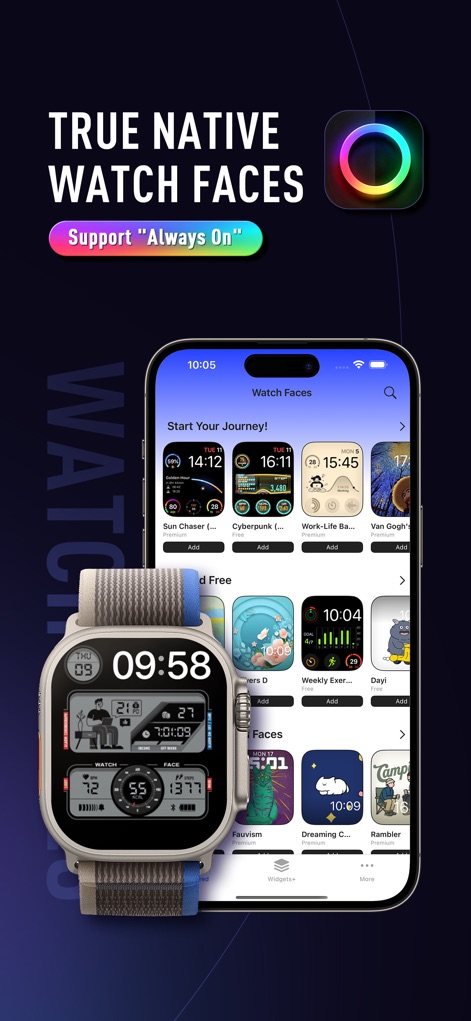
このツールは、Apple Watchの「常時表示」機能に対応した多数のネイティブウォッチフェイスを提供し、iPhoneアプリからシームレスに同期して利用できます。
ネイティブ連携

ウォッチフェイスギャラリーでは、「Limited Free」や「Essential Watch Faces」といったカテゴリ別に整理された豊富なデザインを閲覧し、ユーザーは自分のスタイルに合ったものを簡単に見つけられます。
多彩なコレクション

ユーザーは、選択したウォッチフェイス(例:「Work-Life Balance」)の詳細なプレビューを確認でき、ワンクリックでApple Watchに直接追加する簡便な操作性を体験できます。
簡単追加機能

「Widgets+」セクションでは、退勤までのカウントダウンや最新ニュース表示など、日常を豊かにする多様なスマートウィジェットが提供されており、ユーザーは簡単にApple Watchに追加できます。
スマートウィジェット

丸型や長方形といった異なる形式の豊富なウィジェットオプションが用意されており、記念日カウントダウンや歩数トラッカーなど、ユーザーはライフスタイルに合わせて自由にカスタマイズできます。
ウィジェットの多様性
説明
Download
類似アプリ
似た機能とユーザー体験を持つアプリ

Watchfaces - Watch Wallpaper
亚伦 陈
Watch Faces & Widget Gallery
Hyperday MB
Watch Faces by Facer
Little Labs, Inc.
Watch Faces & Widgets Gallery
GANYMEDES POINT SP Z O O
Buddywatch - Watch Faces
BUDDY SRLS
Watch Faces Gallery & Creator
Artem Vasiliuk
Watch Faces Gallery & Themes
Mikael Melkonyan
Watch Faces Gallery - Widgets.
European apps solutions LTD
Watch Faces Gallery-Widget
Jinan Feiniao culture media Co., Ltd
このページはアプリまたはその開発者の公式ページではなく、情報提供および論評を目的として作成された独立した編集出版物です。明示的に別段の記載がない限り、アプリおよびその開発者は、MWM、Apple、Google Play、アプリのパブリッシャー、またはアプリの開発者と提携、承認、後援、認可、またはその他の公式的な関係はなく、このページのいかなる内容も、アプリがMWMのサービスを使用して開発されたことを意味するものではありません。すべての商標、ロゴ、スクリーンショット、その他のコンテンツはそれぞれの所有者の財産です。