Watch Wayfinder
Watch Wayfinder
ダウンロード: App Store

このページはアプリまたはその開発者の公式ページではなく、情報提供および論評を目的として作成された独立した編集出版物です。明示的に別段の記載がない限り、アプリおよびその開発者は、MWM、Apple、Google Play、アプリのパブリッシャー、またはアプリの開発者と提携、承認、後援、認可、またはその他の公式的な関係はなく、このページのいかなる内容も、アプリがMWMのサービスを使用して開発されたことを意味するものではありません。すべての商標、ロゴ、スクリーンショット、その他のコンテンツはそれぞれの所有者の財産です。

ロゴ: Watch Wayfinder
ダウンロード: App Store

Watch Wayfinder

手首で正確なナビゲーション。オフラインのNOAAチャート、リアルタイムのVMGデータ、およびテクニカルなアウトドアのプロシューマー向けに設計されたカスタムGPX統合で、水上とトレイルをマスターしましょう。

主要数値

ダウンロード

14K+

ユーザー評価

1.0/5

評価数

0

開発元

Evan Hallein

カテゴリ

Navigation

対応言語

1

最新バージョン

1.7.5

サイズ

5.8 MB

リリース日

2023年8月10日
機能

手首でプロ仕様のナビゲーション

かさばるチャートプロッターを、洗練されたデータ駆動型のツールに置き換えましょう。プロ仕様のマリンチャート、リアルタイムのパフォーマンスメトリクス、オフラインマップにアクセスし、テクニカルなアウトドアのプロシューマー向けに設計されています。

オフラインマリン&トレイルマップ

NOAAチャートとOpenStreetMapデータで安全かつコースを維持しましょう。携帯電話サービスがない遠隔地での信頼性を確保するために、外出前に詳細なマップエリアを手動でダウンロードしてください。

リアルタイムパフォーマンス分析

テクニカルメトリクスでラインを最適化しましょう。VMG(目標向上速度)、最高速度、正確な方位を一目で監視できます。ウィンドサーフィン、カイトボーディング、競技セーリングに最適です。

以下のスクリーンショットと説明は、アプリの公式ストアリスティングから直接取得されたものであり、アプリ開発者の所有物です。

アプリストア

スクリーンショット
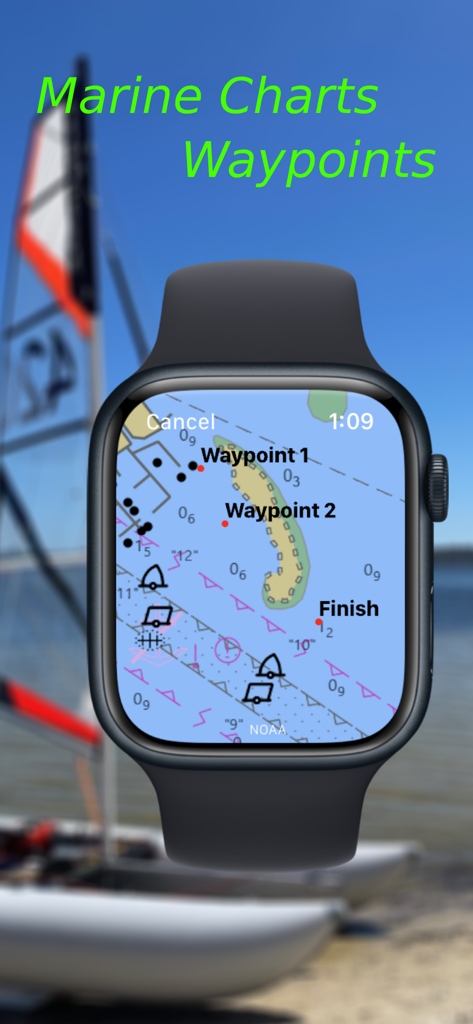
Watch Wayfinder - Watch WayfinderアプリがApple Watch上で詳細なマリンチャートとナビゲーションウェイポイントを表示している様子
Watch WayfinderアプリがApple Watch上で詳細なマリンチャートとナビゲーションウェイポイントを表示している様子

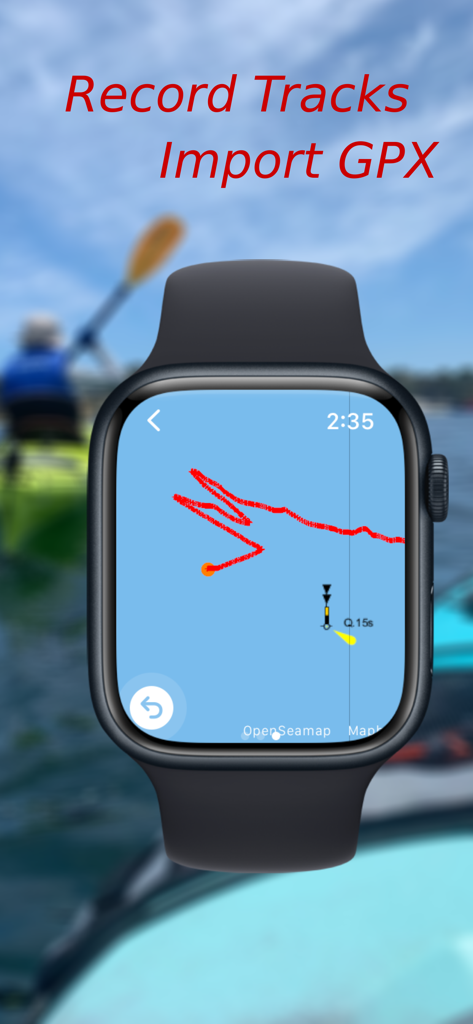
Watch Wayfinder - Apple WatchがWatch Wayfinderアプリを表示し、マリンマップ上でナビゲーショントラックを記録している様子
Apple WatchがWatch Wayfinderアプリを表示し、マリンマップ上でナビゲーショントラックを記録している様子

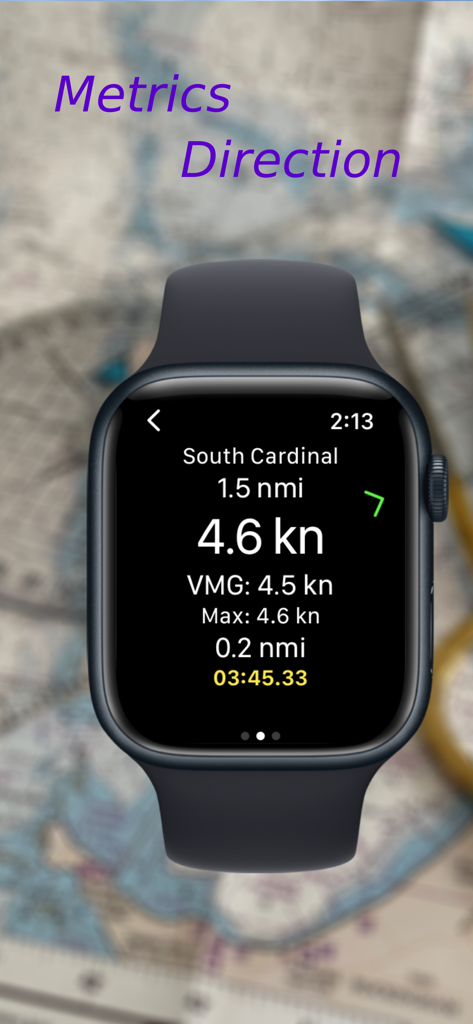
Watch Wayfinder - Apple Watch画面に、速度、VMG、南カーディナルウェイポイントまでの距離を含むナビゲーションデータが表示されている様子
Apple Watch画面に、速度、VMG、南カーディナルウェイポイントまでの距離を含むナビゲーションデータが表示されている様子

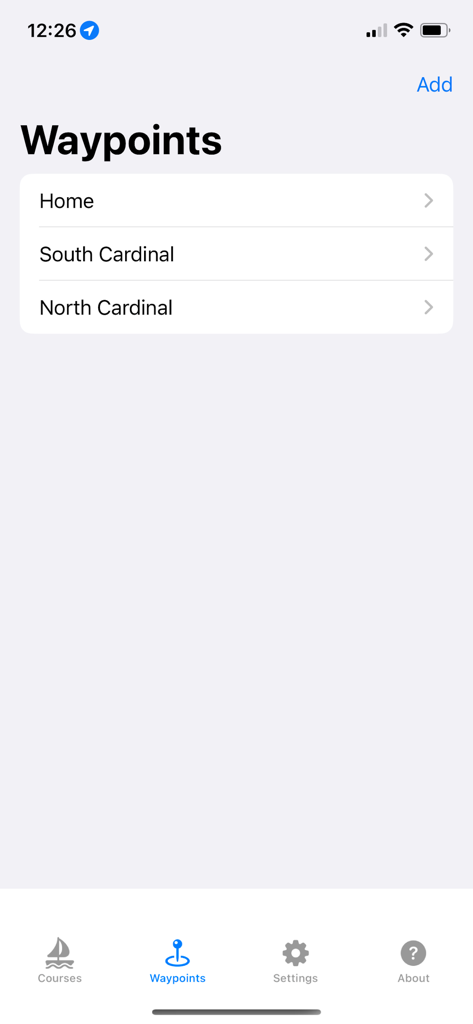
Watch Wayfinder - Watch Wayfinder iPhoneアプリのインターフェースに、保存されたナビゲーションウェイポイントのリストが表示されている様子
Watch Wayfinder iPhoneアプリのインターフェースに、保存されたナビゲーションウェイポイントのリストが表示されている様子

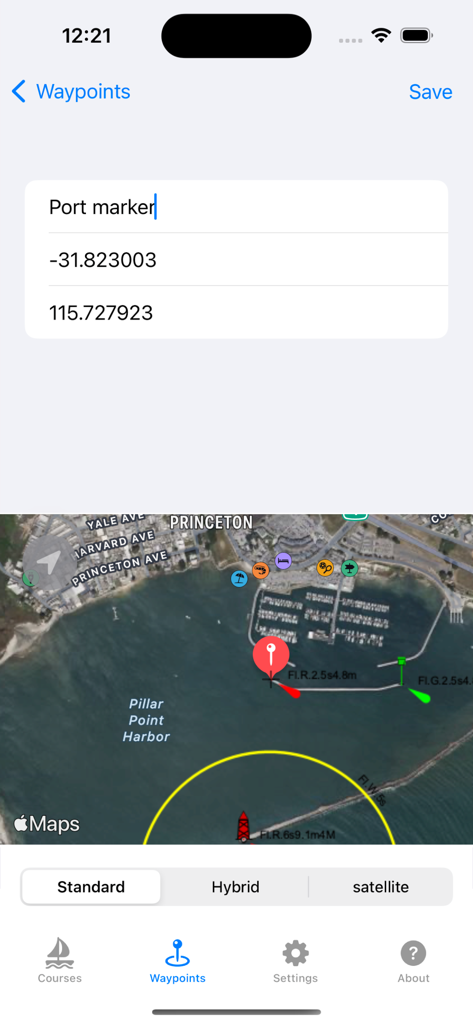
Watch Wayfinder - Watch WayfinderアプリのiPhoneインターフェースに、GPS座標と衛星マップを使用したウェイポイント作成画面が表示されている様子
Watch WayfinderアプリのiPhoneインターフェースに、GPS座標と衛星マップを使用したウェイポイント作成画面が表示されている様子

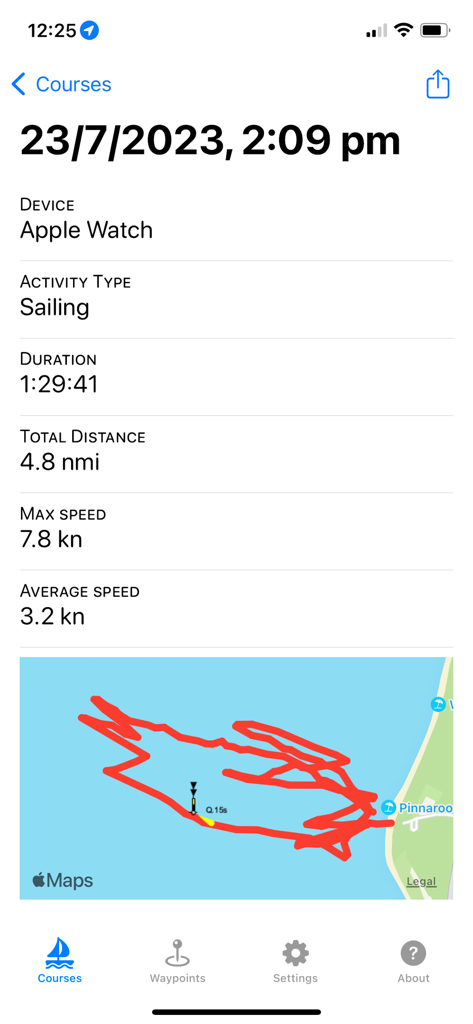
Watch Wayfinder - iPhone画面に、Apple WatchからのGPSトラックマップとマリン統計を含むセーリングアクティビティの概要が表示されている様子

iPhone画面に、Apple WatchからのGPSトラックマップとマリン統計を含むセーリングアクティビティの概要が表示されている様子

説明

Use marine charts and trail maps offline, see your speed and get the direction to waypoints, import and export waypoints using GPX, record your course and share it. Add your own tiled XYZ and WMS map servers allowing third party maps to be used such as google, custom Mapbox or ESRI maps. Watch Wayfinder is a mini chart plotter and activity tracker for your Apple Watch. Designed to provide quick information, such as speed, direction, and distance traveled, with just a glance at your wrist. This app integrates with the Health App, recording your on-water and terrestrial activities, helping you monitor your performance. The companion iPhone app enables you to create or import waypoints from GPX files and sync them with your watch before heading out, and also view your previously recorded activities. You can also export the waypoints to a GPX file for backup and sharing. To start recording a water sport activity on your Apple Watch, either press start activity, do a long press on the map to create a waypoint, or select a previously created waypoint from the list. Compatible with any GPS and compass-enabled Apple Watch. Perfect for small boats, windsurfing, kiteboarding, hiking or cycling, whether you're relaxing or racing. Features: - NOAA marine charts for U.S mapped waters. - OpenSeaMap marine charts for the rest of the world. - OpenStreetMap, Thunderforest or Mapbox basemaps for hiking, walking and cycling. - Add your own tiled XYZ and WMS map servers allowing adding unlimited map types. (see instructions for help) - Map tiles are automatically cached to speed up loading. - Offline maps: manually download map areas of interest before you go out. - Set waypoints directly on your Apple Watch or iPhone, and sync between them. - Import and export GPX files with points for your waypoints either within the iPhone app or using share in external apps such Files or Mail. - Displays speed, max speed and average speed. - Display direction and distance to the next waypoint, and velocity made good (VMG) to the waypoint. - Automatic transition to the next waypoint based on a custom distance to it. - Records your activity as a HealthKit Workout, logging energy burned, heart rate, speed, distance traveled, and the course taken. - Share your activity and stats on Social Media. - Choose units to display as miles, nautical miles or kilometers. This app integrates with the Health app and requires both Location and Health access to be enabled for optimal functionality. Map display initially requires internet access to download offline maps. Note: Not to be relied upon for navigation. Map and chart data copyright: NOAA, OpenStreetMap, Thunderforest and Mapbox.

Download

ダウンロード: App Store

このページはアプリまたはその開発者の公式ページではなく、情報提供および論評を目的として作成された独立した編集出版物です。明示的に別段の記載がない限り、アプリおよびその開発者は、MWM、Apple、Google Play、アプリのパブリッシャー、またはアプリの開発者と提携、承認、後援、認可、またはその他の公式的な関係はなく、このページのいかなる内容も、アプリがMWMのサービスを使用して開発されたことを意味するものではありません。すべての商標、ロゴ、スクリーンショット、その他のコンテンツはそれぞれの所有者の財産です。








