Waypointer - GPS Compass
ダウンロード: App Store

このページはアプリまたはその開発者の公式ページではなく、情報提供および論評を目的として作成された独立した編集出版物です。明示的に別段の記載がない限り、アプリおよびその開発者は、MWM、Apple、Google Play、アプリのパブリッシャー、またはアプリの開発者と提携、承認、後援、認可、またはその他の公式的な関係はなく、このページのいかなる内容も、アプリがMWMのサービスを使用して開発されたことを意味するものではありません。すべての商標、ロゴ、スクリーンショット、その他のコンテンツはそれぞれの所有者の財産です。


ロゴ: Waypointer - GPS Compass
ダウンロード: App Store

Waypointer - GPS Compass

隠れたハイキングトレイルから混雑した駐車場まで、正確に道を見つけましょう。携帯電波不要、バッテリー効率が良く、あらゆる冒険のための厳格にプライベートなナビゲーション。

主要数値

ダウンロード

0

ユーザー評価

1.0/5

評価数

0

開発元

Madras Automation Concepts Private Limited

カテゴリ

Navigation

対応言語

1

最新バージョン

1.0.0

サイズ

6.1 MB

リリース日

2025年12月3日
機能

どこでも自信を持ってナビゲート

Waypointerは信頼性のために作られた、気を散らさないGPSツールです。オフラインで機能し、バッテリーを節約し、データをプライベートに保つ正確な方向指示を得られます。

信頼性の高いオフグリッドナビゲーション

携帯電波がない? 問題ありません。携帯電話のセンサーを使用して、トレイルヘッドやキャンプ場に戻りましょう—完全にオフラインで、地図なしです。

1本の矢のようなシンプルさ

複雑な地図はスキップしましょう。大き​​な方向矢印とライブ距離表示が、余計なものなしで保存したウェイポイントへまっすぐ誘導します。

以下のスクリーンショットと説明は、アプリの公式ストアリスティングから直接取得されたものであり、アプリ開発者の所有物です。

アプリストア

スクリーンショット
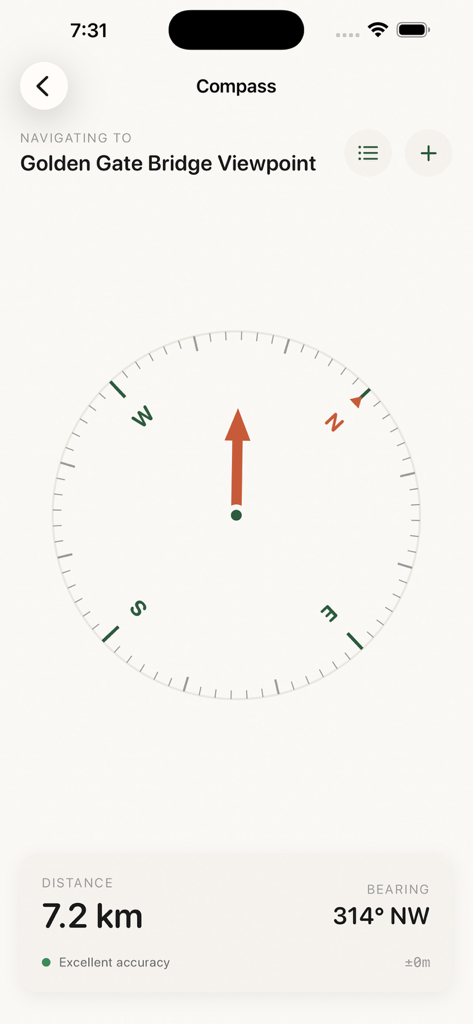
Waypointer - GPS Compass - ゴールデンゲートブリッジの展望台へのナビゲーション矢印、距離、方位を示すWaypointer GPSコンパスインターフェース
ゴールデンゲートブリッジの展望台へのナビゲーション矢印、距離、方位を示すWaypointer GPSコンパスインターフェース

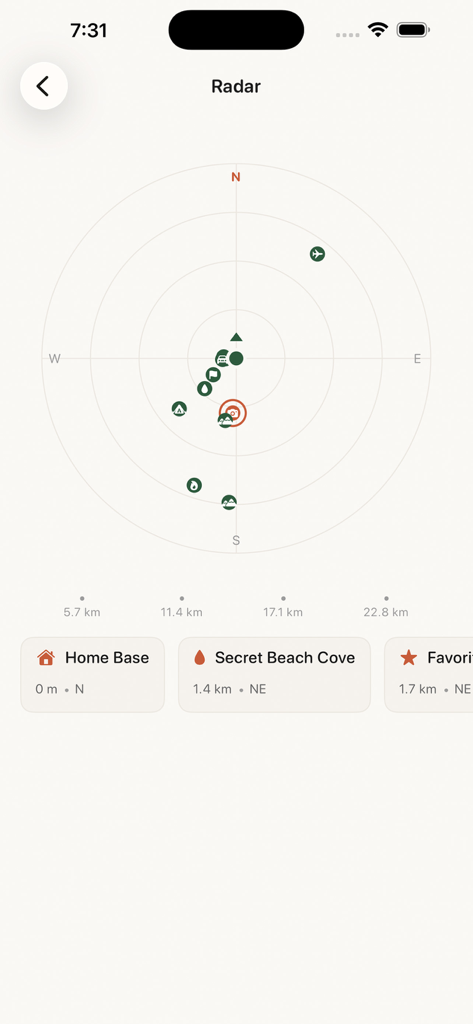
Waypointer - GPS Compass - 保存されたウェイポイントの場所と距離を表示するWaypointerアプリのレーダー画面
保存されたウェイポイントの場所と距離を表示するWaypointerアプリのレーダー画面

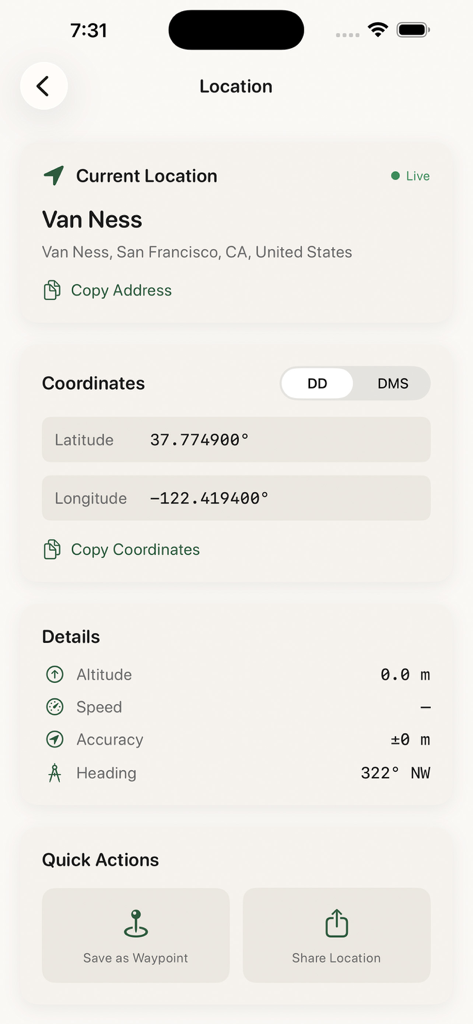
Waypointer - GPS Compass - Waypointerアプリで現在のGPS座標と場所の詳細を表示する画面

Waypointerアプリで現在のGPS座標と場所の詳細を表示する画面
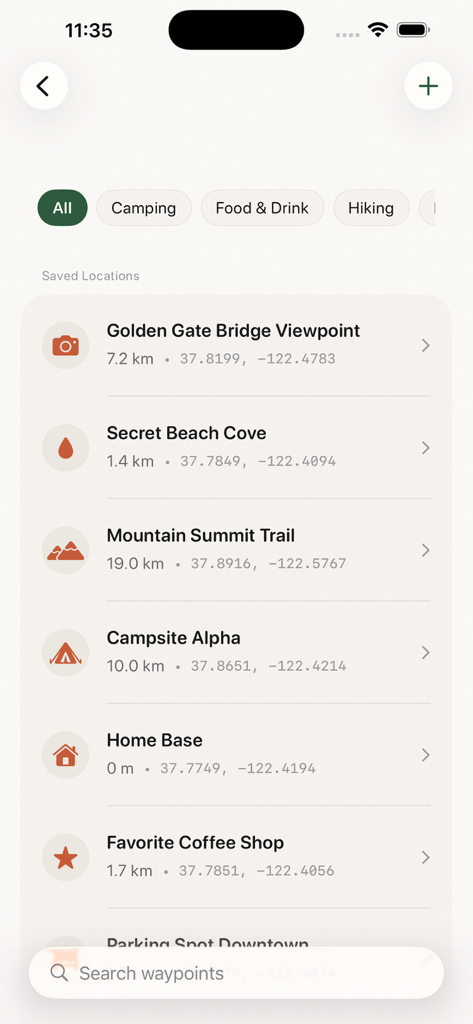
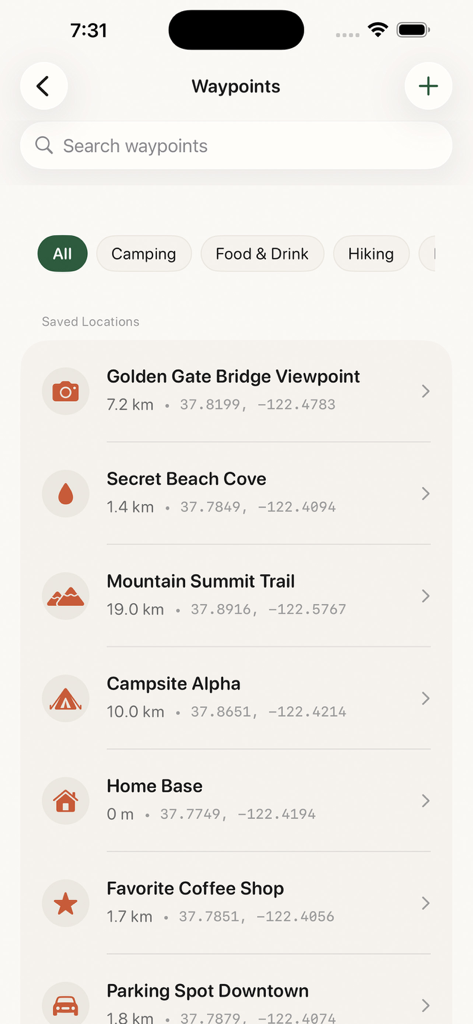
Waypointer - GPS Compass - ウェイポイント名、距離、GPS座標を表示するWaypointerアプリの保存済み場所のリスト
ウェイポイント名、距離、GPS座標を表示するWaypointerアプリの保存済み場所のリスト

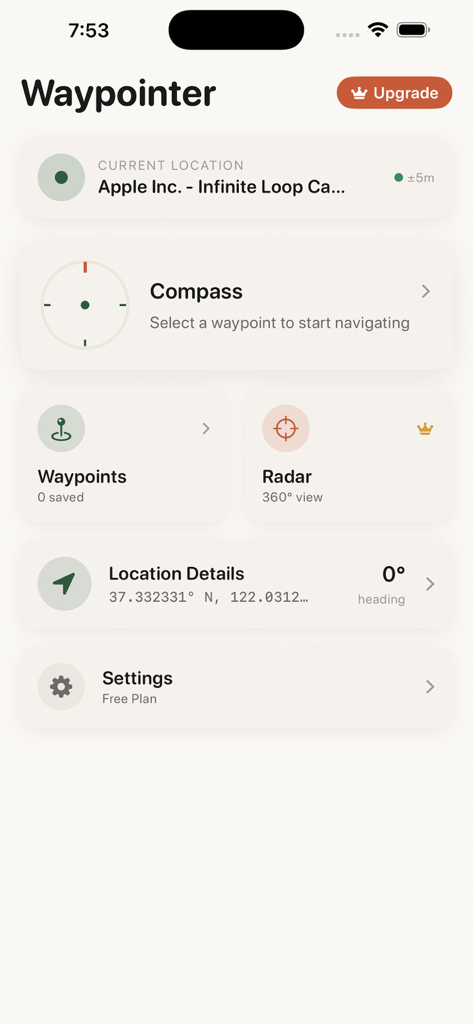
Waypointer - GPS Compass - コンパス、ウェイポイント、レーダーなどのナビゲーションツールを表示するWaypointerアプリのメインダッシュボード
コンパス、ウェイポイント、レーダーなどのナビゲーションツールを表示するWaypointerアプリのメインダッシュボード

Waypointer - GPS Compass - 距離と座標とともに、トレイルヘッド、キャンプ場、街のランドマークを示すWaypointer GPSアプリの保存済み場所のリスト。

距離と座標とともに、トレイルヘッド、キャンプ場、街のランドマークを示すWaypointer GPSアプリの保存済み場所のリスト。

説明

Waypointer is your reliable compass and waypoint navigation companion. Save any location and navigate back to it using a precision compass that works completely offline. Whether you are hiking in the wilderness, trying to find your parked car, marking a camping spot, or saving a favorite fishing location, Waypointer guides you there with clear directional arrows and distance information. KEY FEATURES Precision Compass - True north and magnetic north readings - Real-time heading display with degree accuracy - Smooth compass animation that responds instantly to movement - Works without internet connection Waypoint Management - Save unlimited locations as waypoints with Premium - Add custom names and icons to each waypoint - Organize waypoints into categories - Import and export waypoints for backup and sharing Directional Navigation - Large directional arrow points toward your destination - Live distance updates as you move - Bearing information in degrees and cardinal directions - Simple interface that is easy to read while moving Radar View (Premium) - See all waypoints around you on an interactive radar display - Quickly identify the closest locations - Visual representation of waypoint positions relative to your heading Location Details - View your current coordinates in multiple formats - Decimal degrees and degrees minutes seconds display - Copy coordinates to share with others - Reverse geocoding shows your current address PERFECT FOR Outdoor Adventures - Mark trailheads and return points while hiking - Save camping spots and water sources - Navigate back to your vehicle after exploring - Mark hunting stands and fishing spots Everyday Use - Never forget where you parked your car - Save meeting points and event locations - Mark points of interest while traveling - Create a personal location database Professional Use - Survey and fieldwork location marking - Site documentation with coordinates - Location data export in standard formats WHY CHOOSE WAYPOINTER Simple and Focused Unlike complex mapping apps, Waypointer does one thing exceptionally well. Point you toward your saved locations with a clear, easy-to-read compass interface. Works Offline No cell signal required. Once you save a waypoint, you can navigate to it anywhere using only your phone sensors and GPS. Battery Efficient Optimized to use minimal battery while providing accurate navigation guidance. Privacy Focused Your location data stays on your device. We do not track or store your waypoints on external servers. SUBSCRIPTION OPTIONS Free Version - Save up to 5 waypoints - Full compass functionality - Basic navigation features Premium Subscription - Unlimited waypoints - Radar view - Custom waypoint icons - Category organization - Export and import functionality - Priority support Premium is available as weekly, monthly, or yearly subscription. Payment will be charged to your Apple ID account at confirmation of purchase. Subscription automatically renews unless canceled at least 24 hours before the end of the current period. You can manage and cancel subscriptions in your Account Settings on the App Store. Terms of Service: https://www.apple.com/legal/internet-services/itunes/dev/stdeula/ Download Waypointer today and never lose your way again.

Download

ダウンロード: App Store

このページはアプリまたはその開発者の公式ページではなく、情報提供および論評を目的として作成された独立した編集出版物です。明示的に別段の記載がない限り、アプリおよびその開発者は、MWM、Apple、Google Play、アプリのパブリッシャー、またはアプリの開発者と提携、承認、後援、認可、またはその他の公式的な関係はなく、このページのいかなる内容も、アプリがMWMのサービスを使用して開発されたことを意味するものではありません。すべての商標、ロゴ、スクリーンショット、その他のコンテンツはそれぞれの所有者の財産です。








