
このページはアプリまたはその開発者の公式ページではなく、情報提供および論評を目的として作成された独立した編集出版物です。明示的に別段の記載がない限り、アプリおよびその開発者は、MWM、Apple、Google Play、アプリのパブリッシャー、またはアプリの開発者と提携、承認、後援、認可、またはその他の公式的な関係はなく、このページのいかなる内容も、アプリがMWMのサービスを使用して開発されたことを意味するものではありません。すべての商標、ロゴ、スクリーンショット、その他のコンテンツはそれぞれの所有者の財産です。


Whiteboard: just draw together
退屈な機能を削ぎ落とし、純粋な創造性だけを残した。子供たちのために設計されたシンプルさが、大人も巻き込む。
ダウンロード
2.5M+ユーザー評価
評価数
100.2K開発元
カテゴリ
Business対応言語
4最新バージョン
2.6.2サイズ
8.1 MBリリース日
2019年9月10日'Whiteboard: just draw together' の主要機能とユーザーへの影響評価
アプリケーション機能分析
メッセージ連携共同お絵描き
本アプリは、メッセージアプリを介して友人や家族と一緒に絵を描く機能を提供します。ユーザーは絵を送信し、相手がそれを開いて描き加え、送り返すことで、共有の創作体験を楽しむことが可能です。
スペシャルレインボーマーカー
本ツールは、特別な「レインボー」マーカーを提供し、ユーザーは虹色の線で絵を描くことができます。視覚的に魅力的で、子供たちの創造性を刺激します。
豊富なカラーパレット
このアプリは、ユーザーが虹の様々な色を使用して自由に絵を描くことを可能にします。基本的ながらも表現の幅を広げる重要な機能です。
描画操作の取り消し・やり直し・消去
本ツールは、描画の取り消し、やり直し、およびキャンバス全体の消去といった操作を提供します。これにより、ユーザーは気軽に試行錯誤し、間違いを修正することが可能です。
写真インポート機能
ユーザーは写真をインポートして、その上をなぞったり、注釈を付けたり、写真と組み合わせて新しい作品を作成したりすることができます。この機能は、創造的な遊びの幅を広げます。
描画過程の画面録画
この機能により、ユーザーは絵を描く過程を画面と音声で記録し、その記録を保存したり、友人や家族に送信したりすることが可能です。作成プロセスを共有する新しい方法を提供します。
複数のマーカーサイズ
このアプリは、6種類の事前に設定された便利なマーカーサイズを提供します。ユーザーは線の太さを簡単に調整し、様々な表現を行うことができます。
シェイクで消去
ユーザーはデバイスを振るだけで、簡単に描画を消去できます。直感的で遊び心のある操作性を提供し、子供でも簡単に利用できます。
描画作品の保存
描画した作品をデバイスのフォトライブラリに保存することが可能です。これにより、ユーザーは思い出を永く残し、いつでも見返すことができます。
背景色の変更
ユーザーは、色を長押しすることで背景色を変更できます。これにより、キャンバスの見た目をカスタマイズし、作品に異なる雰囲気を与えることが可能です。
よくある質問
について知っておくべきこと Whiteboard: just draw together
What is Whiteboard: just draw together?
Whiteboard: just draw together is a simple, focused drawing application for kids and adults. It provides a clean whiteboard, multiple colors, and features for collaborative drawing via Messages.
Can users draw collaboratively in Whiteboard: just draw together?
Yes, Whiteboard allows users to draw collaboratively. Drawings are sent via the Messages app, opened for further drawing by a recipient, and then sent back.
What drawing tools does Whiteboard: just draw together provide?
Whiteboard offers drawing with colors of the rainbow, 6 preconfigured marker sizes, and a unique 'Rainbow' marker. Users also have undo, redo, and clear drawing actions.
How do I change the background color in Whiteboard: just draw together?
Users change the background color in Whiteboard by long-pressing on a color within the palette. The app remembers the last used background color.
Does Whiteboard: just draw together support importing photos?
Yes, Whiteboard allows importing photos. Users can trace, annotate, and engage creatively with imported images directly within the app.
How do users erase drawings in Whiteboard: just draw together?
Whiteboard provides several ways to erase drawings. Users can 'shake to erase' the canvas, or utilize the undo and clear drawing action buttons.
Can I save and share drawings from Whiteboard: just draw together?
Yes, users save their Whiteboard drawings to their Photos library. The app also supports sharing drawings through Messages, Mail, and various other integrated applications.
What are the experimental Whiteboard Labs features?
Whiteboard Labs offers opt-in features such as "Draw with Knobs" for a classic drawing experience, "Screen Recording" to capture drawing sessions, and "Draw with Motion" by tilting the device.
Does Whiteboard: just draw together offer printing capabilities?
Yes, Whiteboard supports printing. Users print their creations directly to any AirPrint-enabled printers from within the application.
How can I support the development of Whiteboard: just draw together?
Yes, users support the development of Whiteboard: just draw together by subscribing to Creator Kit. This provides financial backing for ongoing app improvements.
以下のスクリーンショットと説明は、アプリの公式ストアリスティングから直接取得されたものであり、アプリ開発者の所有物です。
アプリストア
スクリーンショット
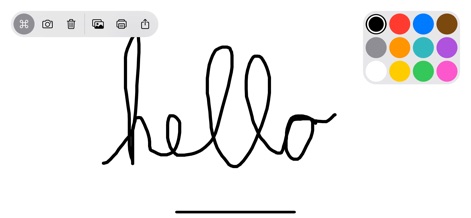
シンプルな描画インターフェースにより、ユーザーは自由にアイデアを表現でき、上部のツールバーから機能にアクセスし、右側のカラーパレットで色を選べます。
自由に描く楽しさ
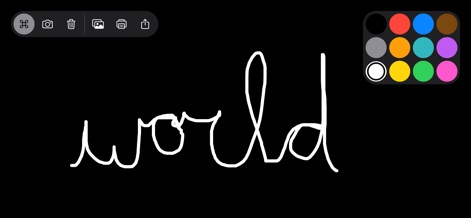
本アプリは、創造性を刺激する多様な背景色を提供しており、この画面では黒い背景色に白い描画色で単語が書かれています。
背景色の変更
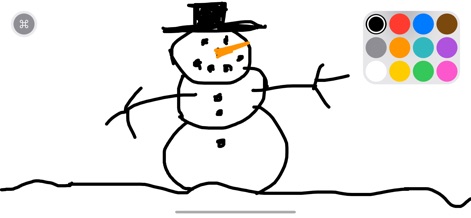
ユーザーは、真っ白なキャンバス上で想像力を自由に働かせ、この雪だるまの描画のように、様々な色の中から黒いマーカーを選んで作品を創り出すことができます。
創造力を形に
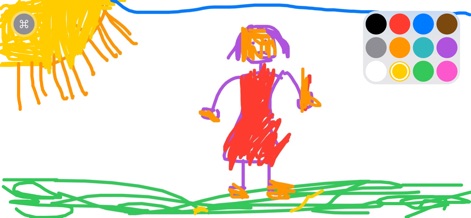
本アプリを使用すると、ユーザーは豊富なカラーパレットから選び、この画面の鮮やかな色彩で描かれた太陽の描画のように、創造的な絵を描くことが可能です。
カラフルな表現
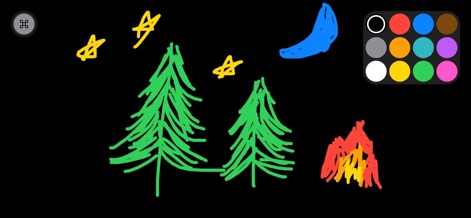
黒い背景をキャンバスに、ユーザーはこの夜の風景の描画のように、複数の色を巧みに使い分けて、キャンプファイヤーや星などの情景を表現できます。
夜空の物語
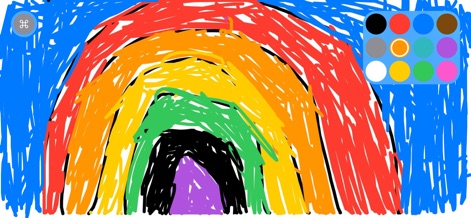
特殊な「虹」マーカーを使用すると、ユーザーはこの画面に示される鮮やかな虹の描画のように、一筆で美しい虹色を表現し、作品に魔法のようなタッチを加えることができます。
魔法の虹色
説明
Download
類似アプリ
似た機能とユーザー体験を持つアプリ

Doodle Magic - Draw, Paint
炳甲 梁

Drawing with Carl
yann le coroller

Coloring with Blippi & Friends
RED GAMES CO, LLC
Moshi Coloring World
Mind Candy
PONY Coloring Pages for Girls
ROMAN SAFRONOV
Kids Coloring Games & Drawing
Budge Studios
Drawing for Kids. Painting Pad
Karaleuski Stanislau

Baby coloring games for girls
Kakadoo

HexaParty - Hexel art for Kids
Marshmallow Games SRL
このページはアプリまたはその開発者の公式ページではなく、情報提供および論評を目的として作成された独立した編集出版物です。明示的に別段の記載がない限り、アプリおよびその開発者は、MWM、Apple、Google Play、アプリのパブリッシャー、またはアプリの開発者と提携、承認、後援、認可、またはその他の公式的な関係はなく、このページのいかなる内容も、アプリがMWMのサービスを使用して開発されたことを意味するものではありません。すべての商標、ロゴ、スクリーンショット、その他のコンテンツはそれぞれの所有者の財産です。