Who's On - Basketball
ダウンロード: App Store

このページはアプリまたはその開発者の公式ページではなく、情報提供および論評を目的として作成された独立した編集出版物です。明示的に別段の記載がない限り、アプリおよびその開発者は、MWM、Apple、Google Play、アプリのパブリッシャー、またはアプリの開発者と提携、承認、後援、認可、またはその他の公式的な関係はなく、このページのいかなる内容も、アプリがMWMのサービスを使用して開発されたことを意味するものではありません。すべての商標、ロゴ、スクリーンショット、その他のコンテンツはそれぞれの所有者の財産です。


ロゴ: Who's On - Basketball
ダウンロード: App Store

Who's On - Basketball

直感的なドラッグ&ドロップ管理、リアルタイム追跡、そして試合の熱気のために設計されたシンプルなツールで、ベンチのストレスをなくし、公平なプレー時間を確保しましょう。

主要数値

ダウンロード

17K+

ユーザー評価

1.0/5

評価数

0

開発元

Left Coast Labs Ltd.

カテゴリ

Sports

対応言語

1

最新バージョン

2.6.5

サイズ

38.2 MB

リリース日

2014年3月24日
機能

自信を持ってベンチをマスターする

クリップボードとストレスのやりくりはやめましょう。Who's Onは、交代の管理、公平なプレーの確保、試合当日の混乱をポケットから直接処理するのに役立ちます。

バランスの取れたプレー時間

すべての選手と保護者を満足させましょう。視覚的な「ホット・コールド」インジケーターが、各子供がどれだけのコート時間を得ているかを正確に追跡し、全員が公平に扱われることを保証します。

ストレスフリーな交代

遅刻や直前の変更にも簡単に対応できます。試合の時計が動いている間、選手のアイコンをドラッグ&ドロップし、ワンタップで交代を実行します。

以下のスクリーンショットと説明は、アプリの公式ストアリスティングから直接取得されたものであり、アプリ開発者の所有物です。

アプリストア

スクリーンショット
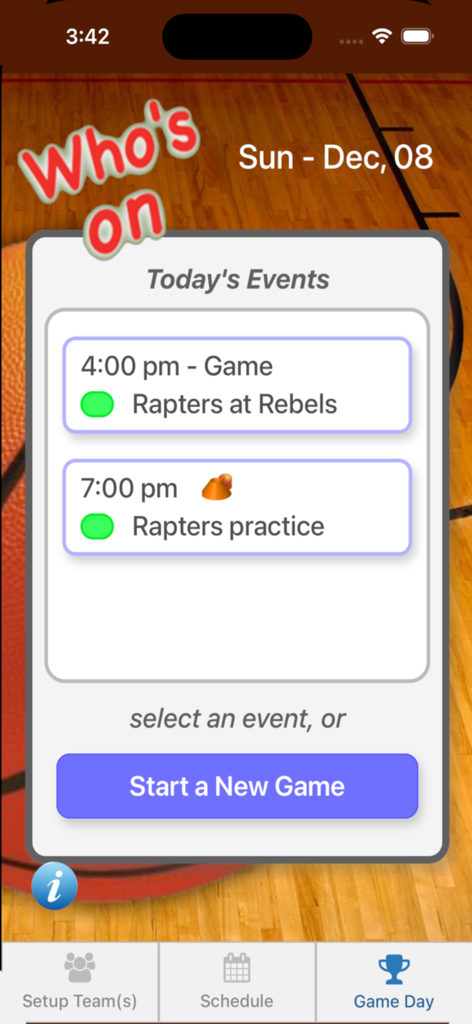
Who's On - Basketball - Who's On Basketballアプリのスクリーンショット。今後の試合や練習を示す試合日のスケジュールが表示されています。
Who's On Basketballアプリのスクリーンショット。今後の試合や練習を示す試合日のスケジュールが表示されています。

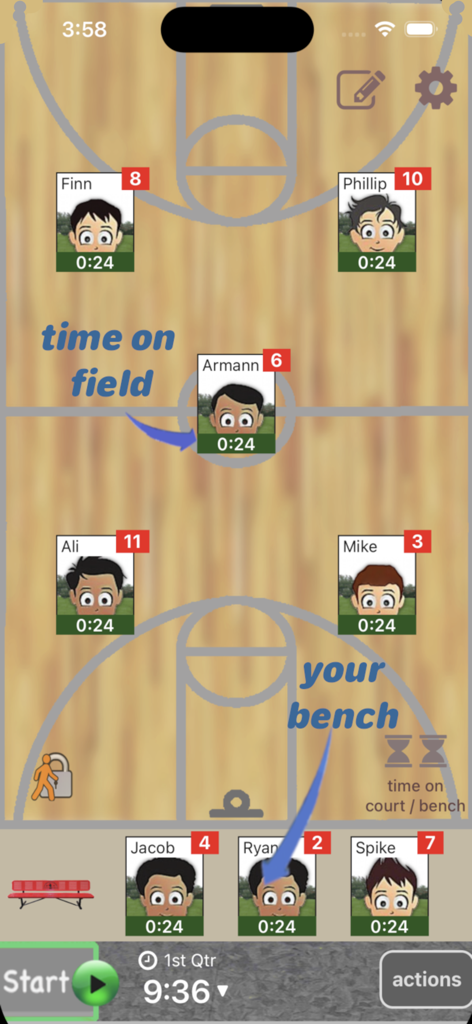
Who's On - Basketball - Who's On - バスケットボールアプリのインターフェース。コートとベンチの選手の位置と個々のプレー時間トラッカーが表示されています。
Who's On - バスケットボールアプリのインターフェース。コートとベンチの選手の位置と個々のプレー時間トラッカーが表示されています。

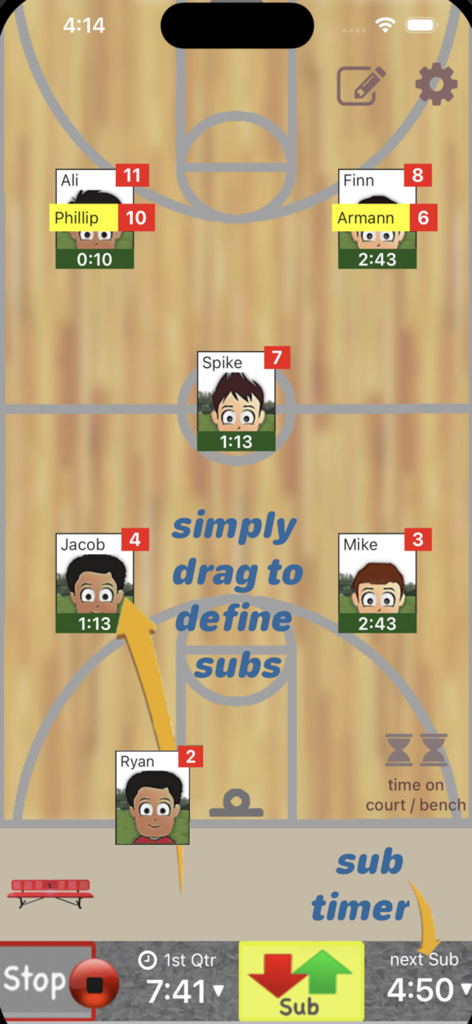
Who's On - Basketball - バスケットボールコーチアプリのインターフェース。デジタルコート上での選手交代と交代管理を行います。
バスケットボールコーチアプリのインターフェース。デジタルコート上での選手交代と交代管理を行います。

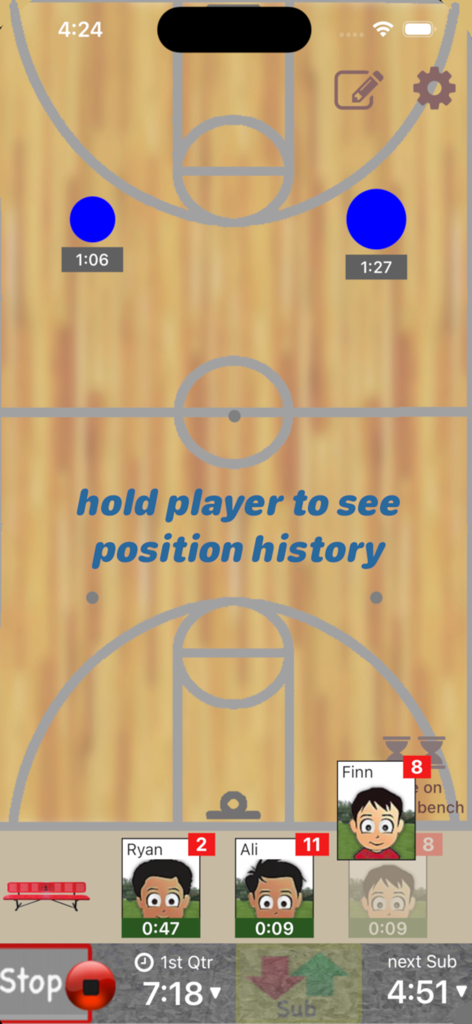
Who's On - Basketball - バスケットボールコーチ向けのモバイルアプリインターフェース。アクティブな試合タイマーを背景にしたコート上で選手交代管理を表示します。
バスケットボールコーチ向けのモバイルアプリインターフェース。アクティブな試合タイマーを背景にしたコート上で選手交代管理を表示します。

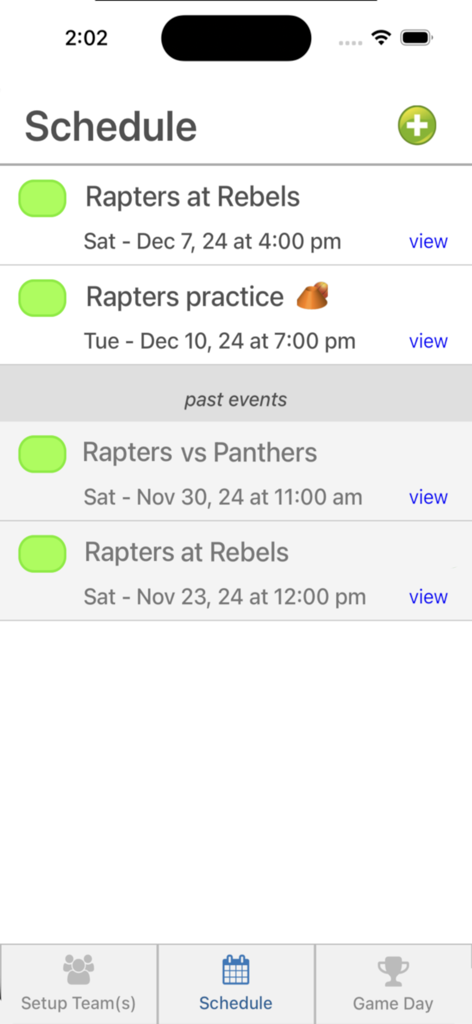
Who's On - Basketball - Whos On Basketballアプリのスケジュール画面。今後のチームの試合や練習のリストが表示されています。
Whos On Basketballアプリのスケジュール画面。今後のチームの試合や練習のリストが表示されています。

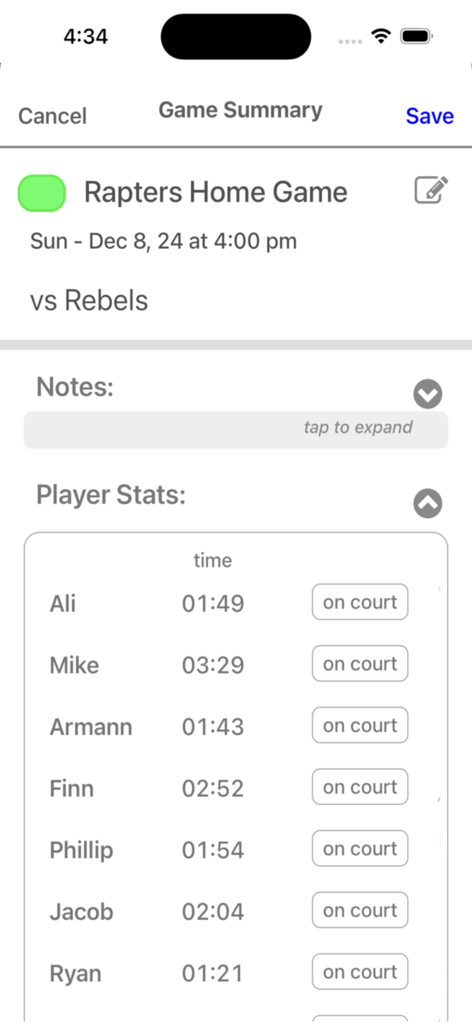
Who's On - Basketball - バスケットボールコーチングアプリの画面。選手名とその試合中の合計プレー時間が表示されています。

バスケットボールコーチングアプリの画面。選手名とその試合中の合計プレー時間が表示されています。

説明

Who's On-Basketball helps youth-basketball coaches manage who's on the floor and who's going on next. It has been developed for the iPhone and iPad with experienced coaches who find managing rotations and balancing play time awkward and stressful. Watch our feature videos at "http://whos-on.leftcoastlabs.biz/videos/basketball". What coaches have said about Who's On apps... "It's intuitive and easy of use." "It can handle all the unpredictability of coaching youth sports. For instance, I don't know who's going to be there [on game day] until I show up at the game. Players sometimes show up late or leave early. Young players decide at the last minute that they don't want to go on, messing up my planned rotation. This app allows me to handle all this... with ease." "I like how clearly each player's name, number and picture is presented on the screen. I have a lousy memory and remembering new player names at the start of a season is always a problem for me." "The 1-touch Position History is really well done... I wouldn't want to coach again without it!" "I love how easy it is to add player photos to the team." Feature Summary: Simple drag and drop - With Who's On-Basketball, you simply drag player icons from the "bench" to "floor positions" as you make decisions for your starting lineup or substitutions. The app remembers "who" you've assigned "where" and tracks how long each player has been in each position during the game. 1-screen game information - All game-time information is displayed clearly on one screen (as shown in the screen shots). Bright yellow banners clearly indicate where you've pre-assigned substitutes for your next rotation. 1-button rotation - When it's time to make substitutions, you press one button to indicate that the subs have taken the floor and the app records this event. The app then places the icons of the players coming off the floor back on the bench ready for their next rotation assignments. Built-in substitution timer - A built-in timer can be used to balance rotation times. Press-and-hold play history (a unique and celebrated feature of Who's On-Soccer) – By simply dragging a player's icon to the bottom of the screen, the display will change to show a Position History (graphically indicating where the player has played and for how long). Hot-Cold Indicators - shows which players have significantly more or less play time than the average. Players with significantly more play time are highlighted red (Hot). Similarily, blue (Cold) for less play time. Fast team setup - We've built Who's On-Basketball to allow you to enter a team's information quickly. Typically it only takes a few minutes to enter all your team's information. 1-touch player pictures - Capture player pictures with the app's integrated camera function. 1-touch, point and click. Multiple teams - If you coach or assist with two or more teams, this app supports multiple teams. Simply select the team you want to use from the team list and your ready to go. Game / Practice schedules - Who's On-Basketball let's you store your team's schedule in your phone if you desire. Game data and notes - Use game notes to track pre-game thoughts and reminders as well as post-game comments. All game data is stored in the team's schedule as a completed game. Game stats can be reviewed at any time or sent to the team's record keeper via email. Supported platforms: - built for iPhone or iPod Touch - will work on iPad or iPad Mini as iPhone app

Download

ダウンロード: App Store

このページはアプリまたはその開発者の公式ページではなく、情報提供および論評を目的として作成された独立した編集出版物です。明示的に別段の記載がない限り、アプリおよびその開発者は、MWM、Apple、Google Play、アプリのパブリッシャー、またはアプリの開発者と提携、承認、後援、認可、またはその他の公式的な関係はなく、このページのいかなる内容も、アプリがMWMのサービスを使用して開発されたことを意味するものではありません。すべての商標、ロゴ、スクリーンショット、その他のコンテンツはそれぞれの所有者の財産です。








