WilCo - Pilot Aviation Weather
ダウンロード: App Store

このページはアプリまたはその開発者の公式ページではなく、情報提供および論評を目的として作成された独立した編集出版物です。明示的に別段の記載がない限り、アプリおよびその開発者は、MWM、Apple、Google Play、アプリのパブリッシャー、またはアプリの開発者と提携、承認、後援、認可、またはその他の公式的な関係はなく、このページのいかなる内容も、アプリがMWMのサービスを使用して開発されたことを意味するものではありません。すべての商標、ロゴ、スクリーンショット、その他のコンテンツはそれぞれの所有者の財産です。


ロゴ: WilCo - Pilot Aviation Weather
ダウンロード: App Store

WilCo - Pilot Aviation Weather

デコードされたMETAR、3D空港ビジュアライゼーション、プロフェッショナルグレードの飛行ツールで空を制しましょう。学生、プライベートパイロット、フライトシム愛好家の状況認識能力を高めるためにパイロットによって設計されました。

主要数値

ダウンロード

31K+

ユーザー評価

4.6/5

評価数

0

開発元

Muammer SAHINGIRAY

カテゴリ

Weather

対応言語

10

最新バージョン

2.6.18

サイズ

48.8 MB

リリース日

2021年2月3日
機能

プロフェッショナルな精度で飛行をマスター

WilCoは、デコードされた気象情報、3D状況認識、および重要なパフォーマンスツールを1つの直感的なデジタルフライトバッグに統合することで、飛行前のルーチンを合理化します。

デコードされた気象情報とNOTAM

手動でのデコードはもう必要ありません。特定の滑走路に対応した、平易な英語のMETAR、TAF、NOTAMレポートに、統合された風ベクトル解析でアクセスできます。

3D空港状況認識

飛行前に目的地を探索しましょう。3Dマップを使用してアプローチと周囲の地形をプレビューし、安全性と自信を高めます。

以下のスクリーンショットと説明は、アプリの公式ストアリスティングから直接取得されたものであり、アプリ開発者の所有物です。

アプリストア

スクリーンショット
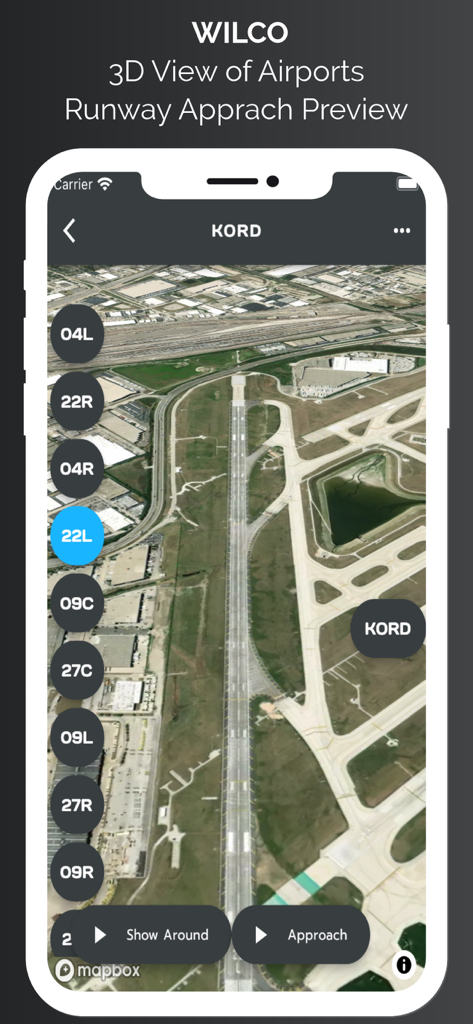
WilCo - Pilot Aviation Weather - WilCo航空アプリにおけるシカゴ・オヘア空港滑走路進入プレビューの3D衛星ビュー
WilCo航空アプリにおけるシカゴ・オヘア空港滑走路進入プレビューの3D衛星ビュー

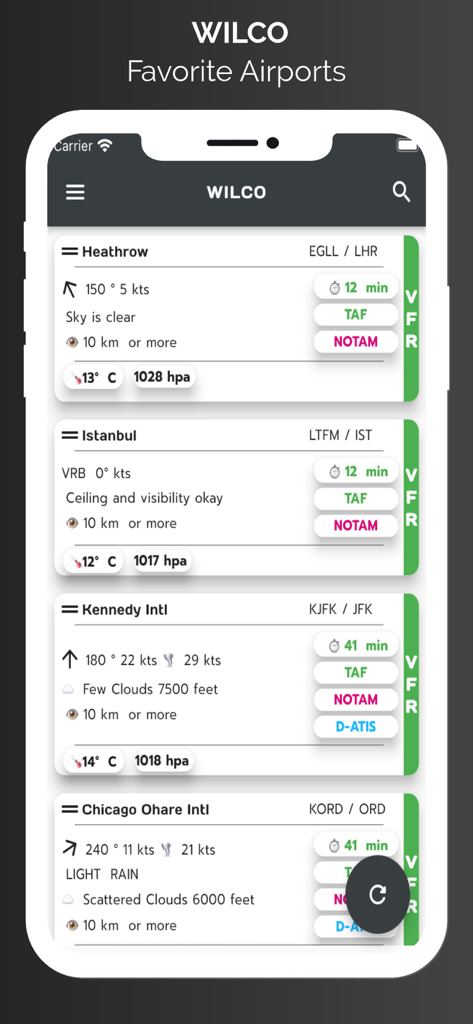
WilCo - Pilot Aviation Weather - WilCoアプリ画面には、風速、視程、空の状態を含むデコード済み気象データのお気に入り空港リストが表示されています
WilCoアプリ画面には、風速、視程、空の状態を含むデコード済み気象データのお気に入り空港リストが表示されています

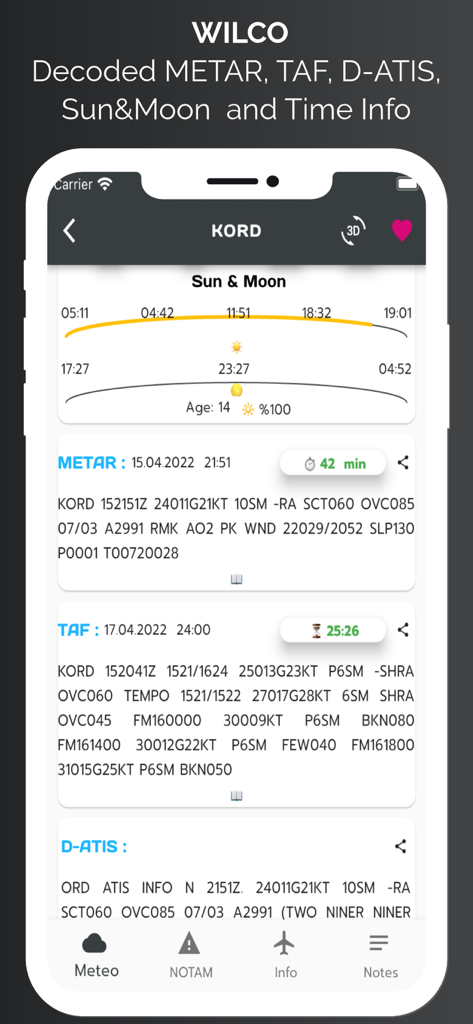
WilCo - Pilot Aviation Weather - WilCoアプリインターフェースには、シカゴ・オヘア空港のMETAR、TAF、D-ATIS、太陽と月の時刻を含む航空気象データが表示されています
WilCoアプリインターフェースには、シカゴ・オヘア空港のMETAR、TAF、D-ATIS、太陽と月の時刻を含む航空気象データが表示されています

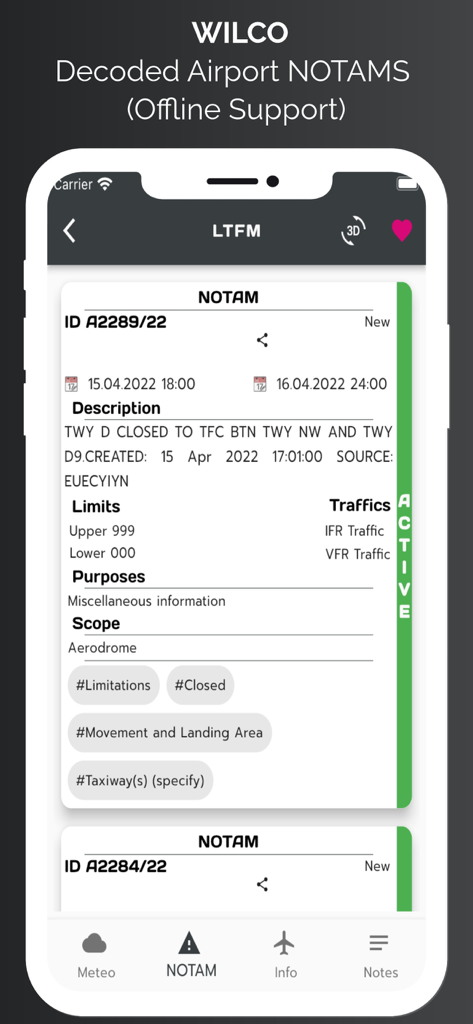
WilCo - Pilot Aviation Weather - WilCo航空アプリでデコードされた空港NOTAM情報が表示されたスマートフォンスクリーン
WilCo航空アプリでデコードされた空港NOTAM情報が表示されたスマートフォンスクリーン

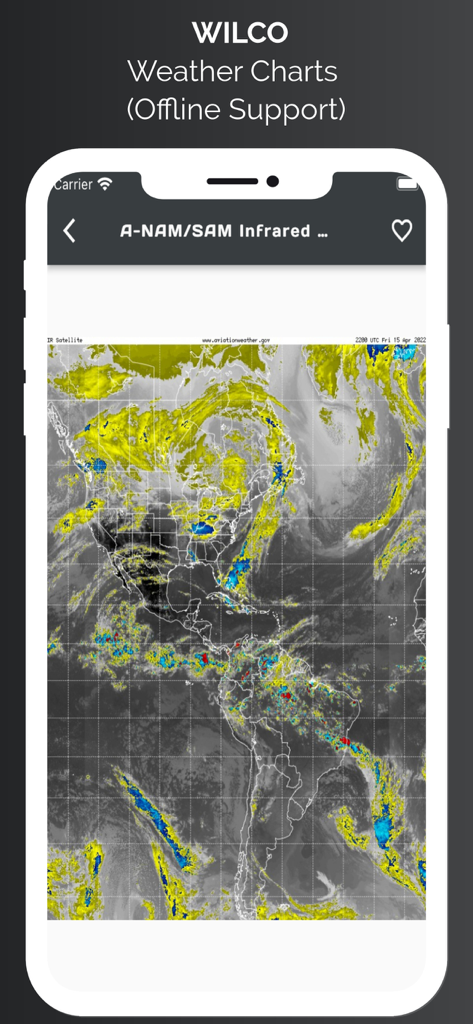
WilCo - Pilot Aviation Weather - WilCoアプリには、オフラインサポート付きの南北アメリカの赤外線衛星気象図が表示されています
WilCoアプリには、オフラインサポート付きの南北アメリカの赤外線衛星気象図が表示されています

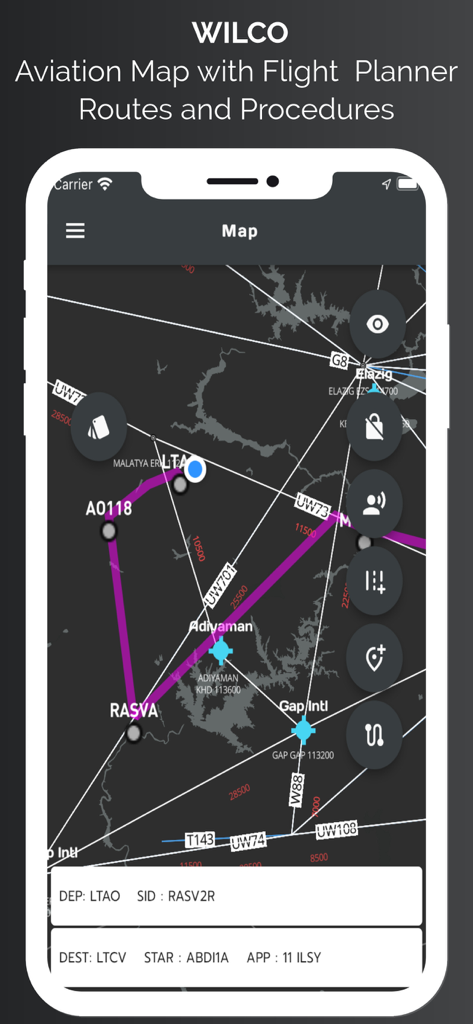
WilCo - Pilot Aviation Weather - WilCoアプリ航空マップインターフェースには、飛行ルート、ウェイポイント、および手順が表示されています
WilCoアプリ航空マップインターフェースには、飛行ルート、ウェイポイント、および手順が表示されています

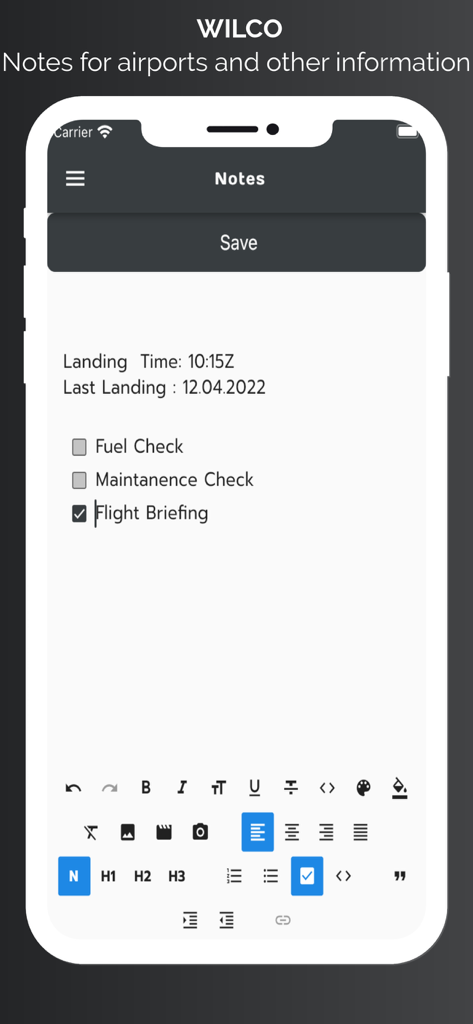
WilCo - Pilot Aviation Weather - WilCo航空アプリ画面には、空港のパイロットノートと飛行ブリーフィングチェックリストが表示されています
WilCo航空アプリ画面には、空港のパイロットノートと飛行ブリーフィングチェックリストが表示されています

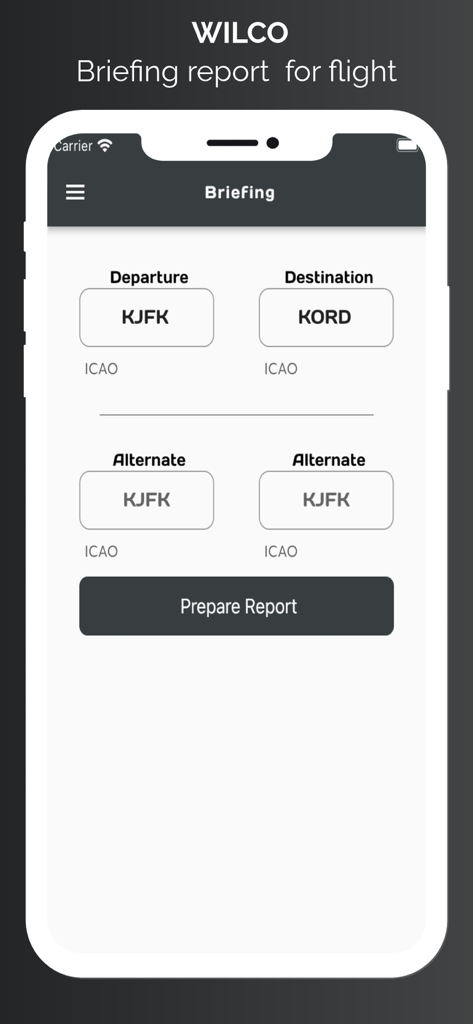
WilCo - Pilot Aviation Weather - WilCoアプリのブリーフィングレポートページ。パイロットが出発および到着空港のICAOコードを入力します。
WilCoアプリのブリーフィングレポートページ。パイロットが出発および到着空港のICAOコードを入力します。

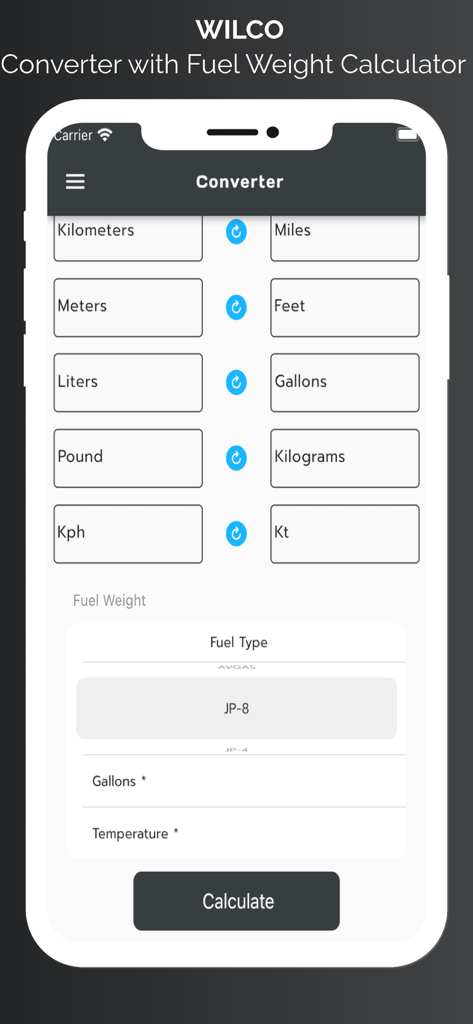
WilCo - Pilot Aviation Weather - WilCoアプリの単位変換および燃料重量計算機インターフェース、パイロット向け

WilCoアプリの単位変換および燃料重量計算機インターフェース、パイロット向け

説明

Wilco is designed and created by pilots. But this information does not supersedes any official data. United States airport charts are available for offline usage. All airports procedures are available in airport data section. Wilco provides lots of aviation specific information. To start with, you may search an airport from database and add it to favorites for offline usage of the data. Wilco provides : METAR, TAF, D-ATIS(for provided US Aiports), NOTAM, Time zone and Sun and Moon rise and set times, procedures for airports. runway information, frequencies of airport, and personal notes section. METAR, TAF and NOTAM data are decoded for easy readiness. You can easily share these reports too. METAR wind data is split into vectors according to runway heading and displayed on weather page. User can take notes for airports. With the latest update we have started to provide a 3D map for airport. With this service you can view preview approach for specific runway. Also you may request "Show Around" to view surrounding area. Map style is also can be changed according to user needs. Aviation map shows airports, waypoints, airways, nav aids. With advanced features of the map page user can see live coordinates of current location, speed and altitude information. User can see real time track, on map and save this track to see it later. User can select departure and arrival airport and user may select appropriate procedures for SID, STAR, or approach. These procedures are NOT FOR REAL NAVIGATION. NEVER EVER USE IN REAL NAVIGATION. This tool provides approximately calculated flight distance and provides situational awareness. User can add airways and waypoints too for your route. App style layer also can be changed for user needs. App provides weather charts for aviation specific usage. These charts include significant weather, winds aloft, satellite view with options. You can add any charts to favorites for future and offline usage. Briefing page provides METAR, TAF data for airports which are 25 nm range of your flight. Also departure and arrival airport runway data, and NOTAM data provided in briefing. You can save this briefing report and print it. Wilco has a converter for aviation calculations and provides holding entry calculations and gives you instructions. Wilco also has a Weight and Balance page for your aircraft. Save Aircraft with Basic Empty Weight and Basic Moment and add custom stations to your aircraft. Provides sustainable Weight and Balance calculation. Wilco has a Flight Computer to calculate Climb, Cruise and Descend time, speed and durations with fuel consumption. Wind vector, Ground speed, True Air Speed, Calibrated Air Speed and lots of other calculations you may need. Also with flight tools section you can calculate VDP, Wind Runway calculator,Feet Per minute Calculator. Have a Safe Flight. ** SUBSCRIPTIONS The following features are enabled with a valid subscription : - Decoded METAR/TAF and NOTAM data -Airport 3D View -Aviation Map - D-ATIS (For US airports only) -Waether Charts -Weight & Balance -ICAO Flight Plan Form -Holding Calulator -Runway Info -Aiports and general notes section -Converter and more -United States Airport Charts Free Trials for 7 days. The subscription varies in time periods (1 month, 12 months). Auto-renewal may be turned off at any time by going to your account settings. A payment will be charged to your iTunes account at the end of the free trial period. Your iTunes account will be charged for renewal within 24 hours prior to the end of the current period. No commitment - you can cancel any time. Pleas read the full “Terms of Use” at: Terms of use: https://pages.flycricket.io/wilco-0/terms.html Privacy policy :https://pages.flycricket.io/wilco-0/privacy.html Important Notice: Never use for critical Flight Planning purposes. It may use only for educational purposes. Always refer your validated resources for flight planning.

Download

ダウンロード: App Store

このページはアプリまたはその開発者の公式ページではなく、情報提供および論評を目的として作成された独立した編集出版物です。明示的に別段の記載がない限り、アプリおよびその開発者は、MWM、Apple、Google Play、アプリのパブリッシャー、またはアプリの開発者と提携、承認、後援、認可、またはその他の公式的な関係はなく、このページのいかなる内容も、アプリがMWMのサービスを使用して開発されたことを意味するものではありません。すべての商標、ロゴ、スクリーンショット、その他のコンテンツはそれぞれの所有者の財産です。








