
このページはアプリまたはその開発者の公式ページではなく、情報提供および論評を目的として作成された独立した編集出版物です。明示的に別段の記載がない限り、アプリおよびその開発者は、MWM、Apple、Google Play、アプリのパブリッシャー、またはアプリの開発者と提携、承認、後援、認可、またはその他の公式的な関係はなく、このページのいかなる内容も、アプリがMWMのサービスを使用して開発されたことを意味するものではありません。すべての商標、ロゴ、スクリーンショット、その他のコンテンツはそれぞれの所有者の財産です。


ダウンロード
1M+ユーザー評価
評価数
4.7K開発元
カテゴリ
Education対応言語
8最新バージョン
3.3サイズ
59.9 MBリリース日
2017年11月15日未就学児から小学生向けの高度にパーソナライズ可能な手書き学習ツールの主要機能評価
アプリケーション分析: Writing Wizard: Learn to Write
豊富なカスタマイズオプション
個々の子どもの学習進度や好みに合わせて、文字サイズ、難易度、フォント、文字・数字・単語リストなどを柔軟に調整できます。
詳細な進捗追跡とレポート機能
保護者や教育者は、子どものなぞり書きの記録を再生・エクスポートし、詳細な進捗レポートを通じて学習状況を正確に把握できます。
楽しい報酬とインタラクティブなゲーム
50種類以上のアニメーションステッカー、効果音、および文字をアニメーション化するゲームを通じて、子どもたちは楽しみながら学習し、学習意欲を維持できます。
正しいなぞり書きの指導と強制
本アプリは、正しい筆順を視覚的に示し、その通りになぞることを促すことで、子どもが適切な運筆を習得できるよう支援します。
印刷可能なワークシートの生成
なぞり書き練習用のPDFワークシートを作成・印刷することで、デジタルデバイス以外でも、紙とペンを使って筆記練習を継続できます。
カスタム単語リストと音声録音
ユーザーは独自の単語リストを作成し、各単語の音声を録音できるため、子どもの名前や特定の学習ニーズに合わせたパーソナライズされた学習が可能です。
強固なプライバシー保護
本アプリは、ユーザーデータの収集を一切行わず、子どものオンラインプライバシーを強力に保護することで、保護者に安心を提供します。
無制限のユーザーアカウント作成
複数の子どもが個別の学習プロファイルを持つことができ、それぞれが自身の進捗を独立して管理することが可能です。
よくある質問
について知っておくべきこと Writing Wizard: Learn to Write
What is Writing Wizard: Learn to Write?
Writing Wizard: Learn to Write is an educational app designed to help children learn to trace letters, numbers, and words through a fun and motivating system.
Can I create my own word lists in the Writing Wizard app?
Yes, the Writing Wizard app allows users to create their own word lists and record audio for each word, providing a personalized learning experience.
How many fonts are available in Writing Wizard: Learn to Write?
Writing Wizard offers 16 fonts, including three popular US fonts and 13 international fonts, allowing children to practice with various styles.
Is the Writing Wizard app free to use?
The Writing Wizard app offers free access to all shapes, the first 7 letters, numbers, and words. A one-time purchase unlocks remaining letters and the ability to add custom words.
Does Writing Wizard provide progress reports for children's tracing?
Yes, Writing Wizard provides detailed reports that display what the child has traced, including the ability to replay and export tracings to monitor progress.
Is Writing Wizard suitable for toddlers?
Yes, Writing Wizard includes a shapes tracing activity specifically designed for toddlers, making it suitable for very young children.
Can parents create printable worksheets from the Writing Wizard app?
Yes, Writing Wizard allows users to create PDF Worksheets and print them, enabling children to practice writing on paper.
Does Writing Wizard collect user data or personal information?
No, Writing Wizard does not collect any user information and does not use data collection tools, adhering to privacy best practices for kids' apps.
Can I customize the difficulty in Writing Wizard: Learn to Write?
Yes, Writing Wizard is fully customizable to suit every child’s needs, allowing adjustments for factors such as letter size, difficulty, and tracing speed.
How does Writing Wizard keep children motivated while learning to write?
Writing Wizard keeps children motivated with over 50 animated stickers, sound effects, and interactive games that animate letters after tracing is complete.
以下のスクリーンショットと説明は、アプリの公式ストアリスティングから直接取得されたものであり、アプリ開発者の所有物です。
アプリストア
スクリーンショット
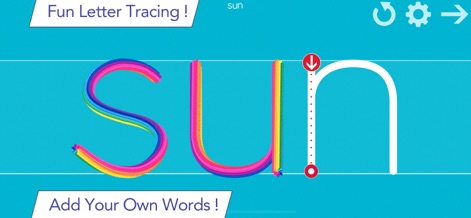
本アプリは、カラフルな線と直感的なトレースガイドで、子供たちが楽しく文字をなぞることを可能にします。
楽しく文字をなぞる

本アプリでは、学校で使用されているフォントを含む複数のフォント選択肢を提供し、なぞり書き後には楽しいインタラクティブなアニメーションで学習意欲を高めます。
多様なフォントと遊び
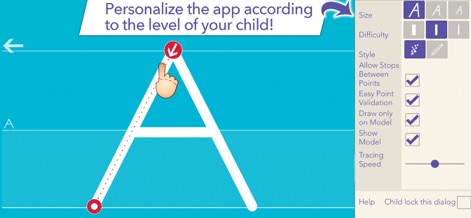
このアプリは、詳細なカスタマイズ設定により、文字サイズや難易度、トレース支援機能などをお子様の学習レベルに合わせて調整できます。
お子様に合わせてカスタマイズ
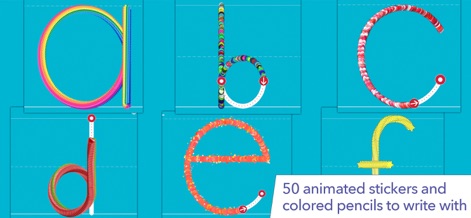
50種類以上のアニメーションスタンプと、色鉛筆のような描写効果を活用し、子供たちは創造的で魅力的な方法で文字を学ぶことができます。
創造的な筆記体験
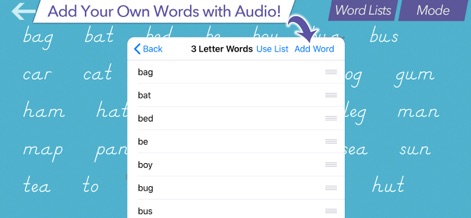
ユーザーは、独自の単語リストを作成し、音声録音機能を使って各単語に音声を付与することで、よりパーソナルな学習体験を実現できます。
オリジナル単語で学習
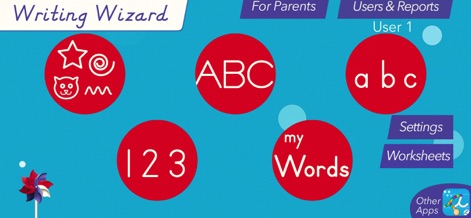
直感的なメインメニューから、アルファベットの大文字・小文字、数字、独自の単語など、様々な学習コンテンツに簡単にアクセスできます。
学習の中心ハブ
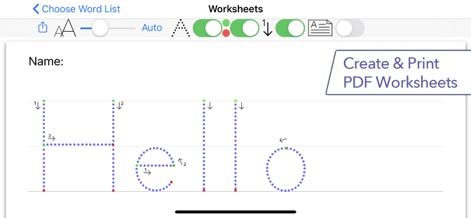
このアプリは、学習内容を紙に再現できるよう、PDFワークシートの生成機能を提供し、印刷可能な学習教材として活用できます。
印刷可能なワークシート
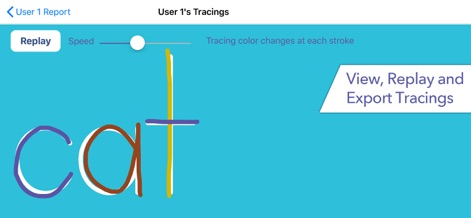
ユーザーのなぞり書き履歴を詳細に表示し、再生・エクスポート機能を通じて、子供の進捗状況を視覚的に把握することができます。
進捗状況を追跡
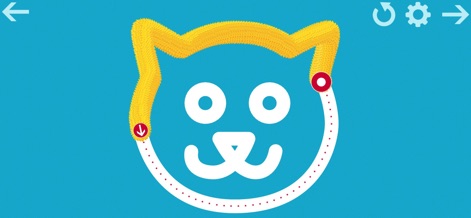
文字だけでなく、多様な図形トレースにも対応しており、アニメーションのような描画エフェクトで学習をさらに楽しくします。
図形も楽しくトレース
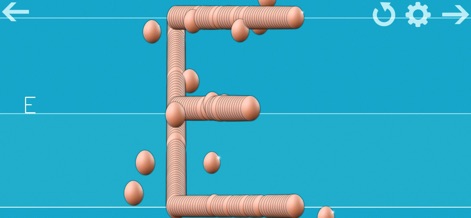
このアプリは、魅力的なテクスチャや立体的な描画スタイルを特徴とし、子供たちの視覚と触覚を刺激し学習体験を豊かにします。
感覚を刺激する描画
説明
Download
類似アプリ
似た機能とユーザー体験を持つアプリ

iHuman Chinese
Human and Perfect Future Education co.,Ltd
iHuman Pinyin
Human and Perfect Future Education co.,Ltd
ABC Reading-RAZ原版独家授权绘本阅读全系列
Dr. Panda Ltd
适趣AI中文-阅读识字,适合才有趣
Beijing Zhilehuo Technology Co., Ltd.
Sight Words Reading Games ABC
CFC s.r.o.
帮帮识字-儿童喜爱的认字古诗阅读软件
Guangzhou Polar Future Culture Technology Co., Ltd

Endless Alphabet
Originator Inc.
Kidbee Детские Читай Раскраска
Marat Khanbekov

القاعدة النورانية
Furqan Group for Education& IT
このページはアプリまたはその開発者の公式ページではなく、情報提供および論評を目的として作成された独立した編集出版物です。明示的に別段の記載がない限り、アプリおよびその開発者は、MWM、Apple、Google Play、アプリのパブリッシャー、またはアプリの開発者と提携、承認、後援、認可、またはその他の公式的な関係はなく、このページのいかなる内容も、アプリがMWMのサービスを使用して開発されたことを意味するものではありません。すべての商標、ロゴ、スクリーンショット、その他のコンテンツはそれぞれの所有者の財産です。