
このページはアプリまたはその開発者の公式ページではなく、情報提供および論評を目的として作成された独立した編集出版物です。明示的に別段の記載がない限り、アプリおよびその開発者は、MWM、Apple、Google Play、アプリのパブリッシャー、またはアプリの開発者と提携、承認、後援、認可、またはその他の公式的な関係はなく、このページのいかなる内容も、アプリがMWMのサービスを使用して開発されたことを意味するものではありません。すべての商標、ロゴ、スクリーンショット、その他のコンテンツはそれぞれの所有者の財産です。


YouTube Kids
子供のデジタル世界を完全に掌握し、個々の成長に合わせた最適なコンテンツ環境を設計する。本アプリは、単なる閲覧制限を超え、安全な領域で子供の好奇心と創造性を意図的に育む「デジタル育成の全権」を親に与えている。
ダウンロード
100M+ユーザー評価
評価数
6.5M開発元
カテゴリ
Entertainment対応言語
73最新バージョン
11.13サイズ
188.3 MBリリース日
2015年2月23日保護者の視点から見た、安全で教育的な子供向けコンテンツ提供と視聴管理を可能にする主要機能の評価
YouTube Kids アプリ機能分析
強力なペアレンタルコントロール
本アプリは、保護者が子供の視聴内容を制限し、視聴体験を効果的に導くための包括的なペアレンタルコントロール機能を提供します。不要な動画やチャンネルをブロックし、不適切なコンテンツを報告することが可能です。
承認済みコンテンツのみモード
本アプリは、保護者が手動で承認した動画、チャンネル、コレクションのみを子供が視聴できるようにするモードを提供します。これにより、保護者は子供がアクセスするコンテンツを厳密に管理できます。
年齢別コンテンツモード
本アプリは、未就学児向けの「未就学児モード」、幼児向けの「低学年モード」、高学年向けの「高学年モード」といった複数の年齢別モードを提供し、子供の成長段階に合わせて適切なコンテンツを提供します。
子供向けに厳選された安全なコンテンツ
本アプリは、子供が興味を探求し、想像力を育み、自信を築くための、保護者が信頼できる安全な動画コンテンツを提供します。
スクリーンタイムタイマー機能
本アプリは、タイマー機能を利用して子供の視聴時間を制限することができます。設定した時間が経過するとアプリが一時停止するため、保護者は子供に休憩を促し、現実世界での活動を奨励することが可能です。
簡単なナビゲーションツール
本アプリは、子供が直感的にコンテンツを探索できるよう、使いやすいナビゲーションツールを備えています。
よくある質問
について知っておくべきこと YouTube Kids
What is the YouTube Kids app?
YouTube Kids is an application designed for children to explore video content they love in a safe, curated environment. It features easy navigation tools and parental controls to help kids discover new interests.
How does YouTube Kids provide age-appropriate content?
YouTube Kids ensures age-appropriate content through personalized filters and modes: Preschool (ages 4 and under), Younger (ages 5-7), and Older (ages 8-12). Parents can also hand-pick content with the "Approved Content Only" mode.
Can parents set screen time limits in the YouTube Kids app?
Yes, YouTube Kids includes a Timer feature. Parents can set screen-time limits, and the app freezes once the set time expires, encouraging children to take a break from viewing.
How can parents control content in YouTube Kids?
YouTube Kids offers Parental Control features. Parents can limit content, guide viewing experiences, block unwanted videos or channels, and flag inappropriate content for review by the YouTube Kids team.
Does YouTube Kids allow users to rewatch videos?
Yes, the YouTube Kids app features a "Watch it Again" tab. This allows parents and children to quickly find favorite videos and previously shared content for rewatching.
Does YouTube Kids display advertisements?
Yes, children using YouTube Kids may see commercial content from YouTube creators. This content is not considered paid advertising, as it originates directly from the creators themselves.
What age-specific content modes are available in YouTube Kids?
YouTube Kids offers content modes including Preschool (ages 4 and under), Younger (ages 5-7), Older (ages 8-12), and an "Approved Content Only" mode for parent-selected videos.
Is parental setup necessary for YouTube Kids?
Parental setup is required for YouTube Kids to ensure the best experience for the family. This process allows parents to configure essential settings and content filters for their children.
How can I hand-pick videos for my child on YouTube Kids?
Parents can hand-pick specific videos, channels, and collections for their children using the "Approved Content Only" mode. This feature gives complete control over accessible content.
以下のスクリーンショットと説明は、アプリの公式ストアリスティングから直接取得されたものであり、アプリ開発者の所有物です。
アプリストア
スクリーンショット
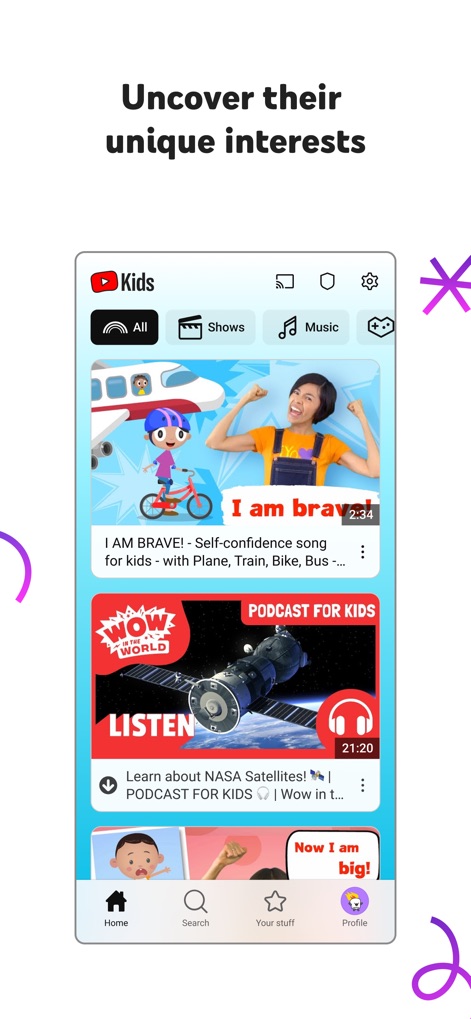
このスクリーンショットでは、子供たちが興味を持つ動画コンテンツを幅広く提供するメイン画面が示されています。上部のカテゴリタブ(「ショー」や「音楽」など)や、下部のナビゲーションバー(「検索」や「プロフィール」など)から、様々なコンテンツにアクセスできます。
興味を広げるコンテンツ
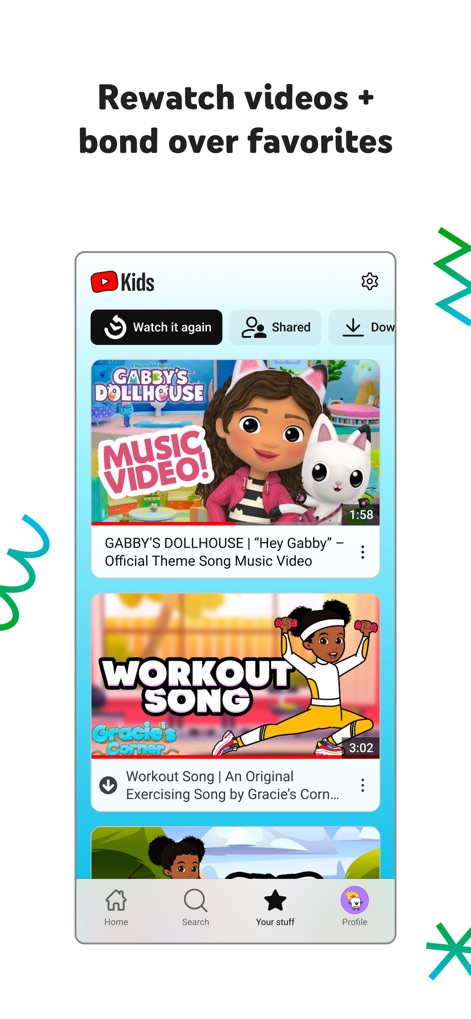
この画面は、過去に視聴した動画を簡単に探し出し、再視聴できる機能を紹介しています。「もう一度見る」ボタンからは視聴履歴にアクセスでき、子供のお気に入りの動画をサムネイル表示からすぐに再生できます。
お気に入り動画を再発見
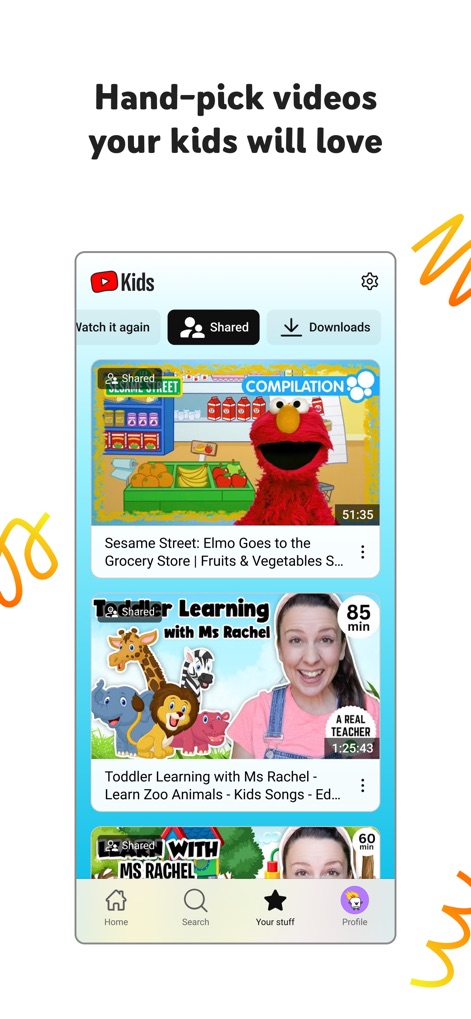
保護者が子供のために厳選した動画コンテンツを管理する画面です。「共有済み」タブが選択されており、保護者が承認した動画がリストアップされ、子供は「セサミストリート」のような教育的なコンテンツを安全に楽しめます。
保護者が選ぶ安心動画
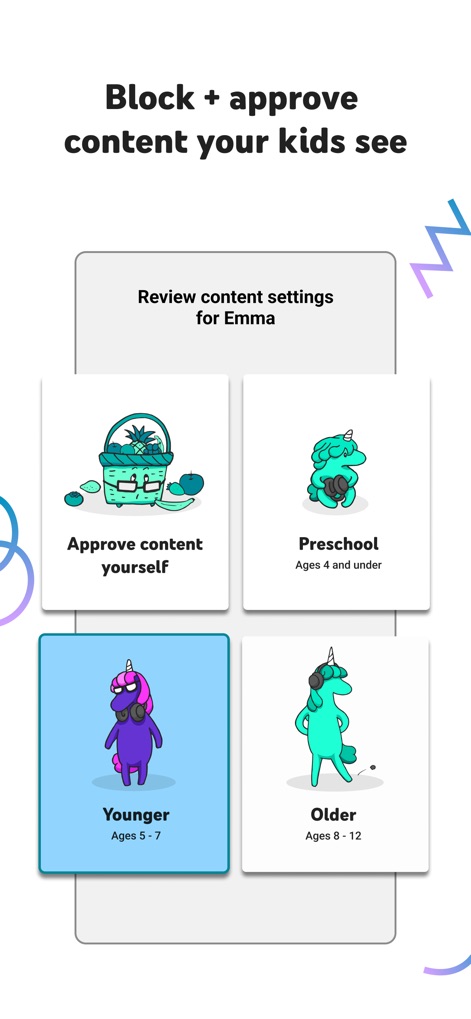
保護者が子供の視聴体験を細かく制御できる設定画面です。年齢層に応じたフィルター(「幼児向け」や「年長向け」など)を設定でき、また「コンテンツを自分で承認する」オプションで視聴可能な動画を手動で選べます。
年齢別コンテンツ管理
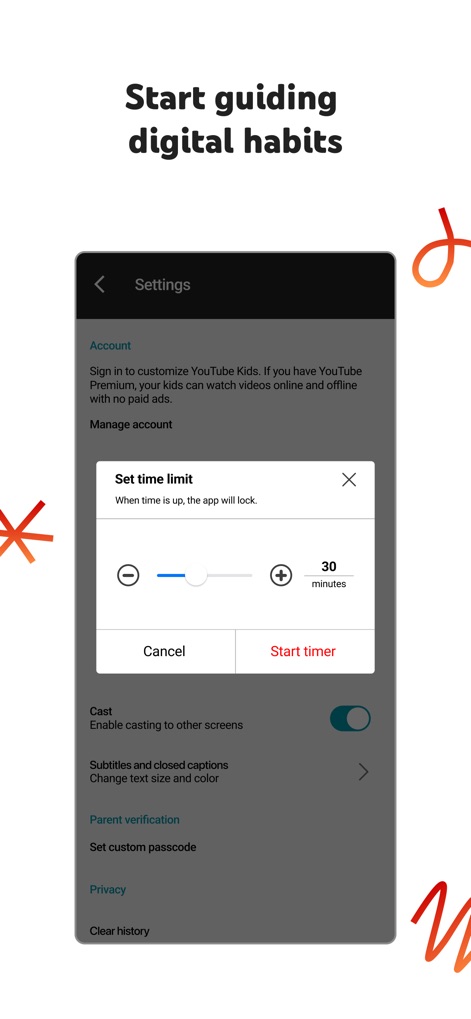
この設定画面では、保護者が子供のスクリーンタイムを管理するための「時間制限の設定」機能が示されています。調整可能なタイマーと、「保護者の確認」といった追加の設定オプションにより、デジタル習慣をサポートします。
健全な視聴習慣を育む
説明
Download
類似アプリ
似た機能とユーザー体験を持つアプリ

Bounce Patrol Nursery Rhymes!
BOUNCE PATROL PTY. LTD.
贝乐虎儿歌-宝贝儿歌故事童话寓言多多听听
Leqing Network Technology Co., Ltd
儿歌点点-儿歌故事动画片益智启蒙
Beijing Mampod Technology Co. Ltd.

Safe Vision Kids for YouTube
Safe Vision Parental Software Pty Ltd

Kidjo TV: Kids Videos to Learn
Kidjo, INC

Tankee Gaming Videos & More
Tankee Inc.
Cuquin - Baby Songs & Cartoons
COLORCITY LIMITED
One4Kids TV
One 4 Kids Pty Ltd

Video Touch: Wild Animals
SoundTouch Interactive
このページはアプリまたはその開発者の公式ページではなく、情報提供および論評を目的として作成された独立した編集出版物です。明示的に別段の記載がない限り、アプリおよびその開発者は、MWM、Apple、Google Play、アプリのパブリッシャー、またはアプリの開発者と提携、承認、後援、認可、またはその他の公式的な関係はなく、このページのいかなる内容も、アプリがMWMのサービスを使用して開発されたことを意味するものではありません。すべての商標、ロゴ、スクリーンショット、その他のコンテンツはそれぞれの所有者の財産です。