
このページはアプリまたはその開発者の公式ページではなく、情報提供および論評を目的として作成された独立した編集出版物です。明示的に別段の記載がない限り、アプリおよびその開発者は、MWM、Apple、Google Play、アプリのパブリッシャー、またはアプリの開発者と提携、承認、後援、認可、またはその他の公式的な関係はなく、このページのいかなる内容も、アプリがMWMのサービスを使用して開発されたことを意味するものではありません。すべての商標、ロゴ、スクリーンショット、その他のコンテンツはそれぞれの所有者の財産です。


ダウンロード
10M+ユーザー評価
評価数
1.2K開発元
カテゴリ
Business対応言語
17最新バージョン
7.0.1サイズ
328.1 MBリリース日
2022年1月10日会議室とワークスペースの効率を最大化する統合ソリューション
Zoom Rooms機能分析
ワンタッチ会議参加/開始
ユーザーはワンタッチで会議に参加または開始することができ、会議準備の時間を大幅に短縮します。
ネイティブな室設備連携
照明やプロジェクターなど、会議室の設備とネイティブに連携することで、高度に自動化された統合的な会議環境を構築します。
高音質・高画質ビデオ会議
あらゆるワークスペースで高品質なビデオ、オーディオ、コンテンツ共有を提供し、クリアで効果的なコミュニケーションを実現します。
仮想受付・ワークスペース予約キオスク
仮想受付およびワークスペース予約機能を提供するキオスクとして活用でき、来訪者管理と社内リソースの効率的な予約を支援します。
多機能ルームコントローラー
iPadを専用コントローラーとして使用できるほか、個人のモバイルデバイスからも会議室の機能を直感的に制御することを可能にします。
ルーム予約表示
会議室の利用状況を外部ディスプレイで表示し、今後の会議の確認や、その場での会議室の予約を可能にすることで、会議室の利用効率を最大化します。
ワークスペース管理機能
柔軟なワークスペースや予約専用ルームの状況を表示し、QRコードを活用した予約やチェックインを通じて、フリーアドレス環境の管理を効率化します。
直感的なルームコントロール
音声、ビデオ、参加者管理など、会議中のあらゆる操作を直感的に行えるコントロールを提供し、ユーザーは会議の進行に集中できます。
マルチプラットフォーム接続
モバイルデバイス、デスクトップ、および遠隔地の会議室など、様々な環境の参加者と簡単に接続でき、場所を問わないシームレスな連携を実現します。
デジタルサイネージ機能
会議室の利用されていない時間にデジタルサイネージとして機能させることができ、重要な情報や企業コンテンツを効果的に表示します。
よくある質問
について知っておくべきこと Zoom Rooms
What is Zoom Rooms?
Zoom Rooms is a comprehensive video conferencing system designed for high-quality video, audio, and sharing across various workspaces. It connects participants on multiple devices and locations.
What are the key features of the Zoom Rooms app?
The Zoom Rooms app offers one-touch meeting join or start, intuitive room controls for audio/video/participants, and supports native room control integration for external devices like projectors.
Can an iPad function as a Zoom Rooms controller?
Yes, an iPad running the Zoom Rooms app can serve as a dedicated Zoom Rooms Controller. It connects to a Mac, PC, or Zoom Rooms Appliance to manage the room.
What operational modes are available on the Zoom Rooms app for iPad?
The Zoom Rooms app for iPad supports five modes: Controller, for Touch, scheduling display, workspace desk, and reservation only room. Each mode offers distinct functionalities.
How can users join a meeting using the Zoom Rooms app?
Users can join a meeting through the Zoom Rooms app by entering a specific Meeting ID. The app also provides an option to join using a Personal Link Name.
Does Zoom Rooms support inviting new participants to a meeting?
Yes, the Zoom Rooms app supports inviting new participants. Users can select contacts from email, phone, or SIP/H.323 through the in-app invite function.
以下のスクリーンショットと説明は、アプリの公式ストアリスティングから直接取得されたものであり、アプリ開発者の所有物です。
アプリストア
スクリーンショット
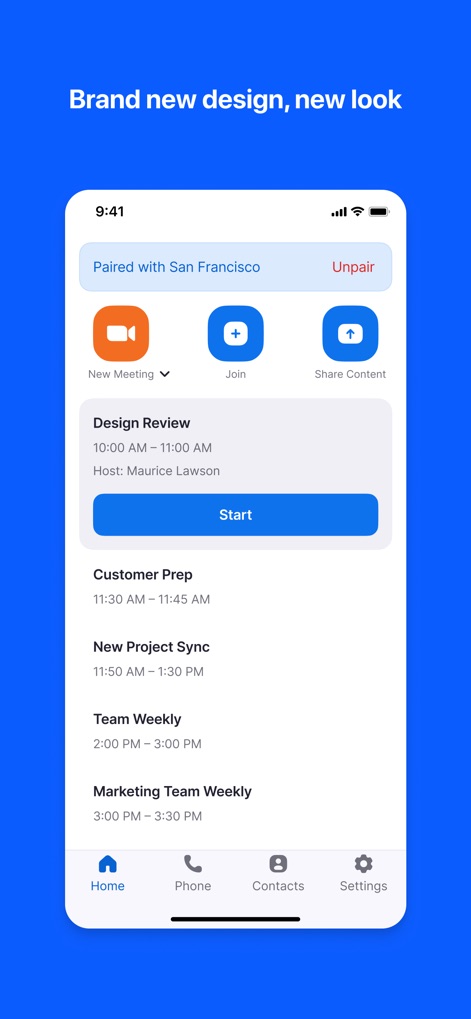
この画面では、会議のスケジュールを一覧表示し、開催中の会議にワンタップで開始できます。また、新規会議の作成やコンテンツ共有も可能です。
会議を効率管理

ユーザーは、明瞭なアイコンを通じてマイクのミュートやビデオの開始などの会議機能を簡単に操作できます。さらに、音量スライダーでオーディオレベルを調整できます。
直感的な会議操作

この画面では、会議IDを入力して任意のミーティングやウェビナーに迅速に参加できます。視覚的な数字キーパッドにより、入力がスムーズに行えます。
会議への簡単参加

ユーザーは、連絡先リストから個人や会議室を検索し、簡単にミーティングに招待できます。お気に入り機能と連絡先リストにより、効率的な招待が実現します。
参加者と部屋を招待
説明
Download



このページはアプリまたはその開発者の公式ページではなく、情報提供および論評を目的として作成された独立した編集出版物です。明示的に別段の記載がない限り、アプリおよびその開発者は、MWM、Apple、Google Play、アプリのパブリッシャー、またはアプリの開発者と提携、承認、後援、認可、またはその他の公式的な関係はなく、このページのいかなる内容も、アプリがMWMのサービスを使用して開発されたことを意味するものではありません。すべての商標、ロゴ、スクリーンショット、その他のコンテンツはそれぞれの所有者の財産です。