
이 페이지는 앱이나 개발자의 공식 페이지가 아니며, 정보 제공 및 논평을 목적으로 작성된 독립 편집 간행물입니다. 명시적으로 달리 언급되지 않는 한, 해당 앱이나 개발자는 MWM, Apple, Google Play, 앱 퍼블리셔 또는 앱 개발자와 제휴, 보증, 후원, 승인 또는 공식적으로 연결되어 있지 않으며, 이 페이지의 어떤 내용도 해당 앱이 MWM의 서비스를 사용하여 개발되었음을 의미하지 않습니다. 모든 상표, 로고, 스크린샷 및 기타 콘텐츠는 해당 소유자의 자산입니다.


AI Photo Cleaner - Cleanup Kit
"저장 공간 부족" 알림에 대한 스트레스를 멈추세요. AI를 사용하여 중복 사진을 즉시 삭제하고, 어수선한 연락처를 정리하고, 원탭 메타데이터 제거로 개인 정보를 보호하세요.
다운로드
81K+사용자 평점
총 평가 수
700개발사
카테고리
Utilities지원 언어
4최신 버전
1.2크기
56.9 MB출시일
2025년 9월 12일휴대폰의 잠재력을 되찾으세요
'저장 공간 부족' 알림과의 씨름을 멈추세요. 당사의 AI 기반 툴킷은 갤러리를 지능적으로 정리하고, 개인 정보를 보호하며, 장치를 최고의 성능으로 유지합니다.
스마트 갤러리 정리
AI가 거의 동일한 순간 포착과 흐릿한 사진을 즉시 식별하여 최고의 추억만 간직하고 나머지는 몇 초 안에 삭제할 수 있도록 합니다.
개인 정보 보호 우선 사진 공유
공유하기 전에 숨겨진 위치 데이터와 메타데이터를 사진에서 즉시 제거하여 집 주소와 개인 정보가 비공개로 유지되도록 합니다.
자주 묻는 질문
에 대해 알아야 할 모든 것 AI Photo Cleaner - Cleanup Kit
AI Photo Cleaner - Cleanup Kit란 무엇인가요?
AI Photo Cleaner - Cleanup Kit는 지능형 도구와 AI 기반 팁을 사용하여 휴대폰 저장 공간을 확보하고 갤러리를 정리하며 기기를 정리하도록 설계된 스마트 솔루션입니다.
AI Photo Cleaner - Cleanup Kit는 저장 공간 확보에 어떻게 도움이 되나요?
AI Photo Cleaner - Cleanup Kit는 유사한 사진, 중복 동영상, 오래된 스크린샷 및 화면 녹화를 식별하여 저장 공간을 확보합니다. 기기 메모리를 최적화하기 위해 불필요한 파일을 삭제하도록 제안합니다.
AI Photo Cleaner - Cleanup Kit는 중복 연락처를 병합할 수 있나요?
예, AI Photo Cleaner - Cleanup Kit에는 연락처 관리자 기능이 있습니다. 이 도구를 사용하면 한 번의 클릭으로 중복 연락처를 병합하고 불완전한 항목을 제거하여 전화번호부를 정리할 수 있습니다.
AI Photo Cleaner - Cleanup Kit는 일정 이벤트를 관리하나요?
예, AI Photo Cleaner - Cleanup Kit에는 일정 이벤트 정리 기능이 포함되어 있습니다. 이를 통해 사용자는 오래되거나 오래된 이벤트를 쉽게 검토하고 제거하여 일정 과부하를 방지하고 깨끗하게 유지할 수 있습니다.
AI Photo Cleaner - Cleanup Kit의 일일 정리 계획이란 무엇인가요?
AI Photo Cleaner - Cleanup Kit의 일일 정리 계획은 개인화된 일일 작업을 제공합니다. 이러한 작은 정리 작업은 사용자가 단계별로 휴대폰을 정리하는 데 도움이 되어 저장 공간 과부하를 효율적으로 방지합니다.
AI Photo Cleaner - Cleanup Kit는 유사한 사진과 동영상을 감지할 수 있나요?
예, AI Photo Cleaner - Cleanup Kit는 유사한 사진 또는 연속 촬영 사진 그룹을 감지하고 중복 동영상을 찾습니다. 사용자는 이를 검토하고 삭제하여 최상의 콘텐츠만 유지할 수 있습니다.
AI Photo Cleaner - Cleanup Kit는 사진 개인 정보를 어떻게 보호하나요?
AI Photo Cleaner - Cleanup Kit는 사진 메타데이터 정리 기능으로 사진 개인 정보를 보호합니다. 이 기능은 사진에서 위치 태그를 제거하여 사용자가 개인 지리 데이터를 노출하지 않고 온라인에서 공유할 수 있도록 합니다.
AI Photo Cleaner - Cleanup Kit는 AI 기반 팁을 제공하나요?
예, AI Photo Cleaner - Cleanup Kit는 AI 팁 및 제안을 제공합니다. 사용자는 메모리 확보 및 파일 정리 모범 사례에 대한 스마트한 조언을 받아 깔끔한 기기를 유지할 수 있습니다.
AI Photo Cleaner - Cleanup Kit 구독은 어떻게 관리하나요?
AI Photo Cleaner - Cleanup Kit의 구독은 사용자가 관리할 수 있습니다. 구독에서 기기의 계정 설정에서 언제든지 자동 갱신을 비활성화할 수 있습니다.
활성 AI Photo Cleaner - Cleanup Kit 구독을 취소할 수 있나요?
아니요, AI Photo Cleaner - Cleanup Kit의 활성 구독은 현재 구독 기간이 완료될 때까지 취소할 수 없습니다. 다음 기간에 대한 자동 갱신을 해제할 수 있습니다.
AI Photo Cleaner - Cleanup Kit에 AI 채팅 도우미가 있나요?
예, AI Photo Cleaner - Cleanup Kit에는 AI 채팅 도우미가 포함되어 있습니다. 이 기능은 휴대폰 정리에 대한 즉각적인 도움을 제공하고 파일 및 저장 공간 관리에 대한 맞춤형 권장 사항과 팁을 제공합니다.
다음 스크린샷과 설명은 앱의 공식 스토어 목록에서 직접 가져온 것이며 앱 개발자의 자산입니다.
앱 스토어
스크린샷
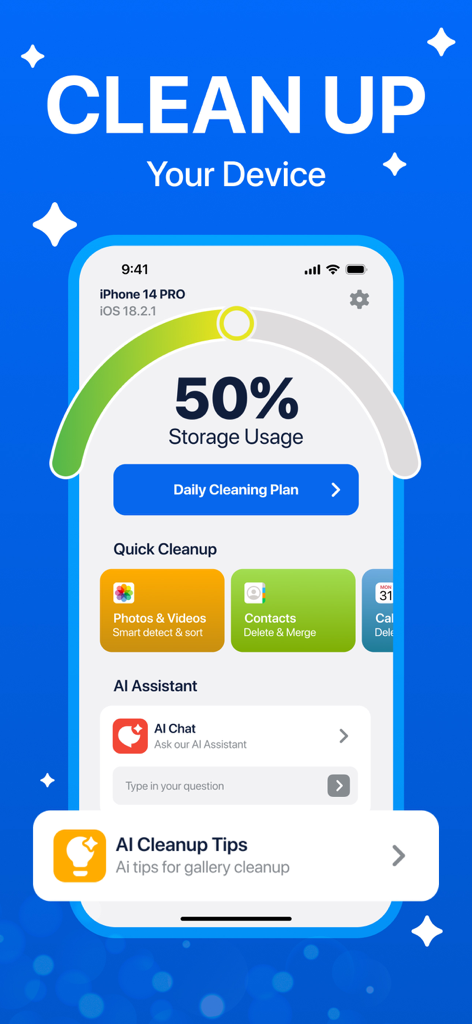
저장 공간 사용량과 정리 옵션을 보여주는 AI 사진 정리 대시보드
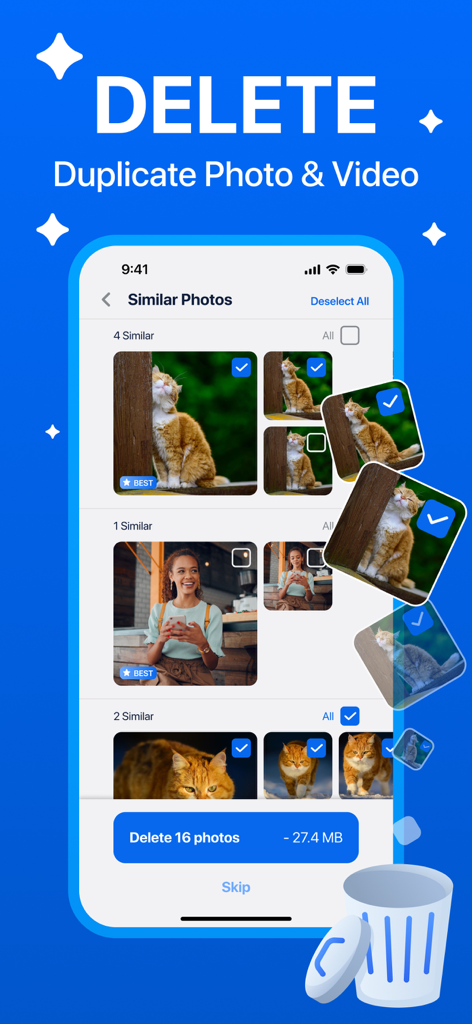
유사 및 중복 사진 삭제 방법을 보여주는 AI 사진 정리 앱 화면
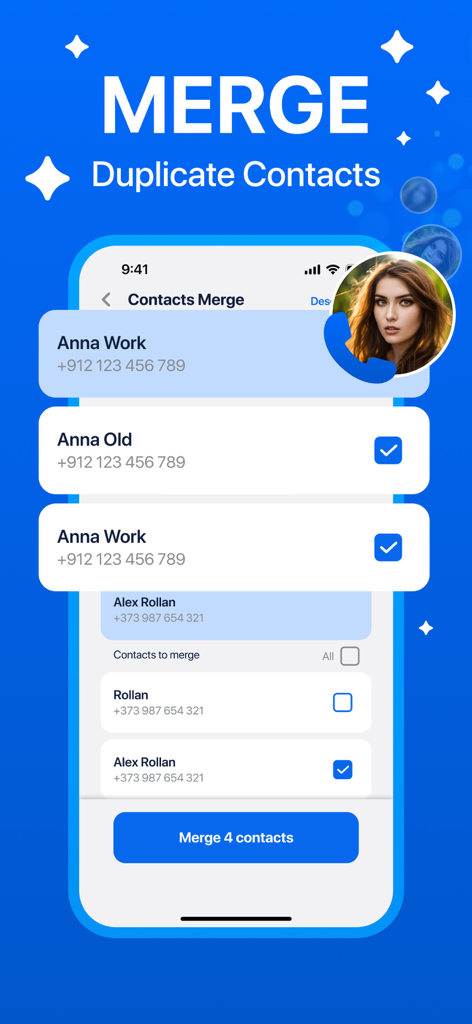
중복 연락처 병합을 위한 연락처 관리자 기능을 보여주는 AI 사진 정리 앱 인터페이스

기기 공간 확보를 위해 여러 항목을 한 번에 삭제하는 옵션이 있는 일정 이벤트 정리 기능을 보여주는 휴대폰 인터페이스
설명
Download
비슷한 앱
유사한 기능과 사용자 경험을 가진 앱

Clever Cleaner: AI CleanUp App
CleverFiles Inc.

Slidebox: Photo Cleaner App
Slidebox LLC

Photo Organizer: Picnic
Picnic Ventures Ltd

Super Smart Cleaner
VIBE WITH ME LTD

Boost Cleaner -Clean Up Smart°
AEGIS SOLUTIONS PRIVATE LIMITED

Cleanup: Phone Storage Cleaner
DEEP FLOW SOFTWARE SERVICES - FZCO

Cleaner Guru: Clean Up Storage
GM UniverseApps Limited

AI Cleaner: Clean Up Storage
GRIMLAX TRADE,S.L.

Photo Cleaner: Swipewipe
MWM
이 페이지는 앱이나 개발자의 공식 페이지가 아니며, 정보 제공 및 논평을 목적으로 작성된 독립 편집 간행물입니다. 명시적으로 달리 언급되지 않는 한, 해당 앱이나 개발자는 MWM, Apple, Google Play, 앱 퍼블리셔 또는 앱 개발자와 제휴, 보증, 후원, 승인 또는 공식적으로 연결되어 있지 않으며, 이 페이지의 어떤 내용도 해당 앱이 MWM의 서비스를 사용하여 개발되었음을 의미하지 않습니다. 모든 상표, 로고, 스크린샷 및 기타 콘텐츠는 해당 소유자의 자산입니다.