
이 페이지는 앱이나 개발자의 공식 페이지가 아니며, 정보 제공 및 논평을 목적으로 작성된 독립 편집 간행물입니다. 명시적으로 달리 언급되지 않는 한, 해당 앱이나 개발자는 MWM, Apple, Google Play, 앱 퍼블리셔 또는 앱 개발자와 제휴, 보증, 후원, 승인 또는 공식적으로 연결되어 있지 않으며, 이 페이지의 어떤 내용도 해당 앱이 MWM의 서비스를 사용하여 개발되었음을 의미하지 않습니다. 모든 상표, 로고, 스크린샷 및 기타 콘텐츠는 해당 소유자의 자산입니다.


Airbrush: Face Photo Editor
현실의 한계를 거부하고, 화면 속 당신의 모든 결점을 지워내는 능력. 이 앱은 인공지능을 통해 사용자가 완벽하게 가공된 자아를 구축하도록 허용합니다.
다운로드
25M+사용자 평점
총 평가 수
624.7K개발사
카테고리
Photo & Video지원 언어
9최신 버전
8.5.0크기
596.1 MB출시일
2015년 10월 8일Airbrush: Face Photo Editor 앱 분석
소셜 미디어 시대의 완벽한 셀피를 위한 필수 도구
AI 리터치
이 앱은 AI 기술을 활용하여 인물 사진을 정교하게 보정하고 모든 세부 사항을 완벽하게 다듬을 수 있도록 지원합니다.
비디오 보정
이 도구는 사용자가 비디오에서도 얼굴을 보정하고, 불필요한 객체를 제거하며, 비디오 화질을 향상시켜 완벽한 결과물을 얻을 수 있도록 돕습니다.
잡티 제거
이 기능은 피부의 여드름이나 잡티를 정밀하게 제거하여 사용자가 깨끗하고 흠 없는 피부를 표현할 수 있게 합니다.
얼굴형 보정
사용자는 이 기능을 통해 얼굴 특징을 손쉽게 조각하여 어떤 각도에서든 최고의 모습을 연출할 수 있습니다.
가상 메이크업
이 앱은 눈썹부터 립스틱까지 다양한 가상 메이크업 도구를 제공하여 사용자의 개성을 표현하고 새로운 스타일을 시도할 수 있도록 합니다.
AI 기반 프로필 사진 생성
이 기능은 AI 기술을 사용하여 스튜디오 방문 없이도 전문적인 품질의 프로필 사진을 즉시 생성할 수 있게 해줍니다.
헤어 스타일 및 색상 변경
사용자는 이 기능을 통해 머리카락에 깊이를 더하거나, 새로운 헤어 색상을 시도하거나, 단순히 머리 색을 어둡게 할 수 있습니다.
배경 편집
이 도구는 사진 배경의 방해 요소를 흐리게 처리하거나 다른 배경으로 매끄럽게 교체하여 피사체에 집중할 수 있도록 돕습니다.
필터 및 효과
이 앱은 다양한 필터와 효과를 제공하여 사용자가 창의적인 경계를 허물고 사진에 독특한 분위기를 부여할 수 있도록 합니다.
저화질 사진 복구
이 기능은 AI를 통해 저화질 사진의 품질을 손쉽게 향상시켜 모든 픽셀에 생기를 불어넣을 수 있게 합니다.
자주 묻는 질문
에 대해 알아야 할 모든 것 Airbrush: Face Photo Editor
Does Airbrush use AI for photo retouching?
Yes, Airbrush features AI Retouch to fine-tune portrait details. It leverages artificial intelligence to elevate photo quality with precision.
Can Airbrush remove blemishes from photos?
Yes, Airbrush provides a Blemish Removal tool. This precision editing feature eliminates acne and blemishes, leaving skin spotless and smooth in photos.
How does Airbrush smooth skin in photos?
Airbrush uses its Smooth feature to soften wrinkles and balance skin tones. This contributes to a natural, youthful glow in portraits, enhancing overall appearance.
Does Airbrush have a highlighter tool for features?
Yes, Airbrush includes a Highlighter tool. It illuminates your best features by adding texture or highlighter, making them pop and enhancing natural beauty in photos.
Can I reshape facial features using Airbrush?
Yes, Airbrush offers a Reshape tool. It allows users to effortlessly sculpt facial features, ensuring every angle presents their best appearance in photos.
What eye enhancements does Airbrush offer?
Airbrush's Eye Enhancer feature allows users to overcome red eyes, erase dark circles, and experiment with vibrant eye colors. This creates a captivating look.
Can Airbrush whiten teeth in photos?
Yes, Airbrush features a Teeth tool to brighten smiles. It also offers the capability to whiten clothing, ensuring an immaculate and polished style in photos.
Does Airbrush offer virtual makeup tools?
Yes, Airbrush includes comprehensive virtual Makeup tools. Users can apply makeup, from eyebrows to lipstick, rivaling a professional beauty editor's kit.
Can I change hair color with Airbrush?
Yes, Airbrush's Hair feature allows users to add depth, explore new hair colors, or darken tresses. This creates dramatic effects and personalized styles in photos.
How do I change photo backgrounds in Airbrush?
Airbrush's Background feature enables seamless swapping or blurring of distractions. This allows users to creatively compose scenes by altering the photo background.
Can Airbrush remove unwanted objects from photos?
Yes, Airbrush provides a Photo Cleaner with Eraser or Stamp tools. These features efficiently remove unwanted objects and clutter, perfecting the shot.
Does Airbrush use AI for photo adjustments?
Yes, Airbrush incorporates AI-Powered Adjustments. This feature optimizes image balance by intelligently tweaking photo temperature, saturation, and other elements.
Does Airbrush include photo filters and effects?
Yes, Airbrush offers a variety of Filter & Effects. Users can apply these to their photos to enhance creativity and achieve different artistic styles.
Can Airbrush enhance low-quality photos?
Yes, Airbrush features AI Repair to enhance lower quality photos. It effortlessly breathes new life into every pixel, improving overall image clarity and detail.
Can Airbrush retouch faces in videos?
Yes, Airbrush extends its renowned face retouching capabilities to videos. Users can apply these enhancements for perfected video selfies and footage.
Does Airbrush support object removal in videos?
Yes, Airbrush includes Object Removal for videos. This feature allows users to clear up scenes by effectively removing unwanted distractions from their footage.
How does Airbrush enhance video quality?
Airbrush enhances video quality by upgrading clarity. This feature ensures every video moment becomes crisp, memorable, and visually superior for users.
Can Airbrush change facial expressions in photos?
Yes, Airbrush features a Mood Swapper tool. It allows users to change facial expressions in seconds, adding versatility and different emotions to portraits.
Does Airbrush offer style variations for portraits?
Yes, Airbrush's Style Explorer allows users to see themselves in various styles. This feature helps discover unique portrait variations, showcasing individual versatility.
Can Airbrush generate professional headshots?
Yes, Airbrush offers a Pro Headshots feature. It instantly generates professional headshots without needing a studio, maintaining high quality and convenience.
Does Airbrush offer body contouring?
Yes, Airbrush includes Body Contouring features. Options like Slim, Waist, Arms, and Breast adjustments are available to reshape body figures within photos.
Can Airbrush adjust lighting in photos?
Yes, Airbrush's 'Relight Photos' feature allows users to adjust lighting. Options include Flash, Sunlit, Custom, and various Studio settings for enhanced illumination.
What is included with Airbrush Premium?
Airbrush Premium grants unlimited access to its full suite of advanced retouching tools, cutting-edge AI tools, filters, and other exclusive features.
Does Airbrush offer a free trial for Premium?
Yes, Airbrush Premium offers a free trial to start a subscription. This trial is limited to one per Apple account for eligible users.
What happens after the Airbrush Premium free trial ends?
After the Airbrush Premium free trial concludes, users are charged a nominal subscription fee. The subscription automatically renews unless manually turned off.
How do I cancel Airbrush Premium auto-renewal?
To cancel Airbrush Premium auto-renewal, turn off the auto-renew option in your Apple account settings. This must be done at least 24 hours before the current period ends.
Does a promotional discount for Airbrush Premium last indefinitely?
No, any promotional discount for Airbrush Premium expires at the end of the current period. Upon renewal, the standard subscription rate applies automatically.
Where do I manage my Airbrush Premium subscription?
Users manage their Airbrush Premium subscription, including turning off auto-renew and viewing billing details, directly through their Apple account settings.
Where can I find Airbrush's Privacy Policy?
The official Privacy Policy for Airbrush is available on its website. Access it directly via the provided link: https://airbrush.com/legal/privacy-policy.
다음 스크린샷과 설명은 앱의 공식 스토어 목록에서 직접 가져온 것이며 앱 개발자의 자산입니다.
앱 스토어
스크린샷
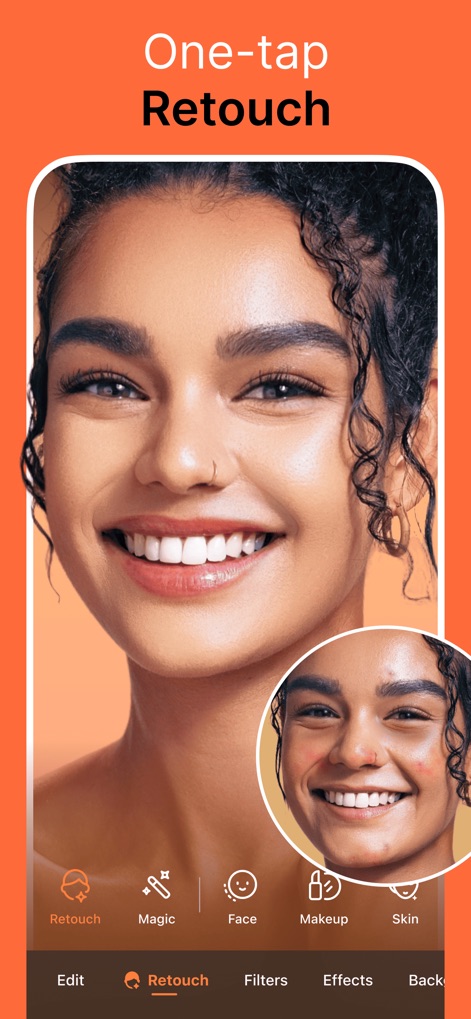
원탭 리터치
사용자는 원터치 리터치 기능으로 피부 결점을 제거하고 매끄러운 피부 톤을 연출할 수 있습니다.
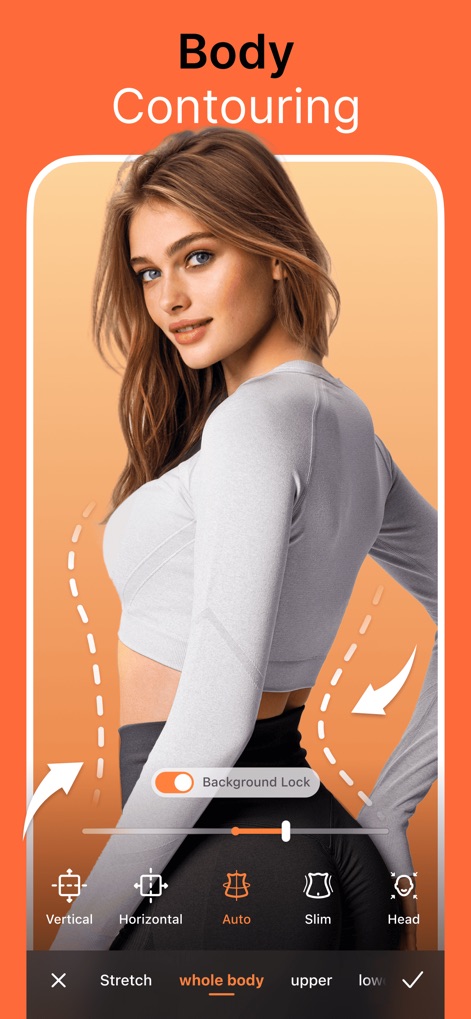
바디 컨투어링
이 앱은 바디 컨투어링 도구를 활용하여 사용자가 신체 라인을 조정하고 비율을 개선할 수 있도록 돕습니다.
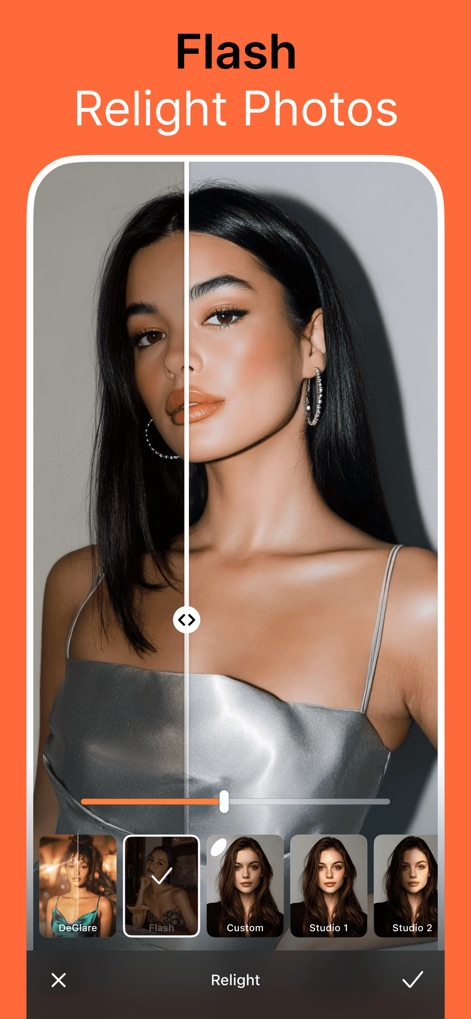
조명 재조정
사용자는 '플래시 재조정' 기능으로 인물 사진의 조명을 조정하여 어두운 부분에 생기를 더하고 밝기를 향상시킬 수 있습니다.
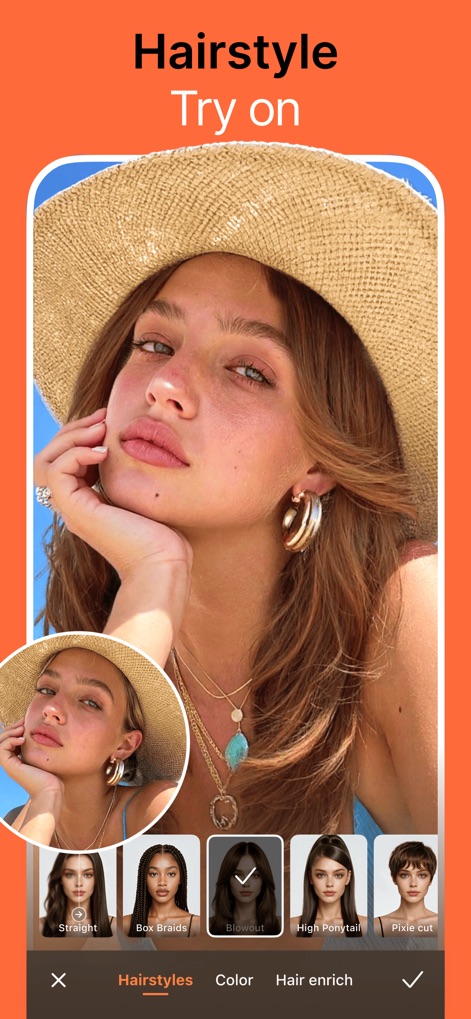
헤어스타일 변신
다양한 헤어스타일 옵션을 통해 사용자는 새로운 머리 모양을 시도하고 자신의 외모에 변화를 주어 색다른 모습을 발견할 수 있습니다.
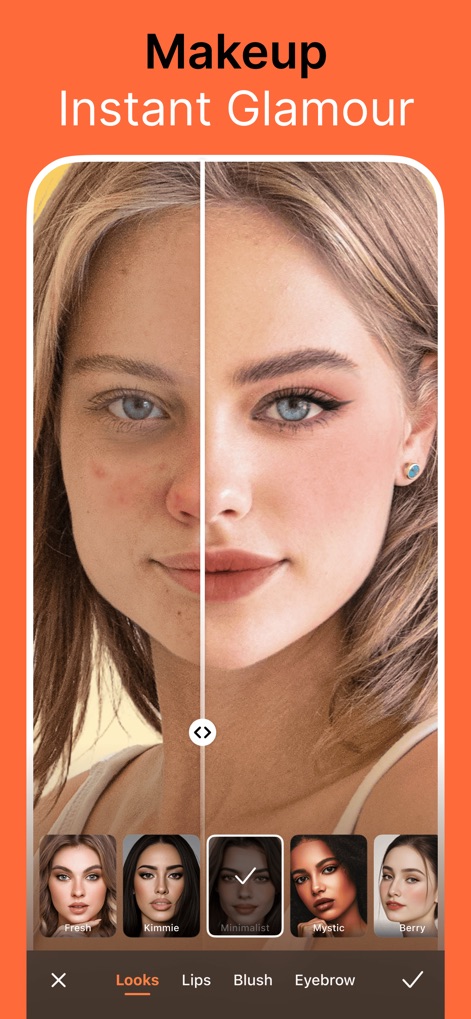
즉석 메이크업
이 도구는 사용자가 가상 메이크업 기능을 활용하여 피부 결점을 커버하고 눈썹과 입술에 다양한 스타일을 적용할 수 있게 합니다.
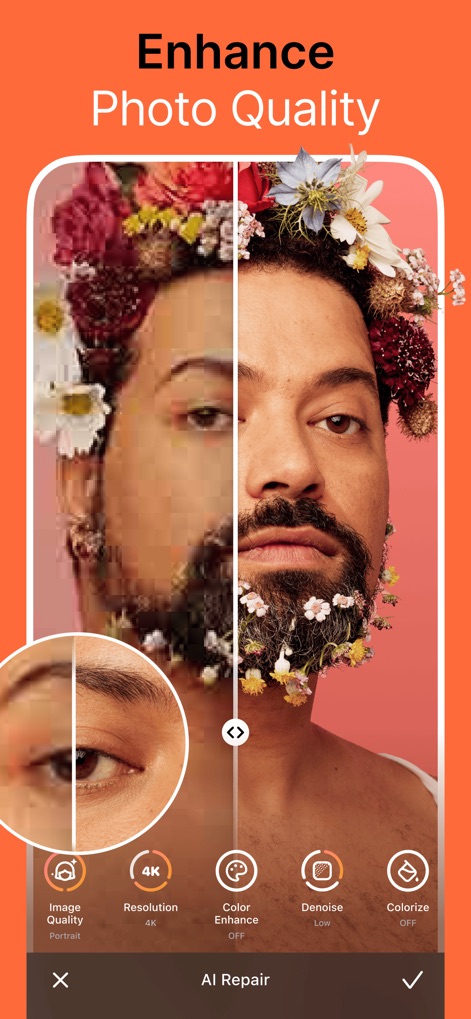
사진 품질 향상
AI 기반의 품질 향상 기능으로 사용자는 저해상도 사진을 고해상도로 변환하고 이미지의 선명도를 높일 수 있습니다.
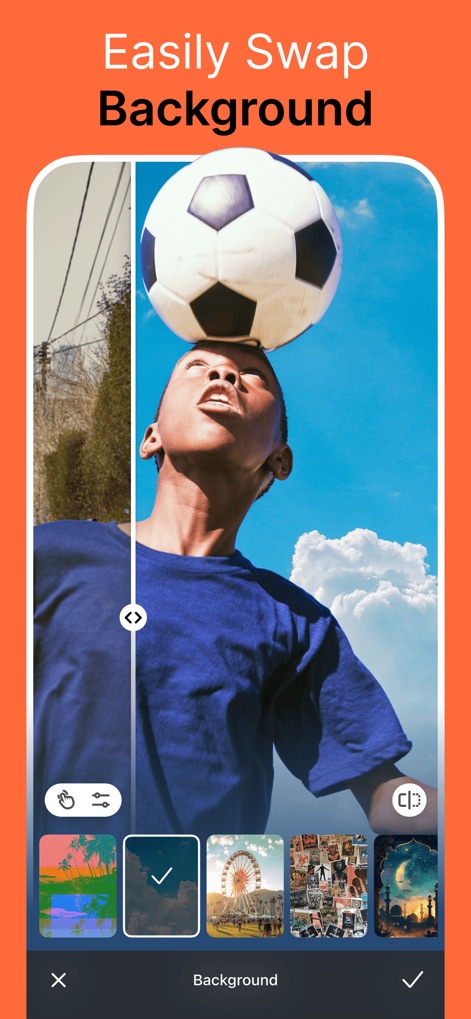
배경 손쉽게 교체
이 앱은 배경 교체 기능을 제공하여 사용자가 인물의 배경을 제거하거나 다양한 패턴으로 변경하여 사진 분위기를 전환할 수 있습니다.
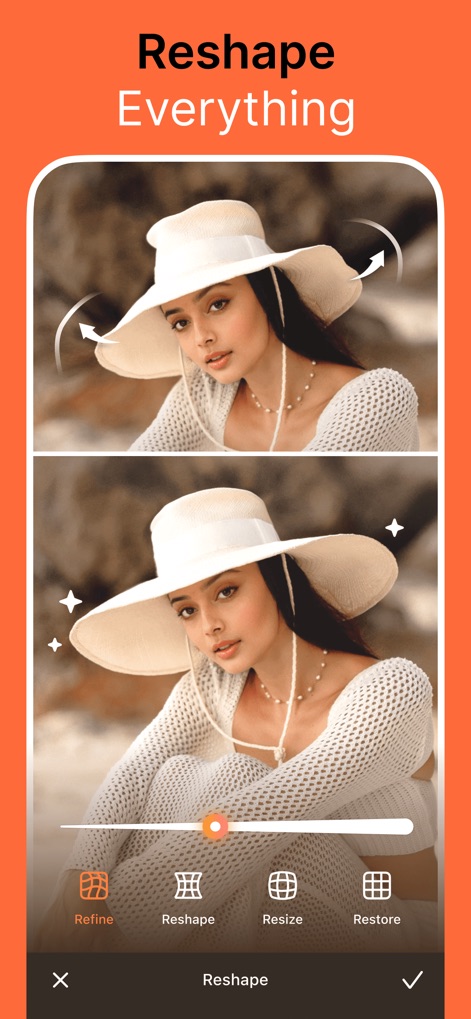
자유로운 형태 변경
사용자는 형태 변경 도구를 통해 이미지 속 피사체의 비율을 섬세하게 조절하고 원하는 모습으로 미세 조정할 수 있습니다.
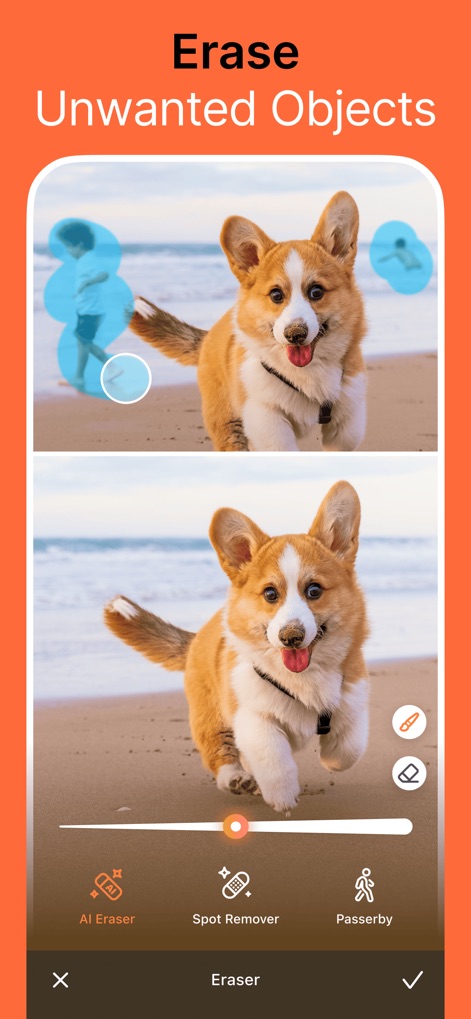
불필요한 객체 제거
이 강력한 기능은 사진에서 원치 않는 객체나 사람을 깔끔하게 지워 배경을 정리하고 피사체에 집중도를 높일 수 있도록 돕습니다.
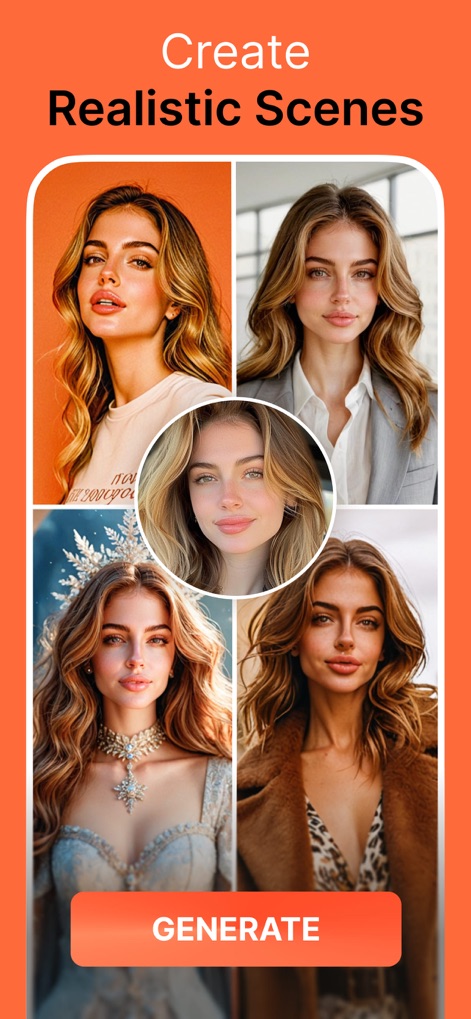
다양한 스타일 생성
사용자는 AI 스타일 익스플로러 기능을 활용하여 자신의 사진을 다양한 의상과 배경에 맞춰 재창조하고 전문적인 느낌의 새로운 이미지를 생성할 수 있습니다.
설명
Download
비슷한 앱
유사한 기능과 사용자 경험을 가진 앱

Meitu- AI Photo & Video Editor
Xiamen Meitu Technology Co., Ltd.

BeautyCam-AI Photo Editor
Xiamen Meitu Technology Co., Ltd.

BeautyPlus-Selfie Photo Editor
PIXOCIAL TECHNOLOGY (SINGAPORE) PTE. LTD.

Peachy - AI Face & Body Editor
SHANTANU PTE. LTD.
YouCam Perfect AI Photo Editor
PERFECT MOBILE CORP.

Persona: AI Beauty Editor
TICKET TO THE MOON, INC.

Wuta Camera - Nice Shot Always
Shanghai Benqumark Network Tech Co., Ltd.

Perfect365 Makeup Photo Editor
Perfect365, Inc.

Polish - AI Photo Editor
SHANTANU PTE. LTD.
이 페이지는 앱이나 개발자의 공식 페이지가 아니며, 정보 제공 및 논평을 목적으로 작성된 독립 편집 간행물입니다. 명시적으로 달리 언급되지 않는 한, 해당 앱이나 개발자는 MWM, Apple, Google Play, 앱 퍼블리셔 또는 앱 개발자와 제휴, 보증, 후원, 승인 또는 공식적으로 연결되어 있지 않으며, 이 페이지의 어떤 내용도 해당 앱이 MWM의 서비스를 사용하여 개발되었음을 의미하지 않습니다. 모든 상표, 로고, 스크린샷 및 기타 콘텐츠는 해당 소유자의 자산입니다.