Asobi: Remote Play
Asobi: Remote Play
다운로드: App Store

이 페이지는 앱이나 개발자의 공식 페이지가 아니며, 정보 제공 및 논평을 목적으로 작성된 독립 편집 간행물입니다. 명시적으로 달리 언급되지 않는 한, 해당 앱이나 개발자는 MWM, Apple, Google Play, 앱 퍼블리셔 또는 앱 개발자와 제휴, 보증, 후원, 승인 또는 공식적으로 연결되어 있지 않으며, 이 페이지의 어떤 내용도 해당 앱이 MWM의 서비스를 사용하여 개발되었음을 의미하지 않습니다. 모든 상표, 로고, 스크린샷 및 기타 콘텐츠는 해당 소유자의 자산입니다.


로고: Asobi: Remote Play
다운로드: App Store

Asobi: Remote Play

120fps, HDR 및 4K 업스케일링으로 콘솔의 잠재력을 최대한 활용하세요. iPhone, iPad 및 Apple Vision Pro에서 초저지연 및 전체 듀얼센스 햅틱을 경험하세요. 성능 타협을 거부하는 게이머를 위해 설계되었습니다.

주요 수치

다운로드

100

사용자 평점

3.8/5

총 평가 수

0

개발사

Inque

카테고리

Games

지원 언어

1

최신 버전

1.0.9

크기

14.8 MB

출시일

2025년 11월 26일
기능

콘솔이 받을 자격이 있는 프로 경험

Asobi는 Apple 기기를 최고의 고성능 리모트 플레이 클라이언트로 전환하여 하드코어 게이머를 위해 설계된 기능으로 공식 표준을 능가합니다.

프로급 비주얼 및 성능

4K ProMotion 업스케일링 및 HDR 지원과 함께 놀라운 120 FPS로 게임을 경험하여 직접 HDMI 연결에 버금가는 시각적 경험을 제공합니다.

차세대 컨트롤러 몰입감

듀얼센스 엣지 및 백본 원에 대한 전체 지원과 통합 햅틱, 라이트바 동기화 및 총 게임 플레이 정밀도를 위한 자이로 지원.

다음 스크린샷과 설명은 앱의 공식 스토어 목록에서 직접 가져온 것이며 앱 개발자의 자산입니다.

앱 스토어

스크린샷
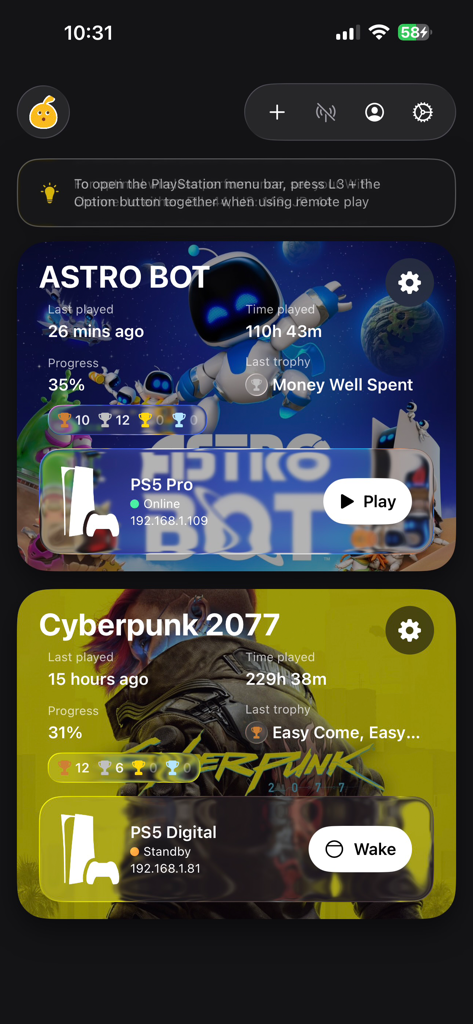
Asobi: Remote Play - Asobi 앱 대시보드에 Astro Bot 및 Cyberpunk 2077에 대한 PlayStation 게임 진행 상황 및 콘솔 연결 상태 표시
Asobi 앱 대시보드에 Astro Bot 및 Cyberpunk 2077에 대한 PlayStation 게임 진행 상황 및 콘솔 연결 상태 표시

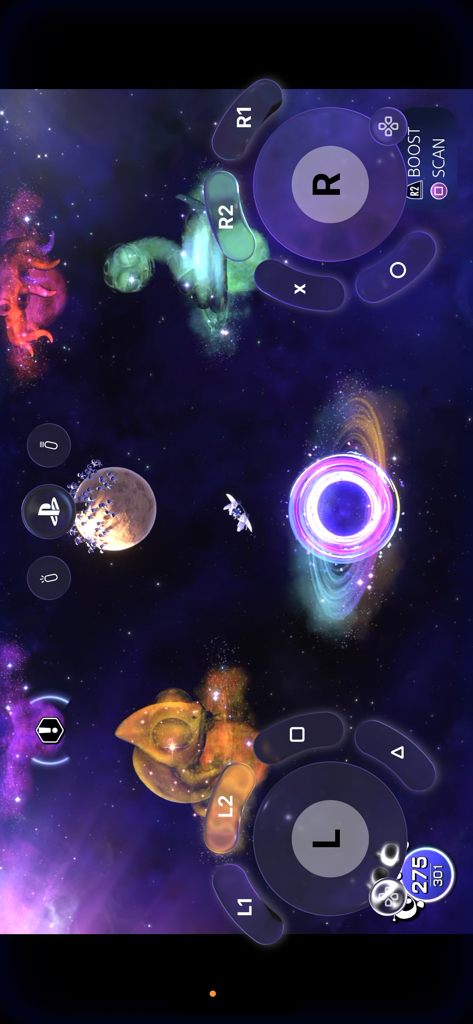
Asobi: Remote Play - Asobi Remote Play 앱에 모바일 게임을 위한 가상 컨트롤러 오버레이 표시
Asobi Remote Play 앱에 모바일 게임을 위한 가상 컨트롤러 오버레이 표시

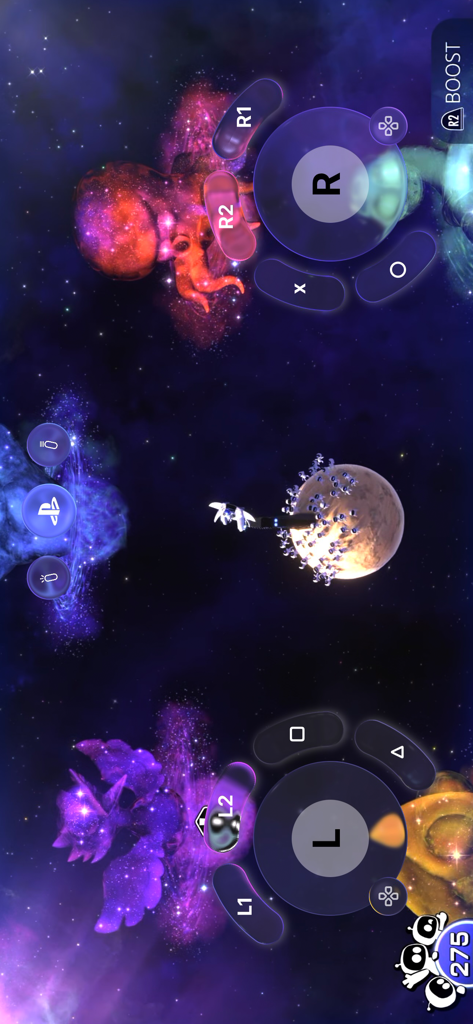
Asobi: Remote Play - Asobi Remote Play 앱 인터페이스에 모바일 장치에서 PlayStation 게임을 플레이하기 위한 가상 컨트롤러 오버레이 표시

Asobi Remote Play 앱 인터페이스에 모바일 장치에서 PlayStation 게임을 플레이하기 위한 가상 컨트롤러 오버레이 표시

설명

This app turns your iPhone or iPad into a high-quality remote play client for your PlayStation® 4 and PlayStation® 5, with support for real controllers, virtual buttons and smart streaming. Core experience: • Account cloud sync - keep your consoles and settings in sync across devices. • Connect and remote play from your PS4 or PS5 • Multiple accounts - sign in with both local and PSN accounts. • Game info & progress - see what you’re playing and how far you’ve come. • 1080p / 30 fps SDR streaming - smooth, sharp video that just works. • Automatic bitrate - the app adapts quality to your network. • Special Backbone controller support with an experience akin to the PlayStation Portal • Built-in virtual controller overlay for on-screen play. Unlock the full mobile experience with a single in-app purchase: • Full Dualshock 4, Dualsense, Dualsense Edge support • HDR video - take full advantage of your device’s color and contrast. • 1080 / 60 fps streaming - double the smoothness for responsive play. • ProMotion upscaling (4k) & up to 120 fps (on supported devices). • Low latency modes for lower lag between the PlayStation and your device. • Manual bitrate control - tune quality and bandwidth to your network. • Experimental FEC mode - helps recover from visual skips on unstable Wi-Fi. • Audio settings - reduce sound delay and fine-tune behavior. • Controller haptics - feel more of the game. • Zoom & Pan - crop and focus the part of the screen that matters most for a full screen experience! • On-screen lightbar halo - visualize controller status right on your display. • On-device gyro support - emulate your controller gryo on iPhone or iPad. • On-device haptics - subtle taps and feedback from the device itself. Disclaimer Asobi is a remote play client for PlayStation®4 and PlayStation®5 and is not affiliated with or endorsed by Sony Interactive Entertainment. PlayStation®, Dualshock®, Dualsense®, PlayStation Portal®, PlayStation®4, PlayStation®5 are trademarks of the Sony Group Corporation.

Download

다운로드: App Store

이 페이지는 앱이나 개발자의 공식 페이지가 아니며, 정보 제공 및 논평을 목적으로 작성된 독립 편집 간행물입니다. 명시적으로 달리 언급되지 않는 한, 해당 앱이나 개발자는 MWM, Apple, Google Play, 앱 퍼블리셔 또는 앱 개발자와 제휴, 보증, 후원, 승인 또는 공식적으로 연결되어 있지 않으며, 이 페이지의 어떤 내용도 해당 앱이 MWM의 서비스를 사용하여 개발되었음을 의미하지 않습니다. 모든 상표, 로고, 스크린샷 및 기타 콘텐츠는 해당 소유자의 자산입니다.








