Attendant Pro for Zoom
다운로드: App Store

이 페이지는 앱이나 개발자의 공식 페이지가 아니며, 정보 제공 및 논평을 목적으로 작성된 독립 편집 간행물입니다. 명시적으로 달리 언급되지 않는 한, 해당 앱이나 개발자는 MWM, Apple, Google Play, 앱 퍼블리셔 또는 앱 개발자와 제휴, 보증, 후원, 승인 또는 공식적으로 연결되어 있지 않으며, 이 페이지의 어떤 내용도 해당 앱이 MWM의 서비스를 사용하여 개발되었음을 의미하지 않습니다. 모든 상표, 로고, 스크린샷 및 기타 콘텐츠는 해당 소유자의 자산입니다.


로고: Attendant Pro for Zoom
다운로드: App Store

Attendant Pro for Zoom

iPad를 전용 전화 교환대로 변환하세요. 원활하고 전문적인 회의를 이끄는 데 집중할 수 있도록 참가자, 소회의실 및 대기실을 손쉽게 관리하세요.

주요 수치

다운로드

9K+

사용자 평점

4.9/5

총 평가 수

0

개발사

Think Tap Work, LLC

카테고리

Business

지원 언어

5

최신 버전

3.2

크기

213.6 MB

출시일

2020년 10월 22일
기능

회의를 완벽하게 제어하세요

iPad 또는 iPhone을 전문적인 회의 전화 교환대로 변환하세요. 메뉴를 뒤지는 대신 두 번째 화면에서 손쉽게 정확하게 이끌어 가세요.

원탭 참가자 제어

'모두 음소거' 및 '자동 음소거' 기능으로 번거로움 없이 즉시 방해 요소를 제거하세요. 복잡한 Zoom 메뉴를 뒤지지 않고 전문적인 분위기를 유지하세요.

프로 수준의 참여 워크플로우

Q&A 세션을 마스터하세요. 한 번의 탭으로 참가자가 손을 들 때 오디오, 비디오, 스포트라이트를 동시에 처리하여 대화를 원활하게 유지하세요.

다음 스크린샷과 설명은 앱의 공식 스토어 목록에서 직접 가져온 것이며 앱 개발자의 자산입니다.

앱 스토어

스크린샷
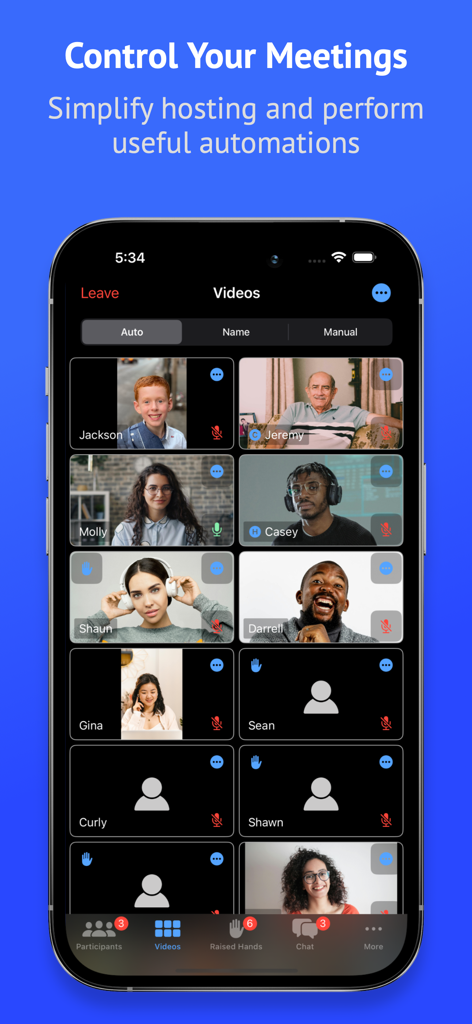
Attendant Pro for Zoom - Zoom용 Attendant Pro 앱 인터페이스에 호스팅 컨트롤이 있는 회의 참가자 비디오 그리드 표시
Zoom용 Attendant Pro 앱 인터페이스에 호스팅 컨트롤이 있는 회의 참가자 비디오 그리드 표시

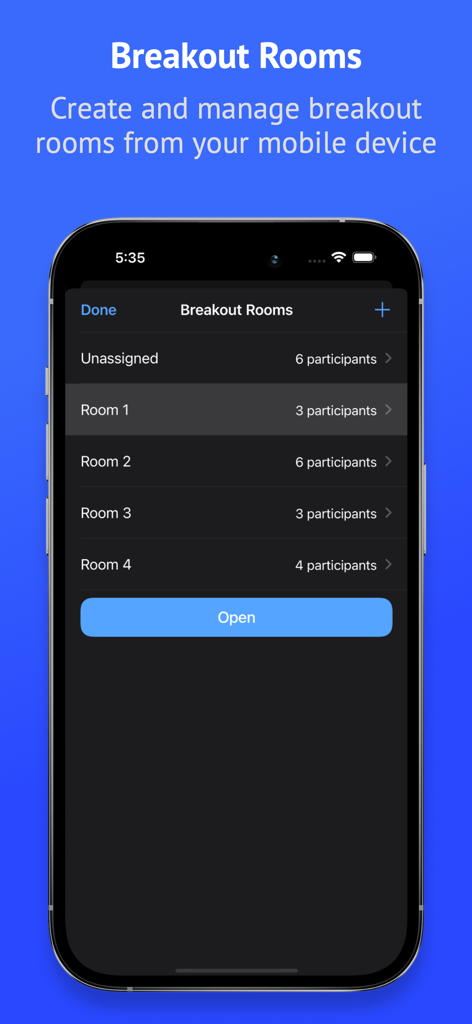
Attendant Pro for Zoom - 모바일 장치에서 소회의실 생성 및 참가자 관리를 보여주는 Zoom용 Attendant Pro 인터페이스
모바일 장치에서 소회의실 생성 및 참가자 관리를 보여주는 Zoom용 Attendant Pro 인터페이스

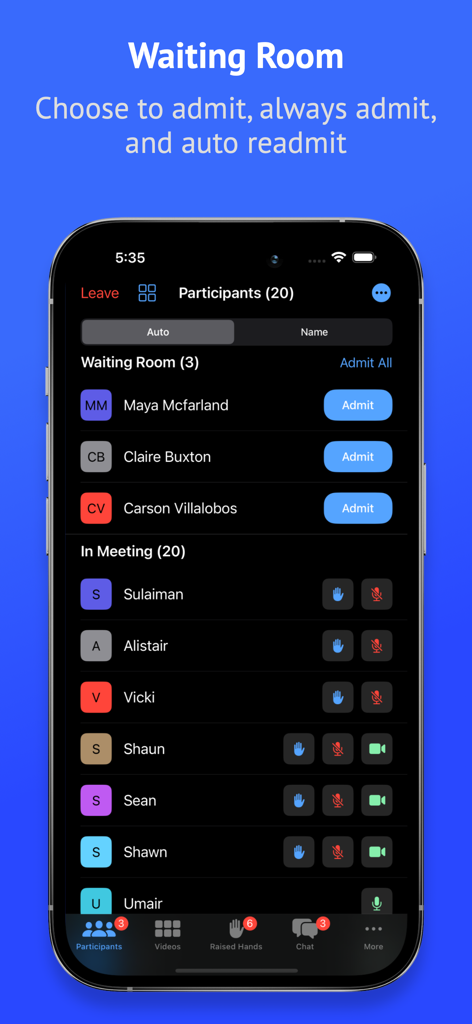
Attendant Pro for Zoom - 모바일 장치에서 대기실 및 참가자 목록 관리를 보여주는 Zoom용 Attendant Pro 인터페이스.
모바일 장치에서 대기실 및 참가자 목록 관리를 보여주는 Zoom용 Attendant Pro 인터페이스.

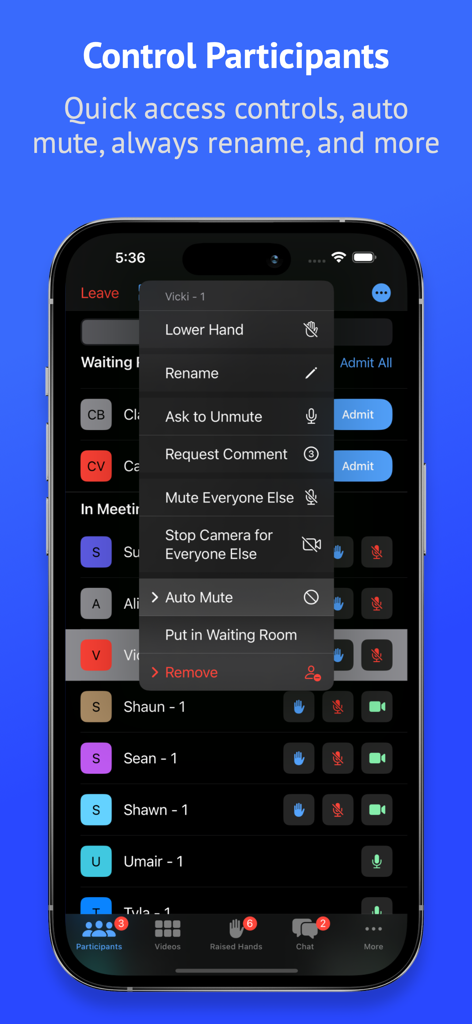
Attendant Pro for Zoom - 음소거 전체 및 대기실 컨트롤을 포함한 고급 참가자 관리 도구를 보여주는 Zoom용 Attendant Pro의 모바일 앱 인터페이스
음소거 전체 및 대기실 컨트롤을 포함한 고급 참가자 관리 도구를 보여주는 Zoom용 Attendant Pro의 모바일 앱 인터페이스

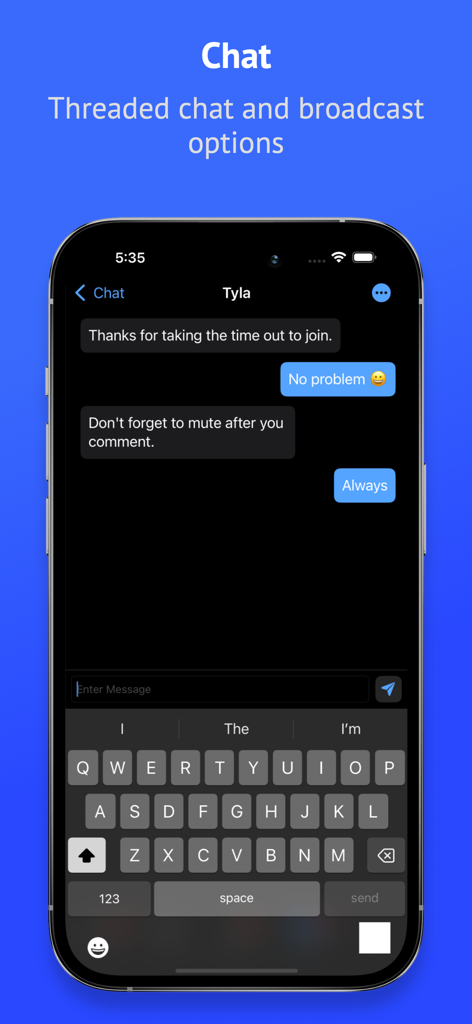
Attendant Pro for Zoom - Zoom용 Attendant Pro 앱의 스레드 채팅 및 브로드캐스트 옵션 화면
Zoom용 Attendant Pro 앱의 스레드 채팅 및 브로드캐스트 옵션 화면

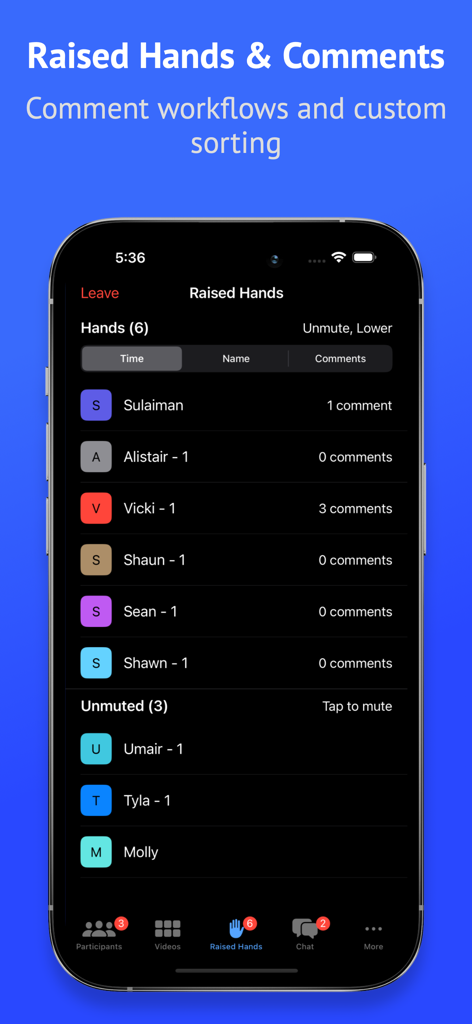
Attendant Pro for Zoom - 회의 관리를 위해 손을 든 참가자 목록과 댓글 수를 보여주는 Zoom용 Attendant Pro 인터페이스.
회의 관리를 위해 손을 든 참가자 목록과 댓글 수를 보여주는 Zoom용 Attendant Pro 인터페이스.

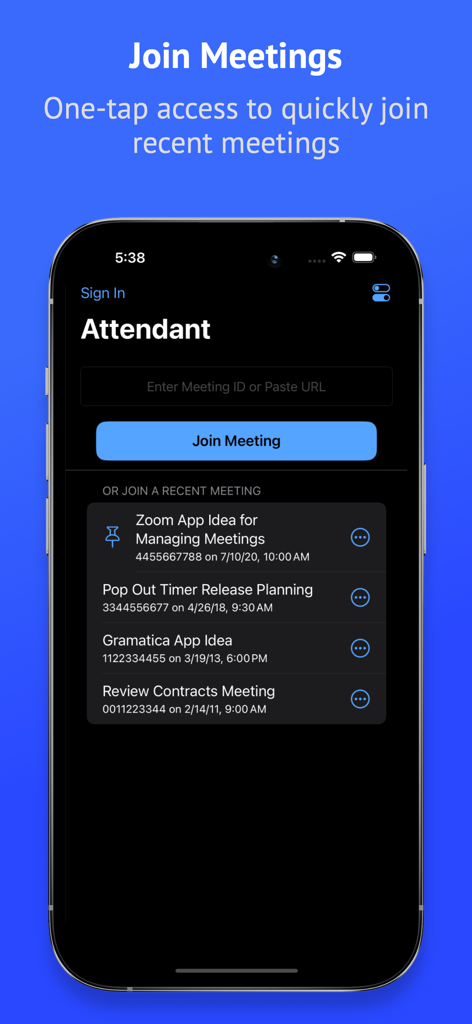
Attendant Pro for Zoom - 회의 ID를 입력할 필드와 최근 회의 목록이 있는 참가 회의 화면을 보여주는 Zoom용 Attendant Pro의 모바일 인터페이스.
회의 ID를 입력할 필드와 최근 회의 목록이 있는 참가 회의 화면을 보여주는 Zoom용 Attendant Pro의 모바일 인터페이스.

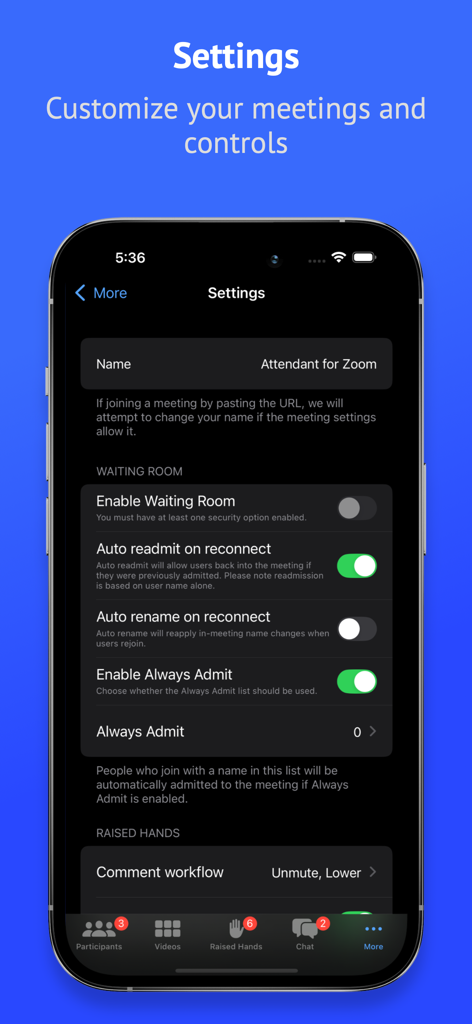
Attendant Pro for Zoom - 대기실 및 손들기 워크플로우에 대한 사용자 지정 옵션을 보여주는 Zoom용 Attendant Pro의 설정 인터페이스
대기실 및 손들기 워크플로우에 대한 사용자 지정 옵션을 보여주는 Zoom용 Attendant Pro의 설정 인터페이스

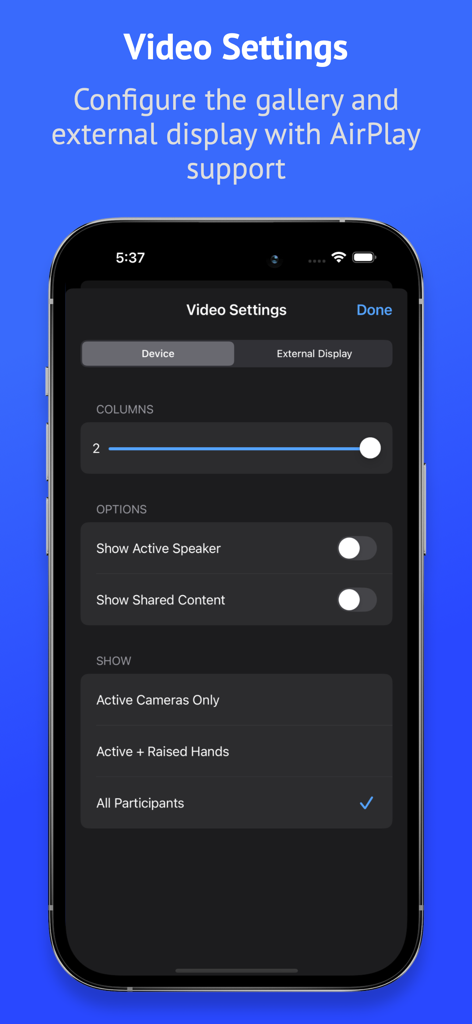
Attendant Pro for Zoom - Zoom용 Attendant Pro의 비디오 설정 화면으로 갤러리 레이아웃 및 외부 디스플레이 구성 옵션 표시
Zoom용 Attendant Pro의 비디오 설정 화면으로 갤러리 레이아웃 및 외부 디스플레이 구성 옵션 표시

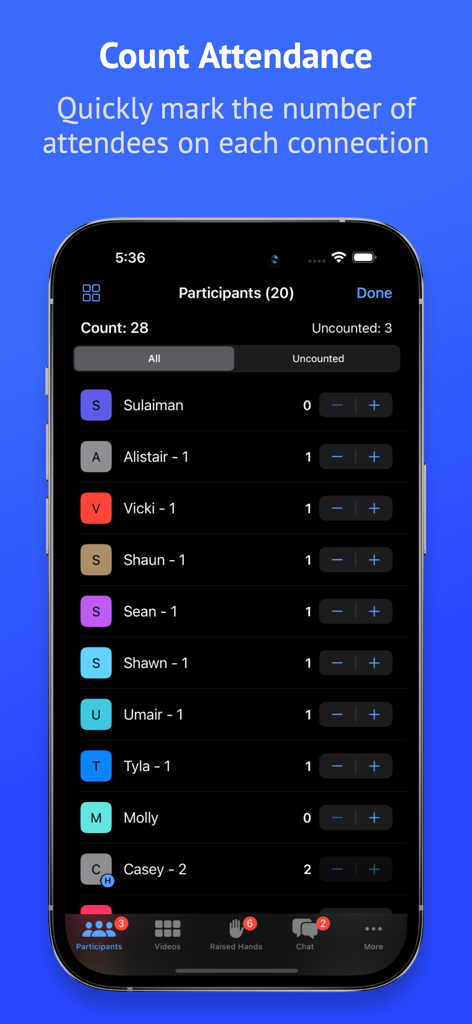
Attendant Pro for Zoom - Zoom용 Attendant Pro 앱의 출석 계산 기능을 표시하는 스마트폰 화면.

Zoom용 Attendant Pro 앱의 출석 계산 기능을 표시하는 스마트폰 화면.

설명

Search for "Attendant for Zoom" to try a free version before your purchase. Easily manage audio/video, counts, raised hands, breakout rooms, chats, and your waiting room. Use Attendant as host/co-host while connected to a Zoom meeting from another device. Tap into these useful features: PARTICIPANTS • Quick tap management of participant audio/video • Export participant list for record keeping • Actions to mute/unmute all and turn on/off all cameras • Mute Everyone Else (everyone but selected participant) • Turn Off Camera for Everyone Else (everyone but selected participant) • Count attendance to quickly mark the number of attendees on each connection (based on count in name) • Rename mode to quickly rename participants • Always Rename: optionally choose to apply a rename any time a user connects • Auto Mute: Attendant will attempt to mute designated participants whenever they unmute themselves VIDEO • Manage participants from the video grid • Search from the video grid • Configure columns to fit more videos on screen • Manually sort • Custom configuration of external display (connected or with AirPlay) • Quick Action: choose between controlling the mic or camera or requesting a comment BREAKOUT ROOMS • Create breakout rooms from your mobile device • Make user assignments • Open, close, rename, and remove rooms • Shuffle: reorganize rooms automatically CHAT • Threaded chat • Chat broadcast: send a direct message to multiple participants at once RAISED HANDS • Configure comment workflow: control audio, video, spotlighting, and hand with a single tap • Comment counting • Sort raised hands by time, name, or comment count WAITING ROOM • Easily manage your Waiting Room • Always Admit: optionally choose to always admit specific names into your meeting • Auto readmit participants when they reconnect Please note that webinars are not currently supported. Attendant for Zoom uses the Zoom SDK but is not endorsed, certified, warrantied, or supported by Zoom Video Communications, Inc. If Zoom changes their policies or capabilities of their SDK this app may lose access.

Download

다운로드: App Store

이 페이지는 앱이나 개발자의 공식 페이지가 아니며, 정보 제공 및 논평을 목적으로 작성된 독립 편집 간행물입니다. 명시적으로 달리 언급되지 않는 한, 해당 앱이나 개발자는 MWM, Apple, Google Play, 앱 퍼블리셔 또는 앱 개발자와 제휴, 보증, 후원, 승인 또는 공식적으로 연결되어 있지 않으며, 이 페이지의 어떤 내용도 해당 앱이 MWM의 서비스를 사용하여 개발되었음을 의미하지 않습니다. 모든 상표, 로고, 스크린샷 및 기타 콘텐츠는 해당 소유자의 자산입니다.








