
이 페이지는 앱이나 개발자의 공식 페이지가 아니며, 정보 제공 및 논평을 목적으로 작성된 독립 편집 간행물입니다. 명시적으로 달리 언급되지 않는 한, 해당 앱이나 개발자는 MWM, Apple, Google Play, 앱 퍼블리셔 또는 앱 개발자와 제휴, 보증, 후원, 승인 또는 공식적으로 연결되어 있지 않으며, 이 페이지의 어떤 내용도 해당 앱이 MWM의 서비스를 사용하여 개발되었음을 의미하지 않습니다. 모든 상표, 로고, 스크린샷 및 기타 콘텐츠는 해당 소유자의 자산입니다.


BestTracker - 百事AA记账
룸메이트, 커플, 친구를 위한 최고의 협업 재정 허브. AI 음성 녹음, 영수증 사진 스냅, 정확한 비용 분할로 청구서를 추적하여 그룹 재정을 투명하고 스트레스 없이 유지하세요.
다운로드
235K+사용자 평점
총 평가 수
5K+개발사
카테고리
Finance지원 언어
2최신 버전
3.12.65크기
129.7 MB출시일
2021년 3월 26일공유 재정을 함께 관리하세요
현대 커플 및 룸메이트가 예산을 추적하고, 청구서를 공정하게 분할하며, 어색한 대화 없이 완벽한 재정 투명성을 확보할 수 있는 최고의 도구입니다.
원활한 협업 장부
전용 장부로 가계 청구서, 그룹 여행 또는 공유 월세를 관리하세요. 파트너나 룸메이트를 초대하여 실시간으로 지출을 추적하고 부채를 정산하세요.
마찰 없는 AI 기록
수동 데이터 입력에 시간을 낭비하지 마세요. AI 음성 명령을 사용하거나 영수증 사진을 찍어 이동 중에 즉시 지출을 분류하고 기록하세요.
자주 묻는 질문
에 대해 알아야 할 모든 것 BestTracker - 百事AA记账
BestTracker - 百事AA记账란 무엇인가요?
BestTracker는 공유 재정을 위한 경비 관리 앱입니다. 여러 가계부를 생성 및 공유하고, 비용을 분담하며, 예산을 추적하고, 다양한 스마트 기능으로 보고서를 생성할 수 있습니다.
BestTracker는 공유 지출 관리에 어떻게 도움이 되나요?
BestTracker를 사용하면 여러 가계부를 생성하고 파트너나 룸메이트와 같은 다른 사람들과 공유할 수 있습니다. 균등 분할, 비율, 몫, 정확한 금액 등 다양한 분할 옵션을 지원합니다.
BestTracker는 음성 입력으로 청구서를 추가하는 것을 지원하나요?
네, BestTracker는 AI 음성 녹음 기능을 제공합니다. 사용자는 문장을 말하여 청구서를 추가하면 앱이 자동으로 금액, 통화, 시간 및 설명을 분류합니다.
사진으로 BestTracker에 청구서를 추가할 수 있나요?
네, BestTracker를 사용하면 영수증 사진이나 스크린샷을 찍어 청구서를 추가할 수 있습니다. 음성 입력이 불편할 때 편리하게 청구서를 저장하는 방법입니다.
BestTracker는 사용자 개인 정보와 데이터를 어떻게 보호하나요?
BestTracker는 기기 암호화를 통해 개인 정보를 보호합니다. 접근 방법에는 얼굴 인식, 지문 인식 및 비밀번호 보호가 포함되어 사용자 데이터를 효과적으로 보호합니다.
BestTracker는 반복 거래를 지원하나요?
네, BestTracker는 회전 수입 및 지불을 지원합니다. 사용자는 고정 수입 및 지출을 설정하면 시스템이 급여나 임대료와 같이 정기적으로 발생하는 청구서를 자동으로 기록합니다.
BestTracker 앱에서 예산을 설정할 수 있나요?
네, BestTracker에는 다중 사용자 예산 센터가 포함되어 있습니다. 다중 사용자 및 다중 장부 예산을 지원하며, 일별, 월별, 연별 및 다양한 범주별로 설정할 수 있습니다.
BestTracker에서 사용할 수 있는 보고서 기능은 무엇인가요?
BestTracker는 팀, 개인 및 기타 회원의 보고서를 포함한 다기능 통계 보고서를 제공합니다. 또한 지출 추세 및 회원 지출 비율을 표시합니다.
BestTracker는 거래 데이터를 내보낼 수 있나요?
네, BestTracker는 거래 내보내기를 지원합니다. 데이터는 HTML 및 Excel을 포함한 다양한 형식으로 내보낼 수 있으며, Excel 내보내기에는 선택적으로 영수증이 포함될 수 있습니다.
BestTracker VIP의 구독 옵션은 무엇인가요?
BestTracker VIP 구독은 1개월, 3개월 또는 12개월 기간을 제공합니다. 이 플랜은 각각 연속 월간, 분기별 또는 연간 자동 갱신 옵션을 제공합니다.
BestTracker VIP 구독 자동 갱신을 취소하려면 어떻게 해야 하나요?
BestTracker VIP 자동 갱신을 취소하려면 현재 구독 기간이 만료되기 최소 24시간 전에 iTunes/Apple ID 설정 관리에서 수동으로 종료해야 합니다.
BestTracker는 여러 통화를 지원하나요?
네, BestTracker는 100개 이상의 통화를 실시간 환율로 지원하는 다중 통화 준비가 되어 있습니다. 사용자는 앱 내에서 언제든지 환율을 사용자 정의할 수 있습니다.
BestTracker 가계부에서 회원이 다른 권한을 가질 수 있나요?
네, BestTracker는 유연한 회원 권한을 제공합니다. 각 계정은 다른 권한으로 공유될 수 있으며, 뷰어, 편집자 또는 관리자와 같은 역할을 할당할 수 있습니다.
다음 스크린샷과 설명은 앱의 공식 스토어 목록에서 직접 가져온 것이며 앱 개발자의 자산입니다.
앱 스토어
스크린샷
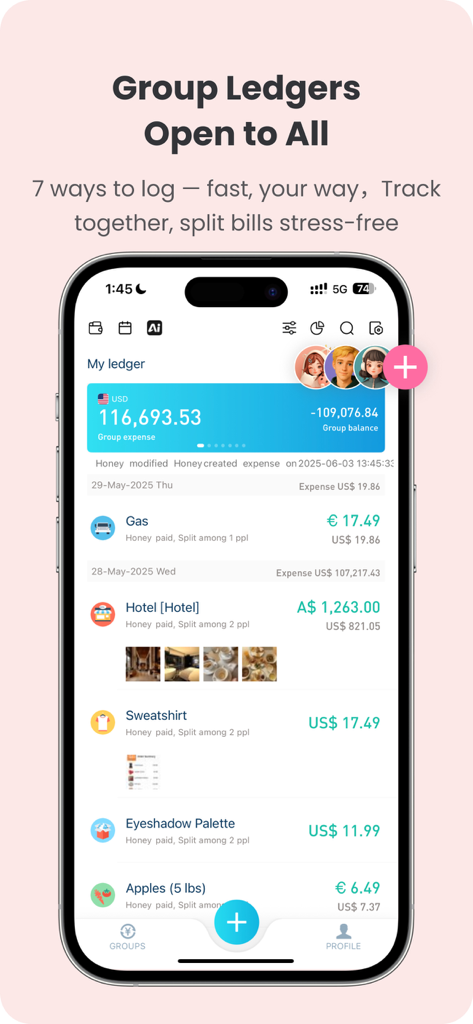
BestTracker 앱 인터페이스가 친구 및 룸메이트를 위한 공유 그룹 장부 및 청구서 분할을 보여줌
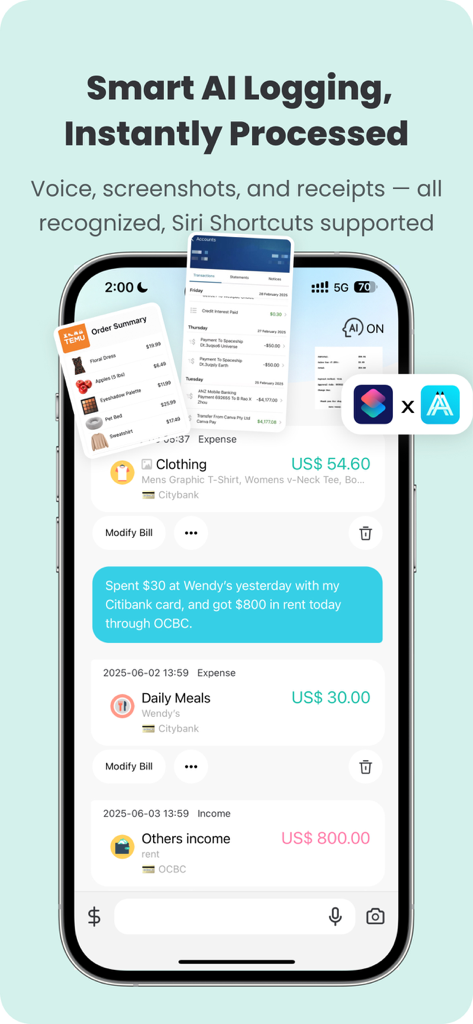
BestTracker 앱 인터페이스가 Siri 바로 가기 통합과 함께 AI 음성 및 스크린샷 지출 기록을 보여줌
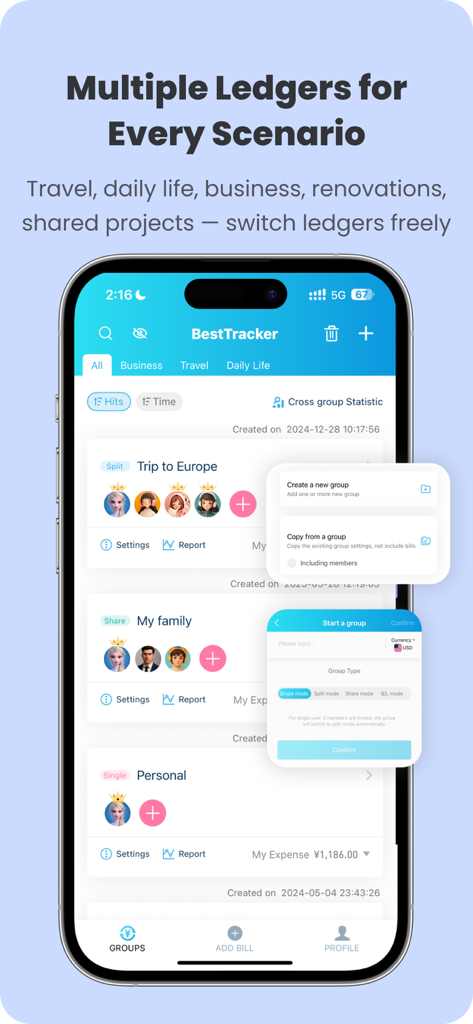
BestTracker 앱 화면이 여행 및 개인 지출 추적을 위한 여러 공유 장부를 표시함
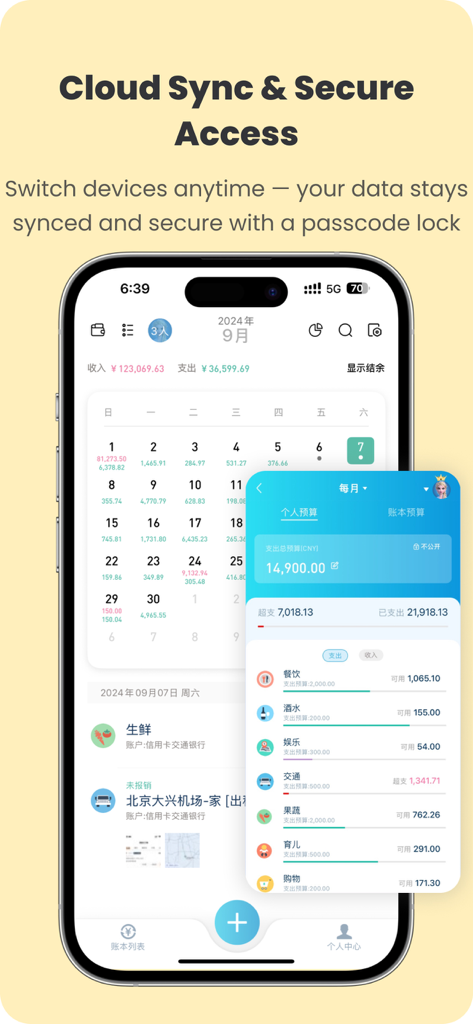
BestTracker 모바일 앱 인터페이스가 클라우드 동기화 및 안전한 암호 기능을 보여줌
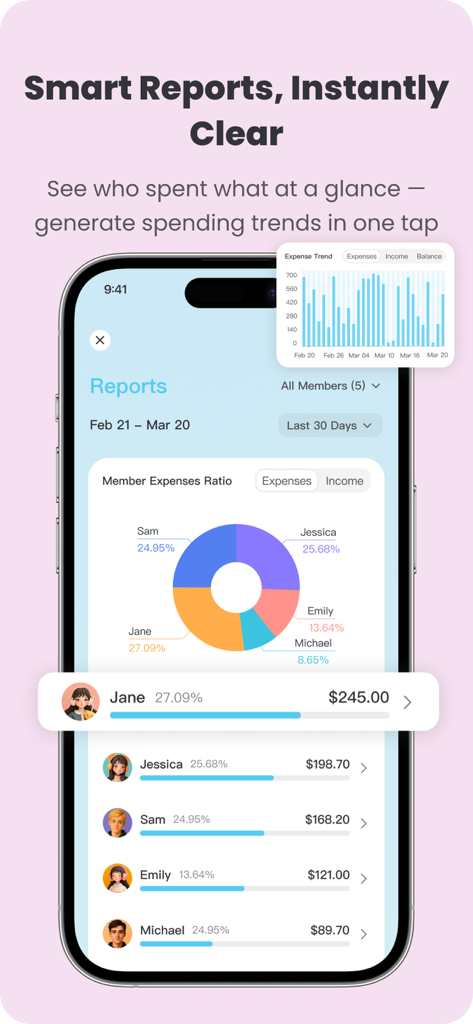
BestTracker 앱 인터페이스가 회원 지출 비율 원형 차트 및 월별 지출 추세를 보여줌
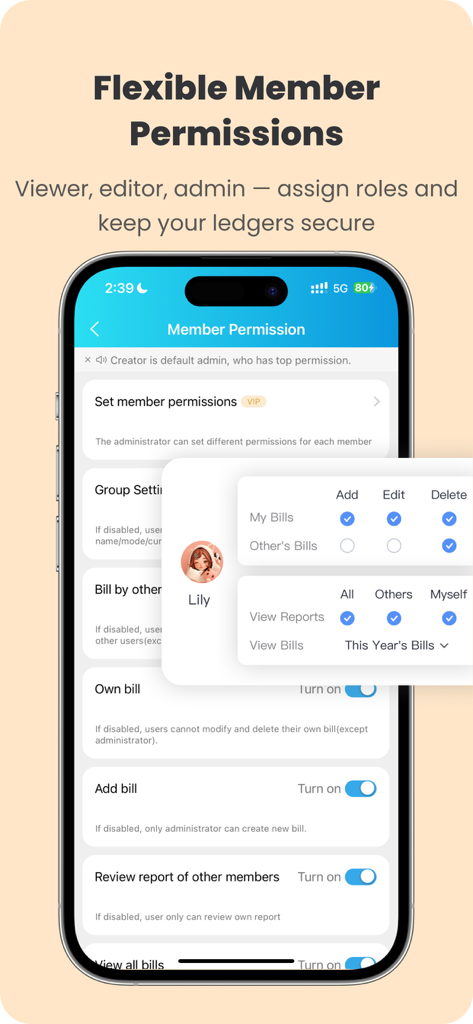
BestTracker의 공유 장부에 대한 유연한 회원 권한 설정을 보여주는 모바일 앱 화면
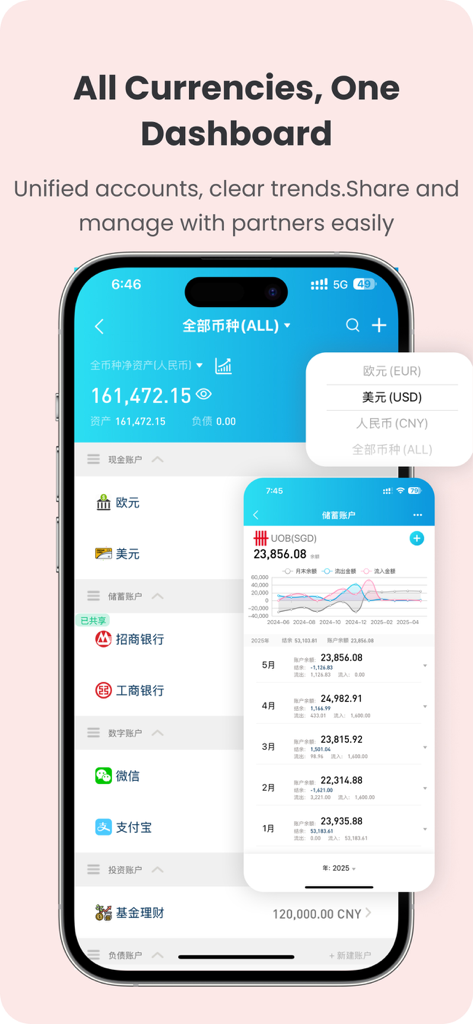
BestTracker 모바일 앱 인터페이스가 다중 통화 계정 및 재정 추세 시각 대시보드를 보여줌
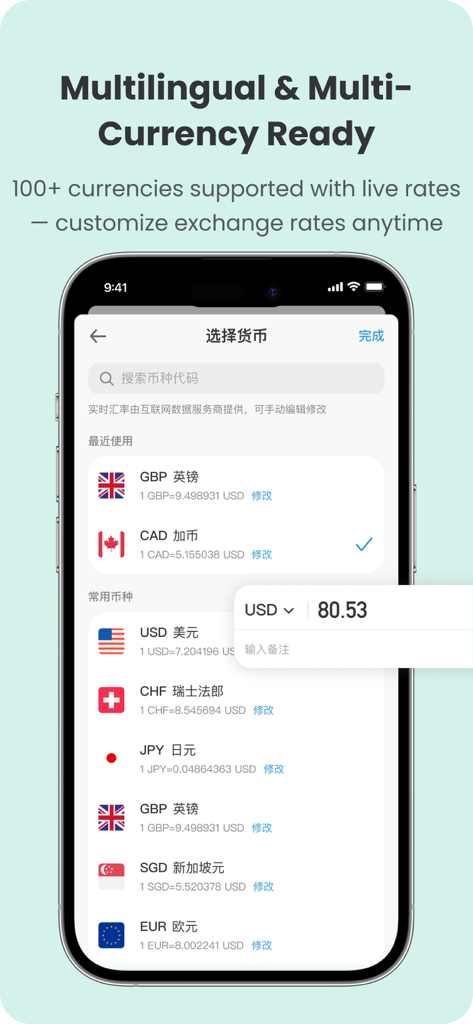
BestTracker 앱 인터페이스가 실시간 환율과 함께 지원되는 100개 이상의 통화 목록을 보여줌
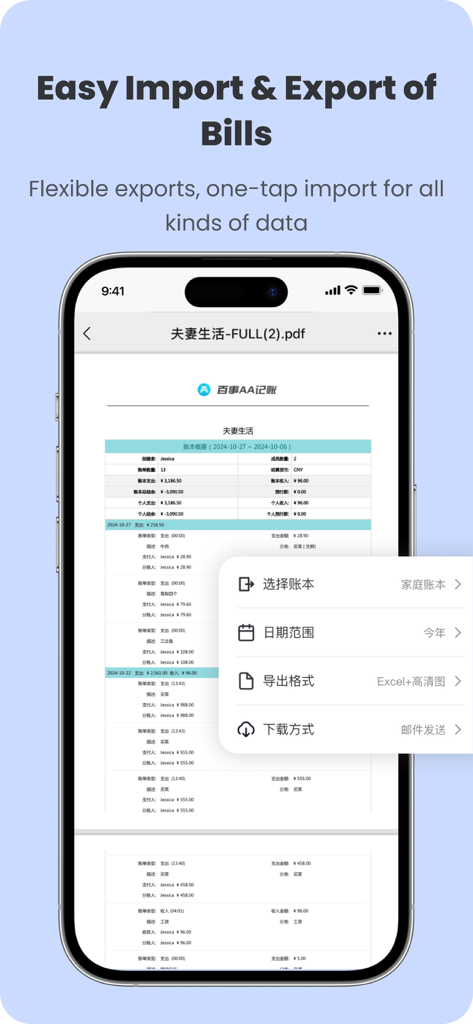
BestTracker 앱 인터페이스가 스마트폰 화면에서 Excel 및 PDF 형식의 청구서 내보내기 설정을 보여줌
설명
Download
비슷한 앱
유사한 기능과 사용자 경험을 가진 앱

tricount: Split & Settle Bills
Tricount SA

Splid – Split group bills
Nicolas Jersch

Settle Up - Group Expenses
Step Up Labs, Inc.

Splitser - WieBetaaltWat
Splitser BV

Bill Bear
XING YU SU

Splittr - Expense Splitting
RWichmann GmbH

割り勘 レコペイ- 共有家計簿・旅行計画・レシート読み取り
Ryo Iida

Cost Split
Jacob Ivstam

Who Owes Me - IOU Tracker
Roman Voglhuber
이 페이지는 앱이나 개발자의 공식 페이지가 아니며, 정보 제공 및 논평을 목적으로 작성된 독립 편집 간행물입니다. 명시적으로 달리 언급되지 않는 한, 해당 앱이나 개발자는 MWM, Apple, Google Play, 앱 퍼블리셔 또는 앱 개발자와 제휴, 보증, 후원, 승인 또는 공식적으로 연결되어 있지 않으며, 이 페이지의 어떤 내용도 해당 앱이 MWM의 서비스를 사용하여 개발되었음을 의미하지 않습니다. 모든 상표, 로고, 스크린샷 및 기타 콘텐츠는 해당 소유자의 자산입니다.