
이 페이지는 앱이나 개발자의 공식 페이지가 아니며, 정보 제공 및 논평을 목적으로 작성된 독립 편집 간행물입니다. 명시적으로 달리 언급되지 않는 한, 해당 앱이나 개발자는 MWM, Apple, Google Play, 앱 퍼블리셔 또는 앱 개발자와 제휴, 보증, 후원, 승인 또는 공식적으로 연결되어 있지 않으며, 이 페이지의 어떤 내용도 해당 앱이 MWM의 서비스를 사용하여 개발되었음을 의미하지 않습니다. 모든 상표, 로고, 스크린샷 및 기타 콘텐츠는 해당 소유자의 자산입니다.


Call Recorder iCall
이 앱은 당신이 과거를 지배하게 합니다. 중요한 것을 잊지 않으려면, 다시 듣고 증명하십시오.
다운로드
10M+사용자 평점
총 평가 수
53.1K개발사
카테고리
Business지원 언어
14최신 버전
3.6.0크기
484.0 MB출시일
2019년 1월 23일비즈니스 및 개인 통화 기록을 위한 핵심 기능 평가
Call Recorder iCall: 심층 분석
실시간 통화 녹음 (수신 및 발신)
이 앱은 사용자에게 단 몇 번의 탭만으로 수신 및 발신 통화를 녹음할 수 있는 기능을 제공하여 중요한 대화를 쉽게 기록할 수 있게 합니다.
녹음 파일 저장 및 관리
이 도구는 녹음된 대화를 저장하고, 언제 어디서든 접근하며, 재생하고, 다른 앱으로 공유하는 기능을 제공하여 사용자가 녹음 데이터를 효율적으로 활용할 수 있도록 돕습니다.
무제한 통화 녹음
이 도구는 사용자가 원하는 만큼 많은 대화를 무제한 길이로 녹음할 수 있게 하여, 중요한 정보나 장시간의 통화도 걱정 없이 기록할 수 있도록 합니다.
직관적인 원탭 인터페이스
이 앱은 원탭 인터페이스를 통해 사용자가 쉽고 빠르게 통화 녹음을 시작할 수 있도록 하여 번거로움 없이 기능을 활용할 수 있게 합니다.
자주 묻는 질문
에 대해 알아야 할 모든 것 Call Recorder iCall
How do I record phone calls using Call Recorder iCall?
Call Recorder iCall records calls in one tap. Open the app, press ‘Record,’ and continue your conversation. Recordings are accessible after the call, and you can play or share them.
Does Call Recorder iCall offer a free trial?
Yes, Call Recorder iCall offers a free trial version for 3 days. This trial is included with the 1-week subscription plan and provides access to all available features.
Can Call Recorder iCall record both incoming and outgoing calls?
Yes, Call Recorder iCall records both incoming and outgoing phone calls. These features are part of the Pro Upgrade.
How can I manage my recordings in Call Recorder iCall?
Users can save, access, play, and share recordings within Call Recorder iCall. The Pro Upgrade enhances this with a specific 'Share-and-manage your calls' feature for comprehensive management.
Does my Call Recorder iCall subscription automatically renew?
Yes, Call Recorder iCall subscriptions automatically renew. Users can manage their subscriptions and disable auto-renewal through their Account Settings at least 24 hours before the current period ends.
Does Call Recorder iCall have a security feature like a PIN?
Call Recorder iCall provides a PIN setting feature to secure your recordings and app access. This enhances privacy by requiring a passcode to open the app.
Does Call Recorder iCall transcribe recorded conversations?
Yes, Call Recorder iCall offers a feature to transcribe your calls. This converts the spoken content of your recordings into text for easy review.
What are the available subscription plans for Call Recorder iCall?
Call Recorder iCall provides three subscription options: a 1-week plan with a 3-day trial, a 1-month plan, and an Annual subscription. Pricing may vary by region.
다음 스크린샷과 설명은 앱의 공식 스토어 목록에서 직접 가져온 것이며 앱 개발자의 자산입니다.
앱 스토어
스크린샷

이 앱을 통해 사용자는 진행 중인 통화를 쉽게 녹음할 수 있으며, 직관적인 '녹음' 버튼과 현재 통화 시간을 명확하게 확인할 수 있습니다.
통화 즉시 녹음

사용자는 모든 통화 기록을 한곳에서 편리하게 관리할 수 있으며, 각 기록의 연락처 정보와 전사된(TRANSCRIBED) 대화 내용을 쉽게 확인할 수 있습니다.
녹음 파일 관리
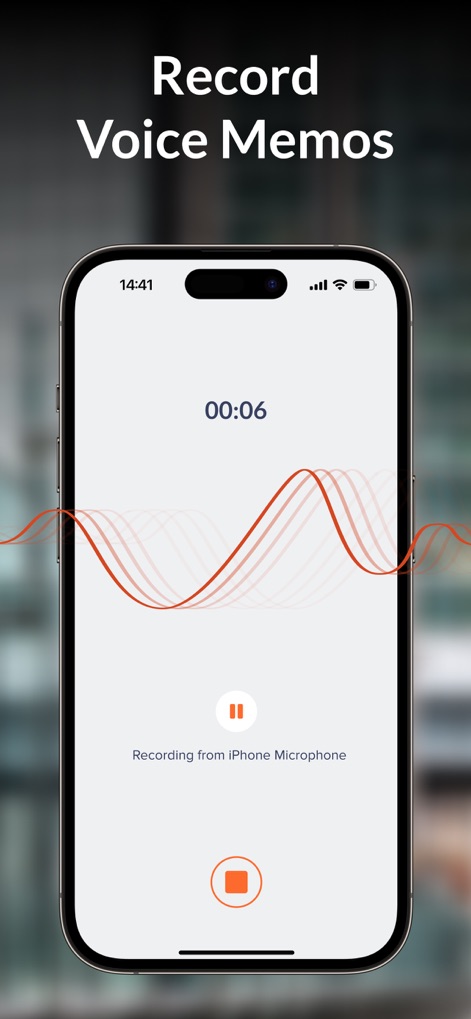
이 도구는 사용자가 별도의 음성 메모를 녹음할 수 있도록 지원하며, 실시간 파형 시각화와 녹음 진행 시간을 정확하게 제공합니다.
음성 메모 기록
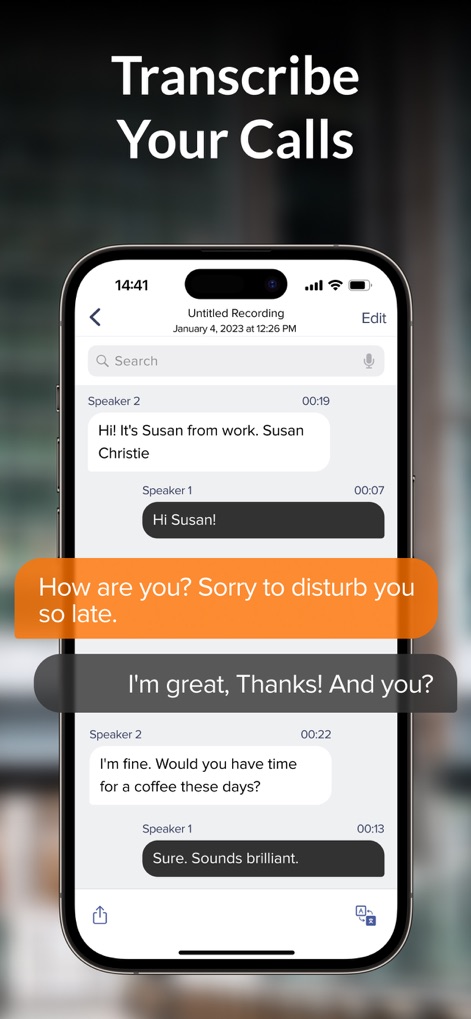
사용자는 녹음된 통화 내용을 텍스트로 정확하게 전사할 수 있으며, 화자별 대화 내용과 메시지의 상세한 시간 표시를 명확하게 확인할 수 있습니다.
통화 내용 전사

이 앱은 사용자 데이터 보호를 위해 PIN 설정 기능을 제공하며, 안전한 접근을 위한 숫자 키패드와 비밀번호 입력 필드를 통해 개인 정보를 보호합니다.
보안 강화 잠금

이 앱의 주요 통계는 수백만 명의 사용자가 이 도구를 신뢰하고 있음을 보여주며, 총 통화 기록 수와 총 녹음 시간을 분 단위로 명확히 제시합니다.
앱 주요 성과
설명
Download
비슷한 앱
유사한 기능과 사용자 경험을 가진 앱

Beside (M1): AI Receptionist
Interface, Inc.

Call Recorder for iPhone.
JatApp LLC

Voice Recorder & Audio Editor
TapMedia Ltd

Call Recorder App ◉ACR MyCalls
AppAmore Limited

Switch - Call recording app
Atlas Guide, Inc.

Call Recorder App-Voice Record
WindTalking LLC

TeleMe – Record on 2nd Number
Gelenk Networks Inc.

Call Recorder: Record All
Henrieta Jaworski

Record Phone Calls App - Auto
Henning Christensen Bonde Søgaard
이 페이지는 앱이나 개발자의 공식 페이지가 아니며, 정보 제공 및 논평을 목적으로 작성된 독립 편집 간행물입니다. 명시적으로 달리 언급되지 않는 한, 해당 앱이나 개발자는 MWM, Apple, Google Play, 앱 퍼블리셔 또는 앱 개발자와 제휴, 보증, 후원, 승인 또는 공식적으로 연결되어 있지 않으며, 이 페이지의 어떤 내용도 해당 앱이 MWM의 서비스를 사용하여 개발되었음을 의미하지 않습니다. 모든 상표, 로고, 스크린샷 및 기타 콘텐츠는 해당 소유자의 자산입니다.