Canon Viewer - Sheet music
다운로드: App Store

이 페이지는 앱이나 개발자의 공식 페이지가 아니며, 정보 제공 및 논평을 목적으로 작성된 독립 편집 간행물입니다. 명시적으로 달리 언급되지 않는 한, 해당 앱이나 개발자는 MWM, Apple, Google Play, 앱 퍼블리셔 또는 앱 개발자와 제휴, 보증, 후원, 승인 또는 공식적으로 연결되어 있지 않으며, 이 페이지의 어떤 내용도 해당 앱이 MWM의 서비스를 사용하여 개발되었음을 의미하지 않습니다. 모든 상표, 로고, 스크린샷 및 기타 콘텐츠는 해당 소유자의 자산입니다.


로고: Canon Viewer - Sheet music
다운로드: App Store

Canon Viewer - Sheet music

즉시 조옮김, 자동 페이지 넘김, Apple Pencil 지원 기능을 갖춘 8,000개 이상의 전문 악보를 이용하세요. 더 스마트하게 연습하고, 진행 상황을 녹음하며, 모든 악보 컬렉션을 iPad에서 어디든지 휴대하세요.

주요 수치

다운로드

57K+

사용자 평점

4.6/5

총 평가 수

700

개발사

Funtap Co. Ltd.

카테고리

Music

지원 언어

2

최신 버전

3.15.13

크기

130.3 MB

출시일

2020년 3월 3일
기능

디지털 정밀함으로 모든 곡을 마스터하세요

8,000개 이상의 악보 라이브러리로 더 스마트하게 연습하고, 즉시 조옮김하며, 종이 없이 연습하는 전문가 도구를 사용하는 수천 명의 음악가와 함께하세요.

스마트 마크업 및 Apple Pencil 지원

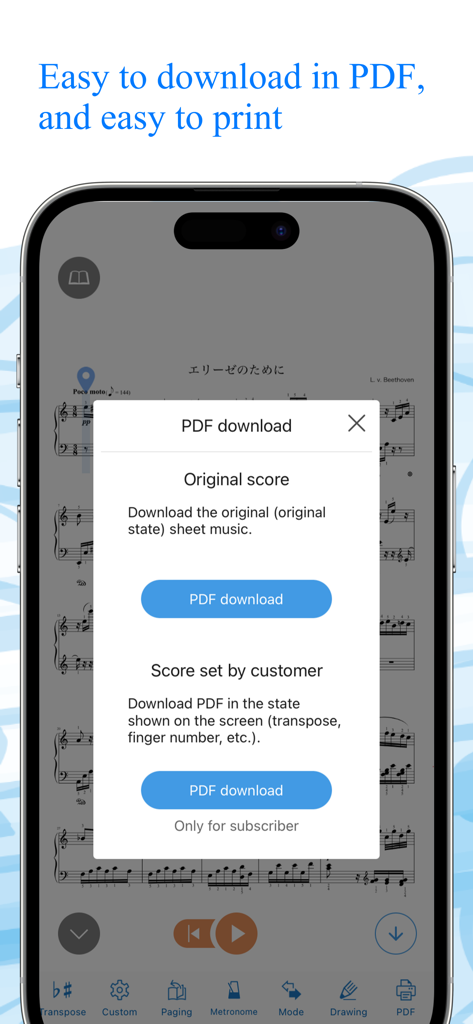
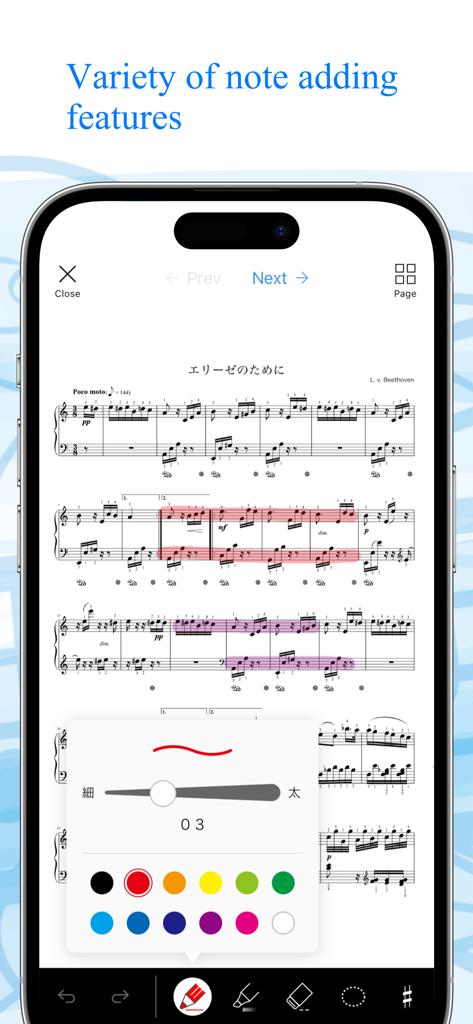
종이와 펜은 잊으세요. Apple Pencil로 자연스럽게 악보에 주석을 달고 편집한 악보를 PDF로 내보내 완벽한 유연성을 확보하세요.

원탭 즉시 조옮김

단 한 번의 탭으로 모든 곡을 자신의 음역대나 악기에 맞게 조정하세요. 수동으로 다시 작성할 필요 없이 12개 모든 키에서 즉시 조옮김하세요.

다음 스크린샷과 설명은 앱의 공식 스토어 목록에서 직접 가져온 것이며 앱 개발자의 자산입니다.

앱 스토어

스크린샷

Canon Viewer - Sheet music - 사람이 연주하는 동안 피아노 악보대 위에 놓인 Canon Viewer 앱의 디지털 악보를 보여주는 iPad

사람이 연주하는 동안 피아노 악보대 위에 놓인 Canon Viewer 앱의 디지털 악보를 보여주는 iPad

Canon Viewer - Sheet music - 재생 텍스트 오버레이가 디지털 악보 기능을 강조하며 피아노를 연주하는 여성
재생 텍스트 오버레이가 디지털 악보 기능을 강조하며 피아노를 연주하는 여성

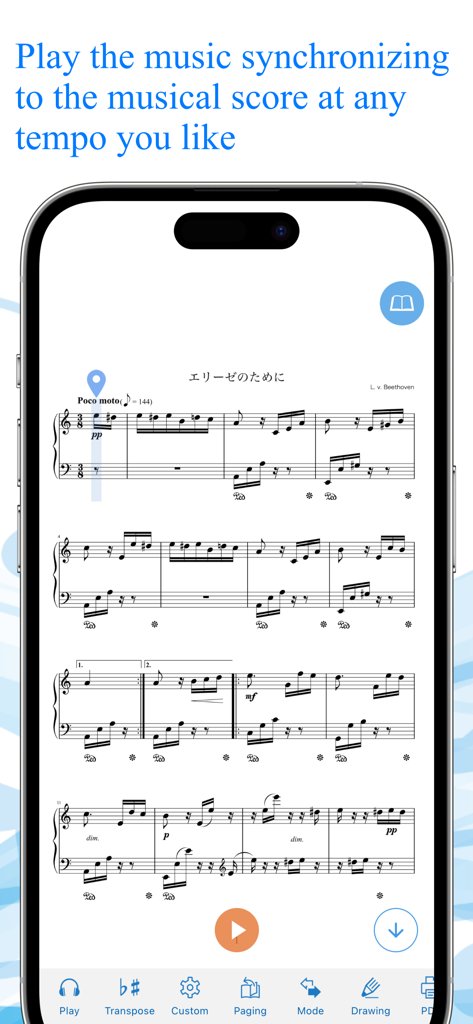
Canon Viewer - Sheet music - Canon Viewer 앱이 스마트폰에서 동기화된 악보 재생을 보여줌
Canon Viewer 앱이 스마트폰에서 동기화된 악보 재생을 보여줌

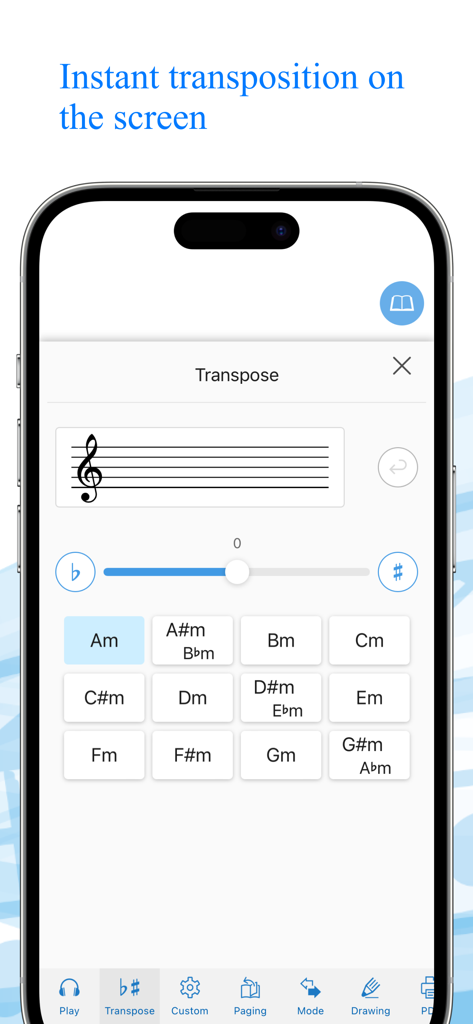
Canon Viewer - Sheet music - Canon Viewer 앱의 즉시 조옮김 인터페이스를 보여주는 스마트폰 화면, 음표 키 그리드와 조옮김 슬라이더 포함
Canon Viewer 앱의 즉시 조옮김 인터페이스를 보여주는 스마트폰 화면, 음표 키 그리드와 조옮김 슬라이더 포함

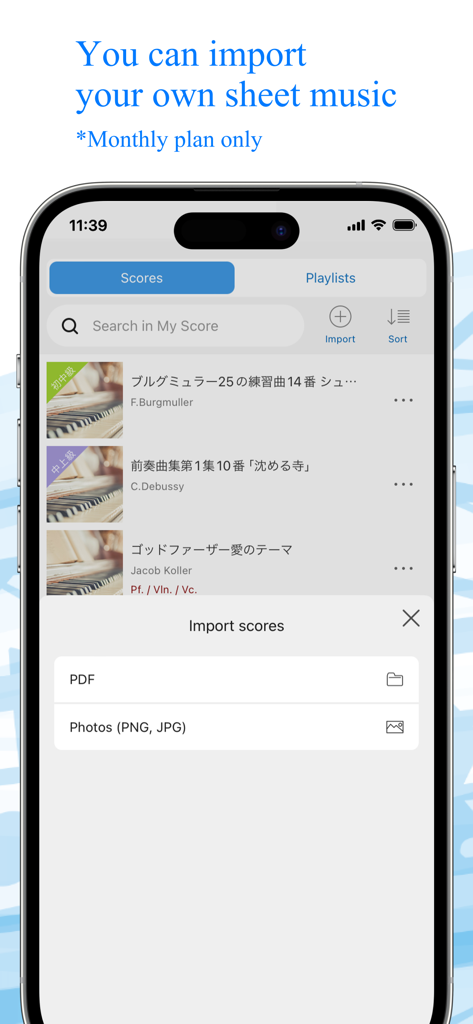
Canon Viewer - Sheet music - Canon Viewer 앱 인터페이스, PDF 또는 사진 파일을 통해 개인 악보를 가져오는 기능 표시
Canon Viewer 앱 인터페이스, PDF 또는 사진 파일을 통해 개인 악보를 가져오는 기능 표시

Canon Viewer - Sheet music - Canon Viewer 앱, 원본 및 사용자 지정 악보를 위한 PDF 다운로드 메뉴 표시
Canon Viewer 앱, 원본 및 사용자 지정 악보를 위한 PDF 다운로드 메뉴 표시

Canon Viewer - Sheet music - Canon Viewer 앱과 피아노 악보를 보여주는 휴대폰 화면, 다양한 색상의 디지털 메모 및 하이라이트 추가 메뉴 포함
Canon Viewer 앱과 피아노 악보를 보여주는 휴대폰 화면, 다양한 색상의 디지털 메모 및 하이라이트 추가 메뉴 포함

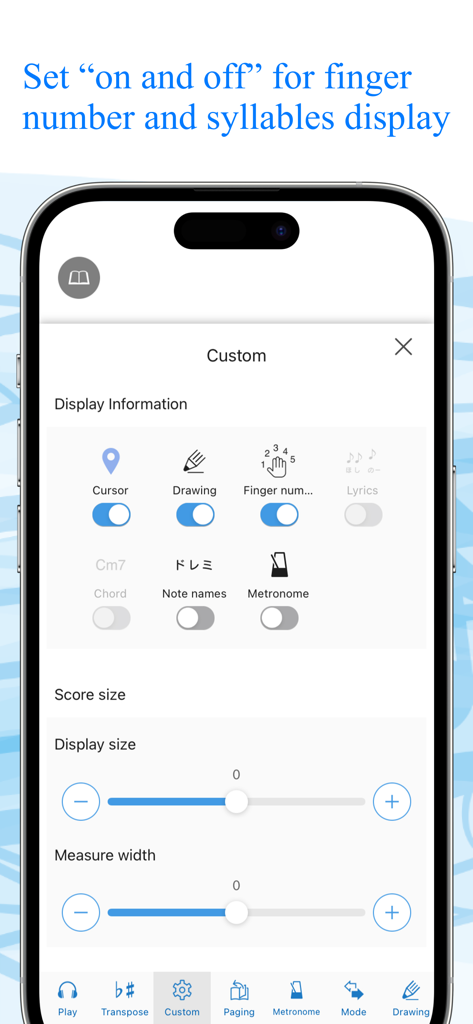
Canon Viewer - Sheet music - Canon Viewer 앱 설정 화면, 손가락 번호 및 음표 이름 토글로 악보 표시 사용자 지정
Canon Viewer 앱 설정 화면, 손가락 번호 및 음표 이름 토글로 악보 표시 사용자 지정

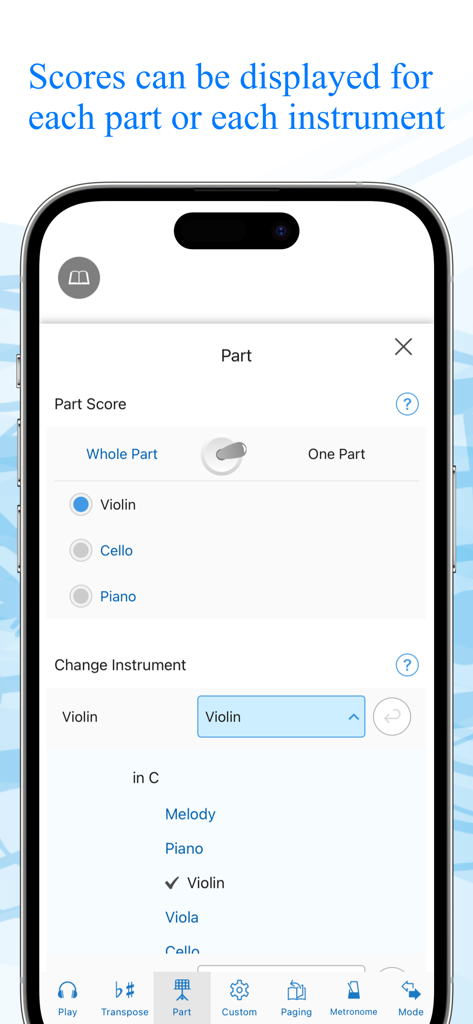
Canon Viewer - Sheet music - 특정 악기 파트 및 악보 선택을 위한 앱 인터페이스

특정 악기 파트 및 악보 선택을 위한 앱 인터페이스

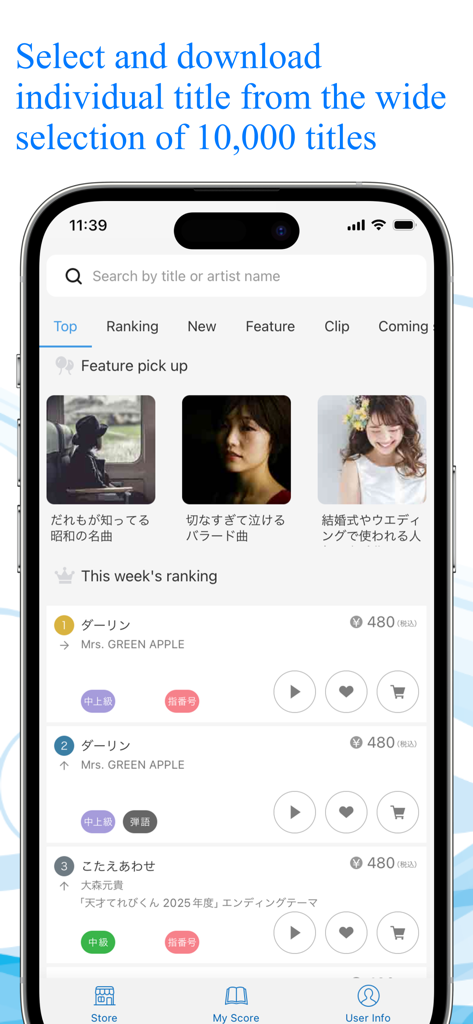
Canon Viewer - Sheet music - 검색창과 다운로드할 디지털 악보 제목의 순위 목록을 보여주는 Canon Viewer 스토어의 스마트폰 화면

검색창과 다운로드할 디지털 악보 제목의 순위 목록을 보여주는 Canon Viewer 스토어의 스마트폰 화면

설명

This is a [free musical score application] with selection of 8,000 titles, where users can download their favorite tiles individually and can find many user-friendly features. “My score” can be used off-line. Users can customize their musical scores by using the functions such as [Automatic page turner] [Adding notes] [Play a musical score] and [background change]. When a user wants to play the melody line with wind instruments or stringed instruments, musical scores that correspond to the selected instruments will be automatically displayed. Another function transposes a whole musical score for those who want to play at the most appropriate key for a certain instrument. ”This is the very musical score application that all the music lovers have wanted!” Please discover what our application offers that may change your music life with its impressive user-friendly features. ◆◇ Point 1 : You can PLAY the musical scores ◇◆ You can listen to the sound, so that makes it easier to read musical sheets with complicated melody or rhythm. You can also change the tempo and play only the selected part, like only the right hand part of the piano scores, or only the alto and tenor parts of the chorus scores. This useful function will surely make your practice more efficient. ◆◇ Point 2 : Instant transposition with one click of a button ◇◆ With only one click of a button, you can transpose to any of 12 keys. If you want to play an instrument at a half lower key to accompany a singer, you can transpose instantly! You can also optimize your scores with “Change of Sound Range” function. Transposed musical scores can be downloaded in PDF format and printed. ◆◇ Point 3 : Perfect command of page turner ◇◆ The greatest feature of Canon Musical Score Viewer is the advanced page turner function. Users can set the speed and timing such as “At which measure to turn the page” for each score. If the display is set for “Scroll display” mode, the score will be shown as a single score flow from the beginning to the end, meaning users do not have to turn pages at all. It also works with external “Page turner pedal”. ◆◇ Point 4 : Scores can be displayed exclusively for favorite parts and instruments ◇◆ Users can change the parts other than piano as “Your favorite instrument”. According to the selection of the instrument, the score will be automatically altered. Display of “All parts” and “Each part” can be switched automatically. ◆◇ Point 5 : Free writing on the screen ◇◆ Users can freely add notes and codes to the scores on the screen, and download the edited scores in PDF format to print. For iPad, the use of Apple Pencil will make the editing easier. ◆◇ Point 6 : 2 kinds of practice mode ◇◆ [Repeat practice mode] Users can select the part of the score to play repeatedly. [Record practice mode] Users can record their performance and play it with the corresponding score. ◆◇ Point 7 : Customized display function ◇◆ Users can select any necessary information to be displayed including [Finger numbers] [Syllables] [Codes] and [Lyrics] by setting ON/OFF. Background image can also be customized with your favorite one. ** About Digital Musical Score Canon Digital Musical Score Canon is an online musical score delivery service. It delivers and sells more than 8,000 titles, majorly popular and trendy titles. All the scores are produced by professionals. All the purchased scores can be displayed and used on “Canon Musical Score Viewer” that can be operated on a Web browser or application of smartphones and tablets. https://www.canon-score.com/support

Download

다운로드: App Store

이 페이지는 앱이나 개발자의 공식 페이지가 아니며, 정보 제공 및 논평을 목적으로 작성된 독립 편집 간행물입니다. 명시적으로 달리 언급되지 않는 한, 해당 앱이나 개발자는 MWM, Apple, Google Play, 앱 퍼블리셔 또는 앱 개발자와 제휴, 보증, 후원, 승인 또는 공식적으로 연결되어 있지 않으며, 이 페이지의 어떤 내용도 해당 앱이 MWM의 서비스를 사용하여 개발되었음을 의미하지 않습니다. 모든 상표, 로고, 스크린샷 및 기타 콘텐츠는 해당 소유자의 자산입니다.