Cellular Network Signal Finder

Cellular Network Signal Finder

다운로드: App Store
로고: Cellular Network Signal Finder

이동통신망 신호 찾기: 6,900만 개의 기지국 찾기 및 연결 최적화

농촌 거주자, 디지털 노마드 및 네트워크 전문가를 위한 최고의 도구입니다. 실시간 5G/LTE 기지국 데이터를 매핑하고, 정밀 나침반 내비게이션으로 안테나를 정렬하고, 전문가 수준의 신호 분석으로 데드 존을 제거하세요.

개발사

BigBalli Consulting llc

카테고리

Navigation

다운로드

1M+

사용자 평점

3.2/5

총 평가 수

5K+

지원 언어

1

신호 내부 엿보기

이 인터페이스를 사용하는 1M+ 명의 사용자.

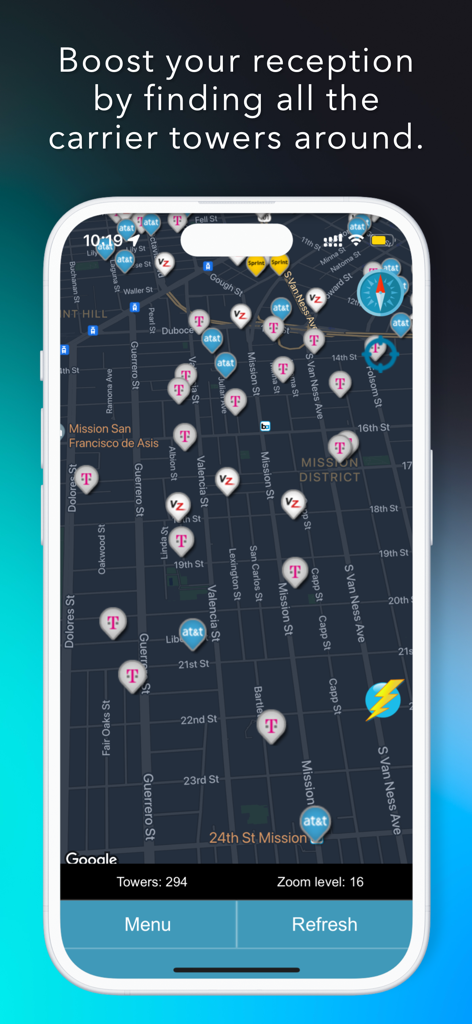
T-Mobile 및 AT&T와 같은 다양한 통신사의 이동통신 기지국을 도시 지역에서 보여주는 지도 표시입니다.
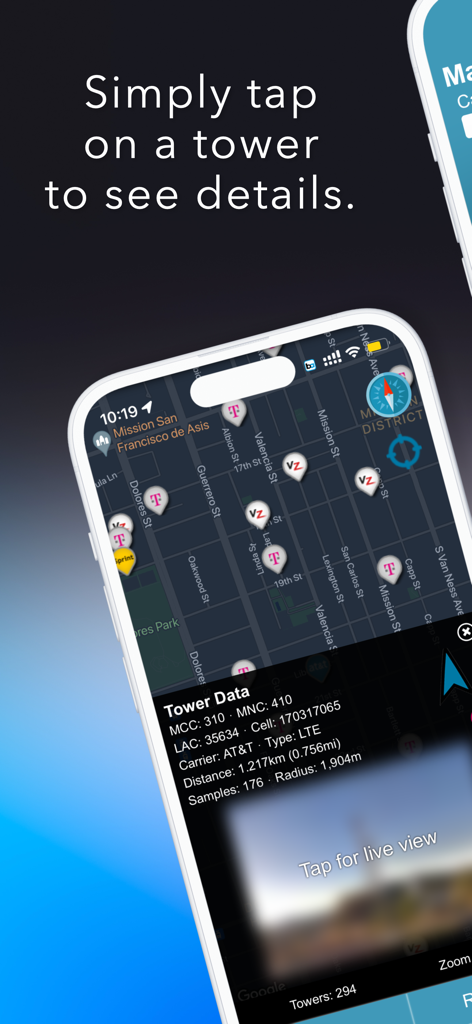
T-Mobile 및 AT&T와 같은 다양한 통신사의 이동통신 기지국을 도시 지역에서 보여주는 지도 표시입니다.

FindTower 앱이 다양한 통신사 기지국 아이콘과 AT&T 기지국에 대한 기술 네트워크 데이터가 포함된 지도를 보여줍니다.
FindTower 앱이 다양한 통신사 기지국 아이콘과 AT&T 기지국에 대한 기술 네트워크 데이터가 포함된 지도를 보여줍니다.

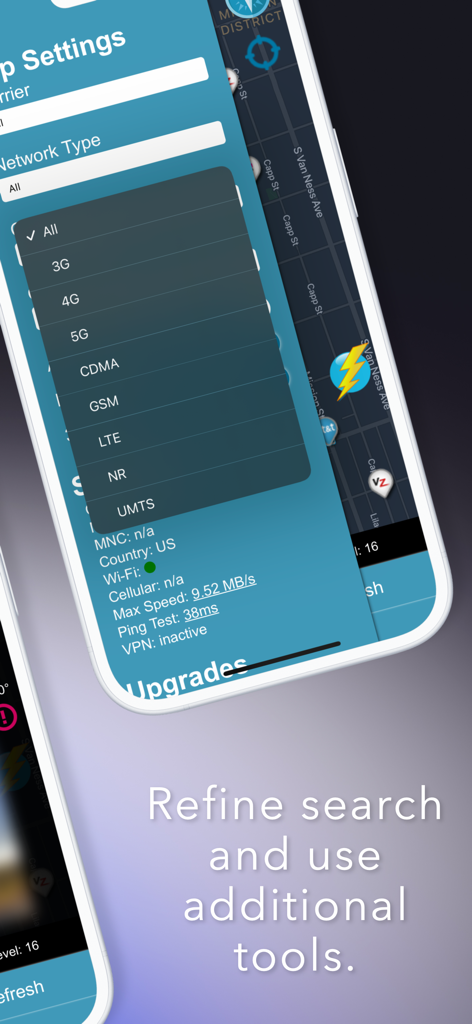
FindTower 앱 인터페이스가 이동통신망 유형 필터 및 신호 진단 도구를 보여줍니다.
FindTower 앱 인터페이스가 이동통신망 유형 필터 및 신호 진단 도구를 보여줍니다.

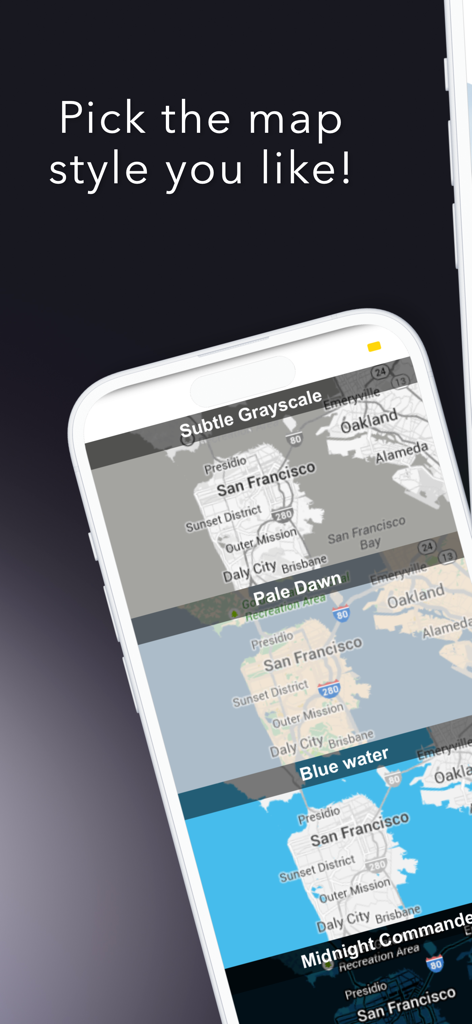
이동통신 기지국 로케이터 앱에 대한 다양한 지도 스타일 옵션을 보여주는 모바일 인터페이스입니다.

이동통신 기지국 로케이터 앱에 대한 다양한 지도 스타일 옵션을 보여주는 모바일 인터페이스입니다.

연결성 제어권을 확보하세요

이 앱을 돋보이게 하는 도구, 1M+ 명의 사용자가 선택.

🧭

정밀 안테나 정렬

내장 나침반을 사용하여 장치 또는 외부 부스터를 가장 가까운 기지국으로 직접 향하게 하여 처리량을 최대화하고 데드 존을 제거하세요.

🗺️

글로벌 기지국 정보

실시간 지도로 경로 또는 원격 근무 설정을 계획하세요. 통신사 및 네트워크 유형별로 필터링하여(4G ~ 5G) 실제 인프라 커버리지를 확인하세요.

📊

진실 추구자 통신사 분석

원시 데이터로 마케팅 주장을 통과하세요. 전문가 수준의 MCC/MNC 인사이트를 사용하여 모든 주요 제공업체의 신호 강도 및 네트워크 성능을 비교하세요.

리뷰 분석

사용자 리뷰 인사이트.

감정 점수

29%
부정적

요약

This mobile app receives predominantly negative feedback due to pervasive issues with its monetization strategy. Users frequently report being unable to use features even after purchasing subscriptions, encountering relentless demands for repeated payments, and experiencing numerous intrusive pop-ups and ads. While a small number of users commend its core ability to accurately locate cell towers for travel and RV planning, many are frustrated by critical functional problems such as glitches, crashes, and the failure to display any useful tower or location data. Critics also point to inaccurate or outdated information and widespread allegations of the app being a scam, leading to a generally poor user experience.

주요 테마

Subscription/Payment Issues(26)
Functionality & Bugs(14)
Intrusive Pop-ups & Ads(9)
Scam Allegations(9)
Overall User Experience / Usability(8)
Tower Location Feature(6)
Data Accuracy & Timeliness(5)

앱 소개

에 대해 알아야 할 모든 것 Cellular Network Signal Finder.

설명

Master Your Mobile Connectivity with 69M+ Towers Worldwide Transform your mobile experience with FindTower, the most comprehensive cell tower locator app that puts the power of 69 million towers at your fingertips. Whether you're troubleshooting weak signals, planning travel routes, or optimizing your mobile setup, FindTower delivers precise tower locations and advanced network insights. Key Features Precision Navigation Navigate directly to towers with our built-in compass feature. See exactly where to point your antenna or position your device for optimal signal strength. Power Search Technology Uncover hidden cell infrastructure using advanced carrier filtering. Our Power Search feature uses MCC/MNC codes and network type filtering to discover towers that standard searches miss. Smart Phone Lookup Get detailed carrier information for any phone number. Identify which network a number belongs to, perfect for understanding coverage patterns. Best Carrier Analysis Find the optimal carrier for your location with our intelligent analysis. Compare coverage, signal strength, and network performance across all major providers. Interactive Tower Mapping - View all nearby cell towers on an intuitive map interface - Filter by carrier, network type (2G, 3G, 4G, 5G), and distance - Tap any tower for detailed technical information including MCC/MNC codes, cell IDs, and signal strength Advanced Network Analysis - Real-time signal strength monitoring - Network speed testing with detailed metrics - Coverage pattern analysis and optimization recommendations Professional-Grade Tools - Street View integration for 3D tower visualization - Auto-refresh functionality for dynamic tower discovery - Geo-search capabilities for worldwide tower lookup Perfect For Every User Remote Workers & Digital Nomads Find the best spots for video calls and reliable internet access. Never miss an important meeting due to poor connectivity. RV Travelers & Outdoor Enthusiasts Plan your routes with confidence, knowing exactly where you'll have cell coverage. Perfect for camping, hiking, and remote adventures. Network Professionals & Technicians Access detailed tower information, carrier codes, and technical specifications. Essential for field work and network optimization. Why Choose FindTower Over Competitors Unlike other tower locator apps that show basic coverage maps, FindTower provides: - Actual tower locations with precise coordinates and technical details - Advanced filtering by carrier, network type, and distance - Professional tools for network analysis and optimization - Global database of 69 million towers with regular updates - Intuitive interface designed for both casual users and professionals Premium Features for Power Users Unlock advanced capabilities with FindTower Premium: - Power Search with advanced carrier filtering - Phone number lookup and carrier identification - Street View integration for 3D tower visualization - Auto-refresh for dynamic tower discovery - Geo-search for worldwide tower lookup - Compass navigation for precise tower targeting Trusted by Professionals Worldwide FindTower is used by network engineers, field technicians, and connectivity professionals who need accurate, reliable tower data. Download FindTower Today Join thousands of users who have transformed their mobile connectivity experience. Whether you're dealing with weak signals at home, planning a remote work setup, or exploring new areas, FindTower gives you the tools to stay connected. Key Benefits: - 69 million towers worldwide - Real-time signal analysis - Professional-grade tools - Global coverage database - Intuitive user interface - Advanced filtering options - Compass navigation - Network optimization insights Stop struggling with poor connectivity. Download FindTower and discover the power of precise tower location data. Your mobile experience will never be the same. https://www.apple.com/legal/internet-services/itunes/dev/stdeula/

최신 버전

12.5

크기

8.1 MB

출시일

2011년 7월 6일

오늘 바로 신호를 제어하세요

FindTower를 사용하여 6,900만 개 이상의 기지국에 액세스하고 정밀 매핑으로 데드 존을 제거하는 100만 명 이상의 전문가 및 모험가와 함께하세요.

다운로드: App Store
FAQ

자주 묻는 질문

에 대해 알아야 할 모든 것 Cellular Network Signal Finder

FindTower란 무엇인가요?

FindTower는 정확한 타워 위치와 고급 네트워크 통찰력을 제공하는 포괄적인 기지국 찾기 앱입니다. 약한 신호를 해결하고 모바일 설정을 최적화하는 데 도움이 됩니다.

FindTower는 어떻게 기지국을 찾는 데 도움이 되나요?

FindTower는 직관적인 지도 인터페이스에 주변 기지국을 표시하여 기지국을 찾는 데 도움이 됩니다. 사용자는 통신사 및 네트워크 유형별로 필터링하고 내장 나침반을 사용하여 타워로 직접 이동할 수 있습니다.

FindTower를 사용하여 기지국에 대한 기술 세부 정보를 얻을 수 있나요?

예, FindTower는 각 기지국에 대한 자세한 기술 정보를 제공합니다. 타워를 탭하면 MCC/MNC 코드, 셀 ID, 신호 강도, 통신사 및 네트워크 유형(예: LTE)이 표시됩니다.

FindTower는 고급 검색 필터를 제공하나요?

예, FindTower는 고급 검색 필터를 제공합니다. 사용자는 특정 셀 인프라를 찾기 위해 통신사, 네트워크 유형(2G, 3G, 4G, 5G, LTE) 및 거리를 기준으로 검색을 구체화할 수 있습니다.

FindTower의 프리미엄 버전이 있나요?

예, FindTower는 프리미엄 버전을 제공합니다. 고급 통신사 필터링, 전화번호 조회, 스트리트 뷰 통합 및 나침반 탐색과 같은 고급 기능을 잠금 해제합니다.

FindTower는 모바일 신호 개선에 도움이 되나요?

예, FindTower는 주변 통신사 타워를 식별하여 모바일 신호를 개선하는 데 도움이 됩니다. 사용자는 이 정보를 사용하여 더 나은 수신을 위해 장치 위치 또는 안테나 방향을 최적화할 수 있습니다.

FindTower의 전 세계 데이터베이스에는 몇 개의 타워가 있나요?

FindTower의 전 세계 데이터베이스에는 전 세계 6,900만 개 이상의 타워가 포함되어 있습니다. 정확한 좌표와 기술 세부 정보가 포함되어 있으며 정기적으로 업데이트됩니다.

FindTower는 네트워크 속도 테스트를 제공하나요?

예, FindTower에는 고급 네트워크 분석 도구가 포함되어 있습니다. 이를 통해 실시간 신호 강도 모니터링 및 자세한 측정 기준을 사용한 네트워크 속도 테스트를 제공합니다.

FindTower는 누구를 위해 설계되었나요?

FindTower는 원격 작업자, RV 여행자 및 네트워크 전문가를 포함한 다양한 사용자를 위해 설계되었습니다. 안정적인 인터넷 액세스, 커버리지 계획 경로 및 현장 작업을 지원합니다.

FindTower로 전화번호의 통신사를 식별할 수 있나요?

예, FindTower는 프리미엄 기능인 스마트폰 조회 기능을 제공합니다. 이를 통해 전화번호가 속한 네트워크를 식별하여 커버리지 패턴을 이해하는 데 도움이 됩니다.

App information, icons, screenshots, and descriptions displayed on this page are sourced from the Apple App Store and are the property of their respective developers. Download estimates and rankings are based on MWM's proprietary models and may not reflect actual figures. This page is provided for informational and analytical purposes only.

Believe this page infringes your intellectual property? File a dispute