
이 페이지는 앱이나 개발자의 공식 페이지가 아니며, 정보 제공 및 논평을 목적으로 작성된 독립 편집 간행물입니다. 명시적으로 달리 언급되지 않는 한, 해당 앱이나 개발자는 MWM, Apple, Google Play, 앱 퍼블리셔 또는 앱 개발자와 제휴, 보증, 후원, 승인 또는 공식적으로 연결되어 있지 않으며, 이 페이지의 어떤 내용도 해당 앱이 MWM의 서비스를 사용하여 개발되었음을 의미하지 않습니다. 모든 상표, 로고, 스크린샷 및 기타 콘텐츠는 해당 소유자의 자산입니다.


DayCount
이 앱은 당신에게 시간이라는 무자비한 흐름을 정복할 힘을 부여합니다. 중요한 순간을 예측하고, 추적하며, 조종하여 당신의 현실을 재구성하십시오.
다운로드
5M+사용자 평점
총 평가 수
31.5K개발사
카테고리
Productivity지원 언어
14최신 버전
6.0.1크기
194.4 MB출시일
2016년 6월 16일효율적인 시간 관리와 목표 달성을 돕는 핵심 기능
DayCount 앱 주요 기능 분석
정밀한 이벤트 카운트다운 및 카운트업
이 앱은 사용자가 중요한 날짜까지 남은 시간이나 지난 시간을 정확하게 추적하고, 반복되는 이벤트를 효율적으로 관리할 수 있도록 지원하여, 핵심적인 순간을 놓치지 않도록 돕습니다.
개인화된 홈/잠금 화면 위젯 제공
이 도구는 사용자가 다양한 필터, 글꼴, 질감, 테두리를 활용하여 중요한 이벤트를 시각적으로 매력적이고 개인화된 방식으로 홈 화면이나 잠금 화면에 표시할 수 있도록 해줍니다. 이를 통해 사용자는 앱을 열지 않고도 핵심 정보를 한눈에 파악하고 지속적인 동기 부여를 얻을 수 있습니다.
목표 달성을 위한 습관 및 연속 기록 관리
이 앱은 일일 연속 기록을 추적하여 긍정적인 습관을 형성하고, 가장 긴 생산적인 날들을 향해 나아가도록 돕습니다. 이는 사용자의 개인 개발과 지속적인 동기 부여를 강력하게 지원합니다.
맞춤형 알림 및 일일 요약 알림
이 앱은 이벤트 전후로 분, 시간, 일, 주, 월, 년 단위로 세분화된 알림을 설정할 수 있게 하며, 상위 5개 이벤트 또는 연속 기록을 보여주는 일일 요약 알림을 제공합니다. 이는 사용자가 중요한 순간을 절대 잊지 않고 효과적으로 일정을 관리하는 데 필수적입니다.
강력한 시각적 사용자 정의 및 테마 옵션
이 도구는 사용자가 이벤트에 기기 사진이나 Unsplash 이미지를 적용하고, 다양한 이벤트 크기, 고대비 옵션, 라이트/다크 모드, 대체 앱 아이콘을 통해 앱의 전체적인 외관을 개인의 취향에 맞춰 꾸밀 수 있도록 해줍니다. 이는 '시각적으로 매력적이고 고도로 맞춤 가능한 도구'라는 요구 사항을 충족시킵니다.
안전한 기기 간 데이터 동기화 및 백업
이 앱은 사용자의 모든 이벤트 및 연속 기록 데이터를 iPhone, iPad, iPod touch, Mac 등 여러 Apple 기기에서 안전하게 백업하고 동기화할 수 있도록 지원합니다. 이는 데이터 손실 위험을 줄이고 어떤 기기에서든 원활하고 일관된 사용자 경험을 보장합니다.
캘린더 연동 및 위치 기반 기능
이 도구는 사용자가 기존 캘린더에서 이벤트를 직접 가져오고, 각 이벤트에 특정 위치를 저장하여 Apple 지도 또는 Google 지도로 바로 길 안내를 받을 수 있도록 해줍니다. 이는 이벤트 관리의 효율성을 높이고 실용적인 연결성을 제공합니다.
개인 정보 보호를 위한 생체 인식 앱 잠금
이 앱은 Face ID 또는 Touch ID를 사용하여 앱에 대한 접근을 잠글 수 있게 하여, 사용자의 민감하거나 개인적인 이벤트 정보가 항상 안전하게 보호되도록 합니다.
자주 묻는 질문
에 대해 알아야 할 모든 것 DayCount
What is DayCount used for?
DayCount helps users track time before and after important events, set reminders, and build positive habits through streaks. It keeps everything clear and manageable.
Can DayCount track time since an event occurred?
Yes, DayCount can track time since important moments using event counters. It displays time in days, hours, minutes, and seconds.
Does DayCount provide countdown timers for future events?
Yes, DayCount provides countdowns for events. It tracks time before an event in days, hours, minutes, and seconds, visible on the main screen.
Can I track my habits and streaks with the DayCount app?
Yes, DayCount allows users to build positive habits by tracking daily streaks and working towards their longest run of productive days, which are viewed alongside events.
Does DayCount offer Home Screen widgets?
Yes, DayCount offers widgets. Users can create customizable widgets with different filters, fonts, textures, and borders to add to their Home Screen or Lock Screen.
Can DayCount send me reminders for events?
Yes, DayCount allows users to set alerts minutes, hours, days, weeks, months, or years before or after events. It also provides daily summary notifications.
Can I secure my events in DayCount with Face ID or Touch ID?
Yes, DayCount provides privacy and security features. Users can lock the app using Face ID or Touch ID to protect their event information.
Does DayCount sync events across multiple Apple devices?
Yes, DayCount supports backup and sync of events and streaks across iPhone, iPad, iPod touch, and Mac, ensuring your data is consistent on all your devices.
Does DayCount offer a free trial for its subscription?
Yes, DayCount offers a free 7-day trial with its auto-renewing yearly subscription. Payment is charged to your iTunes account after the trial concludes.
Is DayCount Premium available as a one-time purchase?
Yes, DayCount Premium is available as an annual subscription or as a lifetime purchase. Users can choose the payment model that best suits their needs.
Can I use custom images for my events in DayCount?
Yes, DayCount allows users to apply images from their device or search Unsplash to customize their event counters.
Does DayCount integrate with my device's calendar?
Yes, DayCount supports importing events directly from your calendar, making it easy to add existing dates to the app.
Does DayCount offer improved text readability options?
Yes, DayCount includes higher contrast options for improved text readability and supports Dynamic Type for enhanced accessibility.
다음 스크린샷과 설명은 앱의 공식 스토어 목록에서 직접 가져온 것이며 앱 개발자의 자산입니다.
앱 스토어
스크린샷

이 앱은 사용자가 뉴욕으로 이주한 지 74일이 지났음을 보여주며, 상단에 위치한 주요 일수 카운터와 하단에 정밀하게 표시되는 시간, 분, 초 단위 카운터를 통해 중요한 순간을 기록합니다.
삶의 이정표 추적

이 앱은 사용자가 함께한 시간을 93일째 기록하며, 월 단위로 표시되는 메인 카운터와 배경으로 설정된 감성적인 이미지를 통해 관계의 기념일을 특별하게 관리할 수 있도록 돕습니다.
소중한 순간 함께
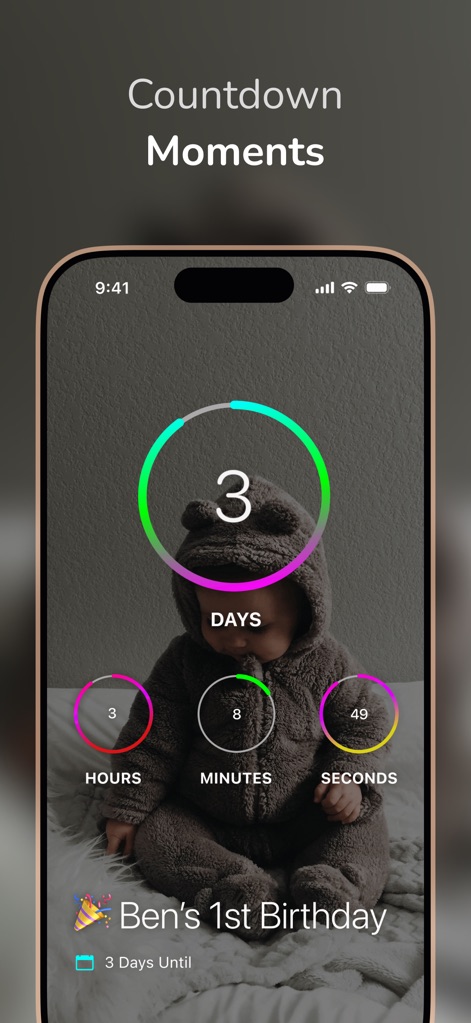
이 앱은 벤의 첫 생일이 3일 남았음을 시각적으로 보여주며, 중앙의 D-day 숫자와 하단에 표시되는 이벤트 제목과 남은 일수 정보를 통해 중요한 기념일을 놓치지 않도록 합니다.
다가오는 순간 카운트
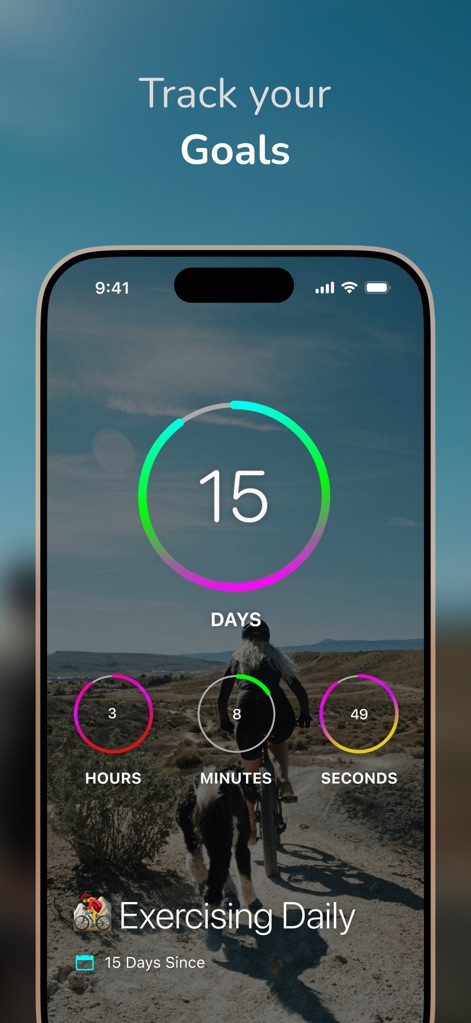
이 앱은 사용자가 매일 운동한 지 15일이 지났음을 기록하며, 카운터 주변의 진행률 원형 게이지와 운동하는 사람의 역동적인 배경 이미지를 통해 건강 목표 달성을 독려합니다.
목표 달성 추적

이 앱은 사용자의 다가오는 휴가까지 남은 26일을 명확하게 보여주며, 중앙의 D-day 카운터와 아름다운 열대 섬 배경을 통해 기대감을 높여줍니다.
미래를 꿈꾸는 시간

이 앱은 사용자가 금연한 지 7개월이 지났음을 정확히 추적하며, 월 단위로 표시되는 주요 카운터와 평온한 자연 배경을 통해 사용자의 건강한 노력을 시각적으로 기념합니다.
건강 습관 유지
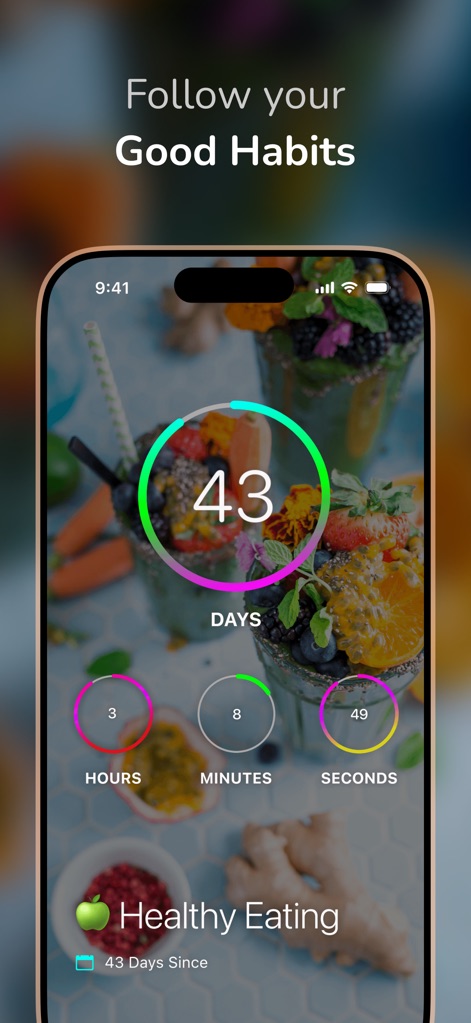
이 앱은 사용자가 건강한 식단을 실천한 지 43일이 지났음을 보여주며, 큼직한 일수 숫자와 싱그러운 음식 배경 이미지를 통해 긍정적인 습관 형성을 독려합니다.
좋은 습관 따르기

이 앱은 사용자가 마지막 치과 진료 후 120일이 지났음을 명확히 표시하며, 주요 카운터의 경과 일수와 치아 아이콘이 포함된 이벤트 정보를 통해 건강 관리를 돕습니다.
중요한 약속 기억
설명
Download
비슷한 앱
유사한 기능과 사용자 경험을 가진 앱
倒数日 · Days Matter
iDaily Corp.
Countdown
Find Appiness LLC

Days since - Countdown
Inner Grow Limited
Countdown°
rongsheng li

Days • Countdown & Widgets
MD Apps LTD

Days Matter Air - Countdown
iDaily Corp.
MyDays - Countdown days life
凤 袁

Bears Countdown
Isuru Wanasinghe

Birthday Countdown • Reminder
HAPPYPIXEL - LDA
이 페이지는 앱이나 개발자의 공식 페이지가 아니며, 정보 제공 및 논평을 목적으로 작성된 독립 편집 간행물입니다. 명시적으로 달리 언급되지 않는 한, 해당 앱이나 개발자는 MWM, Apple, Google Play, 앱 퍼블리셔 또는 앱 개발자와 제휴, 보증, 후원, 승인 또는 공식적으로 연결되어 있지 않으며, 이 페이지의 어떤 내용도 해당 앱이 MWM의 서비스를 사용하여 개발되었음을 의미하지 않습니다. 모든 상표, 로고, 스크린샷 및 기타 콘텐츠는 해당 소유자의 자산입니다.