Desh Marathi Keyboard
다운로드: App Store

이 페이지는 앱이나 개발자의 공식 페이지가 아니며, 정보 제공 및 논평을 목적으로 작성된 독립 편집 간행물입니다. 명시적으로 달리 언급되지 않는 한, 해당 앱이나 개발자는 MWM, Apple, Google Play, 앱 퍼블리셔 또는 앱 개발자와 제휴, 보증, 후원, 승인 또는 공식적으로 연결되어 있지 않으며, 이 페이지의 어떤 내용도 해당 앱이 MWM의 서비스를 사용하여 개발되었음을 의미하지 않습니다. 모든 상표, 로고, 스크린샷 및 기타 콘텐츠는 해당 소유자의 자산입니다.

로고: Desh Marathi Keyboard
다운로드: App Store

Desh Marathi Keyboard

간편한 영어-마라티어 음역으로 집과의 거리를 좁히세요. 모든 채팅 앱에서 문화적으로 연결되어 있기 위해 스마트 예측, 사용자 지정 스티커, 쉬운 언어 전환을 사용하는 전 세계 수천 명의 마라티어 사용자와 함께하세요.

주요 수치

다운로드

115K+

사용자 평점

4.7/5

총 평가 수

7K+

개발사

ClusterDev Technologies Private Limited

카테고리

Utilities

지원 언어

1

최신 버전

3.0.7

크기

37.0 MB

출시일

2023년 4월 5일
기능

영어 속도로 마라티어 입력

전 세계 마라티어 커뮤니티가 모든 iOS 앱에서 손쉽게 소통하고 뿌리와 연결을 유지할 수 있는 최고의 키보드입니다.

스마트 음역

영문자로 소리나는 대로 입력하면 즉시 마라티어 문자로 변환됩니다. 배울 복잡한 레이아웃이 없습니다.

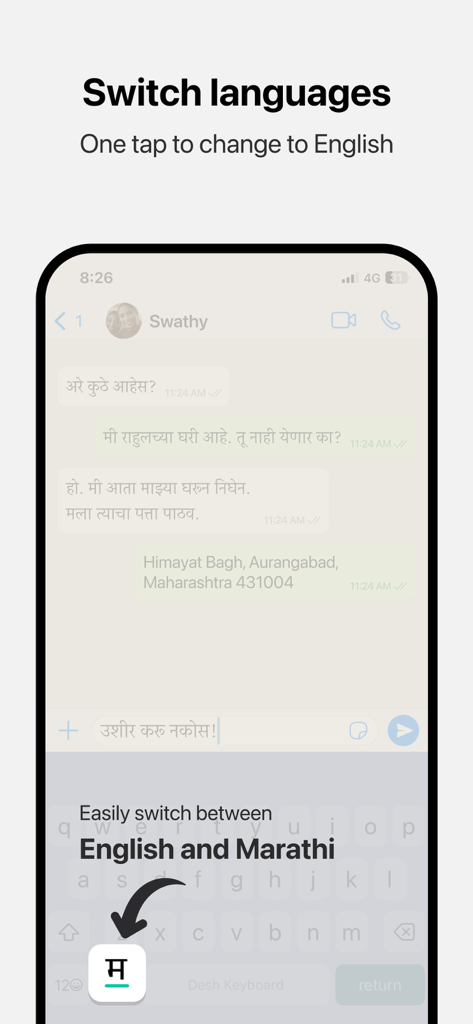
원활한 언어 전환

마라티어와 영어 간을 한 번의 탭으로 전환할 수 있어 직장 환경과 개인 채팅 모두에 적합합니다.

다음 스크린샷과 설명은 앱의 공식 스토어 목록에서 직접 가져온 것이며 앱 개발자의 자산입니다.

앱 스토어

스크린샷
Desh Marathi Keyboard - Desh Marathi Keyboard 앱 스플래시 화면과 로고 및 태그라인
Desh Marathi Keyboard 앱 스플래시 화면과 로고 및 태그라인

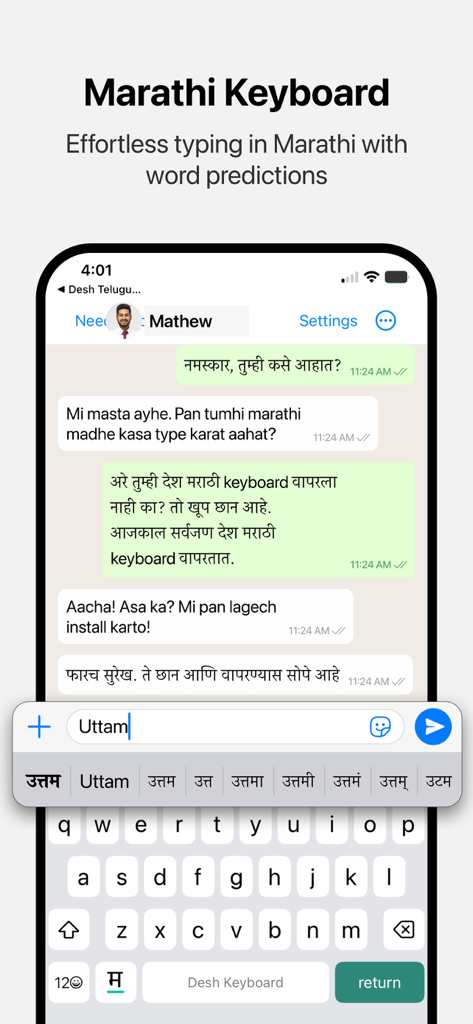
Desh Marathi Keyboard - iPhone 화면에 영어 입력에 대한 마라티어 단어 제안이 표시된 Desh Marathi Keyboard가 표시됨
iPhone 화면에 영어 입력에 대한 마라티어 단어 제안이 표시된 Desh Marathi Keyboard가 표시됨

Desh Marathi Keyboard - Desh Marathi Keyboard에서 마라티어와 영어 간의 한 번의 탭으로 언어를 전환하는 기능을 보여주는 모바일 화면
Desh Marathi Keyboard에서 마라티어와 영어 간의 한 번의 탭으로 언어를 전환하는 기능을 보여주는 모바일 화면

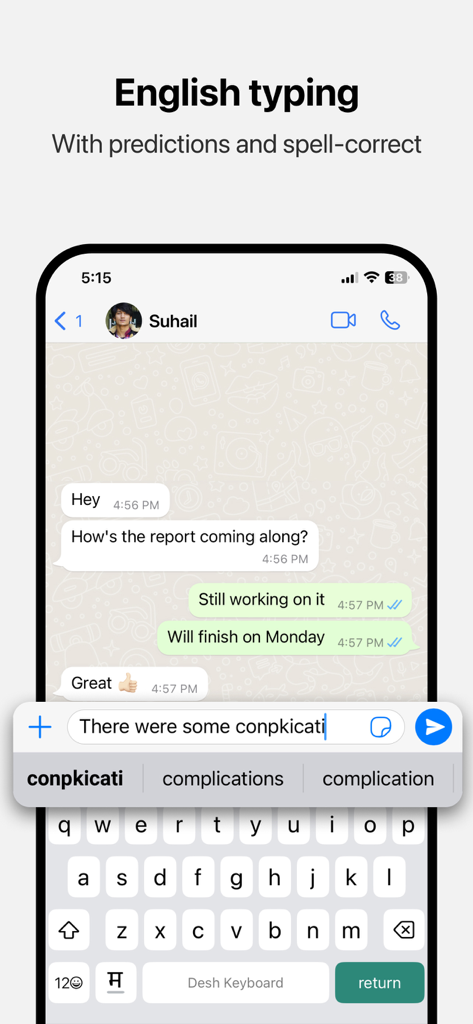
Desh Marathi Keyboard - iPhone에서 단어 예측 및 맞춤법 교정 기능이 있는 Desh Marathi Keyboard의 영어 입력 인터페이스

iPhone에서 단어 예측 및 맞춤법 교정 기능이 있는 Desh Marathi Keyboard의 영어 입력 인터페이스

설명

Desh Marathi Keyboard is a keyboard extension that makes Marathi typing super easy: • Type in English letters and get Marathi words with our transliteration technology • Type faster using word predictions • Easily switch to English with the language key • Word predictions and spell-correct is available in English also • Emoji button is available after pressing 123 Open the app and follow instructions to get your new Marathi keyboard: • Enable keyboard from settings • Activate the keyboard by holding the Globe icon and selecting "Desh Marathi Keyboard" • Type Marathi everywhere! Allowing full access: • When enabling the keyboard, you may enable "Allow Full Access" • This allows us to access crash reports and will help us improve the stability of the app • We respect your privacy. No personal information is collected • A standard warning is shown when you enable any downloaded keyboard app How to access settings: • Tap on the ⋯ button after opening the app and tap Settings. This option will be available after keyboard is activated • Available settings: sound on key press, vibrate on key press, emoji row, number row Using the clipboard: • The clipboard lets you save text that you frequently use and paste them easily • After you copy any text, it can be viewed from the clipboard by tapping on "Paste copied text". You can use the Pin button to save it permanently • To show copied text automatically when clipboard is opened, you can change the "Paste from Other Apps" setting to "Allow" Using stickers to make your chats more fun: • Open the stickers page by clicking on the sticker icon on the keyboard. Click on any sticker you like to copy it • Navigate back to your chat app and use your phone's Paste option in the message box • The sticker will be pasted in the chat. Note that animations are currently sent as GIFs due to technical limitations Do share your feedback and help us improve Desh Marathi Keyboard. And don't forget to leave a review if you like it.

Download

다운로드: App Store

이 페이지는 앱이나 개발자의 공식 페이지가 아니며, 정보 제공 및 논평을 목적으로 작성된 독립 편집 간행물입니다. 명시적으로 달리 언급되지 않는 한, 해당 앱이나 개발자는 MWM, Apple, Google Play, 앱 퍼블리셔 또는 앱 개발자와 제휴, 보증, 후원, 승인 또는 공식적으로 연결되어 있지 않으며, 이 페이지의 어떤 내용도 해당 앱이 MWM의 서비스를 사용하여 개발되었음을 의미하지 않습니다. 모든 상표, 로고, 스크린샷 및 기타 콘텐츠는 해당 소유자의 자산입니다.