Dialer for WhatsApp - Click

Dialer for WhatsApp - Click

다운로드: App Store
로고: Dialer for WhatsApp - Click

WhatsApp용 다이얼러 - 클릭: 연락처 번거로움 없이 메시지 보내기

"연락처 추가"의 번거로움을 건너뛰고 즉시 연결하세요. 메시지 템플릿, 개인 메모 저장 및 클라우드 동기화로 워크플로우를 간소화하세요. 효율성을 중시하는 전문가를 위해 설계되었습니다.

다운로드: App Store

개발사

Juan Cazalla Estrella

카테고리

Social Networking

다운로드

429K+

사용자 평점

4.8/5

총 평가 수

3K+

지원 언어

6

한눈에 보는 효율성

이 인터페이스를 사용하는 429K+ 명의 사용자.

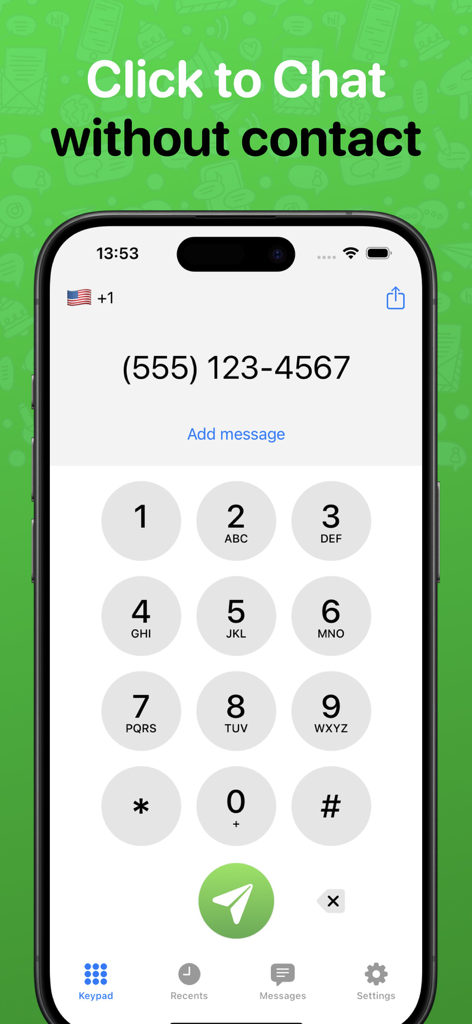
WhatsApp용 다이얼러 앱의 숫자 키패드 인터페이스로, 미국 전화번호와 연락처를 저장하지 않고 채팅 옵션이 표시됩니다.
WhatsApp용 다이얼러 앱의 숫자 키패드 인터페이스로, 미국 전화번호와 연락처를 저장하지 않고 채팅 옵션이 표시됩니다.

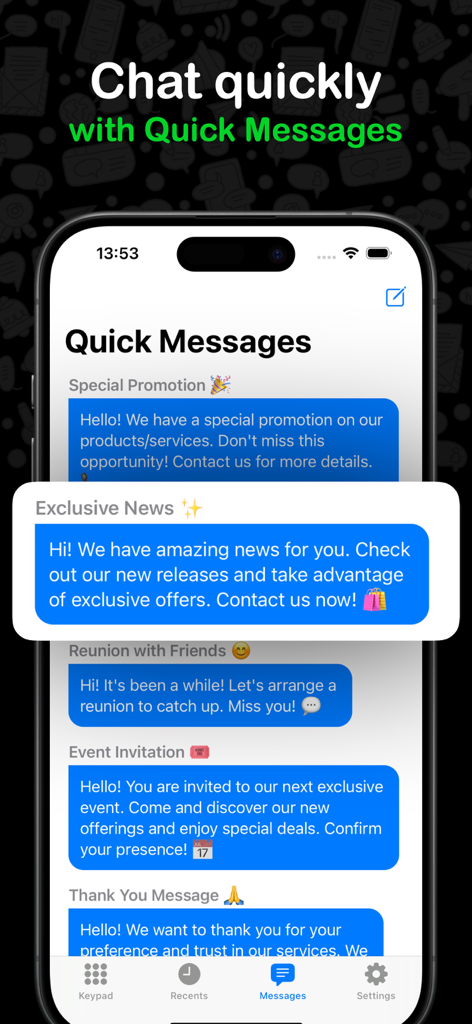
WhatsApp용 다이얼러 인터페이스로, 비즈니스 및 개인용 사용자 지정 가능한 빠른 메시지 템플릿 목록을 보여줍니다.
WhatsApp용 다이얼러 인터페이스로, 비즈니스 및 개인용 사용자 지정 가능한 빠른 메시지 템플릿 목록을 보여줍니다.

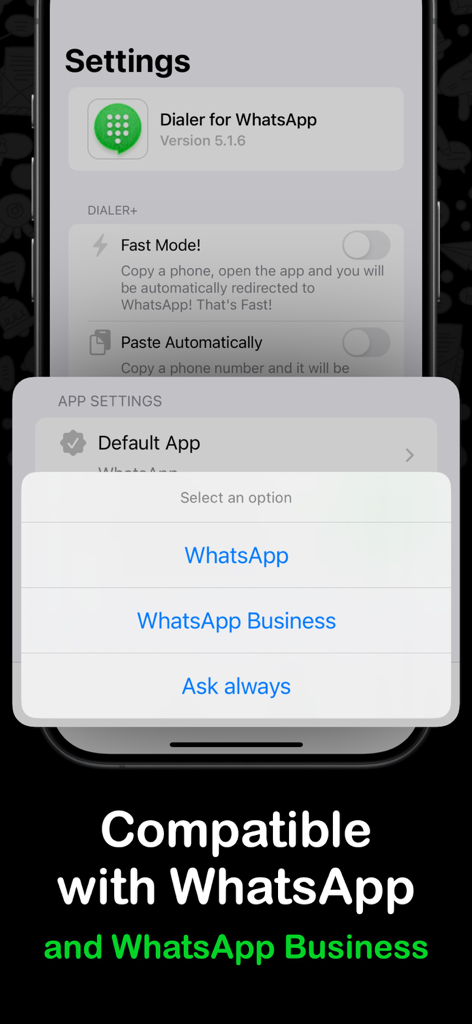
WhatsApp용 다이얼러 앱 설정 화면으로, 기본 메시징 앱으로 WhatsApp 또는 WhatsApp Business를 선택하는 옵션을 보여줍니다.
WhatsApp용 다이얼러 앱 설정 화면으로, 기본 메시징 앱으로 WhatsApp 또는 WhatsApp Business를 선택하는 옵션을 보여줍니다.

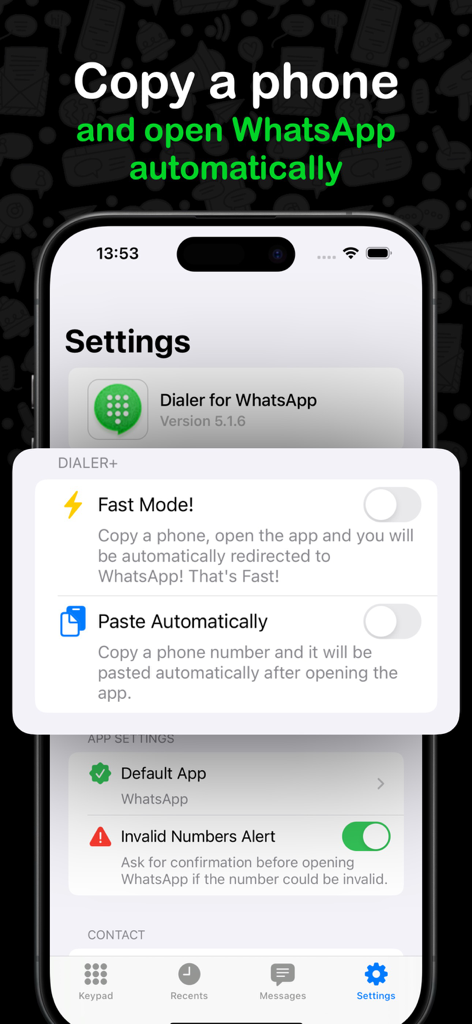
빠른 메시징을 위한 빠른 모드 및 자동 붙여넣기 옵션을 보여주는 WhatsApp용 다이얼러 앱 설정 스크린샷.

빠른 메시징을 위한 빠른 모드 및 자동 붙여넣기 옵션을 보여주는 WhatsApp용 다이얼러 앱 설정 스크린샷.

메시징 워크플로우 마스터하기

이 앱을 돋보이게 하는 도구, 429K+ 명의 사용자가 선택.

🚫

연락처 없는 메시징

주소록에 추가하지 않고 누구에게나 즉시 메시지를 보내세요. 개인 연락처 목록을 깔끔하게 유지하고 낯선 사람으로부터 프로필을 비공개로 유지하세요.

스마트 메시지 템플릿

반복적인 응답을 탭 한 번으로 저장하고 배포하세요. 고객 및 마켓플레이스 구매자에게 가격 목록, 주소 또는 FAQ를 즉시 보내는 데 적합합니다.

📋

클립보드 지능

클립보드에서 전화번호를 자동으로 감지합니다. 한 숫자도 입력하지 않고 이메일이나 웹 브라우저에서 채팅 창으로 전환하세요.

리뷰 분석

사용자 리뷰 인사이트.

감정 점수

34%
부정적

요약

This app receives mixed to largely negative feedback, with many users initially appreciating its ease of use and convenience for sending WhatsApp messages without saving contacts. However, a significant number of complaints highlight excessive advertisements, even for premium subscribers, and critical bugs affecting core app functionality. Users frequently report the app getting stuck, the share sheet feature failing, and a widespread incompatibility with WhatsApp Business, especially after updates or on specific models like the iPhone 13 Pro Max and 14 Pro Max. Issues like incorrect redirection to WhatsApp chats or the app becoming useless on iPhones are also prominent concerns.

주요 테마

Advertisements(15)
Ease of Use(10)
App Functionality(9)
WhatsApp Business Compatibility(7)
Premium Features(5)
Contact Management Options(3)
Share Sheet Integration(2)

앱 소개

에 대해 알아야 할 모든 것 Dialer for WhatsApp - Click.

설명

Dialer for WhatsApp: Your Essential WhatsApp Companion App Dialer for WhatsApp elevates your messaging experience by allowing the use of WhatsApp and WhatsApp Business without the hassle of adding unknown numbers to your contacts. Tired of cluttering your contact list with one-time WhatsApp contacts? We've got you covered! Key Features: - No More Ghost Contacts: Directly write and send messages without saving numbers to your contacts. Pure convenience! - Quick Access to Repetitive Messages: Save your go-to messages and deploy them anytime with ease. - Self-Storage for Documents and Private Messages: Send documents and personal notes to yourself, organizing your important items magically within WhatsApp. - Uncover the Unknown: Copy any phone number, open it in Dialer for WhatsApp, and swiftly navigate to the WhatsApp profile of unknown contacts. - Cloud Sync: Keep your preset messages synchronized across devices with iCloud integration. And there’s more on the way! We’re constantly adding new features to enhance your experience even further. Terms and Conditions: https://www.apple.com/legal/internet-services/itunes/dev/stdeula/

최신 버전

6.1.4

크기

52.8 MB

출시일

2020년 10월 16일

연락처 정리에서 벗어나세요

임시 번호를 저장하지 않고 WhatsApp에서 누구에게나 즉시 메시지를 보내는 429,000명 이상의 전문가와 함께하세요. 오늘 워크플로우를 간소화하세요.

다운로드: App Store
FAQ

자주 묻는 질문

에 대해 알아야 할 모든 것 Dialer for WhatsApp - Click

연락처에 저장하지 않고 발신자 앱으로 알 수 없는 번호에 메시지를 보낼 수 있나요?

네, WhatsApp용 발신자 - 클릭을 사용하면 번호를 연락처 목록에 저장하지 않고도 WhatsApp 및 WhatsApp Business에서 직접 메시지를 보낼 수 있어 깔끔한 환경을 보장합니다.

WhatsApp용 발신자 - 클릭은 반복적인 메시지에 어떻게 도움이 되나요?

WhatsApp용 발신자 - 클릭 앱에는 '빠른 메시지' 기능이 있어 사용자가 자주 사용하는 메시지를 즉시 저장하고 배포할 수 있습니다. 이를 통해 반복적인 상호 작용을 위한 커뮤니케이션을 최적화할 수 있습니다.

WhatsApp용 발신자 - 클릭은 WhatsApp Business와 호환되나요?

네, WhatsApp용 발신자 - 클릭은 WhatsApp 및 WhatsApp Business와 완벽하게 호환됩니다. 사용자는 앱 설정 내에서 기본 메시징 앱을 지정할 수 있습니다.

WhatsApp용 발신자 - 클릭으로 나 자신에게 메시지나 문서를 보낼 수 있나요?

네, WhatsApp용 발신자 - 클릭에는 자체 저장 기능이 포함되어 있습니다. 이를 통해 사용자는 문서를 개인 메모와 함께 자신의 WhatsApp 번호로 보내 쉽게 정리하고 액세스할 수 있습니다.

WhatsApp용 발신자 - 클릭은 여러 기기에서 미리 설정된 메시지를 동기화하나요?

네, WhatsApp용 발신자 - 클릭은 iCloud 통합을 통해 클라우드 동기화를 제공합니다. 이 기능은 미리 설정된 모든 메시지를 여러 기기에서 동기화하여 일관된 액세스를 보장합니다.

WhatsApp용 발신자 - 클릭의 '빠른 모드'란 무엇인가요?

WhatsApp용 발신자 - 클릭은 속도를 높이기 위해 '빠른 모드'를 제공합니다. 이 모드를 활성화하면 전화번호를 복사하면 자동으로 WhatsApp으로 이동하여 채팅을 빠르게 시작할 수 있습니다.

App information, icons, screenshots, and descriptions displayed on this page are sourced from the Apple App Store and are the property of their respective developers. Download estimates and rankings are based on MWM's proprietary models and may not reflect actual figures. This page is provided for informational and analytical purposes only.

Believe this page infringes your intellectual property? File a dispute