
이 페이지는 앱이나 개발자의 공식 페이지가 아니며, 정보 제공 및 논평을 목적으로 작성된 독립 편집 간행물입니다. 명시적으로 달리 언급되지 않는 한, 해당 앱이나 개발자는 MWM, Apple, Google Play, 앱 퍼블리셔 또는 앱 개발자와 제휴, 보증, 후원, 승인 또는 공식적으로 연결되어 있지 않으며, 이 페이지의 어떤 내용도 해당 앱이 MWM의 서비스를 사용하여 개발되었음을 의미하지 않습니다. 모든 상표, 로고, 스크린샷 및 기타 콘텐츠는 해당 소유자의 자산입니다.


Dialog - Translate Speech
언어 장벽은 지워지고, 소통의 능력을 부여한다. 이 앱은 175개 이상의 언어에서 음성 및 텍스트 번역을 실시간으로 처리하여 사용자가 세계를 정복할 수 있도록 한다.
다운로드
7.5M+사용자 평점
총 평가 수
51.4K개발사
카테고리
Reference지원 언어
19최신 버전
4.72.1크기
327.1 MB출시일
2018년 4월 22일이 앱은 국제 여행자, 디지털 노마드 및 언어 학습자를 위한 포괄적이고 사용하기 쉬운 번역 솔루션을 제공합니다.
Dialog - Translate Speech 앱 주요 기능 분석
광범위한 언어 지원
이 앱은 175개 이상의 언어를 지원하여 국제 여행자와 언어 학습자가 광범위한 환경에서 소통할 수 있도록 돕는 필수적인 기본 기능을 제공합니다.
음성-음성 번역
이 도구는 실시간 음성-음성 번역 기능을 갖추고 있어 사용자가 즉각적인 구두 의사소통을 할 수 있게 해주며, 여행자 및 디지털 노마드에게 특히 유용합니다.
카메라 및 AR 번역
이 앱은 카메라를 사용하여 주변의 간판, 메뉴, 물리적 객체의 텍스트를 즉시 번역하는 기능을 제공하여 외국 환경에서 정보를 이해하는 데 탁월한 도움을 줍니다.
오프라인 모드
이 도구는 인터넷 연결 없이도 텍스트 번역 기능을 사용할 수 있는 오프라인 모드를 갖추고 있어, 사용자가 안정성과 편의성을 확보할 수 있게 해줍니다.
텍스트 번역
이 앱은 쉽고 빠르게 텍스트를 번역할 수 있는 기본 기능을 제공하여, 읽기와 쓰기가 필요한 모든 사용자에게 필수적인 도구입니다.
AI 기반 텍스트 정교화
이 도구는 번역된 텍스트의 톤, 문법, 길이를 조절하는 고급 AI 기능을 갖추고 있어, 사용자가 전문적이고 미묘한 커뮤니케이션을 할 수 있도록 지원합니다.
번역 키보드
이 앱은 메신저나 이메일 앱에서 직접 번역 기능을 사용할 수 있는 키보드를 제공하여, 사용자가 원활한 다국어 소통을 할 수 있게 해줍니다.
고급 음성 인식
이 도구는 시끄러운 환경에서도 정확하게 음성을 인식하는 고급 음성 인식 기능을 갖추고 있어, 사용자가 번역 오류를 줄이고 명확한 의사소통을 할 수 있도록 보장합니다.
자동 언어 감지
이 앱은 사용자가 말하는 동안 선택된 언어 간의 언어를 자동으로 감지하는 기능을 제공하여, 번역 과정을 간소화하고 사용자 편의성을 높입니다.
Apple Watch 앱
이 도구는 Apple Watch에서 직접 175개 이상의 언어를 즉시 번역할 수 있는 기능을 갖추고 있어, 사용자가 편리하고 핸즈프리 번역 경험을 할 수 있게 해줍니다.
자주 묻는 질문
에 대해 알아야 할 모든 것 Dialog - Translate Speech
What is Dialog - Translate Speech?
Dialog - Translate Speech is an app providing quick speech and text translation. It supports over 175 languages for voice-to-voice, text, and camera-based translations, facilitating communication and language learning.
How many languages does Dialog - Translate Speech support?
Dialog - Translate Speech supports instantaneous translation between more than 175 languages and dialects for both speech and text. This includes a wide range of global languages.
Does Dialog - Translate Speech offer camera translation?
Yes, Dialog - Translate Speech includes a Camera Translator feature. Users can utilize their device's camera to instantly translate text found on signs, menus, or any other printed material.
Can I use Dialog - Translate Speech without an internet connection?
Yes, Dialog - Translate Speech offers an offline mode. This feature allows users to translate texts even when they do not have an active internet connection.
What are the subscription options for Dialog - Translate Speech?
Dialog - Translate Speech offers a weekly subscription option. This subscription automatically renews unless turned off at least 24 hours before the current period ends.
Is Dialog - Translate Speech available on Apple Watch?
Yes, Dialog - Translate Speech has an Apple Watch app. It enables instant translation of over 175 languages directly from the user's wrist. Unlimited translations require a Dialog Plus subscription.
What AI tools are available in Dialog - Translate Speech?
Dialog - Translate Speech provides advanced AI tools. Users can adjust the tone, check grammar, and change the length of their translations to refine the output.
Does Dialog - Translate Speech translate physical objects using AR?
Yes, Dialog - Translate Speech includes an AR Translator feature. This allows users to employ their camera to translate the names of physical objects located around them in real-time.
Can Dialog - Translate Speech be used for messaging?
Yes, Dialog - Translate Speech includes a translation keyboard feature. This allows users to communicate via text and email with friends and contacts directly through a built-in translator.
What translation engine does Dialog - Translate Speech use?
Dialog - Translate Speech utilizes Google Translate to power its translations. This ensures excellent accuracy and lightning-fast results across supported languages.
다음 스크린샷과 설명은 앱의 공식 스토어 목록에서 직접 가져온 것이며 앱 개발자의 자산입니다.
앱 스토어
스크린샷

이 앱은 명확한 마이크 버튼과 입력된 텍스트 필드를 통해 음성과 텍스트를 모두 번역하여 사용자가 손쉽게 대화할 수 있도록 지원합니다.
음성 및 텍스트 번역

이 도구는 다양한 국기 아이콘과 함께 100개 이상의 언어를 제공하여 사용자가 원하는 언어를 손쉽게 선택하고 번역할 수 있습니다.
다양한 언어 지원

이 앱은 카메라를 사용하여 간판의 '주차장' 텍스트를 'Parking lot'으로 즉시 번역하며, 텍스트 및 객체 인식 모드를 지원합니다.
카메라 번역 기능

이 앱은 메시지 앱 내에서 번역 키보드를 제공하여 사용자가 'Buongiorno!'와 같은 문장을 이탈리아어로 입력하고 영어로 번역된 응답을 보낼 수 있게 합니다.
번역 키보드 통합

이 도구는 '오프라인 모드 켜짐' 표시와 함께 인터넷 연결 없이 '커피 한 잔 주시겠어요?'와 같은 텍스트를 즉시 번역하여 언제 어디서나 사용할 수 있습니다.
오프라인 번역 모드

이 앱은 'Where is a good restaurant?'와 같은 유용한 구문이 분류별로 정리된 내장 회화집을 제공하여 사용자가 여행 중 필요한 정보를 빠르게 찾을 수 있습니다.
내장된 회화집

이 도구는 AR 카메라 기능을 통해 해변의 'ombrello'(우산)와 'sedia'(의자)와 같은 실제 물체의 이름을 즉시 번역하여 주변 환경을 이해하는 데 도움을 줍니다.
AR 카메라 번역
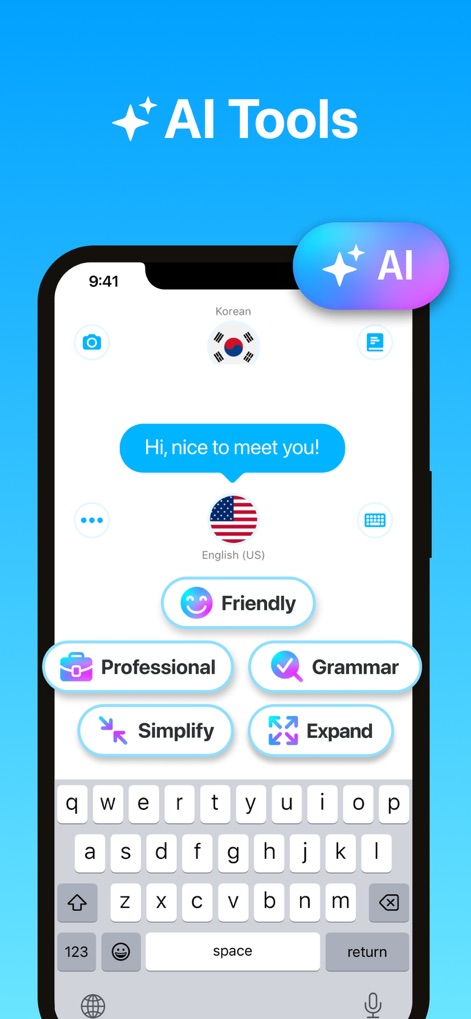
이 앱은 '친근하게', '전문적으로', '문법 확인'과 같은 다양한 AI 도구를 제공하여 번역된 텍스트의 어조와 스타일을 세밀하게 조정할 수 있습니다.
고급 AI 도구

이 앱은 Apple Watch 앱을 통해 사용자가 손목에서 직접 175개 이상의 언어를 번역하고, 최근 번역 기록을 쉽게 확인할 수 있도록 지원합니다.
Apple Watch 연동
설명
Download
비슷한 앱
유사한 기능과 사용자 경험을 가진 앱

DeepL Translate
DeepL SE

腾讯翻译君-多语言翻译
Tencent Technology (Shenzhen) Company Limited

出国翻译官- 多语言语音翻译聊天交友
Beijing Qicai Muzhi Technology Co.,Ltd.

Translate Voice:Ai Chat
TINY BOLT (HK) CO., LIMITED

GO Translate・AI Translator App
INNOVAPP LLC

翻译全能王-中文日文图片扫描翻译器
Shanghai Baowu Network Technology Co., Ltd.

translation-Global translation
Hebei jiudao network technology co., ltd

Photo Translator: Camera OCR
Son Hoang

Voice Translator : Language +
AmazinPro Technology Solutions And Training Company Limited
이 페이지는 앱이나 개발자의 공식 페이지가 아니며, 정보 제공 및 논평을 목적으로 작성된 독립 편집 간행물입니다. 명시적으로 달리 언급되지 않는 한, 해당 앱이나 개발자는 MWM, Apple, Google Play, 앱 퍼블리셔 또는 앱 개발자와 제휴, 보증, 후원, 승인 또는 공식적으로 연결되어 있지 않으며, 이 페이지의 어떤 내용도 해당 앱이 MWM의 서비스를 사용하여 개발되었음을 의미하지 않습니다. 모든 상표, 로고, 스크린샷 및 기타 콘텐츠는 해당 소유자의 자산입니다.