DoubleTake - Multicam video

DoubleTake - Multicam video

다운로드: App Store
로고: DoubleTake - Multicam video

DoubleTake: 당신의 아이폰을 전문가 수준의 멀티캠 스튜디오로 바꿔보세요

시네마틱 인터뷰, 끊김 없는 반응, 고급 브이로그를 위해 두 개의 카메라 피드를 동시에 녹화하세요. 후반 작업 시간을 절약하고 기기의 렌즈의 모든 창의적 잠재력을 활용하세요.

다운로드: App Store

개발사

Bending Spoons Apps ApS

카테고리

Photo & Video

다운로드

1M+

사용자 평점

3.6/5

총 평가 수

2K+

지원 언어

11

두 배의 비전

이 인터페이스를 사용하는 1M+ 명의 사용자.

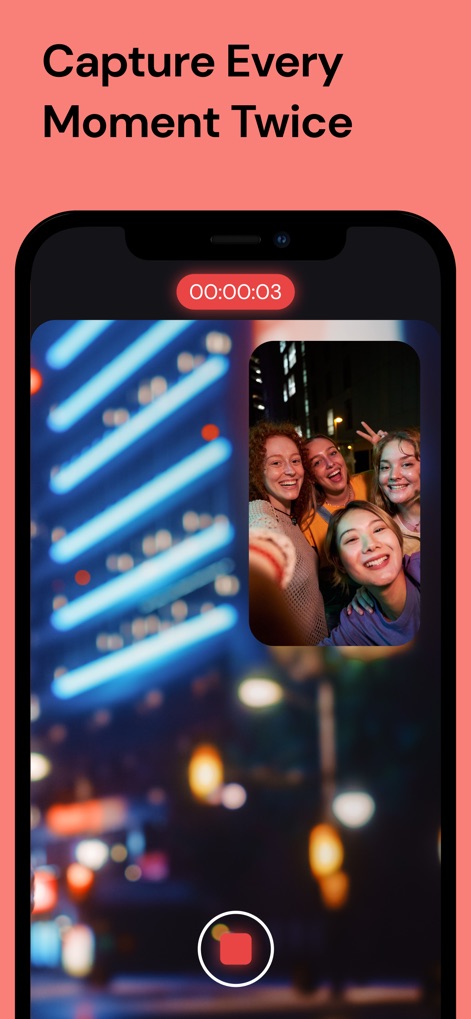
네 명의 친구가 사진 속 사진 보기로 멀티캠 비디오를 녹화하는 DoubleTake 앱을 보여주는 스마트폰 화면.

네 명의 친구가 사진 속 사진 보기로 멀티캠 비디오를 녹화하는 DoubleTake 앱을 보여주는 스마트폰 화면.

사진 속 사진 및 분할 화면 녹화 모드를 보여주는 DoubleTake 앱 인터페이스

사진 속 사진 및 분할 화면 녹화 모드를 보여주는 DoubleTake 앱 인터페이스

동시 녹화를 위해 초광각 및 셀카 렌즈를 포함한 카메라 조합 옵션을 보여주는 DoubleTake 앱의 인터페이스

동시 녹화를 위해 초광각 및 셀카 렌즈를 포함한 카메라 조합 옵션을 보여주는 DoubleTake 앱의 인터페이스

4K 비디오 설정 및 멀티캠 사진 속 사진 모드를 보여주는 DoubleTake 앱 인터페이스

4K 비디오 설정 및 멀티캠 사진 속 사진 모드를 보여주는 DoubleTake 앱 인터페이스

다양한 멀티캠 비디오 녹화 및 내보내기 옵션이 있는 미디어 갤러리를 보여주는 DoubleTake 앱 인터페이스

다양한 멀티캠 비디오 녹화 및 내보내기 옵션이 있는 미디어 갤러리를 보여주는 DoubleTake 앱 인터페이스

전문적인 제작, 단 하나의 기기

이 앱을 돋보이게 하는 도구, 1M+ 명의 사용자가 선택.

📸

다중 렌즈 시점

추가 장비 없이 전문가 수준의 시네마틱 경험을 시청자에게 제공하기 위해 와이드 및 망원 샷을 동시에 캡처하세요.

👥

끊김 없는 인터뷰

샷/역샷 모드를 사용하여 인터뷰 진행자와 피험자를 동시에 녹화하세요. 팟캐스트 및 거리 브이로그에 완벽합니다.

⏱️

제로 싱크 편집

최종 파일을 단일 합성 파일 또는 별도의 고비트율 클립으로 내보내 편집 시간을 절반으로 줄여 더 빠르게 소셜 공유가 가능합니다.

리뷰 분석

사용자 리뷰 인사이트.

감정 점수

18%
부정적

요약

This mobile app, designed for multi-camera video recording, is currently facing significant functionality issues, leading to widespread user dissatisfaction. Many reviews report frequent app crashes, failure to save recorded footage (often resulting in lost content or only one camera's feed saved), and general instability, particularly following recent updates and on newer iOS versions (e.g., iOS 18.x, iOS 26) and iPhone models (e.g., 12 Pro Max, 16 Pro). While users appreciate its intuitive interface and the core concept of multi-camera recording, these positives are overshadowed by critical bugs, poor video quality, and frustrating pricing models like weekly subscriptions, making the app unreliable and often unusable.

주요 테마

Multi-Camera Recording(4)
Reliability(4)
Creative Control(2)
Intuitive Interface(1)
High-Quality Output(1)
Separate Video Feeds(1)
Advanced Camera Features(1)

앱 소개

에 대해 알아야 할 모든 것 DoubleTake - Multicam video.

설명

DoubleTake transforms your iPhone into a multi-cam studio allowing you to capture video from two cameras at the same time on recent devices* *NOTE: Per iOS 15 capabilities, multi-cam video is restricted to the following devices only: iPhone 13 series devices, iPhone 12 series devices, iPhone 11 Pro Max, 11 Pro, 11, Xs Max, Xs, Xr, SE 2. iPad Pro 2018 and newer. While this app will install and function on all devices supported by iOS 15, all devices outside of this list will be restricted to recording video from on a single camera. Use DoubleTake to record video in new ways: - Camera Visualization: Better than a director’s viewfinder! Use DoubleTake’s camera picker view to visualize all available cameras for your device. Use this view to help decide how to frame your shot and which cameras you will select. - Shot/Reverse shot: To capture all the organic and intimate interaction between two actors or interviewer and interviewee. Traditionally, filmmakers would need to employ two cameras and place these in cumbersome ‘over the shoulder’ locations. With DoubleTake you can place one device in between your actors and place the audience right in the middle of the conversation. - Multi-cam: Capture two different focal lengths of the same subject at the same time. Use DoubleTake with the Ultra Wide lens (iPhone 11 Pro Max, 11 Pro and 11 only) and the Tele to capture both an establishing shot and a punch-in on your subject simultaneously. Or use any other combination of front and rear lenses for unrivaled multi-cam capture. - PiP or Discreet: The DoubleTake interface allows you to see both cameras of your video capture at the same time through the use of a Picture in Picture (PiP) window. You can move this PiP around the screen, tap to zoom in, or swipe it away if it’s distracting (the second video will continue to record). With DoubleTake you can decide if you want to record your videos as separate discrete files or if you want the video recorded as a composite video that includes the PiP window animated as you see it on the screen. - Split-screen: Doubletake also allows you to use any two cameras to create a 50/50 split-screen effect that is saved as a single video. This is great for capturing engaging interviews, or any scenario where two sides of the story need equal weighting on screen. - Focus & Exposure Controls: DoubleTake allows you to set and lock your focus and exposure on both cameras during multi-cam capture with our unified reticle. Just tap anywhere to set an area of interest with the reticle, then tap again to lock or unlock. Our easy to use camera switcher lets you effortlessly move between your A and B cams during a recording to adjust the focus and exposure for each independently of one another. Video Specs: - Full frame focus and exposure for smooth and easy automated focus and exposure adjustments. - Selectable broadcast frame rates: 24fps, 25fps, and 30fps depending on your project requirements. - 1080p video at high bitrate encoding for maximum quality. (note: 1080p video is the maximum resolution supported by the Apple API for multi-cam capture). - Composited PiP or separate discreet video files recorded as .h264 .mov files are saved to DoubleTake’s internal library which supports batch export to the Camera Roll. Terms of Use: https://support.bendingspoons.com/tos.html?app=436577167

최신 버전

3.1.2

크기

64.6 MB

출시일

2020년 1월 28일

멀티캠 스튜디오가 탭 한 번이면 됩니다

제작 수준을 높이고 있는 1백만 명 이상의 크리에이터와 함께하세요. 아이폰을 전문가용 장비로 바꾸고 오늘부터 이야기의 양면을 모두 캡처하세요.

다운로드: App Store

App information, icons, screenshots, and descriptions displayed on this page are sourced from the Apple App Store and are the property of their respective developers. Download estimates and rankings are based on MWM's proprietary models and may not reflect actual figures. This page is provided for informational and analytical purposes only.

Believe this page infringes your intellectual property? File a dispute