
이 페이지는 앱이나 개발자의 공식 페이지가 아니며, 정보 제공 및 논평을 목적으로 작성된 독립 편집 간행물입니다. 명시적으로 달리 언급되지 않는 한, 해당 앱이나 개발자는 MWM, Apple, Google Play, 앱 퍼블리셔 또는 앱 개발자와 제휴, 보증, 후원, 승인 또는 공식적으로 연결되어 있지 않으며, 이 페이지의 어떤 내용도 해당 앱이 MWM의 서비스를 사용하여 개발되었음을 의미하지 않습니다. 모든 상표, 로고, 스크린샷 및 기타 콘텐츠는 해당 소유자의 자산입니다.
다운로드
333K+사용자 평점
총 평가 수
11K+개발사
카테고리
Navigation지원 언어
21최신 버전
6.9.1크기
79.5 MB출시일
2018년 8월 2일완벽한 마음의 평화로 운전하세요
iPhone을 스마트 AI 기반 대시 캠으로 전환하여 책임 문제를 보호하고 안전을 모니터링하며 모든 운전을 클라우드에 백업하세요.
프로급 책임 보호
속도, G-포스, GPS 데이터가 포함된 HD 비디오를 녹화하세요. 보험 또는 법률 지원팀에 안전한 클라우드 링크를 즉시 공유하여 실제 상황을 증명하세요.
AI 기반 안전 경고
당사의 머신러닝 알고리즘은 실시간으로 급제동, 끼어들기, 사고 위험을 감지하여 주의를 기울이고 더 안전한 운전 습관을 형성하도록 돕습니다.
자주 묻는 질문
에 대해 알아야 할 모든 것 Driver: Driving & Dash Cam App
운전자 앱이란 무엇인가요?
운전자 앱은 연결된 운전 경험을 제공하며, 클라우드 + 앱 플랫폼을 통해 책임 보호, 긴급출동 서비스, 사고 처리 지원, 속도계 및 운전자 교육 기능을 제공합니다. 여행 기록을 위한 대시캠 및 포켓 드라이브 모드를 지원합니다.
운전자 앱이 대시캠으로 작동하나요?
네, 운전자 앱은 '대시캠 모드'에서 대시캠으로 작동합니다. 휴대폰을 녹화 장치로 변환하여 여행의 전체 HD 동영상을 녹화하고 Apple CarPlay를 지원합니다.
운전자의 '포켓 드라이브 모드'는 어떻게 작동하나요?
운전자의 '포켓 드라이브 모드'는 동영상 녹화 없이 위치, 속도, G-포스 및 텔레매틱스 이벤트 등 포괄적인 여행 데이터를 기록합니다. 특히 동영상 녹화가 필요하지 않을 때 유용한 데이터 중심의 컴패니언 역할을 합니다.
운전자 앱으로 녹화한 여행을 공유할 수 있나요?
네, 사용자는 운전자 앱으로 녹화한 여행을 쉽게 공유할 수 있습니다. 이 플랫폼을 통해 운전자 클라우드에서 여행에 대한 고유한 URL 링크를 생성하고 보낼 수 있습니다.
운전자 프리미엄에는 어떤 기능이 포함되어 있나요?
운전자 프리미엄은 클라우드에서의 HD 여행 저장, 미국 내 24시간 긴급출동 서비스, 월별 나무 심기, 카메라 및 동영상 사용자 정의 옵션, 연간 요금제 가입 시 무료 운전자 쿨러를 제공합니다.
운전자 앱은 긴급출동 서비스를 제공하나요?
네, 운전자 프리미엄 가입자는 미국 전역에서 24시간 긴급출동 서비스를 받을 수 있습니다. 서비스는 일반적으로 15~30분 이내에 도착하여 운전 중에 안심할 수 있습니다.
운전자 AI는 어떻게 운전 안전을 개선하나요?
운전자 AI는 머신러닝 알고리즘을 사용하여 급제동, 급가속, 과속, 사고 임박, 위험한 추격 등 중요한 이벤트를 자동으로 감지하고 캡처하여 운전 습관 개선을 위한 데이터를 제공함으로써 안전성을 향상시킵니다.
운전자 앱이 휴대폰의 저장 공간을 자동으로 관리하나요?
네, 운전자 앱은 휴대폰 저장 공간을 자동으로 관리합니다. 운전자 클라우드에 성공적으로 업로드된 모든 여행은 2일 후에 삭제되어 기기 공간을 확보합니다.
운전자 앱은 외부 및 내부 동영상을 동시에 녹화할 수 있나요?
네, 운전자 앱은 듀얼 카메라 녹화를 지원합니다. iPhone XS 이상 모델의 사용자는 여행 중에 외부 및 내부 동영상을 동시에 녹화할 수 있습니다.
운전자 앱의 무료 버전이 있나요?
네, 운전자 앱의 무료 버전이 있습니다. 유료 버전이 아닌 것은 사용이 완전히 무료이며 광고가 포함되어 있지 않습니다.
운전자 프리미엄 구독은 어떻게 관리하나요?
운전자 프리미엄 구독은 iTunes 계정 설정을 통해 관리됩니다. 구매 후 App Store의 계정 설정에 액세스하여 언제든지 자동 갱신을 비활성화할 수 있습니다.
운전자 앱은 GPS를 사용하나요?
네, 운전자 앱이 작동하려면 GPS 기능이 필요합니다. 백그라운드에서 GPS를 계속 사용하면 다른 GPS 지원 애플리케이션과 마찬가지로 기기의 배터리 수명에 영향을 줄 수 있습니다.
운전자 클라우드에 동영상이 얼마나 오래 저장되나요?
운전자 클라우드는 90일의 조회 기간 동안 대시캠 모드의 전체 HD 동영상을 보관합니다. 프리미엄 사용자는 HD 여행 버전의 향상된 저장 공간 혜택을 누릴 수 있습니다.
운전자 앱 내에서 속도계 기능을 사용할 수 있나요?
네, 운전자 앱에는 통합 속도계가 있습니다. 대시캠 모드에서 앱을 활발하게 사용하는 동안 속도를 정확하게 표시합니다.
운전자 앱은 Apple CarPlay를 어떻게 지원하나요?
운전자 앱은 Apple CarPlay를 지원하므로 운전 중에 선호하는 내비게이션 및 음악 애플리케이션과 함께 대시캠 모드를 원활하게 사용할 수 있습니다.
다음 스크린샷과 설명은 앱의 공식 스토어 목록에서 직접 가져온 것이며 앱 개발자의 자산입니다.
앱 스토어
스크린샷
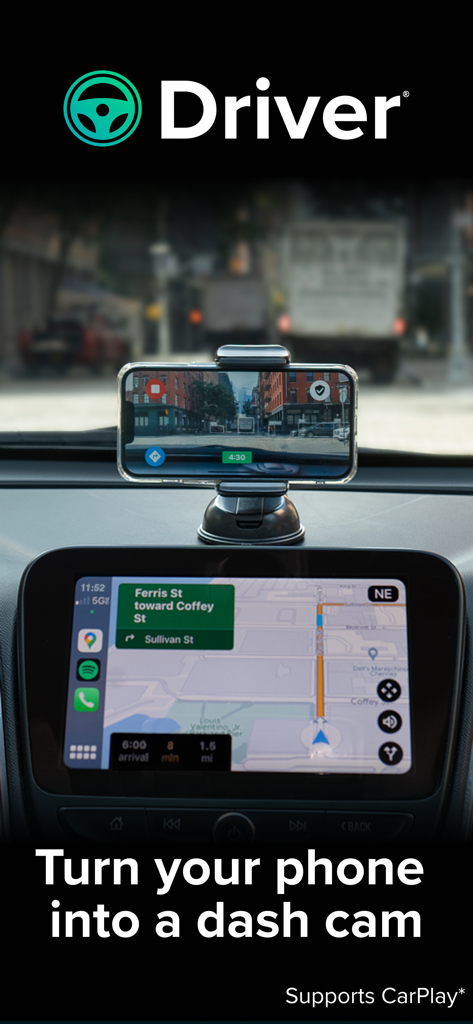
iPhone이 차량 대시보드에 장착되어 Apple CarPlay 내비게이션과 통합된 대시 캠으로 Driver 앱을 사용하고 있습니다.
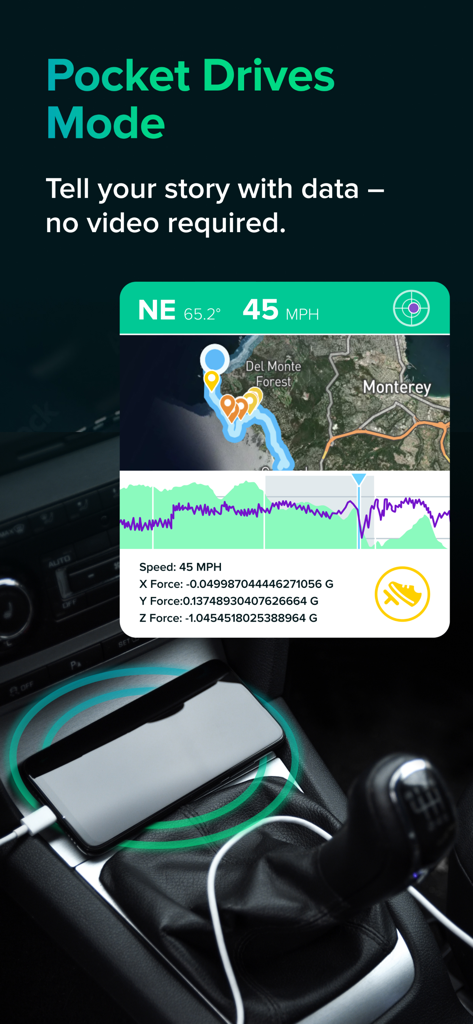
Driver 앱 Pocket Drives 모드 화면으로, 지도에 속도 및 G-포스와 같은 원격 측정 데이터가 표시됩니다.
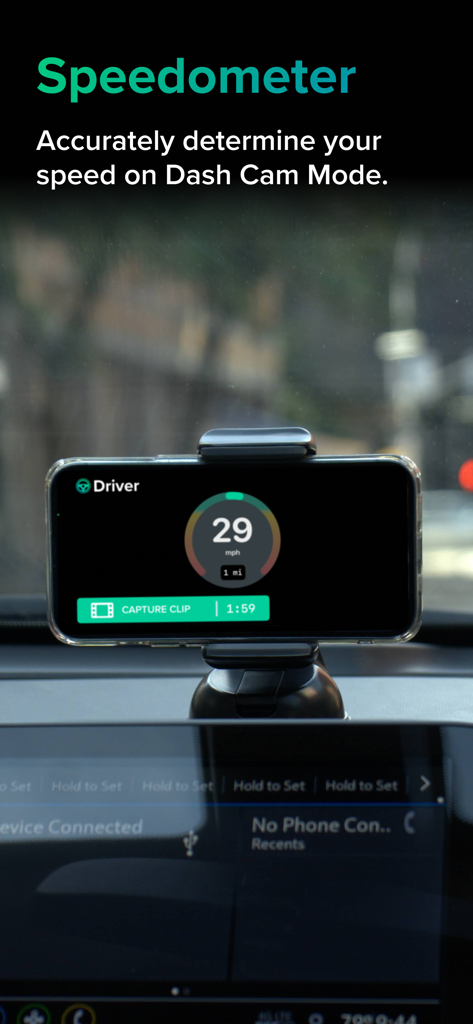
차량 대시보드에 장착된 iPhone이 Driver 앱 속도계 및 대시 캠 녹화 인터페이스를 표시하고 있습니다.
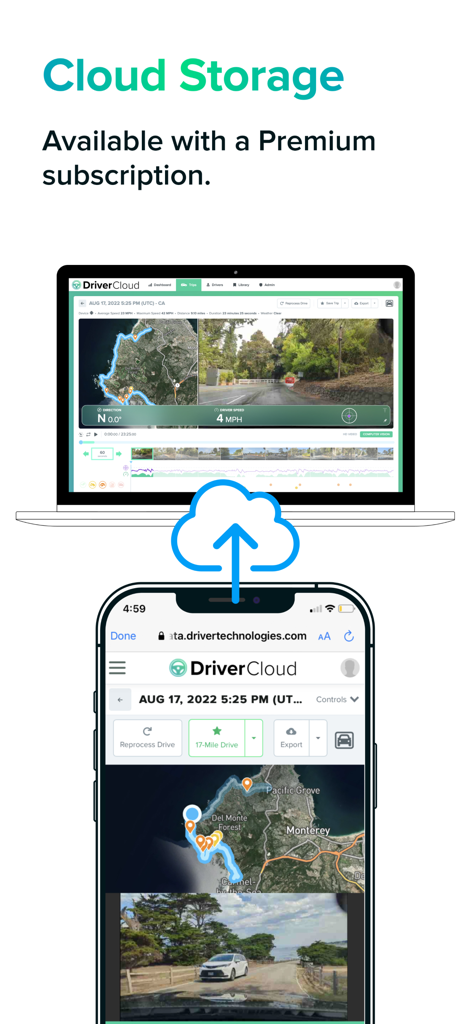
Driver 앱 클라우드 스토리지 인터페이스로, 스마트폰과 노트북 간에 동기화된 여행 데이터 및 비디오가 표시됩니다.
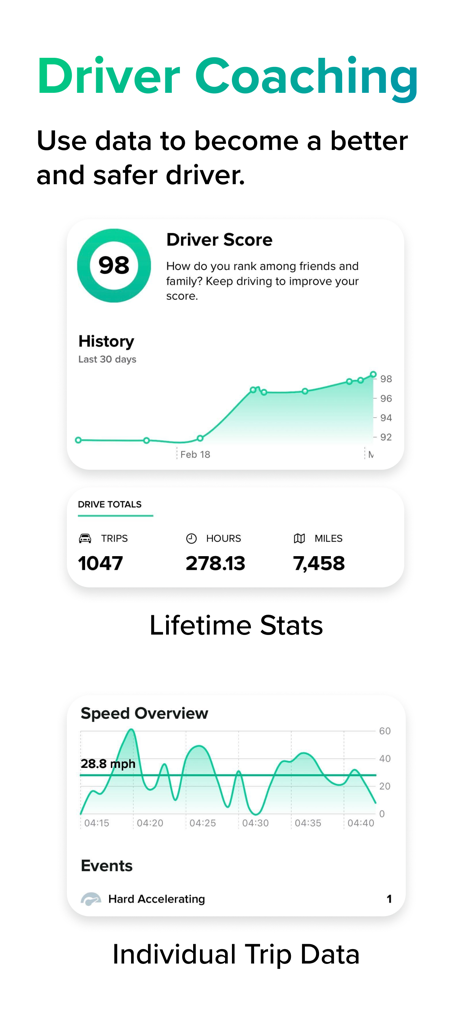
운전 코칭 화면으로 안전 점수 및 운전 통계가 표시됩니다.
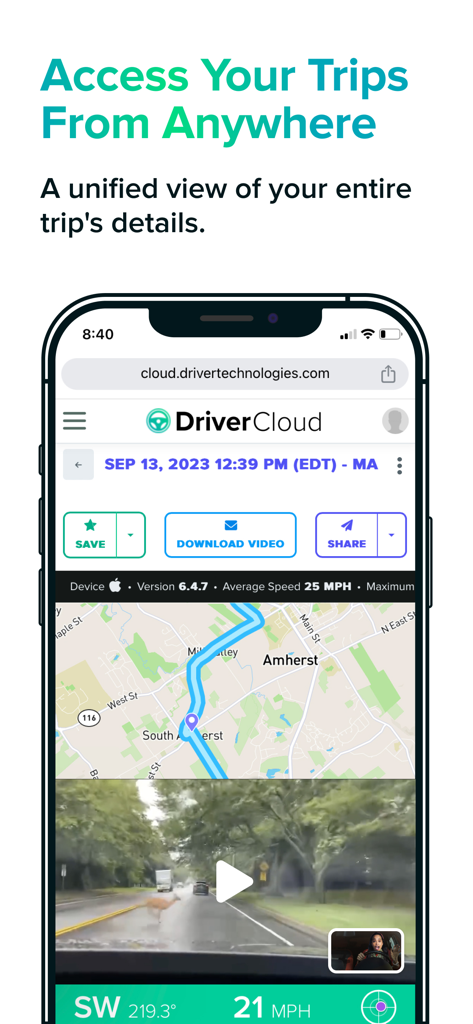
스마트폰에 Driver Cloud 인터페이스가 표시되며, 지도 경로, 사슴 충돌 영상이 포함된 대시 캠 영상, 여행 데이터 저장 또는 공유 옵션이 있습니다.
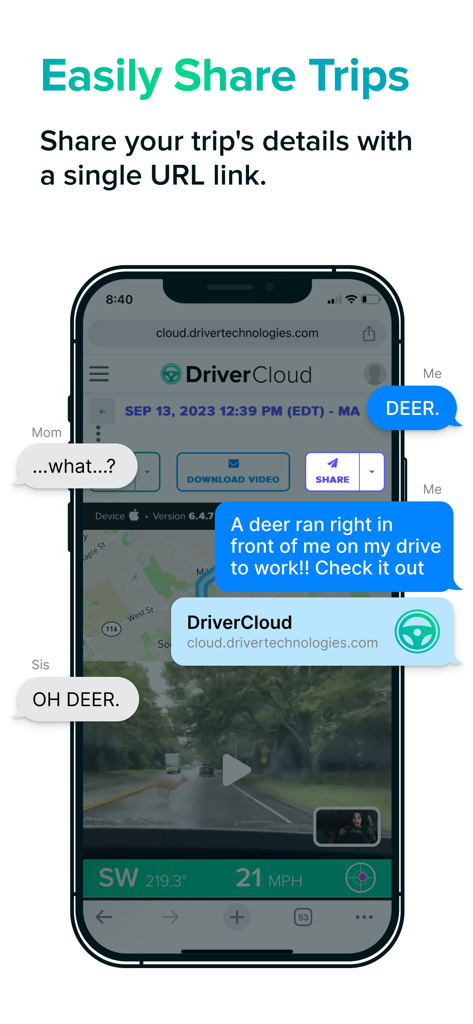
스마트폰에 Driver 앱이 텍스트 대화에서 단일 링크를 통해 여행 녹화 및 위치 데이터를 공유하는 화면이 표시됩니다.
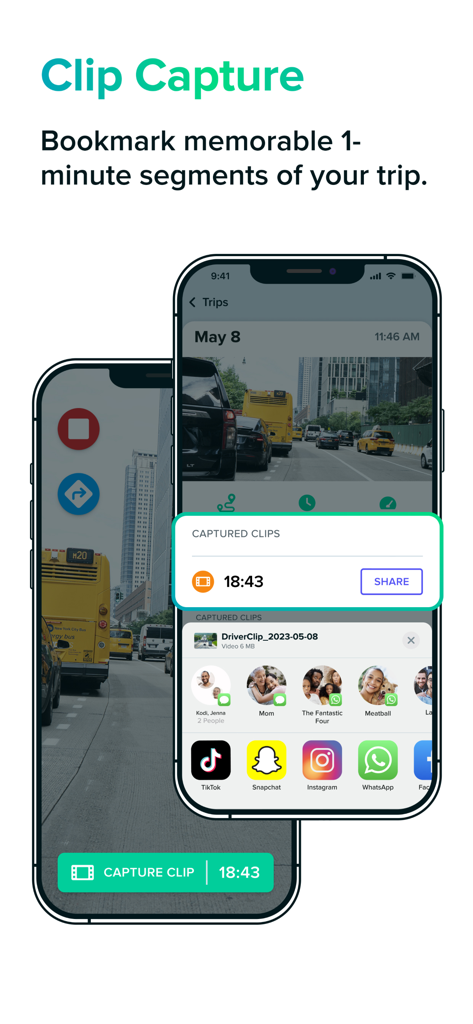
Driver 대시 캠 앱의 인터페이스로, 두 대의 스마트폰에서 클립 캡처 및 비디오 공유 기능이 표시됩니다.
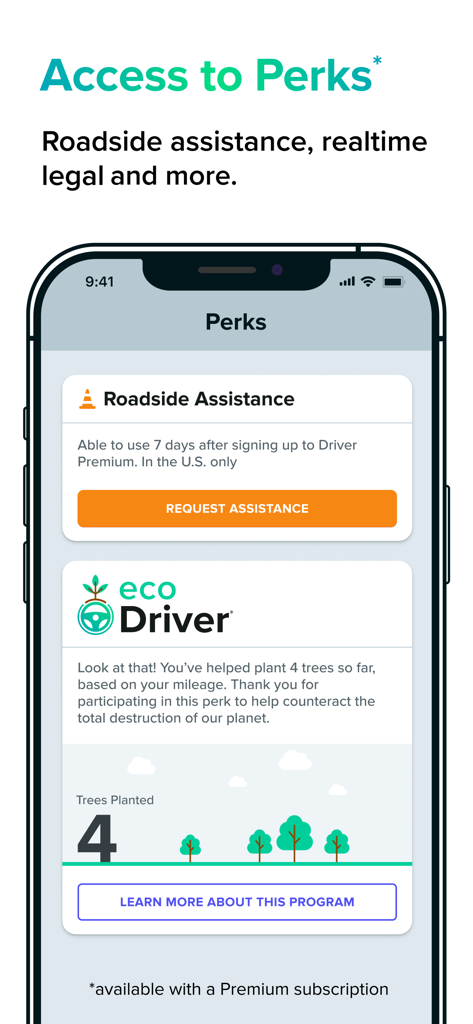
Driver 앱 Perks 화면에 긴급출동 서비스와 친환경 운전자 나무 심기 프로그램이 표시됩니다.
설명
Download



이 페이지는 앱이나 개발자의 공식 페이지가 아니며, 정보 제공 및 논평을 목적으로 작성된 독립 편집 간행물입니다. 명시적으로 달리 언급되지 않는 한, 해당 앱이나 개발자는 MWM, Apple, Google Play, 앱 퍼블리셔 또는 앱 개발자와 제휴, 보증, 후원, 승인 또는 공식적으로 연결되어 있지 않으며, 이 페이지의 어떤 내용도 해당 앱이 MWM의 서비스를 사용하여 개발되었음을 의미하지 않습니다. 모든 상표, 로고, 스크린샷 및 기타 콘텐츠는 해당 소유자의 자산입니다.