
이 페이지는 앱이나 개발자의 공식 페이지가 아니며, 정보 제공 및 논평을 목적으로 작성된 독립 편집 간행물입니다. 명시적으로 달리 언급되지 않는 한, 해당 앱이나 개발자는 MWM, Apple, Google Play, 앱 퍼블리셔 또는 앱 개발자와 제휴, 보증, 후원, 승인 또는 공식적으로 연결되어 있지 않으며, 이 페이지의 어떤 내용도 해당 앱이 MWM의 서비스를 사용하여 개발되었음을 의미하지 않습니다. 모든 상표, 로고, 스크린샷 및 기타 콘텐츠는 해당 소유자의 자산입니다.


eSign App: Sign PDF Documents
종이 서류는 당신을 묶어두지만, eSign App은 당신을 해방시킨다. 이 앱은 아이폰을 디지털 서명의 지휘봉으로 변신시켜, 언제 어디서든 문서 흐름을 제어할 수 있는 힘을 부여한다.
다운로드
1M+사용자 평점
총 평가 수
1.7K개발사
카테고리
Business지원 언어
10최신 버전
1.4.4크기
70.9 MB출시일
2023년 3월 29일전문가를 위한 모바일 전자 서명 솔루션 핵심 기능 평가
eSign App: Sign PDF Documents 분석
전자 서명 기능
이 앱은 사용자가 iPhone 또는 iPad를 통해 PDF 및 기타 형식의 문서에 전자 서명을 할 수 있도록 지원합니다.
서명 요청 및 문서 공유
이 도구는 서명을 위해 다른 당사자에게 문서를 보낼 수 있게 하며, 완성된 문서를 PDF 또는 JPG 파일로 공유할 수 있습니다.
간편한 문서 가져오기 및 스캔
이 앱은 사용자가 문서를 빠르고 쉽게 가져오거나 스캔하여 디지털 형식으로 전환할 수 있도록 합니다.
주요 클라우드 서비스 연동
이 앱은 iCloud, Dropbox, Evernote, Box, OneDrive, Google Drive 등 다양한 클라우드 서비스와 원활하게 연동되어 문서 접근성을 높입니다.
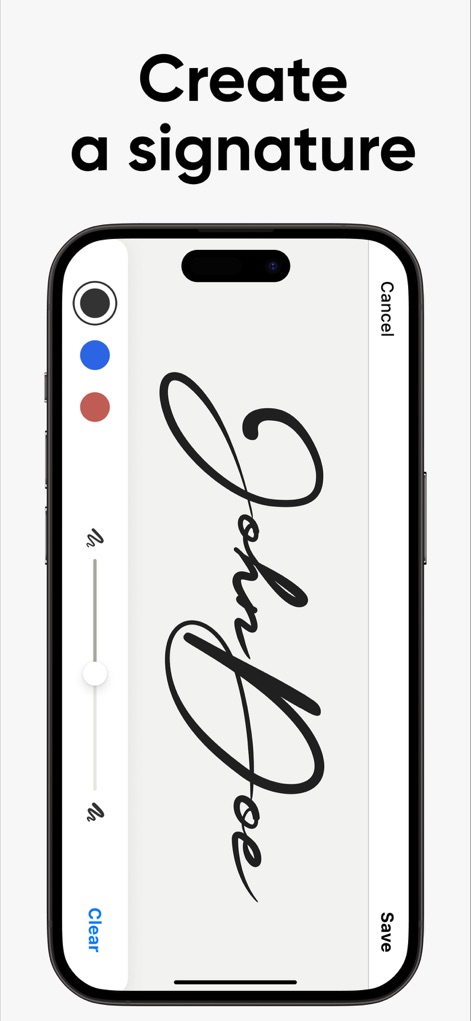
전자 서명 생성 및 맞춤 설정
이 도구는 사용자가 자신만의 전자 서명을 생성하고 저장하여 문서에 쉽게 적용할 수 있도록 지원합니다.
문서 작성 및 내용 편집
이 앱은 사용자가 양식을 작성하고 문서 내용을 편집할 수 있는 기능을 제공하여 디지털 문서 작업의 편의성을 더합니다.
자주 묻는 질문
에 대해 알아야 할 모든 것 eSign App: Sign PDF Documents
What is eSign App?
eSign App transforms an iPhone or iPad into a powerful tool for e-signing PDF and other document formats. It allows users to import, sign, and share documents easily.
Can eSign App function without an internet connection?
Yes, eSign App functions offline. It does not require an Internet connection because all documents are stored locally on your device for convenient access.
What are the core features of eSign App?
eSign App's core features include signing, filling, and editing documents, creating e-signatures, importing, sending for signing, and integrating with cloud services.
How can I create an e-signature in eSign App?
Users can create their e-signature directly within eSign App. The interface allows for custom signature creation, which can then be applied to documents.
Does eSign App support cloud storage integrations?
Yes, eSign App supports cloud integrations. It works seamlessly with iCloud, Dropbox, Evernote, Box, OneDrive, and Google Drive for document management.
What are the subscription costs for eSign App?
eSign App subscriptions are $4.99 for one week (with a 3-day trial), $9.99 for one month, and $49.99 for twelve months. Prices may vary by location.
Is a free trial available for eSign App?
Yes, eSign App offers a free trial. A 3-day trial version is included with the 1-week subscription plan, as stated in the app's details.
How do eSign App subscriptions auto-renew?
eSign App subscriptions automatically renew unless auto-renewal is turned off 24 hours before the current period ends. Users manage this in iTunes Account Settings.
What file formats can eSign App export?
eSign App can export documents as PDF or JPG files. This allows users flexibility in sharing and storing their signed documents.
Can I request signatures from others using eSign App?
Yes, eSign App allows you to send documents for signature to another party. This feature simplifies collecting multiple signatures efficiently.
Where can I find the privacy policy for eSign App?
The privacy policy for eSign App is available at e-sign.co/privacy. This link provides details on data handling and user privacy practices.
다음 스크린샷과 설명은 앱의 공식 스토어 목록에서 직접 가져온 것이며 앱 개발자의 자산입니다.
앱 스토어
스크린샷


설명
Download
비슷한 앱
유사한 기능과 사용자 경험을 가진 앱

Docusign - Upload & Sign Docs
Docusign

Sign.Me
SM, OOO (Apps)

Signeasy-Sign Documents App
Glykka LLC

Genius Sign: PDF doc signature
The Grizzly Labs

eSign - Fill & Sign Form Docs
B TO J PTY LTD

Sign Documents: PDF Signature
MR BIKRAMJIT SINGH

Fill & Sign Documents PDF Scan
Upsquare Technosys Private Limited

Receipt Maker - Sign & Send
SVG Apps

Sign Documents - eSign PDF
Tola Marciniak
이 페이지는 앱이나 개발자의 공식 페이지가 아니며, 정보 제공 및 논평을 목적으로 작성된 독립 편집 간행물입니다. 명시적으로 달리 언급되지 않는 한, 해당 앱이나 개발자는 MWM, Apple, Google Play, 앱 퍼블리셔 또는 앱 개발자와 제휴, 보증, 후원, 승인 또는 공식적으로 연결되어 있지 않으며, 이 페이지의 어떤 내용도 해당 앱이 MWM의 서비스를 사용하여 개발되었음을 의미하지 않습니다. 모든 상표, 로고, 스크린샷 및 기타 콘텐츠는 해당 소유자의 자산입니다.