
이 페이지는 앱이나 개발자의 공식 페이지가 아니며, 정보 제공 및 논평을 목적으로 작성된 독립 편집 간행물입니다. 명시적으로 달리 언급되지 않는 한, 해당 앱이나 개발자는 MWM, Apple, Google Play, 앱 퍼블리셔 또는 앱 개발자와 제휴, 보증, 후원, 승인 또는 공식적으로 연결되어 있지 않으며, 이 페이지의 어떤 내용도 해당 앱이 MWM의 서비스를 사용하여 개발되었음을 의미하지 않습니다. 모든 상표, 로고, 스크린샷 및 기타 콘텐츠는 해당 소유자의 자산입니다.


Expense Tracker: Budget AI
수동 입력에 시간을 낭비하지 마세요. 말하는 것만으로 몇 초 만에 지출을 기록하고, 암호화폐와 현금을 관리하며, 은행 계좌를 연결하지 않고도 재정을 관리하세요.
다운로드
2K+사용자 평점
총 평가 수
0개발사
카테고리
Finance지원 언어
18최신 버전
1.2크기
44.4 MB출시일
2026년 1월 9일생각하는 속도로 예산 관리
수동 데이터 입력에 시간을 낭비하지 마세요. AI 기반 추적기는 재정 관리의 마찰을 제거하여 전통적인 스프레드시트의 번거로움 없이 완벽한 제어를 제공합니다.
간편한 음성 기록
타이핑은 건너뛰세요. 앱에 지출한 내용과 장소를 말하기만 하면 AI가 즉시 거래를 분류하고 몇 초 만에 기록합니다.
실시간 지출 용돈
현재 예산을 기준으로 명확한 '일일 용돈'을 받으세요. 계산 실수 없이 지금 당장 얼마를 쓸 수 있는지 정확히 알아보세요.
자주 묻는 질문
에 대해 알아야 할 모든 것 Expense Tracker: Budget AI
Expense Tracker: Budget AI는 어떻게 지출을 추적하나요?
Budget AI는 음성 입력, 영수증 스캔 또는 수동 입력을 포함한 빠른 입력 방법을 통해 지출을 추적합니다. 여러 항목을 한 번에 추가하는 것을 지원하며 AI를 활용하여 사용자 습관에 따라 거래를 자동으로 분류합니다.
Budget AI로 여러 거래를 한 번에 추가할 수 있나요?
네, Budget AI를 사용하면 사용자가 여러 거래를 동시에 추가할 수 있습니다. 이 기능은 여러 지출을 한 번에 말하는 음성 입력과 영수증 스캔을 통해 효율적으로 작동합니다.
Expense Tracker: Budget AI는 예산 관리를 지원하나요?
네, Expense Tracker: Budget AI에는 포괄적인 예산 기능이 포함되어 있습니다. 사용자는 특정 범주에 대한 예산을 설정하고, 하위 범주를 만들고, 일일 또는 주간 지출 허용액을 관리할 수 있습니다.
Expense Tracker: Budget AI는 어떤 통화를 지원하나요?
Expense Tracker: Budget AI는 BTC 및 ETH와 같은 인기 있는 암호화폐를 포함하여 170개 이상의 통화를 지원합니다. 사용자는 원하는 통화로 계정을 설정할 수 있으며 앱에서 환율을 관리합니다.
Expense Tracker: Budget AI는 안전하고 개인 정보 보호가 되나요?
네, Expense Tracker: Budget AI는 사용자 개인 정보 보호 및 보안을 우선시합니다. 인증 또는 가입이 필요 없으며 Face ID, Touch ID 또는 PIN 보안을 제공하고 클라우드 동기화 없이 작동하여 데이터를 로컬에 보관합니다.
Budget AI는 거래를 자동으로 분류할 수 있나요?
네, Budget AI는 통합 AI를 사용하여 거래를 자동으로 분류합니다. 앱은 지출 습관을 학습하고 간소화된 금융 관리를 위해 항목을 올바른 범주로 효율적으로 분류합니다.
Expense Tracker: Budget AI에는 다크 테마가 있나요?
네, Expense Tracker: Budget AI는 다크 테마 옵션을 제공합니다. 이 기능을 통해 사용자는 앱 인터페이스를 더 어두운 색 구성표로 전환하여 사용 중 시각적 편안함을 향상시킬 수 있습니다.
Budget AI로 반복되는 거래를 추적할 수 있나요?
네, Budget AI를 사용하면 사용자가 반복되는 거래를 추적할 수 있습니다. 수입 또는 지출을 매일, 매주 또는 매월 반복되도록 설정할 수 있으며 앱에서 이러한 계획된 거래를 자동으로 관리합니다.
다음 스크린샷과 설명은 앱의 공식 스토어 목록에서 직접 가져온 것이며 앱 개발자의 자산입니다.
앱 스토어
스크린샷
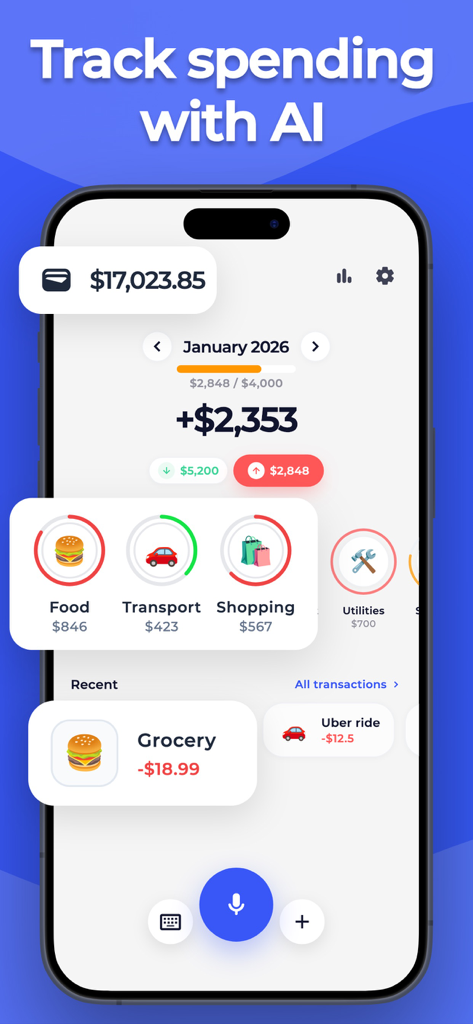
월별 지출 카테고리와 예산 개요를 표시하는 지출 추적기 예산 AI 앱 대시보드

음성 명령을 통해 기록된 여러 지출을 보여주는 AI 예산 앱 인터페이스
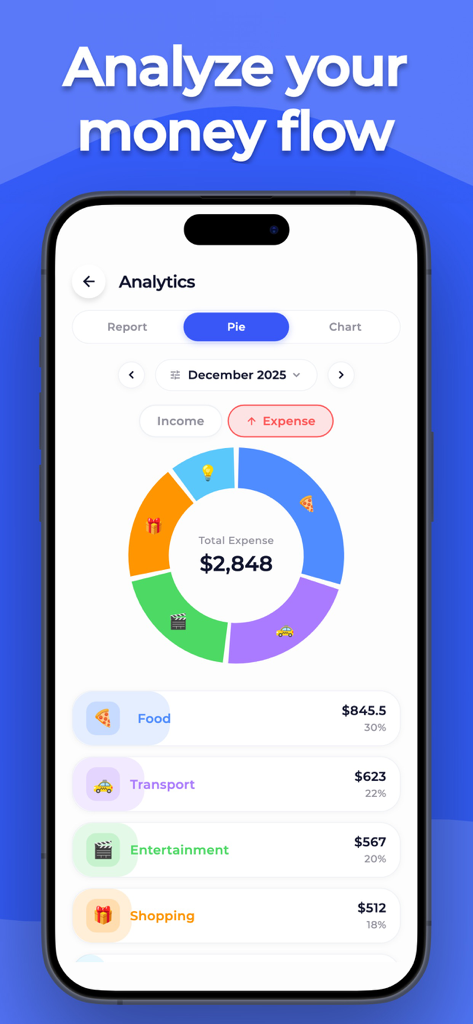
월별 지출 카테고리의 다채로운 파이 차트를 표시하는 지출 추적기 예산 AI 분석 화면
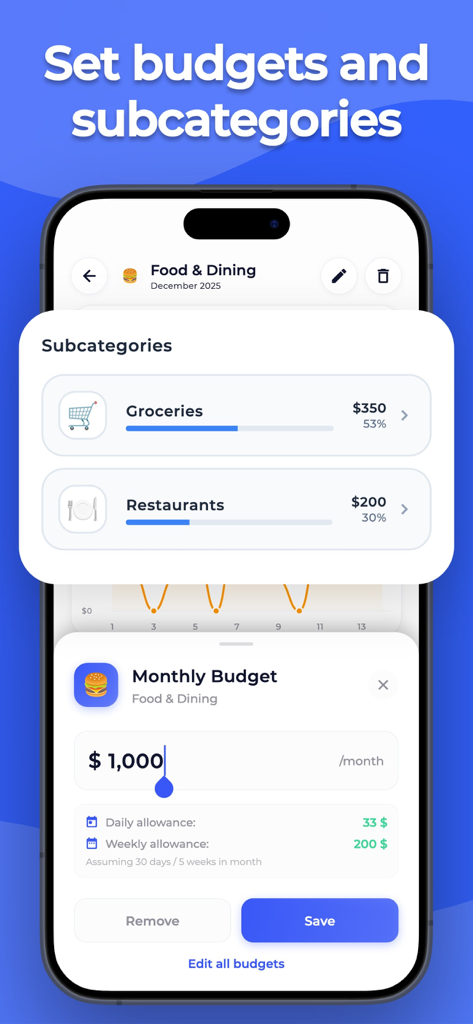
음식 및 외식에 대한 월별 예산 설정 및 하위 카테고리를 보여주는 예산 AI 앱의 인터페이스
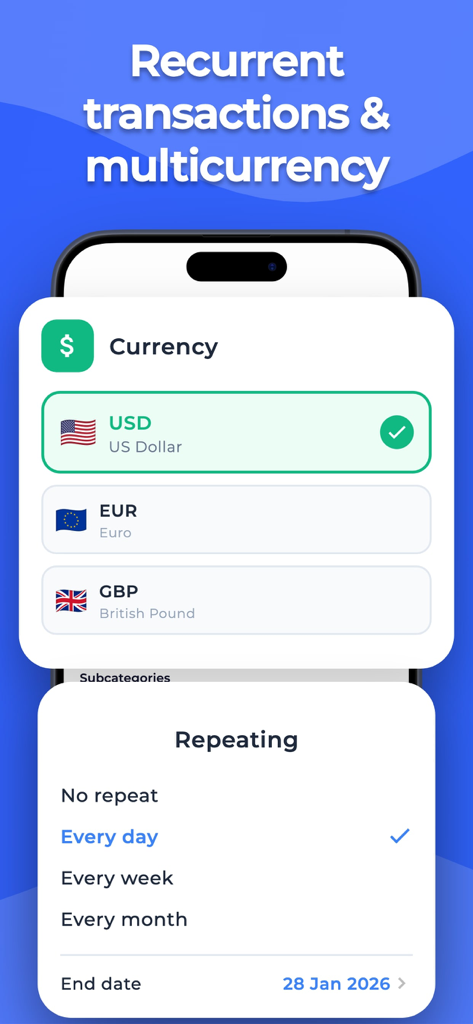
통화 선택 및 반복 거래 설정을 보여주는 지출 추적기 예산 AI의 인터페이스.
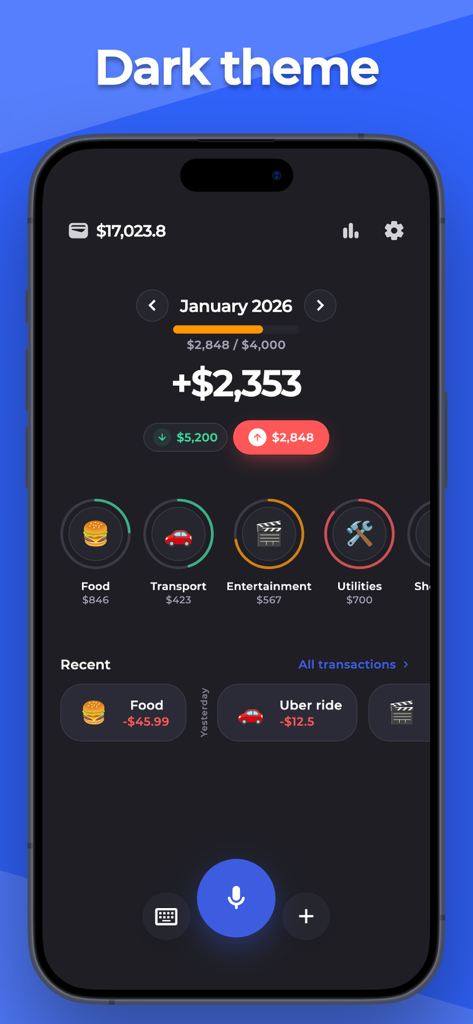
월별 지출 카테고리와 소득을 보여주는 다크 모드의 지출 추적기 예산 AI 모바일 앱 대시보드
설명
Download
비슷한 앱
같은 카테고리의 상위 앱

电子税务局
State Administration of Taxation

UnionPay APP
China Unionpay Co.,Ltd.

养基宝 - 年轻人的养基神器
Shenzhen Xiaoduotou Information Technology Co.,Ltd.

PayPal - Pay, Send, Save
PayPal, Inc.

中国农业银行
AGRICULTURAL BANK OF CHINA LIMITED

Mercado Pago: cuenta digital
MercadoLibre S.A.

Kalshi: Trade on the Big Game
KALSHI INC.

中国工商银行
Industrial and Commercial Bank of China

个人所得税
State Administration of Taxation
이 페이지는 앱이나 개발자의 공식 페이지가 아니며, 정보 제공 및 논평을 목적으로 작성된 독립 편집 간행물입니다. 명시적으로 달리 언급되지 않는 한, 해당 앱이나 개발자는 MWM, Apple, Google Play, 앱 퍼블리셔 또는 앱 개발자와 제휴, 보증, 후원, 승인 또는 공식적으로 연결되어 있지 않으며, 이 페이지의 어떤 내용도 해당 앱이 MWM의 서비스를 사용하여 개발되었음을 의미하지 않습니다. 모든 상표, 로고, 스크린샷 및 기타 콘텐츠는 해당 소유자의 자산입니다.