
이 페이지는 앱이나 개발자의 공식 페이지가 아니며, 정보 제공 및 논평을 목적으로 작성된 독립 편집 간행물입니다. 명시적으로 달리 언급되지 않는 한, 해당 앱이나 개발자는 MWM, Apple, Google Play, 앱 퍼블리셔 또는 앱 개발자와 제휴, 보증, 후원, 승인 또는 공식적으로 연결되어 있지 않으며, 이 페이지의 어떤 내용도 해당 앱이 MWM의 서비스를 사용하여 개발되었음을 의미하지 않습니다. 모든 상표, 로고, 스크린샷 및 기타 콘텐츠는 해당 소유자의 자산입니다.


File Managers
이 앱은 사용자가 디지털 혼돈을 지배하게 합니다. 산만한 파일들을 깔끔하게 정돈하고, 필요할 때 정확히 찾아내며, 기기의 모든 구석을 통제하는 힘을 부여합니다.
다운로드
250k+사용자 평점
총 평가 수
4.5K개발사
카테고리
Utilities지원 언어
17최신 버전
1.0.30크기
89.3 MB출시일
2021년 7월 13일파일 관리의 포괄적인 솔루션
File Managers 앱 분석
포괄적 파일 관리
이 앱은 사용자가 기기 내 저장소, 네트워크 연결 저장소 및 다양한 클라우드 저장소(iCloud, Google Drive 등) 전반에 걸쳐 파일을 쉽게 관리하고, 복사, 이동, 삭제, 이름 변경, 압축, 해제 등 필수적인 파일 작업을 수행할 수 있도록 지원합니다.
개인 정보 보호 강화
이 앱은 사용자가 앱에 암호를 설정하고 특정 폴더를 비공개로 유지할 수 있게 하여, 민감한 파일에 대한 접근을 제한하고 개인 정보 보호를 강화합니다. (Pro 구독 시)
다중 클라우드 및 네트워크 저장소 통합
이 도구는 iCloud, Google Drive와 같은 주요 클라우드 서비스는 물론, 네트워크 연결 저장소까지 통합하여 사용자가 여러 플랫폼에 분산된 파일을 한곳에서 편리하게 관리할 수 있도록 합니다.
미디어 파일 전문 관리
이 앱은 이미지, 오디오, 비디오 등 다양한 미디어 파일을 체계적으로 관리하며, 이미지 미리보기와 같은 기능을 제공하여 미디어 콘텐츠 작업을 용이하게 합니다.
강력한 파일 검색 기능
사용자는 파일 이름, 유형, 날짜 또는 파일 내용 기준으로 강력한 검색 기능을 활용하여 필요한 파일을 몇 초 만에 신속하게 찾아낼 수 있습니다.
효율적인 일괄 작업 처리
이 앱은 여러 파일에 대한 이름 변경, 삭제, 이동과 같은 작업을 동시에 수행하는 일괄 처리 기능을 제공하여, 사용자가 파일 관리 작업을 간소화하고 시간을 절약할 수 있도록 돕습니다.
기기 저장 공간 현황 분석
이 도구는 앱 실행 시 기기에 있는 파일과 앱의 수를 한눈에 표시하여, 사용자가 저장 공간 사용 현황을 즉시 파악하고 관리할 수 있도록 합니다.
올인원 유틸리티 (프로세스 및 백업)
이 앱은 기본적인 파일 관리 기능 외에 프로세스 관리 및 백업 관리 기능을 보너스로 포함하여, 사용자가 기기를 최적화하고 데이터를 안전하게 관리할 수 있는 올인원 유틸리티 경험을 제공합니다.
자주 묻는 질문
에 대해 알아야 할 모든 것 File Managers
What is File Managers?
File Managers is a free, fast, and full-featured application for managing files and folders across your device, network-attached storage, and cloud storages like iCloud and Google Drive.
Does File Managers allow organizing files by categories?
Yes, File Managers organizes all your files by categories including Photos, Video, Audio, Documents, Vault, Archives, Downloads, and Cloud Drive for efficient management.
What basic file management actions are available in File Managers?
File Managers supports basic actions like open, search, navigate directory, copy, paste, cut, delete, rename, compress, decompress, transfer, and download for various file types.
Can File Managers handle different media files and formats?
Yes, File Managers supports managing image, audio, and video files, along with major file formats. It includes image previews and dedicated sections for media.
What features are included with a File Manager Pro Unlimited subscription?
A File Manager Pro Unlimited subscription grants access to all features, App Passcode protection, private folders, and automatically removes all advertisements from the app.
How often is the File Manager Pro subscription billed?
The File Manager Pro subscription is billed weekly, monthly, or annually, corresponding to the selected plan. A one-time payment option is also available if needed.
Does the File Manager Pro subscription automatically renew?
Yes, the File Manager Pro subscription automatically renews unless auto-renewal is turned off at least 24 hours before the end of the current billing period.
Can I password protect files and folders using File Managers?
Yes, File Managers allows users to protect photos and videos with a password using the Vault feature. This functionality is included with the Pro Unlimited subscription.
How do I find files within the File Managers app?
File Managers offers powerful search capabilities, allowing you to quickly find files by name, type, date, or even by content within the files themselves.
Does File Managers support performing actions on multiple files at once?
Yes, File Managers supports batch operations, enabling you to save time by batch renaming, deleting, or moving multiple files simultaneously to streamline management tasks.
다음 스크린샷과 설명은 앱의 공식 스토어 목록에서 직접 가져온 것이며 앱 개발자의 자산입니다.
앱 스토어
스크린샷

이 앱은 무료이며 기능이 풍부한 파일 관리자로, 사용자가 파일을 신속하게 정리하고 효율적인 파일 관리 기능을 경험할 수 있습니다.
빠른 파일 정리
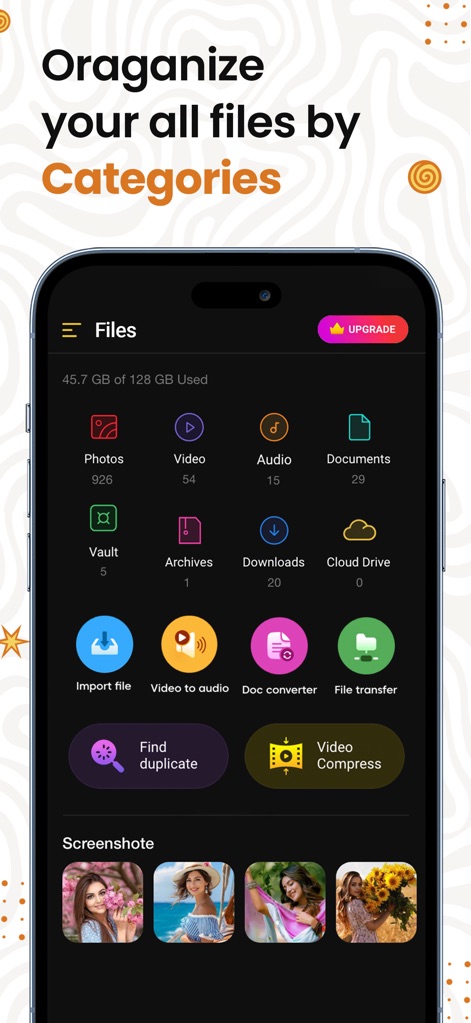
파일 관리자는 사진, 비디오와 같은 주요 카테고리로 파일을 효율적으로 분류하여, 사용자가 미디어 및 문서 파일을 한눈에 파악하고 접근할 수 있도록 돕습니다.
파일 카테고리 분류

이 앱은 모든 음악 및 사운드 관련 파일을 목록으로 보여주며, 내장된 플레이어를 통해 사용자가 오디오 트랙을 직접 재생하고 제어할 수 있습니다.
음악 파일 관리
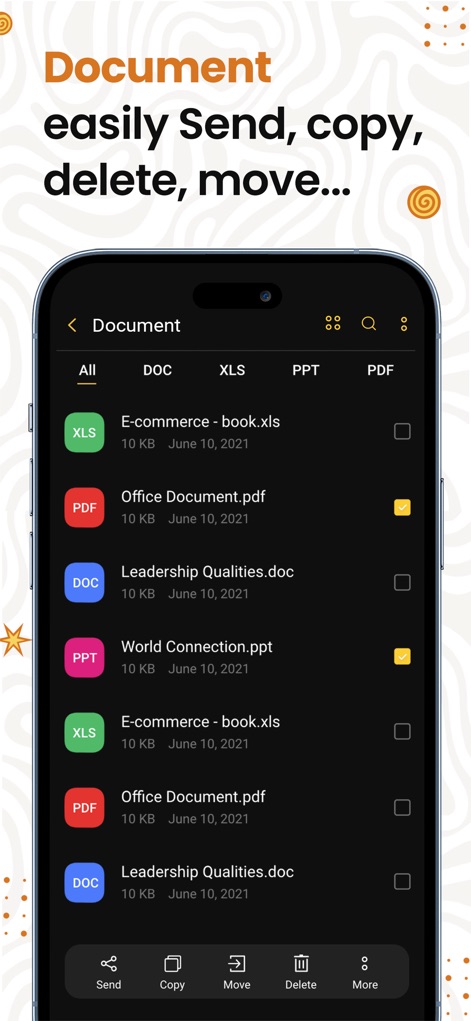
이 도구는 DOC, PDF와 같은 다양한 형식의 문서 파일을 효과적으로 관리할 수 있으며, 사용자는 파일을 쉽게 복사, 이동, 삭제하는 기본 작업을 수행할 수 있습니다.
문서 파일 처리

이 앱은 이미지에 스티커를 추가하거나 필터를 적용하는 등 다양한 편집 옵션을 제공하여, 사용자가 사진을 창의적으로 꾸밀 수 있습니다.
이미지 편집 기능

이 앱은 사진과 비디오를 위한 보안 금고 기능을 제공하며, 사용자가 개인 정보를 보호하기 위해 암호로 접근을 제한할 수 있습니다.
개인 파일 보호
설명
Download
비슷한 앱
유사한 기능과 사용자 경험을 가진 앱

Video Save : Video Saver
Mason Hertial

トルミル
ULTIMATE, Y.K.

FE File Explorer Pro
Skyjos Co., Ltd.

FileBrowser: Documents Manager
Stratospherix

Total files pro
App Ideas S.r.l.

Photo Manager Pro
Skyjos Co., Ltd.

FTPManager Pro
Skyjos Co., Ltd.

Owlfiles - File Manager
Skyjos Co., Ltd.

File Master - document manager
俊杰 阮
이 페이지는 앱이나 개발자의 공식 페이지가 아니며, 정보 제공 및 논평을 목적으로 작성된 독립 편집 간행물입니다. 명시적으로 달리 언급되지 않는 한, 해당 앱이나 개발자는 MWM, Apple, Google Play, 앱 퍼블리셔 또는 앱 개발자와 제휴, 보증, 후원, 승인 또는 공식적으로 연결되어 있지 않으며, 이 페이지의 어떤 내용도 해당 앱이 MWM의 서비스를 사용하여 개발되었음을 의미하지 않습니다. 모든 상표, 로고, 스크린샷 및 기타 콘텐츠는 해당 소유자의 자산입니다.