
이 페이지는 앱이나 개발자의 공식 페이지가 아니며, 정보 제공 및 논평을 목적으로 작성된 독립 편집 간행물입니다. 명시적으로 달리 언급되지 않는 한, 해당 앱이나 개발자는 MWM, Apple, Google Play, 앱 퍼블리셔 또는 앱 개발자와 제휴, 보증, 후원, 승인 또는 공식적으로 연결되어 있지 않으며, 이 페이지의 어떤 내용도 해당 앱이 MWM의 서비스를 사용하여 개발되었음을 의미하지 않습니다. 모든 상표, 로고, 스크린샷 및 기타 콘텐츠는 해당 소유자의 자산입니다.


FlipStudio: Draw & Animate App
이 앱은 당신의 정적인 그림에 숨결을 불어넣습니다. 'FlipStudio'는 단순한 스케치 도구가 아닌, 픽셀 하나하나에 생명을 부여하는 동력원입니다.
다운로드
1M+사용자 평점
총 평가 수
22.3K개발사
카테고리
Games지원 언어
2최신 버전
1.47크기
383.0 MB출시일
2020년 11월 16일애니메이터 및 디지털 아티스트를 위한 핵심 기능 평가
FlipStudio: Draw & Animate 앱 분석
프레임별 애니메이션 및 강력한 드로잉 도구
이 앱은 사용자가 최대 6개의 레이어, 변형 기능, 효과 기능, 올가미 도구 및 트레이싱 기능을 활용하여 프레임별 애니메이션을 손쉽게 제작할 수 있도록 지원합니다. 양파껍질(Onion skin) 기능은 움직임을 부드럽게 연결하는 데 도움을 줍니다.
학습 및 공유를 위한 재료 시스템
이 도구는 사용자들이 애니메이션 프로젝트 파일을 공유하고 다운로드할 수 있는 '재료 시스템'을 제공하여, 다른 작품들로부터 애니메이션 기술과 팁을 학습하고 자신의 작업에 적용할 수 있게 합니다.
풍부한 오디오 편집 및 효과 기능
이 앱은 최대 8개의 오디오 트랙을 사용하여 오디오 클립을 쉽게 추가하고 편집할 수 있도록 합니다. 마이크로 소리를 녹음하고, 음성 변조, 피치/속도 변경 기능을 활용하여 애니메이션에 특별한 효과와 음악을 더할 수 있습니다.
일러스트 드로잉 과정 비디오 제작 기능
이 도구는 사용자가 자신의 일러스트 드로잉 과정을 담은 비디오를 쉽고 빠르게 제작할 수 있는 새로운 기능을 제공하여, 작업 과정을 공유하고 소셜 미디어 콘텐츠를 만드는 데 유용합니다.
글로벌 갤러리를 통한 작품 공유 및 탐색
이 앱은 사용자들이 자신의 애니메이션을 친구 및 전 세계와 쉽게 공유하고, 다른 사용자들이 올린 작품들을 탐색하며 즐길 수 있는 글로벌 갤러리 기능을 갖추고 있습니다.
Apple Pencil 완벽 지원
이 앱은 Apple Pencil을 완벽하게 지원하여, 사용자가 더욱 정밀하고 자연스러운 드로잉 및 애니메이션 작업을 경험할 수 있도록 합니다.
자주 묻는 질문
에 대해 알아야 할 모든 것 FlipStudio: Draw & Animate App
What is FlipStudio used for?
FlipStudio is a drawing application designed for creating flipbooks and high-quality animations. It provides powerful tools for sketching, drawing, and bringing creations to life.
Does FlipStudio support multiple layers for drawing?
Yes, FlipStudio supports up to 6 layers for free. It includes features like a favorite frame, layer function, and a frames viewer for efficient drawing.
Can I add sound effects and music to my animations in FlipStudio?
Yes, FlipStudio allows users to add and edit audio clips with up to eight free tracks. It supports recording sounds, special effects, and importing audio files.
What is the 'material system' in FlipStudio?
The 'material system' in FlipStudio allows users to share animation project files. This system enables learning animation skills and tips from expert works.
What benefits does FlipStudio Premium Membership offer?
Premium Membership offers no ads, unlocks Character Studio, two canvas types, removes material system limits, and increases the maximum frame count to 999.
How do I restore my FlipStudio purchases on a new device?
To restore FlipStudio purchases, click the "Restore purchase" button within the app. You must log in using the same Apple ID used for the initial purchase.
Where can I find FlipStudio's privacy policy?
The privacy policy for FlipStudio is available online at https://flipstudio-1.jimdosite.com/terms-of-service/. This link also includes the terms of service.
다음 스크린샷과 설명은 앱의 공식 스토어 목록에서 직접 가져온 것이며 앱 개발자의 자산입니다.
앱 스토어
스크린샷

사용자는 최대 6개의 레이어를 활용하여 정교한 애니메이션을 만들 수 있으며, 프레임 뷰어를 통해 각 프레임의 진행 상황을 한눈에 확인합니다.
정교한 애니메이션 도구
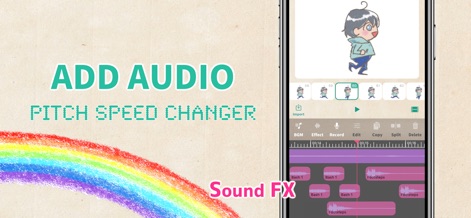
이 앱은 최대 8개의 오디오 트랙을 지원하여 배경음악과 효과음을 추가할 수 있으며, 피치/속도 변경 기능을 통해 소리를 자유롭게 조절합니다.
풍부한 사운드 경험

사용자들은 자신의 작품을 전 세계와 공유하고, 다른 창작자의 애니메이션 자료를 다운로드하여 학습과 영감의 원천으로 활용할 수 있습니다.
글로벌 작품 공유
설명
Download
비슷한 앱
같은 카테고리의 상위 앱

Block Blast!
ARETIS LIMITED

Heartopia
XD Entertainment Co., Ltd.

Solitaire Associations Journey
Hitapps Games LTD

Roblox
Roblox Corporation

Gossip Harbor®: Merge & Story
Microfun Limited

Arrows – Puzzle Escape
Lessmore UG haftungsbeschraenkt

Township
PLR Worldwide Sales Limited

Last War:Survival
FUNFLY PTE. LTD.

Vita Mahjong
VITA STUDIO PTE. LTD.
이 페이지는 앱이나 개발자의 공식 페이지가 아니며, 정보 제공 및 논평을 목적으로 작성된 독립 편집 간행물입니다. 명시적으로 달리 언급되지 않는 한, 해당 앱이나 개발자는 MWM, Apple, Google Play, 앱 퍼블리셔 또는 앱 개발자와 제휴, 보증, 후원, 승인 또는 공식적으로 연결되어 있지 않으며, 이 페이지의 어떤 내용도 해당 앱이 MWM의 서비스를 사용하여 개발되었음을 의미하지 않습니다. 모든 상표, 로고, 스크린샷 및 기타 콘텐츠는 해당 소유자의 자산입니다.