
이 페이지는 앱이나 개발자의 공식 페이지가 아니며, 정보 제공 및 논평을 목적으로 작성된 독립 편집 간행물입니다. 명시적으로 달리 언급되지 않는 한, 해당 앱이나 개발자는 MWM, Apple, Google Play, 앱 퍼블리셔 또는 앱 개발자와 제휴, 보증, 후원, 승인 또는 공식적으로 연결되어 있지 않으며, 이 페이지의 어떤 내용도 해당 앱이 MWM의 서비스를 사용하여 개발되었음을 의미하지 않습니다. 모든 상표, 로고, 스크린샷 및 기타 콘텐츠는 해당 소유자의 자산입니다.


다운로드
2.5M+사용자 평점
총 평가 수
11.6K개발사
카테고리
Photo & Video지원 언어
21최신 버전
6.4.9크기
177.6 MB출시일
2014년 8월 4일전문가 및 고급 DIY 사용자를 위한 열화상 진단 도구
Flir One 앱 기능 분석
FLIR Ignite™ 클라우드 통합
이 앱은 FLIR Ignite™에 연결하여 파일을 클라우드에 즉시 업로드하고, 여러 기기에서 액세스하며, 파일을 정리하고, 이미지를 편집하고, 보고서를 작성하고, 동료 및 고객과 결과를 공유할 수 있게 해줍니다.
최고/최저 온도 지점 자동 추적
이 도구는 가장 뜨겁거나 차가운 지점을 자동으로 추적하여 효율적인 문제 해결을 지원합니다.
FLIR ONE 점검 가이드
사용자가 습기, 단열 및 공기 누출 문제 식별에 대한 단계별 가이드를 통해 자신 있게 문제를 식별할 수 있도록 지원합니다.
온도 스팟 측정
사용자가 특정 지점의 온도를 측정하여 문제점을 정밀하게 분석할 수 있습니다.
열화상 카메라 보기 및 사진/비디오 캡처
이 앱은 사용자가 열화상 카메라 뷰를 통해 문제점을 스캔하고, 분석을 위해 사진과 비디오를 갤러리에 저장할 수 있게 해줍니다.
IR 스케일 조정
이 앱은 문제점을 더욱 명확하게 강조하기 위해 IR 스케일을 조정할 수 있는 기능을 제공합니다.
사진에 텍스트 메모 추가
사용자가 발견 사항을 문서화하기 위해 사진에 텍스트 메모를 추가할 수 있습니다.
품질/성능 모드 전환
이 도구는 최고의 이미지 품질을 위한 품질 모드와 더 빠른 카메라 반응을 위한 성능 모드 간 전환을 지원합니다.
자주 묻는 질문
에 대해 알아야 할 모든 것 Flir One
What is the main purpose of the Flir One app?
The Flir One app connects FLIR ONE® series Thermal Cameras to smartphones for efficient troubleshooting and inspection. It helps users find hidden problems like electrical faults, HVAC failures, or water damage with precision.
Does the Flir One app require a thermal camera?
Yes, the Flir One app requires a FLIR ONE® series Thermal Camera connected to your smartphone to see the thermal view. Users can still explore the app's interface and features without a connected device.
Can the Flir One app capture thermal photos and videos?
Yes, the Flir One app enables users to scan for faults with the thermal camera view and capture both photos and videos. These media files are saved directly to the user's gallery for documentation.
How does the Flir One app enhance thermal imagery?
The Flir One app uses advanced image enhancement features like FLIR MSX® and FLIR VividIR™. These deliver best-in-class thermal imagery for smartphones, ensuring problems are detected with high precision.
Can users adjust color palettes in the Flir One app?
Yes, the Flir One app offers a variety of color palettes. Users can choose different palettes for optimal visualization, which aids in analyzing thermal images and highlighting specific problem areas effectively.
What is FLIR Ignite™ integration in the Flir One app?
FLIR Ignite™ allows the Flir One app to instantly upload files to the cloud. Users can then access, organize, edit images, create reports, and share findings with clients and co-workers from any device.
Does the Flir One app offer inspection guides?
Yes, the Flir One app includes FLIR ONE Inspection Guides, a paid feature. These provide step-by-step instructions and tips to confidently identify issues such as moisture, insulation, and air leak problems.
Can I add notes to thermal images using the Flir One app?
Yes, the Flir One app allows users to add text notes directly to photos. This feature helps in accurately documenting specific findings and observations from captured thermal images for later reference.
Does the Flir One app automatically track hot and cold spots?
Yes, the Flir One app automatically tracks the hottest and coldest spots within the thermal view. This feature is specifically available for FLIR ONE Edge Series and Pro Series cameras to aid in troubleshooting.
다음 스크린샷과 설명은 앱의 공식 스토어 목록에서 직접 가져온 것이며 앱 개발자의 자산입니다.
앱 스토어
스크린샷

이 앱은 표준 이미지 위에 열화상 오버레이를 제공하여 숨겨진 문제점을 명확하게 시각화하고, 특정 지점의 온도 변화를 감지할 수 있습니다.
숨겨진 문제 발견

이 도구를 사용하여 고해상도 열화상 이미지를 촬영할 수 있으며, 이미지 내에서 두드러지는 최고 온도(28.5°)와 특정 지점 온도(21.6°)를 실시간으로 확인할 수 있습니다.
열화상 이미지 촬영
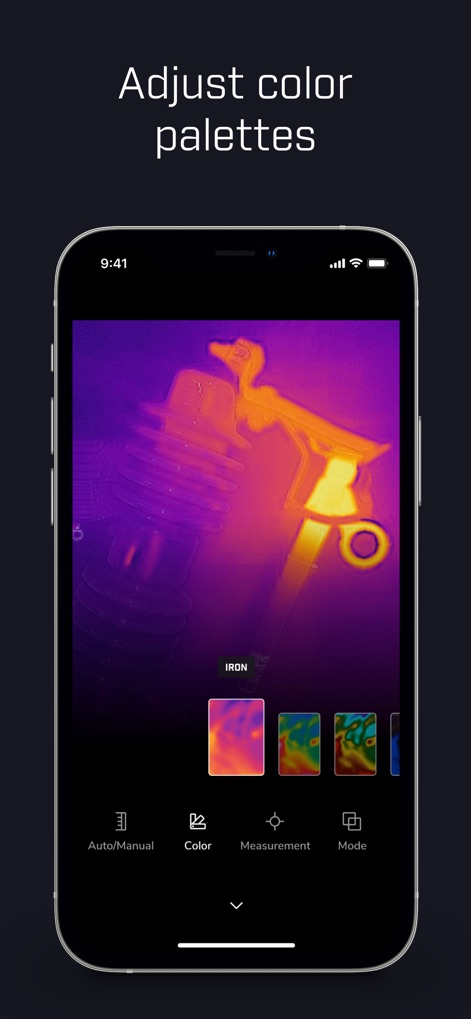
사용자는 다양한 색상 팔레트(예: 'Iron' 및 여러 시각화 옵션) 중에서 선택하여 열화상 데이터를 최적의 방식으로 시각화하고 문제 영역을 더욱 명확하게 식별할 수 있습니다.
색상 팔레트 조정
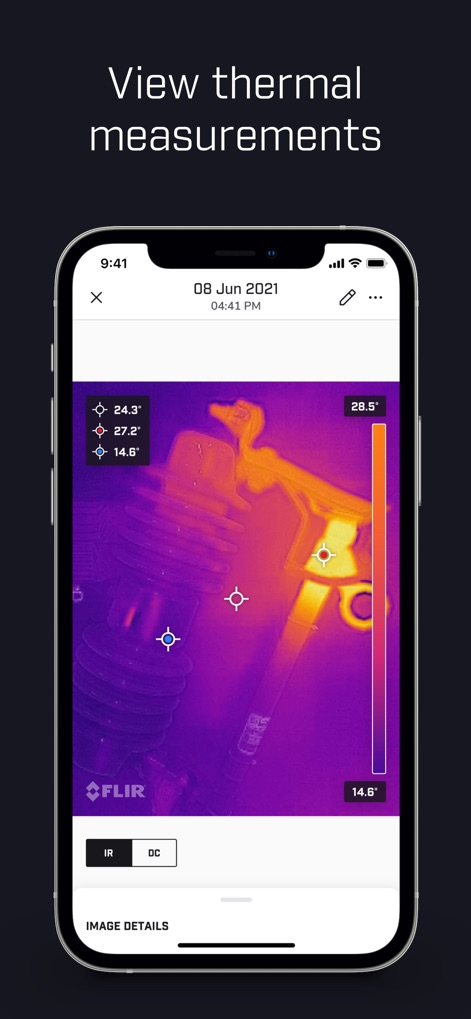
이 앱은 저장된 이미지에서 여러 지점의 정밀한 온도 측정값(예: 24.3°, 27.2°, 14.6°)을 제공하여, 사용자가 상세한 열 분포를 파악하고 문제를 효과적으로 진단하도록 돕습니다.
열 측정값 확인
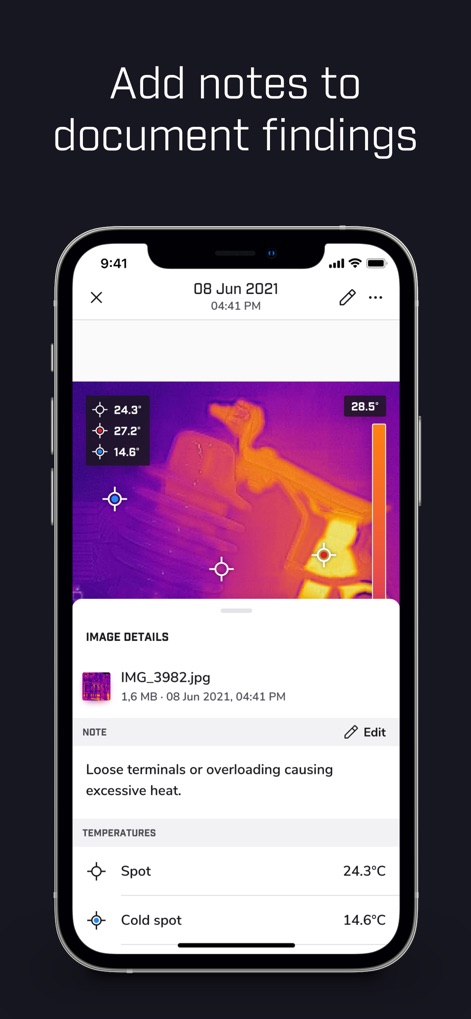
사용자는 발견된 문제에 대한 상세한 소견을 텍스트 메모 필드에 직접 기록하고, 이미지에 표시된 특정 지점 온도(24.3°C) 및 최저 온도(14.6°C)와 함께 정보를 효율적으로 문서화할 수 있습니다.
소견 기록 추가
설명
Download
비슷한 앱
유사한 기능과 사용자 경험을 가진 앱

Doximity
Doximity

PrepWizard
CyberDynamite LLC

MaintainX Work Orders
MAINTAINX INC.

WAGO
WAGO Kontakttechnik GmbH & Co. KG

Flash.It
Structured Steel Pty Ltd

iCoder CPT RVU ICD10 HCPCS
StarInix Corporation

Summons Partner+
n.u. logistics

OneClick Code - Building Codes
One Click Reports

德馨ּּ维修
小东 何
이 페이지는 앱이나 개발자의 공식 페이지가 아니며, 정보 제공 및 논평을 목적으로 작성된 독립 편집 간행물입니다. 명시적으로 달리 언급되지 않는 한, 해당 앱이나 개발자는 MWM, Apple, Google Play, 앱 퍼블리셔 또는 앱 개발자와 제휴, 보증, 후원, 승인 또는 공식적으로 연결되어 있지 않으며, 이 페이지의 어떤 내용도 해당 앱이 MWM의 서비스를 사용하여 개발되었음을 의미하지 않습니다. 모든 상표, 로고, 스크린샷 및 기타 콘텐츠는 해당 소유자의 자산입니다.