Golfboy:Launch Monitor
다운로드: App Store

이 페이지는 앱이나 개발자의 공식 페이지가 아니며, 정보 제공 및 논평을 목적으로 작성된 독립 편집 간행물입니다. 명시적으로 달리 언급되지 않는 한, 해당 앱이나 개발자는 MWM, Apple, Google Play, 앱 퍼블리셔 또는 앱 개발자와 제휴, 보증, 후원, 승인 또는 공식적으로 연결되어 있지 않으며, 이 페이지의 어떤 내용도 해당 앱이 MWM의 서비스를 사용하여 개발되었음을 의미하지 않습니다. 모든 상표, 로고, 스크린샷 및 기타 콘텐츠는 해당 소유자의 자산입니다.


로고: Golfboy:Launch Monitor
다운로드: App Store

Golfboy:Launch Monitor

추측은 그만, 측정은 시작하세요. 아이폰 카메라만으로 프로급 볼 속도, 거리, 발사 각도 데이터를 얻으세요. 비싼 하드웨어를 버리고 실시간 피드백과 자동 영상 분석으로 스윙을 마스터하세요.

주요 수치

다운로드

219K+

사용자 평점

4.6/5

총 평가 수

2K+

개발사

Qoncept, Inc.

카테고리

Sports

지원 언어

2

최신 버전

19.4.5

크기

169.2 MB

출시일

2022년 1월 21일
기능

정밀 데이터로 게임을 마스터하세요

아이폰을 전문가 수준의 런치 모니터로 바꾸세요. 모든 드라이브를 추적하고, 스윙을 분석하고, 가상 라운드를 플레이하여 핸디캡을 더 빨리 낮추세요.

실시간 샷 추적

비싼 하드웨어 없이 아이폰만으로 볼 속도, 발사 각도, 캐리 거리에 대한 즉각적인 피드백을 받으세요.

스마트 스윙 녹화

자동 영상 캡처와 데이터 오버레이로 폼을 분석하여 느낌과 실제 성능을 동기화하세요.

다음 스크린샷과 설명은 앱의 공식 스토어 목록에서 직접 가져온 것이며 앱 개발자의 자산입니다.

앱 스토어

스크린샷
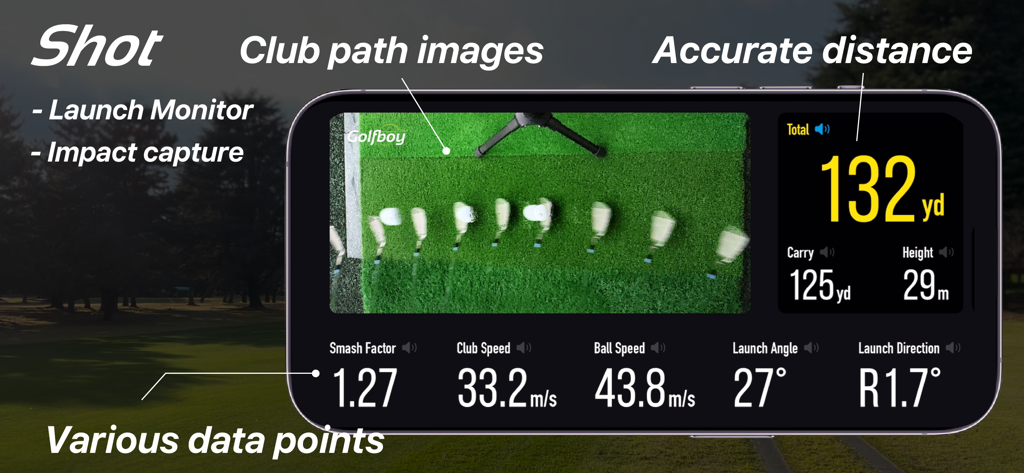
Golfboy:Launch Monitor - 골프 보이 앱 런치 모니터 인터페이스로 클럽 경로 분석과 거리 및 볼 속도와 같은 샷 측정값 표시
골프 보이 앱 런치 모니터 인터페이스로 클럽 경로 분석과 거리 및 볼 속도와 같은 샷 측정값 표시

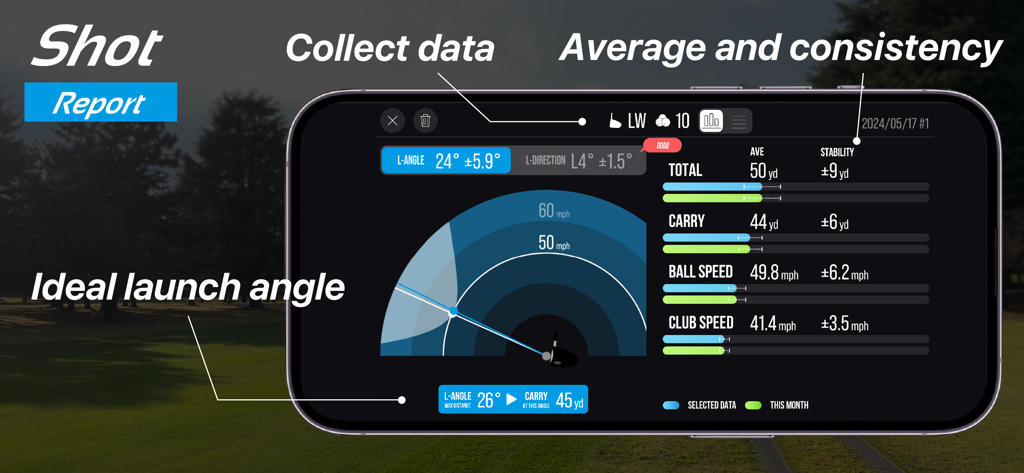
Golfboy:Launch Monitor - 골프 보이 앱 샷 보고서로 스마트폰에 발사 각도, 볼 속도, 거리 측정값이 표시됨
골프 보이 앱 샷 보고서로 스마트폰에 발사 각도, 볼 속도, 거리 측정값이 표시됨

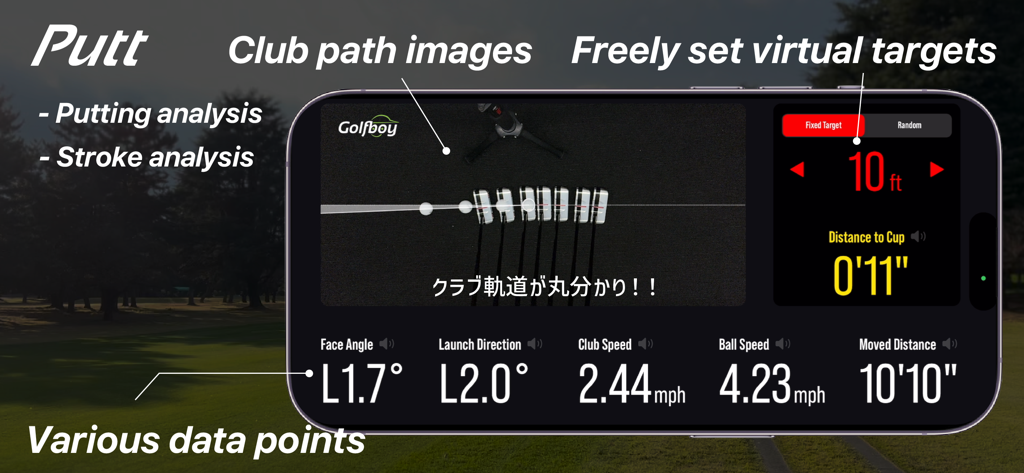
Golfboy:Launch Monitor - 골프 보이 앱 스크린샷으로 클럽 경로 이미지와 샷 데이터가 포함된 퍼팅 스트로크 분석 표시
골프 보이 앱 스크린샷으로 클럽 경로 이미지와 샷 데이터가 포함된 퍼팅 스트로크 분석 표시

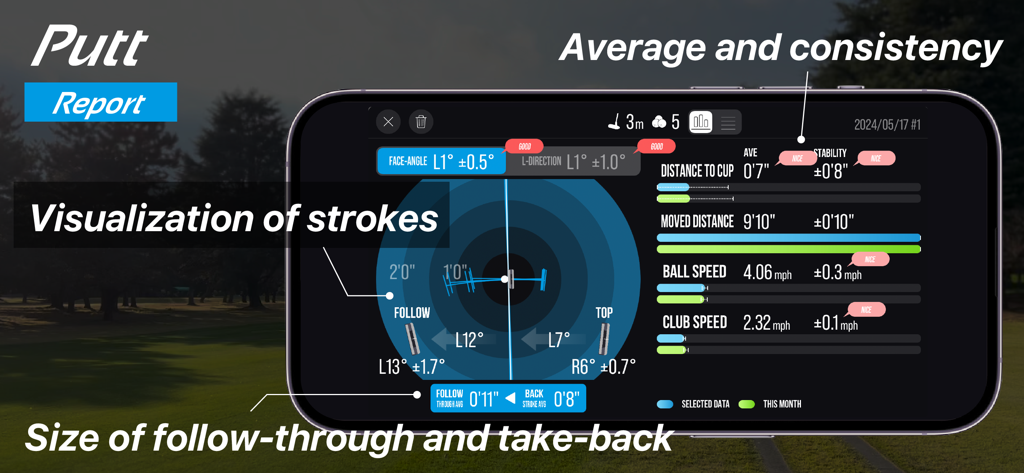
Golfboy:Launch Monitor - 골프 보이 앱 화면으로 퍼팅 데이터와 스트로크 시각화가 포함된 상세 퍼팅 보고서 표시
골프 보이 앱 화면으로 퍼팅 데이터와 스트로크 시각화가 포함된 상세 퍼팅 보고서 표시

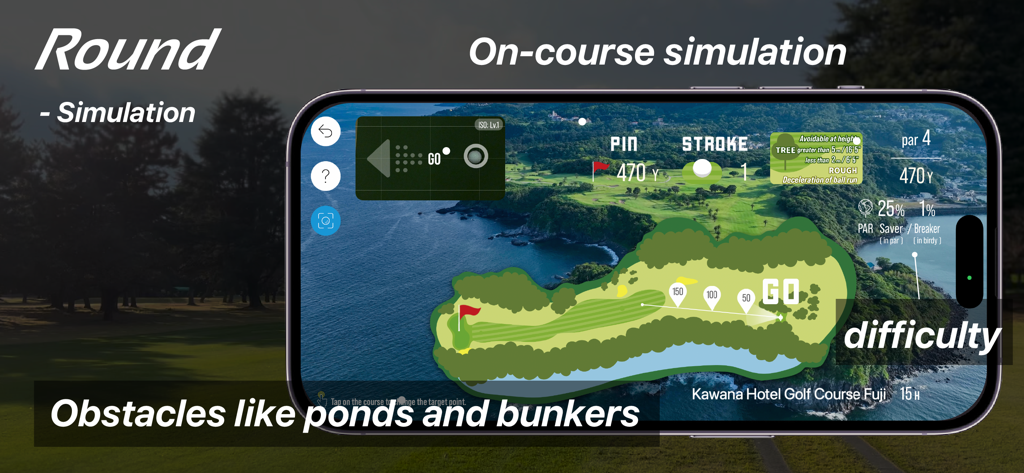
Golfboy:Launch Monitor - 골프 보이 앱 라운드 모드 인터페이스로 연못과 벙커를 포함한 골프 홀의 가상 지도가 있는 코스 내 시뮬레이션 표시
골프 보이 앱 라운드 모드 인터페이스로 연못과 벙커를 포함한 골프 홀의 가상 지도가 있는 코스 내 시뮬레이션 표시

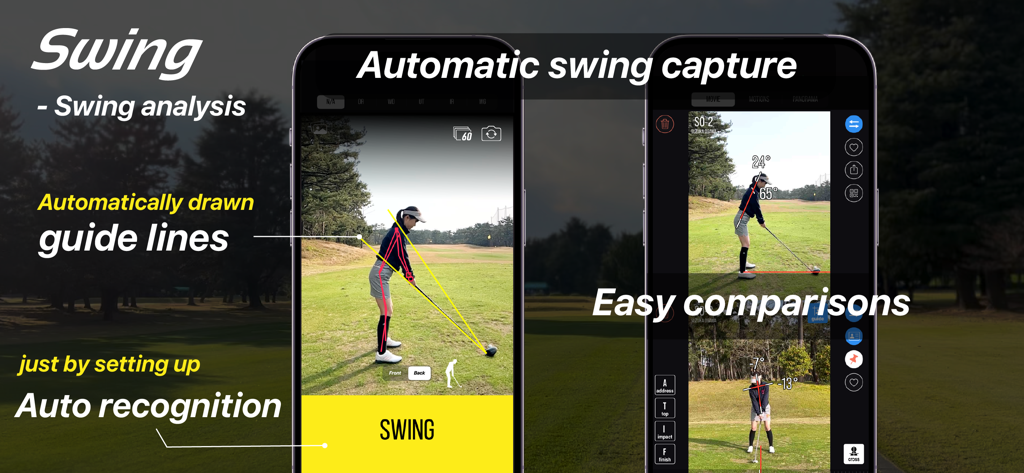
Golfboy:Launch Monitor - 골프 보이 앱 자동 스윙 분석 인터페이스로 가이드 라인 및 나란히 비교 표시
골프 보이 앱 자동 스윙 분석 인터페이스로 가이드 라인 및 나란히 비교 표시

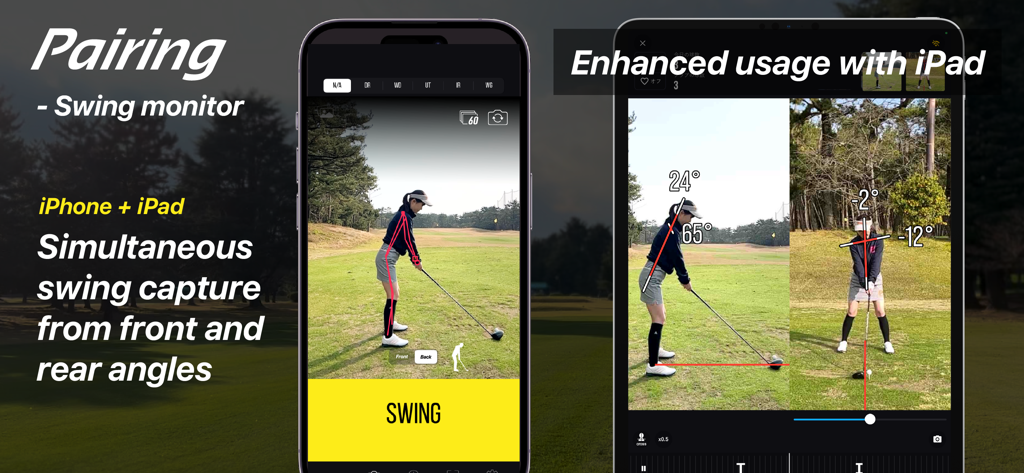
Golfboy:Launch Monitor - 골프 보이 앱으로 페어링된 아이폰과 아이패드를 사용하여 전면 및 후면 각도의 골프 스윙을 동시에 캡처하는 모습 시연
골프 보이 앱으로 페어링된 아이폰과 아이패드를 사용하여 전면 및 후면 각도의 골프 스윙을 동시에 캡처하는 모습 시연

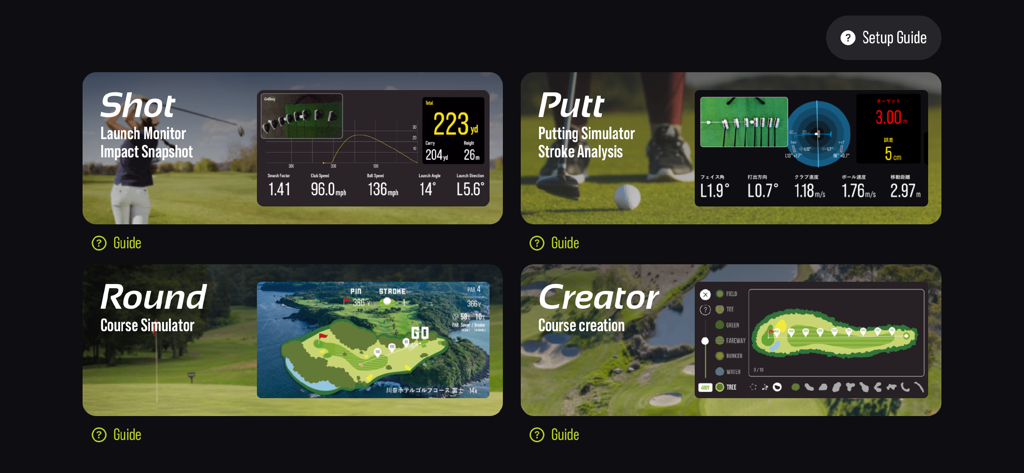
Golfboy:Launch Monitor - 골프 보이 앱 인터페이스로 샷, 퍼트, 라운드, 크리에이터 기능 모드와 데이터 분석 표시

골프 보이 앱 인터페이스로 샷, 퍼트, 라운드, 크리에이터 기능 모드와 데이터 분석 표시

설명

Golfboy is a golf shot measurement app designed for iPhone users. Since it works with just an iPhone, anyone can use it easily with a simple tripod setup. Using advanced image analysis technology, the app provides real-time measurements for distance, ball speed, launch angle, and club speed. It also features a course simulation function, allowing users to practice in realistic scenarios. Additional features include a putting mode and automatic swing video recording, offering comprehensive support for various golf training needs. Leveraging our expertise in professional sports analysis, we developed Golfboy to make golf practice easier, more enjoyable, and more efficient for everyone. We’ve conducted numerous accuracy comparison tests against existing laser-based distance measuring devices, refining the app’s precision to meet real-world demands. Use Golfboy to take your game to the next level! ■ Key Features: + Real-time feedback on shot data allows for precise adjustments after every swing. + Practice while visualizing the distance and trajectory of your ideal shot. + Usable both indoors and outdoors, including at golf courses. + If you have a second iPhone, pair it to automatically record swing videos with shot data when practicing with friends. + In Round Mode, experience simulated practice on original Golfboy courses for more realistic training. + Putter Mode lets you specify target distances and quantify your putting shots. ■ Supported Devices: iPhone 8, iPhone SE (2nd generation) or later Note: Form analysis features are available on iPhone SE2, iPhone 11, and later models. ■ Measurable Distances: The maximum measurable distance varies depending on your iPhone’s lens: - iPhones with ultra-wide lenses (using a tripod at 1.2m height): Up to 280 yards - iPhones without ultra-wide lenses (using a tripod at 1.2m height): Up to 220 yards Raising the tripod height can extend the measurement range. Measurements may be inaccurate in low-light environments or when the ball blends into the background. Please test the app in your environment during the free trial period. ■ Subscription Plans: Golfboy is free to download, but a subscription is required to access measurement features. Start with a free trial, then continue with a subscription based on rates set for your country. Subscriptions automatically renew unless canceled at least 24 hours before the current period ends. Charges for the next period will be billed 24 hours before the current subscription expires. ・Available Plans: 1)Basic Plan (Monthly) Unlocks shot, putting, swing functions, and device-pairing features. 2)Premium Plan (Monthly/Yearly) Includes all Basic Plan features plus access to all in-app purchases during the subscription period. 3)Business [Commercial] Plan (Monthly) Grants a commercial license for business use (e.g., lessons, rentals). Includes the Basic Plan features, as well as operational support tools like Data Auto-Deletion and Settings Lock. *Commercial use refers to using the app for profit-driven purposes such as lessons, rentals, or business operations. ■ Free Features Without Subscription: Trial versions of Round Mode, Creator Mode, and Swing Mode are available for free. ■ One-Time Paid Features: These are available for purchase alongside the Basic or Business plans: - Shot Cast – Displays measurement results in various modes on a external display. - Putter Cast – Displays putting results on a external display. - Swing Cast – Displays camera and swing videos in various modes. - Round Cast - Play 3D courses on a external display or on a iPad display. - Customization Skins – Personalize the app’s appearance. ■ Terms of Use & Privacy Policy: You can review both directly within the app. ■ Contact & Support golfboy@qoncept.co.jp

Download

다운로드: App Store

이 페이지는 앱이나 개발자의 공식 페이지가 아니며, 정보 제공 및 논평을 목적으로 작성된 독립 편집 간행물입니다. 명시적으로 달리 언급되지 않는 한, 해당 앱이나 개발자는 MWM, Apple, Google Play, 앱 퍼블리셔 또는 앱 개발자와 제휴, 보증, 후원, 승인 또는 공식적으로 연결되어 있지 않으며, 이 페이지의 어떤 내용도 해당 앱이 MWM의 서비스를 사용하여 개발되었음을 의미하지 않습니다. 모든 상표, 로고, 스크린샷 및 기타 콘텐츠는 해당 소유자의 자산입니다.