
이 페이지는 앱이나 개발자의 공식 페이지가 아니며, 정보 제공 및 논평을 목적으로 작성된 독립 편집 간행물입니다. 명시적으로 달리 언급되지 않는 한, 해당 앱이나 개발자는 MWM, Apple, Google Play, 앱 퍼블리셔 또는 앱 개발자와 제휴, 보증, 후원, 승인 또는 공식적으로 연결되어 있지 않으며, 이 페이지의 어떤 내용도 해당 앱이 MWM의 서비스를 사용하여 개발되었음을 의미하지 않습니다. 모든 상표, 로고, 스크린샷 및 기타 콘텐츠는 해당 소유자의 자산입니다.


다운로드
10M+사용자 평점
총 평가 수
27.4K개발사
카테고리
Business지원 언어
1최신 버전
3.27.20079932크기
121.9 MB출시일
2016년 1월 28일이동 중에도 광고 캠페인을 효과적으로 관리하고 최적화할 수 있는 핵심 기능 평가
Google Ads 모바일 앱 주요 기능 분석
신속한 캠페인 조정
이 도구는 사용자가 캠페인, 예산, 키워드 등을 언제 어디서든 빠르게 수정하고 관리할 수 있도록 지원합니다.
최적화 점수 및 권장사항 적용
이 도구는 캠페인의 최적화 점수를 표시하고, 성능 향상을 위한 맞춤형 권장사항을 제공하여 사용자가 쉽게 적용할 수 있도록 돕습니다.
실시간 성과 모니터링
이 앱은 사용자가 이동 중에도 캠페인 성과를 실시간으로 추적하고 분석할 수 있게 해줍니다.
실시간 알림 수신
이 앱은 사용자가 성과 요약 및 광고 비승인과 같은 중요한 정보를 실시간 알림으로 받을 수 있게 하여 신속한 대응을 가능하게 합니다.
광고 생성 및 편집
이 앱은 사용자가 새로운 광고를 만들거나 기존 광고를 편집하여 캠페인을 효율적으로 관리할 수 있도록 해줍니다.
전문가 지원 문의
이 도구는 사용자가 필요할 때 언제든지 전문가에게 문의하여 지원을 받을 수 있는 채널을 제공합니다.
자주 묻는 질문
에 대해 알아야 할 모든 것 Google Ads
Can I monitor Google Ads campaign performance using the mobile app?
Yes, the Google Ads mobile app allows users to monitor their campaign performance in real-time while on the go. This feature ensures continuous oversight of advertising efforts.
How can I improve my Google Ads optimization score with the mobile app?
The Google Ads mobile app displays your optimization score and provides specific recommendations. Users can review and apply these recommendations directly within the app to increase their score.
Does the Google Ads app allow me to make changes to my campaigns?
Yes, the Google Ads mobile app enables users to make quick changes to campaigns, budgets, and keywords. It also supports creating and editing ads directly from the mobile device.
What types of notifications does the Google Ads mobile app provide?
The Google Ads mobile app provides real-time notifications. These include performance summaries and alerts regarding ad disapprovals, keeping users informed about their campaign status.
Can I get support from an expert using the Google Ads mobile app?
Yes, the Google Ads mobile app provides a way to talk to an expert for support directly through the application. This ensures users can get assistance wherever they are.
Where can I manage my billing and payments in the Google Ads app?
Users manage their billing and payments through the "Billing & payments" section available in the 'More' menu of the Google Ads app. This section allows access to financial details.
How do I view individual campaign performance in the Google Ads mobile app?
Users navigate to the "Campaigns" tab within the Google Ads mobile app to view individual campaign performance. This section lists all campaigns, showing their budget, current status, and click data.
다음 스크린샷과 설명은 앱의 공식 스토어 목록에서 직접 가져온 것이며 앱 개발자의 자산입니다.
앱 스토어
스크린샷

이 앱은 캠페인 성과를 한눈에 보여줍니다. 지난 7일간의 '노출수 479K'와 '클릭수 310'을 그래프와 함께 확인할 수 있습니다.
성과 개요 확인

성과 향상을 위한 맞춤형 권장 사항을 확인하십시오. '새 키워드 추가' 및 '타겟 CPA로 입찰 효율 높이기'와 같은 제안으로 캠페인을 개선할 수 있습니다.
최적화 제안 적용
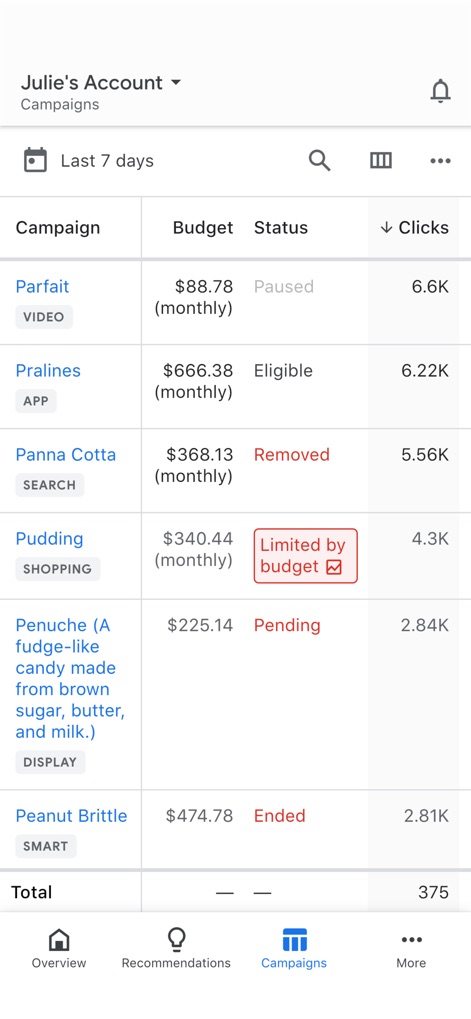
실시간 캠페인 목록과 상태를 쉽게 관리하십시오. 'Parfait' 캠페인의 '일시정지' 상태와 'Pudding' 캠페인의 '예산 제한' 상태를 빠르게 파악할 수 있습니다.
캠페인 현황 관리

계정 관련 다양한 옵션에 빠르게 접근하십시오. 'Ad groups' 및 'Keywords'와 같은 중요한 섹션을 통해 캠페인을 세부적으로 조정할 수 있습니다.
계정 설정 접근
설명
Download






이 페이지는 앱이나 개발자의 공식 페이지가 아니며, 정보 제공 및 논평을 목적으로 작성된 독립 편집 간행물입니다. 명시적으로 달리 언급되지 않는 한, 해당 앱이나 개발자는 MWM, Apple, Google Play, 앱 퍼블리셔 또는 앱 개발자와 제휴, 보증, 후원, 승인 또는 공식적으로 연결되어 있지 않으며, 이 페이지의 어떤 내용도 해당 앱이 MWM의 서비스를 사용하여 개발되었음을 의미하지 않습니다. 모든 상표, 로고, 스크린샷 및 기타 콘텐츠는 해당 소유자의 자산입니다.