
이 페이지는 앱이나 개발자의 공식 페이지가 아니며, 정보 제공 및 논평을 목적으로 작성된 독립 편집 간행물입니다. 명시적으로 달리 언급되지 않는 한, 해당 앱이나 개발자는 MWM, Apple, Google Play, 앱 퍼블리셔 또는 앱 개발자와 제휴, 보증, 후원, 승인 또는 공식적으로 연결되어 있지 않으며, 이 페이지의 어떤 내용도 해당 앱이 MWM의 서비스를 사용하여 개발되었음을 의미하지 않습니다. 모든 상표, 로고, 스크린샷 및 기타 콘텐츠는 해당 소유자의 자산입니다.

다운로드
100M+사용자 평점
총 평가 수
7.1M개발사
카테고리
Productivity지원 언어
67최신 버전
1.2026.13103크기
297.8 MB출시일
2014년 4월 30일Google Docs: 심층 기능 분석
테크 분석가가 평가한 클라우드 기반 문서 도구의 핵심 역량
AI 기반 콘텐츠 초안 작성 및 편집
이 앱은 Gemini AI 기능을 활용하여 사용자가 빠르게 콘텐츠 초안을 작성하고, AI 기반 제안을 통해 글쓰기를 개선할 수 있도록 지원합니다.
실시간 협업 및 공유
이 앱은 사용자가 팀과 문서를 공유하고 실시간으로 편집, 댓글 추가 및 작업 항목을 지정할 수 있게 해줍니다.
다양한 파일 형식 호환
이 도구는 Microsoft Word 파일을 포함한 다양한 파일 형식을 직접 열고 편집할 수 있으며, 파일을 원활하게 변환하고 내보낼 수 있는 기능을 갖추고 있어 타사 애플리케이션과의 마찰 없는 협업을 가능하게 합니다.
오프라인 작업 모드
이 도구는 사용자가 인터넷 연결 없이도 문서를 생성하고 편집할 수 있도록 지원하여 언제 어디서든 생산성을 유지하게 해줍니다.
Google Workspace 통합
이 도구는 Google Workspace 생태계의 일부로서, 사용자가 다른 Google 서비스와 유기적으로 연동하여 팀 커뮤니케이션 및 협업을 강화할 수 있게 해줍니다.
전문적인 템플릿 제공
이 도구는 사용자가 손쉽게 전문적인 문서를 작성하고 시간을 절약할 수 있도록 다양한 템플릿을 제공합니다.
자주 묻는 질문
에 대해 알아야 할 모든 것 Google Docs
Can users collaborate in real time on Google Docs?
Yes, Google Docs enables real-time collaboration. Users share documents, edit, add comments, and assign action items together in the app.
Does Google Docs offer an offline editing mode?
Yes, Google Docs provides an offline mode. Users can create and get things done, capturing ideas on the go, even without an internet connection.
Can Google Docs open and edit Microsoft Word files?
Yes, Google Docs opens and edits various file types, including Microsoft Word files. This allows for frictionless collaboration regardless of the application teammates use.
What additional features does Gemini offer in Google Docs?
Gemini in Google Docs allows users to quickly draft and edit content, create outlines, blog posts, or briefs, and improve writing with AI-powered suggestions. This feature is available for paid Google Workspace subscribers.
Is Google Docs part of Google Workspace?
Yes, Google Docs is an integral part of Google Workspace. This platform allows teams of any size to chat, create, and collaborate efficiently.
Does Google Docs provide templates for documents?
Yes, Google Docs provides easy-to-use templates. These templates help users save time and add polish to their documents, streamlining the creation process.
다음 스크린샷과 설명은 앱의 공식 스토어 목록에서 직접 가져온 것이며 앱 개발자의 자산입니다.
앱 스토어
스크린샷

어디서든 문서 작업
사용자는 이동 중에도 문서를 작성하고 편집할 수 있습니다. 이 앱은 'Cymbal Cleaning Company' 문서의 'Product development plan'과 같은 상세한 내용을 보여주며, 언제 어디서든 생산성을 유지하도록 돕습니다.
다양한 파일 관리
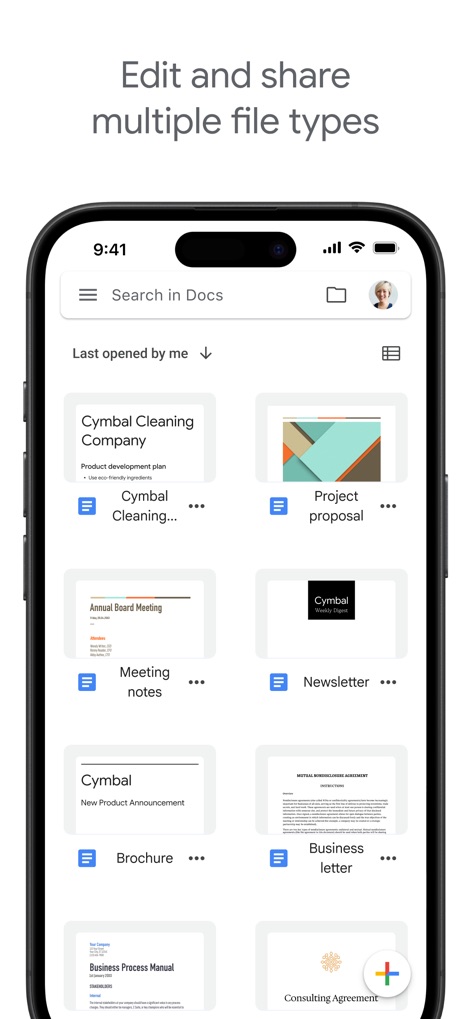
사용자는 다양한 유형의 파일을 쉽게 편집하고 공유할 수 있습니다. 'Project proposal'과 'Newsletter' 같은 여러 문서를 한눈에 확인하고, 상단의 'Search in Docs' 검색창을 통해 빠르게 원하는 파일을 찾을 수 있습니다.
실시간 협업 및 의견 교환
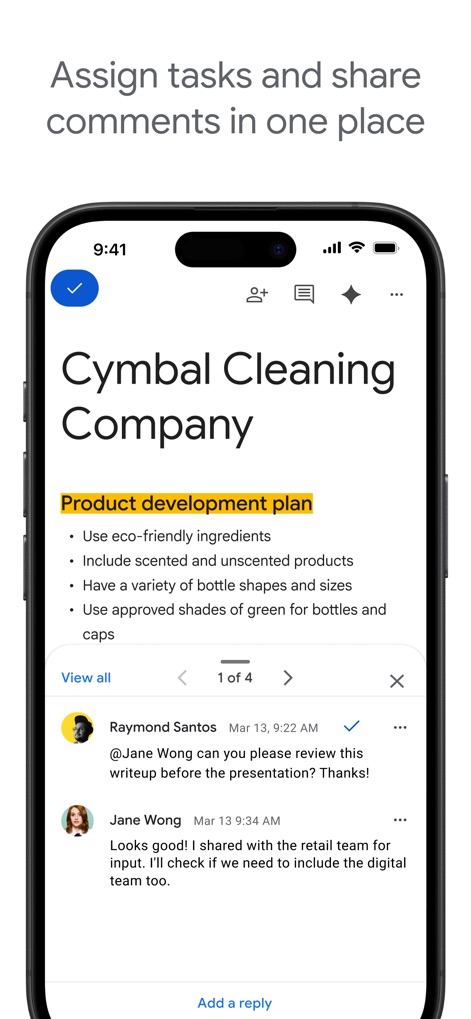
이 도구를 통해 사용자는 문서에 대한 피드백을 주고받으며 실시간으로 협업할 수 있습니다. 'Product development plan' 문서 아래에 'Raymond Santos'와 'Jane Wong'이 주고받는 댓글 스레드를 통해 팀원 간의 활발한 소통을 확인할 수 있습니다.
AI를 활용한 문서 작성
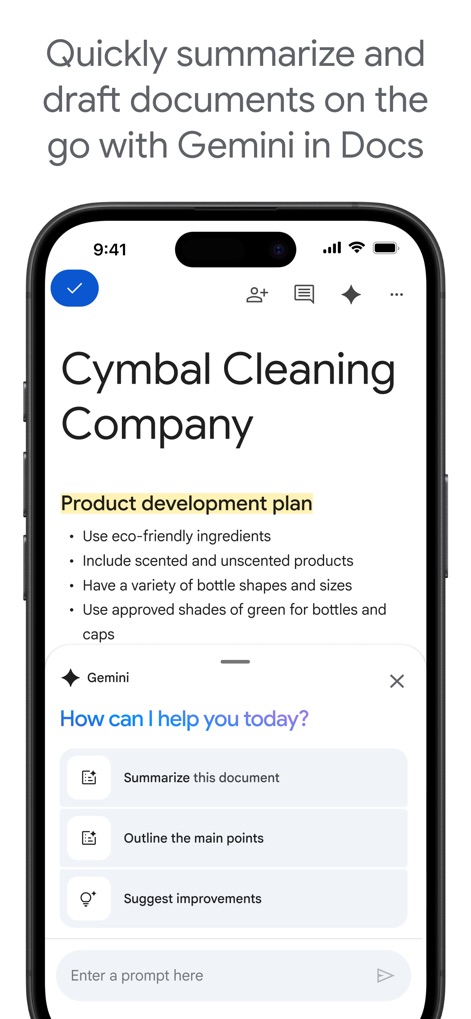
이 앱은 Gemini AI를 활용하여 문서 작성 과정을 혁신합니다. 사용자는 'Summarize this document'나 'Suggest improvements'와 같은 옵션을 통해 문서 요약 및 개선 제안을 받아 생산성을 극대화할 수 있습니다.
설명
Download
비슷한 앱
유사한 기능과 사용자 경험을 가진 앱

AiPPT - PPT & Slide Maker
Mge Information Technology Co.,Ltd

Slidey: Ai Presentation Slides
Andrii Fomichov

iSlide - 海量PPT模板,专业团队原创设计
Chengdu iSlide Network Technology Co., Ltd.
Microsoft PowerPoint
Microsoft Corporation
Google Slides
Google LLC

Good Slide
ShenZhen Meiyinet Technology Co.,Ltd

Beautiful AI Slides by GammaAI
Manjinder Kaur

Visme - Presentation & Charts
Easy WebContent, Inc.
幻灯片手机版-实用幻灯片演示设计
卓臻 李
이 페이지는 앱이나 개발자의 공식 페이지가 아니며, 정보 제공 및 논평을 목적으로 작성된 독립 편집 간행물입니다. 명시적으로 달리 언급되지 않는 한, 해당 앱이나 개발자는 MWM, Apple, Google Play, 앱 퍼블리셔 또는 앱 개발자와 제휴, 보증, 후원, 승인 또는 공식적으로 연결되어 있지 않으며, 이 페이지의 어떤 내용도 해당 앱이 MWM의 서비스를 사용하여 개발되었음을 의미하지 않습니다. 모든 상표, 로고, 스크린샷 및 기타 콘텐츠는 해당 소유자의 자산입니다.