
이 페이지는 앱이나 개발자의 공식 페이지가 아니며, 정보 제공 및 논평을 목적으로 작성된 독립 편집 간행물입니다. 명시적으로 달리 언급되지 않는 한, 해당 앱이나 개발자는 MWM, Apple, Google Play, 앱 퍼블리셔 또는 앱 개발자와 제휴, 보증, 후원, 승인 또는 공식적으로 연결되어 있지 않으며, 이 페이지의 어떤 내용도 해당 앱이 MWM의 서비스를 사용하여 개발되었음을 의미하지 않습니다. 모든 상표, 로고, 스크린샷 및 기타 콘텐츠는 해당 소유자의 자산입니다.


다운로드
25M+사용자 평점
총 평가 수
34.2K개발사
카테고리
Entertainment지원 언어
38최신 버전
3.30.00001크기
82.0 MB출시일
2014년 1월 15일다양한 스트리밍 콘텐츠를 통합적으로 관리하고 발견하고자 하는 개인을 위한 핵심 기능
Google TV: Watch Movies & TV 앱 분석
통합 콘텐츠 검색 및 발견
이 앱은 사용자가 여러 스트리밍 앱의 영화 및 TV 프로그램을 한곳에서 탐색하고, 주제 및 장르별로 정리된 추천을 통해 새로운 볼거리를 발견할 수 있도록 돕습니다.
스트리밍 플랫폼 연동 검색
이 도구는 사용자가 특정 제목을 검색하여 어떤 스트리밍 앱에서 해당 콘텐츠를 시청할 수 있는지 즉시 확인할 수 있도록 지원합니다.
교차 기기 시청 목록 동기화
이 앱은 사용자가 흥미로운 영화와 프로그램을 시청 목록에 추가하여 추적하고 나중에 볼 수 있도록 하며, 이 시청 목록은 모든 기기에서 자동으로 동기화됩니다.
모바일 기기 시청 및 오프라인 다운로드
이 플랫폼은 사용자가 모바일 기기에서 직접 콘텐츠를 스트리밍하거나, 이전에 구매한 엔터테인먼트를 다운로드하여 인터넷 연결 없이 시청할 수 있도록 제공합니다.
자주 묻는 질문
에 대해 알아야 할 모든 것 Google TV: Watch Movies & TV
What is the Google TV app?
The Google TV app, previously Play Movies & TV, consolidates entertainment from all your streaming apps into one place. It helps users find and enjoy content efficiently.
How does Google TV help me find content?
Google TV allows users to browse movies and TV episodes across their streaming apps, organized by topics and genres. It provides recommendations based on preferences and trending content. Users can also search for specific titles.
Can I create a watchlist in Google TV?
Yes, the Google TV app allows users to create a Watchlist for new discoveries. This Watchlist syncs across all devices, including TV, phone, and laptop via Search on any browser.
Can I watch my purchased content offline using the Google TV app?
Yes, the Google TV app allows users to download previously purchased entertainment from their Library. This enables watching content even when not connected to the internet.
Does the Google TV app function as a remote control?
Yes, the Google TV app includes a built-in remote control function. Users can use their phone to navigate Google TV or other Android TV OS devices and type with the phone's keyboard.
Does Google TV offer personalized recommendations?
Yes, Google TV offers recommendations based on what users love and what's trending across their accessible services. These recommendations are part of the "For you" section.
Is my Watchlist shared across devices in Google TV?
Yes, the Watchlist in Google TV is shared across all your devices. Users can add items from their TV, phone, or laptop via Search on any browser.
Can I resume watching content from where I left off in Google TV?
Yes, Google TV enables users to jump right back into content from where they left off. The app features a dedicated "Continue watching" section for this purpose.
Does Google TV integrate with Chromecast?
Yes, the Google TV app integrates with Chromecast. Users can get Google TV content on a big screen using a Chromecast device, as shown in the app's promotional material.
다음 스크린샷과 설명은 앱의 공식 스토어 목록에서 직접 가져온 것이며 앱 개발자의 자산입니다.
앱 스토어
스크린샷
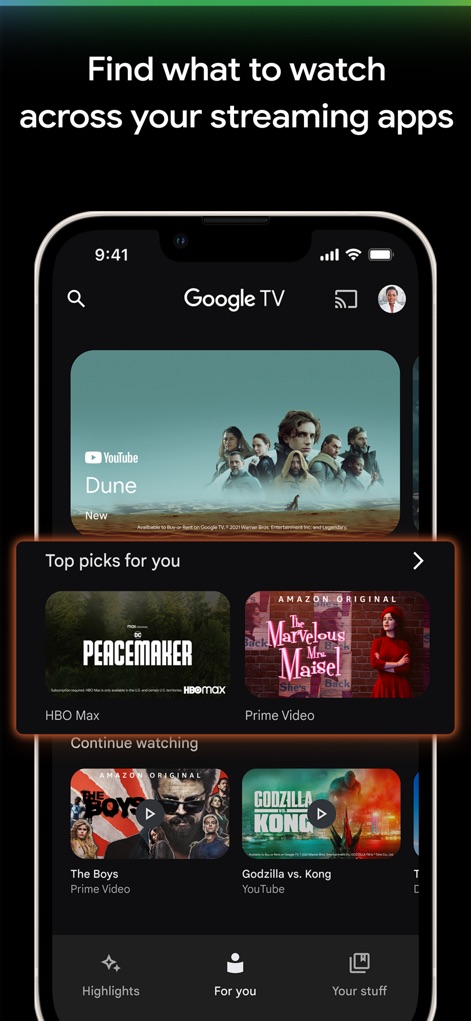
이 앱은 사용자 맞춤형 추천을 제공하여 다양한 스트리밍 앱에서 시청할 콘텐츠를 쉽게 찾을 수 있도록 돕습니다. 상단의 'Dune' 배너와 'Top picks for you' 섹션을 통해 사용자의 취향에 맞는 영화와 시리즈를 빠르게 탐색할 수 있습니다.
맞춤형 콘텐츠 추천

사용자는 관심 있는 모든 콘텐츠를 '찜 목록'에 추가하여 체계적으로 관리할 수 있습니다. 상단에 표시된 'Jack Ryan' 및 'Succession'과 같은 인기 타이틀들이 찜 목록에 깔끔하게 정리되어 있습니다.
시청 목록 관리

이 도구는 사용자가 이전에 시청을 중단했던 지점부터 즉시 이어볼 수 있도록 지원합니다. 'Continue watching' 섹션에서 'The Boys'와 'Godzilla vs. Kong' 같은 콘텐츠를 바로 재생할 수 있는 옵션이 명확하게 제시됩니다.
중단 없이 시청

사용자는 스마트폰과 TV를 넘나들며 언제 어디서든 원하는 콘텐츠를 시청할 수 있습니다. 상단 이미지에서 여러 스트리밍 앱이 통합된 TV 인터페이스와 하단 이미지에서 Google TV 앱이 실행 중인 스마트폰 및 크롬캐스트 기기가 이 유연성을 보여줍니다.
어디서든 끊김 없이
설명
Download
비슷한 앱
유사한 기능과 사용자 경험을 가진 앱

JioHotstar
JIOSTAR INDIA PRIVATE LIMITED

百搜视频-原百度视频
Xiaodu TV Co., Ltd

MagentaTV: TV & Streaming
Telekom Deutschland GmbH

今日影视大全 - 电影电视剧视频大全
Mertkan YASA
百搜视频HD-原百度视频HD 电影电视剧影视大全
Xiaodu TV Co., Ltd
Apple TV
Apple Inc.

MEGOGO: TV, Movies, Audiobooks
MEGOGO LLC

OTTplay
HT Media Ltd.

KPN TV+ App
KPN B.V.
이 페이지는 앱이나 개발자의 공식 페이지가 아니며, 정보 제공 및 논평을 목적으로 작성된 독립 편집 간행물입니다. 명시적으로 달리 언급되지 않는 한, 해당 앱이나 개발자는 MWM, Apple, Google Play, 앱 퍼블리셔 또는 앱 개발자와 제휴, 보증, 후원, 승인 또는 공식적으로 연결되어 있지 않으며, 이 페이지의 어떤 내용도 해당 앱이 MWM의 서비스를 사용하여 개발되었음을 의미하지 않습니다. 모든 상표, 로고, 스크린샷 및 기타 콘텐츠는 해당 소유자의 자산입니다.