
이 페이지는 앱이나 개발자의 공식 페이지가 아니며, 정보 제공 및 논평을 목적으로 작성된 독립 편집 간행물입니다. 명시적으로 달리 언급되지 않는 한, 해당 앱이나 개발자는 MWM, Apple, Google Play, 앱 퍼블리셔 또는 앱 개발자와 제휴, 보증, 후원, 승인 또는 공식적으로 연결되어 있지 않으며, 이 페이지의 어떤 내용도 해당 앱이 MWM의 서비스를 사용하여 개발되었음을 의미하지 않습니다. 모든 상표, 로고, 스크린샷 및 기타 콘텐츠는 해당 소유자의 자산입니다.


GPS Camera 55. Field Survey
정밀한 UTM/MGRS 좌표 스탬프, 즉각적인 사진 주석, 엔지니어 및 측량사를 위한 자동화된 PDF 보고서로 현장 검사를 간소화하세요.
다운로드
1M+사용자 평점
총 평가 수
9K+개발사
카테고리
Navigation지원 언어
7최신 버전
4.9크기
70.4 MB출시일
2018년 12월 6일전문적인 현장 조사를 간소화하세요
모든 디테일을 정확하게 캡처하세요. GPS Camera 55는 엔지니어, 측량사 및 현장 관리자를 위해 설계된 강력한 기록 도구로 기기를 전환합니다.
정확한 위치 오버레이
UTM, MGRS 또는 십진수 형식의 고정밀 좌표, 나침반 방향, 고도 및 확인된 타임스탬프로 사진에 스탬프를 찍으세요.
즉각적인 전문 보고서
지도, 메모 및 이미지가 포함된 포괄적인 PDF 보고서를 생성하여 클라이언트 또는 프로젝트 관리자와 즉시 공유함으로써 사무실 업무 시간을 절약하세요.
자주 묻는 질문
에 대해 알아야 할 모든 것 GPS Camera 55. Field Survey
GPS Camera 55는 무엇이며 주요 기능은 무엇인가요?
GPS Camera 55는 이미지에 정확한 위치, 날짜, 주소 및 사용자 지정 노트를 스탬프로 찍어 사진을 캡처합니다. 또한 손으로 그린 주석을 지원하고 보고를 위해 사진을 폴더별로 구성합니다.
GPS Camera 55에서 사진에 사용자 지정 주석과 노트를 추가할 수 있나요?
예, GPS Camera 55를 사용하면 손가락이나 Apple Pencil을 사용하여 손으로 그린 주석을 추가할 수 있습니다. 또한 나중에 편집할 수 있는 텍스트 노트, 제목, 태그 및 주소도 지원합니다.
GPS Camera 55는 어떤 위치 데이터 형식을 지원하나요?
예, GPS Camera 55는 정확한 위치 데이터를 캡처합니다. 십진수, DM, DMS, UTM 및 MGRS를 포함한 다양한 좌표 형식과 실제 또는 자기 방위각 및 고도를 지원합니다.
기존 사진을 GPS Camera 55로 가져오고 위치 데이터를 복원할 수 있나요?
예, GPS Camera 55는 기기 라이브러리에서 사진을 가져올 수 있습니다. 앱은 가져온 이미지에서 TIFF/EXIF/GPS/IPTC 데이터를 구문 분석하여 위치, 방향 및 노트를 자동으로 복원하려고 시도합니다.
GPS Camera 55는 사진에 대한 PDF 보고서 생성을 제공하나요?
예, GPS Camera 55는 선택한 사진 또는 전체 컬렉션에 대한 PDF 보고서를 생성합니다. 사용자는 페이지당 이미지 수를 사용자 지정하고 보고서에 사진 설명을 포함할 수 있습니다.
GPS Camera 55 Pro Pack 업그레이드에는 어떤 기능이 포함되어 있나요?
GPS Camera 55의 Pro Pack 업그레이드를 통해 추가 컬렉션을 만들고, 5개 이상의 포인트/이미지를 공유하고, KMZ를 내보내고 가져오고, 주석을 저장하고, 고급 사진 편집 및 생체 인식 보안을 사용할 수 있습니다.
PIN 코드나 생체 인식으로 GPS Camera 55에서 데이터를 보호할 수 있나요?
예, GPS Camera 55 Pro Pack 업그레이드에는 Face ID와 같은 PIN 코드 또는 생체 인식 기반 액세스 옵션을 통해 작업과 개인 정보 보호를 강화할 수 있습니다.
GPS Camera 55에서 사진 및 데이터를 다른 사람과 공유하려면 어떻게 해야 하나요?
예, GPS Camera 55를 사용하면 여러 포인트 또는 전체 컬렉션을 공유할 수 있습니다. 이미지는 위치/노트 텍스트 및 오버레이와 함께 또는 없이 공유할 수 있으며 KMZ 파일로 내보내 전체 포인트 및 이미지 전송이 가능합니다.
GPS Camera 55에서 컬렉션 또는 태그별로 사진을 구성하고 검색할 수 있나요?
예, GPS Camera 55는 이미지를 컬렉션 또는 폴더로 구성합니다. 사용자는 노트, 주소 또는 태그별로 검색하고, 생성 월별로 필터링하고, 근접성 또는 날짜별로 정렬할 수 있습니다.
GPS Camera 55에서 사용자 지정 워터마크를 사진과 함께 사용할 수 있나요?
예, GPS Camera 55는 사용자 지정 워터마크를 지원합니다. Pro Pack 업그레이드를 사용하면 기본 워터마크가 제거되고 사용자가 자신의 이미지, 텍스트 및 색상을 사용하여 사용자 지정 워터마크를 설정할 수 있습니다.
다음 스크린샷과 설명은 앱의 공식 스토어 목록에서 직접 가져온 것이며 앱 개발자의 자산입니다.
앱 스토어
스크린샷
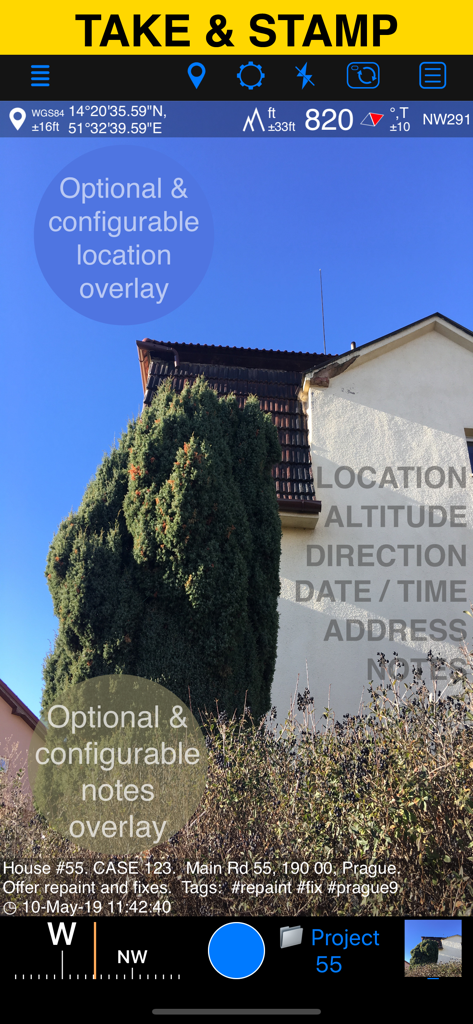
GPS Camera 55 앱 인터페이스가 위치 고도 및 사용자 지정 메모 오버레이가 있는 현장 사진을 표시합니다.
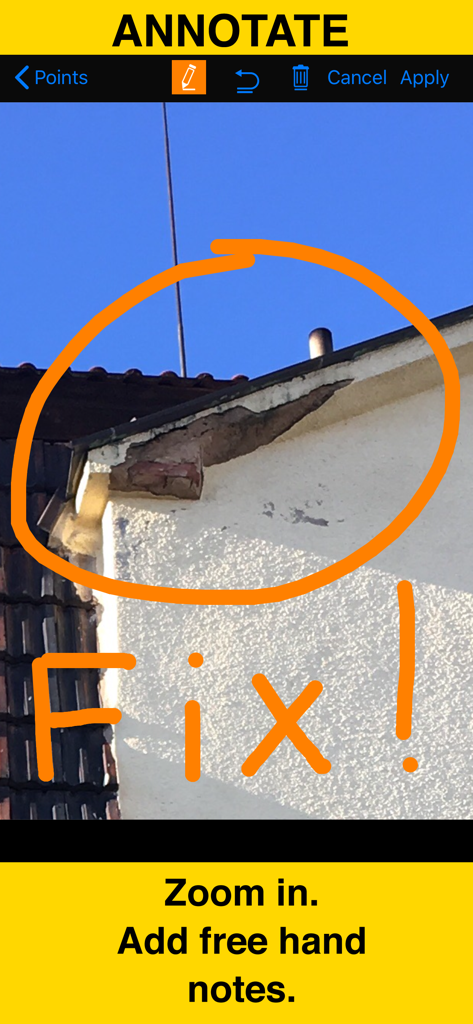
gps 카메라 주석 도구를 사용하여 그린 손글씨 주황색 원과 수정 메모가 있는 건물 손상 근접 사진
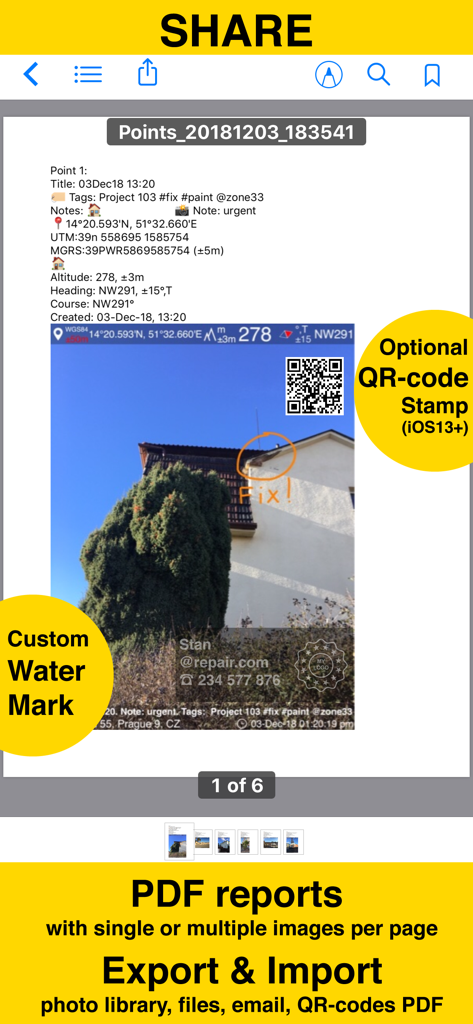
GPS Camera 55 앱에서 생성된 PDF 보고서 스크린샷으로 위치 스탬프, 주석 및 사용자 지정 워터마크가 있는 사진을 보여줍니다.
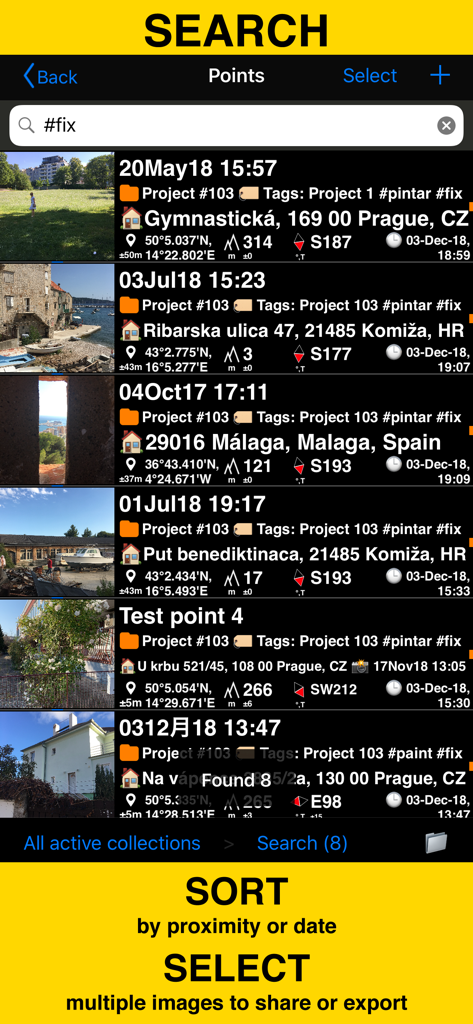
GPS Camera 55 앱에서 태그 및 좌표로 현장 조사 사진 검색 및 정렬
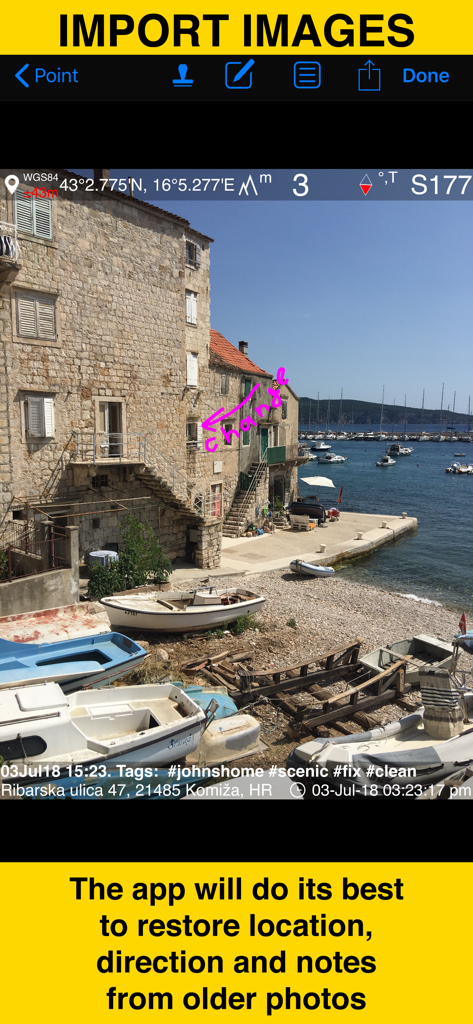
GPS Camera 55 앱으로 가져온 이전 사진에서 위치 및 메모 복원을 보여주는 스크린샷
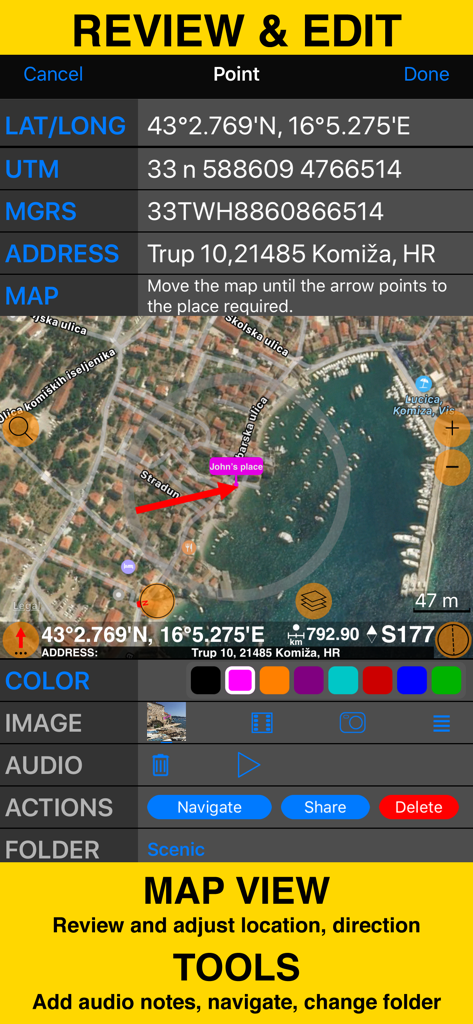
좌표 지도 보기 및 현장 조사 도구가 있는 검토 및 편집 화면
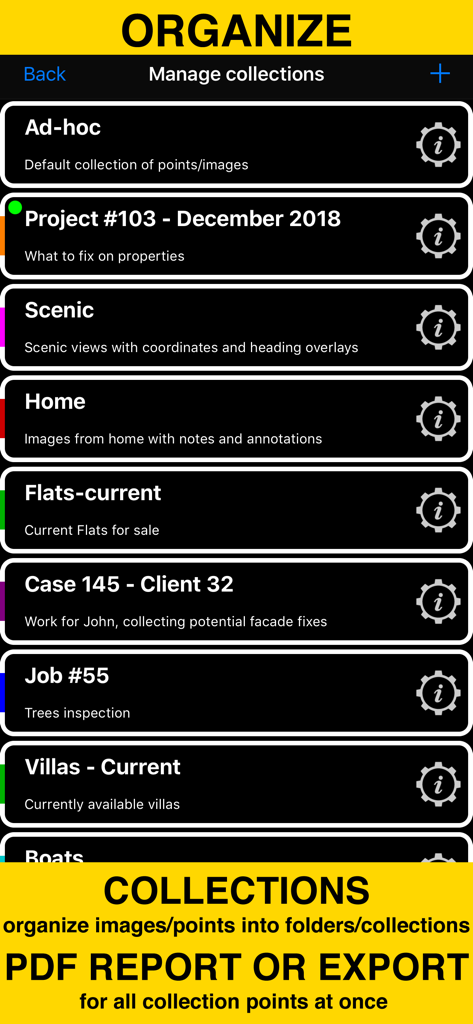
현장 조사 사진을 정리하고 PDF 보고서를 생성하기 위한 폴더 및 컬렉션 표시 화면
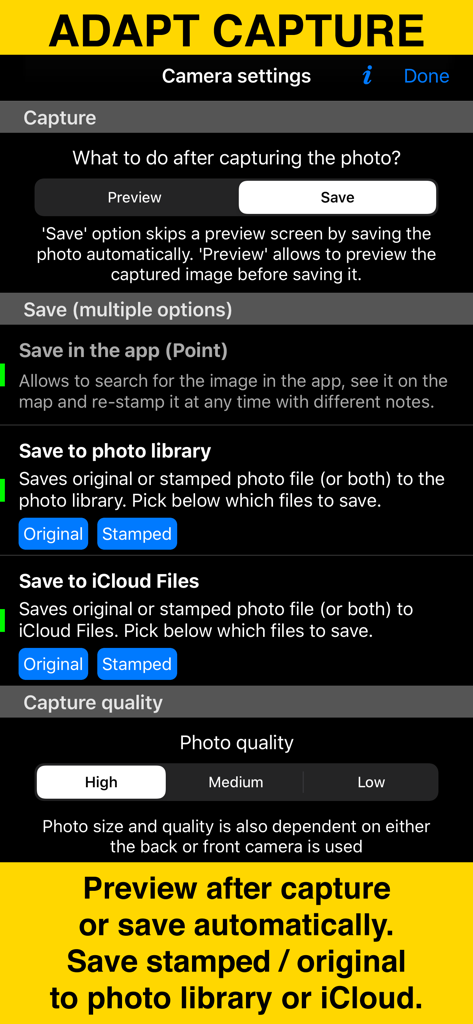
사진 캡처 및 저장 옵션을 보여주는 GPS Camera 55 앱의 카메라 설정 화면.
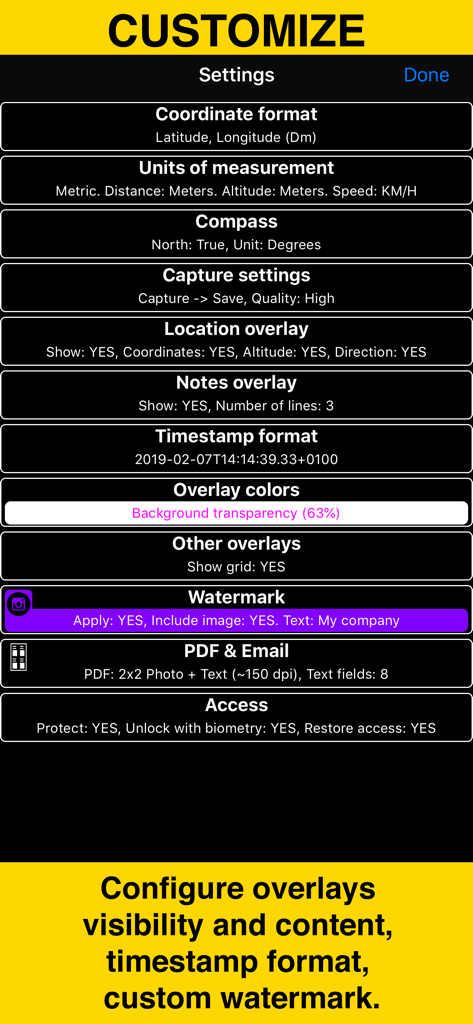
좌표 단위 오버레이 및 워터마크 사용자 지정을 위한 옵션을 보여주는 GPS Camera 55의 설정 메뉴
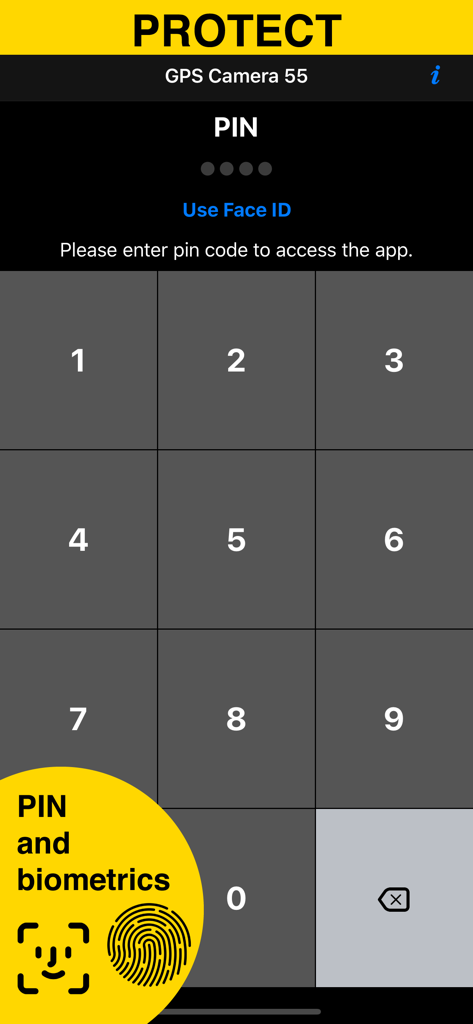
GPS Camera 55 앱의 PIN 및 생체 인식 보안 화면
설명
Download
비슷한 앱
유사한 기능과 사용자 경험을 가진 앱
今日水印相机-时间地点经纬度打卡拍照
Keep Curiosity, Inc.

Timemark: Photo Proof
OCEAN GALAXY PTE. LTD.
自定义水印相机
Beidou Hanglu Technology Co.,Ltd.

CompanyCam
CompanyCam, Inc
今日水印专业版-官方无广告版,真实时间今日水印相机拍照
Keep Curiosity, Inc.

经纬度相机&水印相机-记录时间地点天气
Shuzhuo Network Technology Guangzhou Co., Ltd.

水印相机-时间地点工作打卡拍照视频
Chengdu Chongbianli Science and Technology Ltd.

经纬相机:水印相机拍照水印记录时间地点
佳铭 游

TimeStamp Camera+MAP
源泽 高
이 페이지는 앱이나 개발자의 공식 페이지가 아니며, 정보 제공 및 논평을 목적으로 작성된 독립 편집 간행물입니다. 명시적으로 달리 언급되지 않는 한, 해당 앱이나 개발자는 MWM, Apple, Google Play, 앱 퍼블리셔 또는 앱 개발자와 제휴, 보증, 후원, 승인 또는 공식적으로 연결되어 있지 않으며, 이 페이지의 어떤 내용도 해당 앱이 MWM의 서비스를 사용하여 개발되었음을 의미하지 않습니다. 모든 상표, 로고, 스크린샷 및 기타 콘텐츠는 해당 소유자의 자산입니다.