
이 페이지는 앱이나 개발자의 공식 페이지가 아니며, 정보 제공 및 논평을 목적으로 작성된 독립 편집 간행물입니다. 명시적으로 달리 언급되지 않는 한, 해당 앱이나 개발자는 MWM, Apple, Google Play, 앱 퍼블리셔 또는 앱 개발자와 제휴, 보증, 후원, 승인 또는 공식적으로 연결되어 있지 않으며, 이 페이지의 어떤 내용도 해당 앱이 MWM의 서비스를 사용하여 개발되었음을 의미하지 않습니다. 모든 상표, 로고, 스크린샷 및 기타 콘텐츠는 해당 소유자의 자산입니다.


Graphionica: Story Maker
당신의 인스타그램은 더 이상 평범하지 않습니다. 'Graphionica: Story Maker'는 당신의 콘텐츠에 치명적인 매력을 부여합니다.
다운로드
1M+사용자 평점
총 평가 수
4.2K개발사
카테고리
Graphics & Design지원 언어
14최신 버전
3.1.9크기
107.2 MB출시일
2020년 6월 14일소셜 미디어 콘텐츠 제작자를 위한 시각적 스토리텔링 도구 평가
Graphionica: Story Maker 주요 기능 분석
편집 가능한 템플릿 및 사용자 지정 템플릿 생성
이 앱은 미리 디자인된 편집 가능한 템플릿을 제공하여 사용자가 신속하게 프로젝트를 시작할 수 있게 하며, 자신만의 고유한 스타일을 적용한 템플릿을 생성하고 저장하여 콘텐츠의 일관성을 유지할 수 있도록 돕습니다.
사진 및 비디오 배경 제거
이 도구는 사용자가 사진과 비디오에서 배경을 쉽게 제거하고, 제거된 요소를 자체 스티커로 저장하여 시각적으로 매력적인 콘텐츠를 만들 수 있게 해줍니다.
종합적인 비디오 편집 기능
이 앱은 비디오 콜라주 제작, 비디오 배경 제거, 비디오에 스티커, 사용자 지정 텍스트 및 문구 추가 등 다양한 비디오 편집 기능을 지원하여 사용자가 동적인 스토리를 만들 수 있게 합니다.
다양한 텍스트 및 서체 옵션
이 도구는 다양한 서체 컬렉션과 미리 만들어진 레터링 스티커 팩을 제공하며, 사용자가 사진이나 비디오에 자신의 텍스트를 추가하여 개인 브랜딩과 메시지 전달을 강화할 수 있도록 지원합니다.
레이어 기반 편집 및 정밀 조정
이 앱은 레이어 기능을 통해 사용자가 사진, 스티커, 텍스트의 순서를 변경하고, 개체를 복제하거나 반사시켜 복잡하면서도 정교한 콜라주와 디자인을 만들 수 있게 해줍니다.
고해상도 내보내기 및 소셜 미디어 최적화
이 도구는 스토리 및 피드에 적합한 모든 인기 해상도를 지원하며, 사용자가 고품질 손실 없는 이미지와 비디오를 내보내어 전문적인 콘텐츠를 소셜 미디어에 공유할 수 있도록 합니다.
풍부한 스티커 및 그래픽 라이브러리
이 앱은 정기적으로 업데이트되는 무료 레터링 스티커 팩 외에도 그림, 캘리그라피, PNG 형식의 문구 등 다양한 스티커와 그래픽 요소를 제공하여 시각적인 매력을 더할 수 있게 합니다.
편집 기록(실행 취소 기능)
이 도구는 최대 100단계의 편집 기록을 제공하여 사용자가 위치, 크기, 투명도, 색상 변경 또는 지우기 등 모든 작업을 실행 취소할 수 있게 함으로써 자유로운 실험과 실수를 두려워하지 않는 편집 환경을 조성합니다.
자주 묻는 질문
에 대해 알아야 할 모든 것 Graphionica: Story Maker
What is Graphionica: Story Maker?
Graphionica is a stylish photo and video editor designed for creating Instagram stories and social network content. It offers collages, text, stickers, editable templates, and background removal features.
Does Graphionica offer editable templates?
Yes, Graphionica provides unique editable templates for Instagram stories and social feeds. Users can start projects from ready templates or create and reuse their own.
Can I combine photos and videos in Graphionica?
Yes, Graphionica allows users to create beautiful collages by combining several photos and videos simultaneously. It also supports adding stickers and text to videos.
How can I remove backgrounds from images or videos in Graphionica?
Graphionica allows users to erase the background from any photo and save it as a custom sticker. The app also supports erasing backgrounds directly from videos.
Does Graphionica support adding custom fonts?
Yes, Graphionica allows users to write their own text with many fonts available in the application. Some fonts support Cyrillic characters.
What kind of stickers are available in Graphionica?
Graphionica offers regularly replenished sticker packs with free ready letterings. Users can also create their own stickers by erasing backgrounds from photos.
Can Graphionica animate projects?
Yes, Graphionica allows users to animate projects. The app includes various animation options to enhance creations for social media.
What are the subscription benefits of Graphionica Premium?
Graphionica Premium provides full unlimited access to all fonts and stickers available within the application, enhancing creative possibilities.
How do I manage my Graphionica Premium subscription?
Users can manage their Graphionica subscriptions and turn off auto-renewal by accessing their Account Settings after purchase on iTunes.
Does Graphionica export stories in high resolution?
Yes, Graphionica supports all popular resolutions and exports stories in high resolution without any quality loss.
Can I create a calendar in Graphionica?
Yes, Graphionica includes functionality to create calendars. This feature allows users to design and customize personal calendars within the app.
How many editable templates does Graphionica offer?
Graphionica offers over 500 editable templates for users to create Instagram stories and social media designs. These templates are fully customizable.
Does Graphionica have an undo feature for edits?
Yes, Graphionica implements a history feature allowing users to undo any action, such as changing position, size, transparency, color, or eraser, up to 100 states.
다음 스크린샷과 설명은 앱의 공식 스토어 목록에서 직접 가져온 것이며 앱 개발자의 자산입니다.
앱 스토어
스크린샷

이 앱은 500개 이상의 편집 가능한 템플릿을 제공하여 사용자가 'Daily morning rituals'와 같은 다양한 스타일의 스토리를 즉시 제작할 수 있도록 지원합니다.
매력적인 템플릿 컬렉션
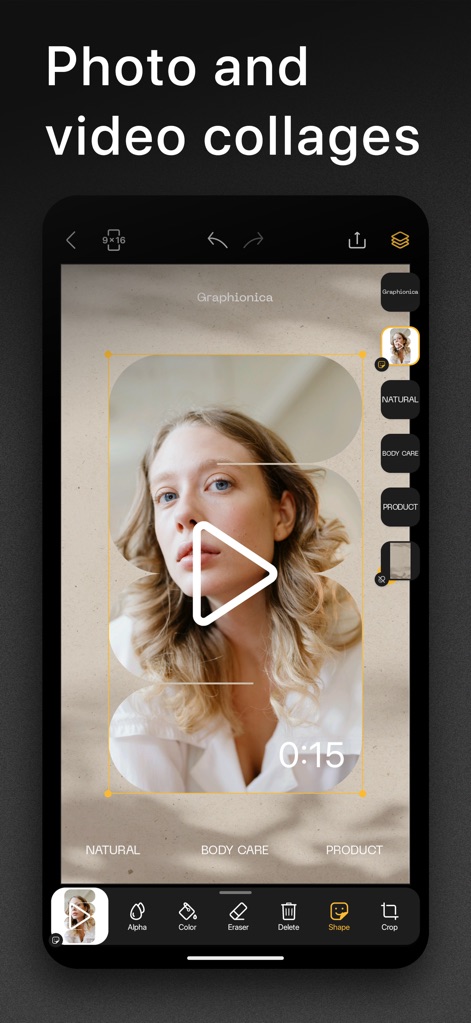
사용자는 이 앱에서 사진 및 비디오 콜라주를 손쉽게 제작하고, 우측의 레이어 편집 기능을 활용하여 각 요소를 정교하게 배치할 수 있습니다.
강력한 콜라주 기능
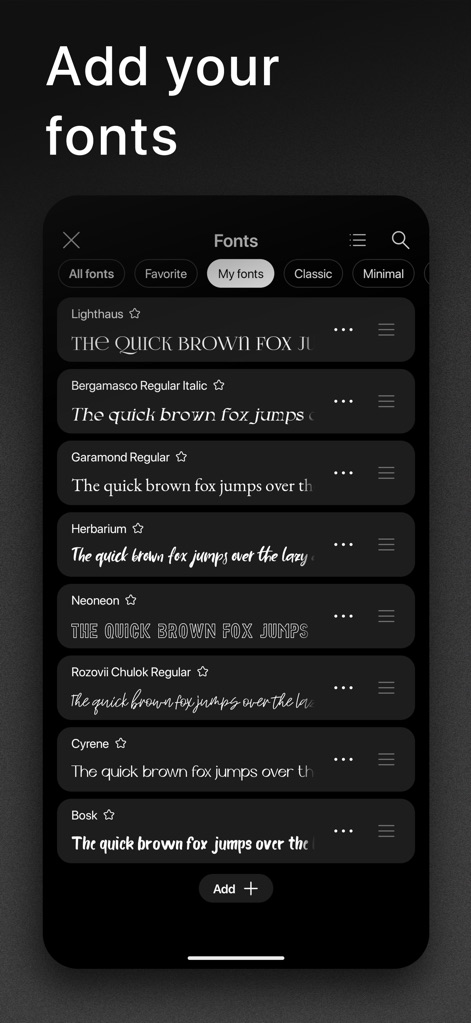
사용자는 이 앱이 제공하는 'Garamond Regular'와 같은 다양한 폰트 옵션 중에서 선택하거나, 'Add +' 버튼을 통해 나만의 폰트를 추가하여 콘텐츠를 더욱 돋보이게 할 수 있습니다.
개성 있는 폰트 추가
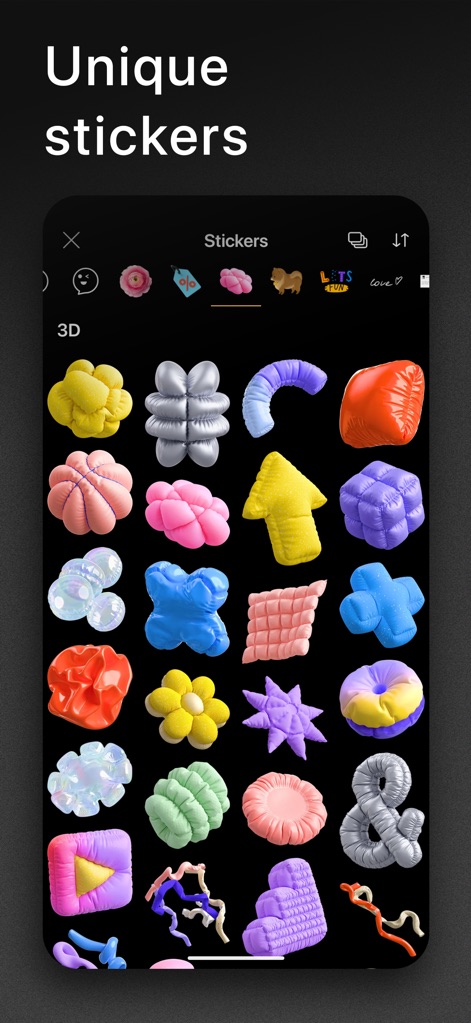
이 앱은 시선을 사로잡는 '3D 스티커 컬렉션'을 포함한 독특하고 다채로운 스티커를 제공하여 사용자의 콘텐츠에 개성을 더할 수 있습니다.
창의적인 스티커 활용
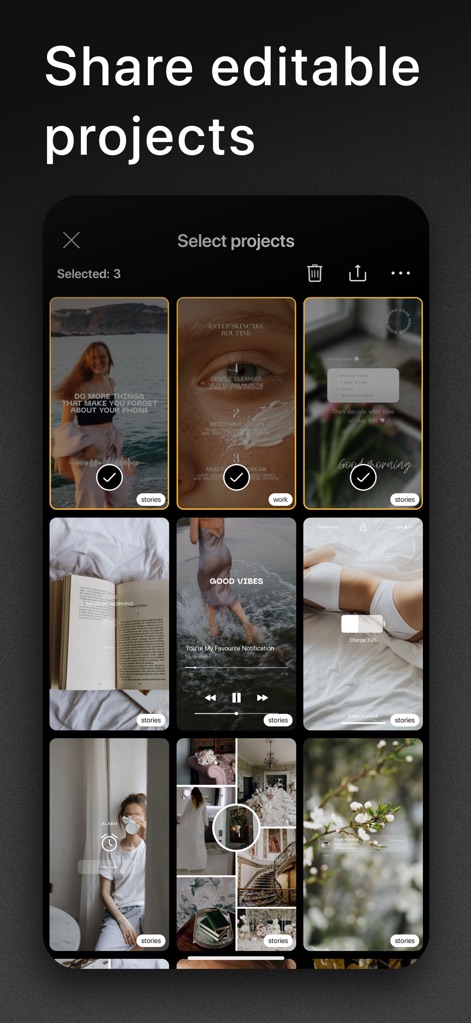
이 앱은 사용자가 완성된 콘텐츠를 '편집 가능한 프로젝트'로 공유할 수 있게 하며, '다중 프로젝트 선택 기능'으로 여러 작품을 한 번에 관리할 수 있도록 돕습니다.
프로젝트를 편리하게 공유
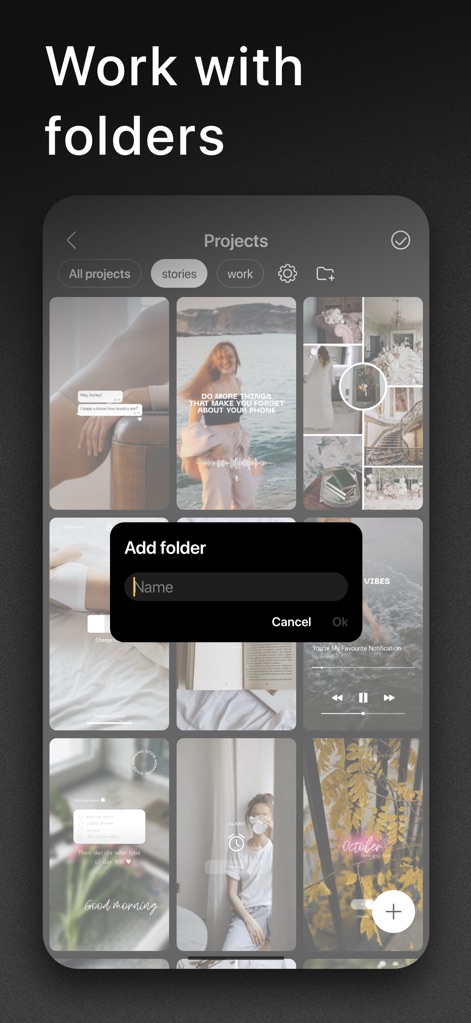
사용자는 이 앱의 '폴더 관리 기능'을 활용하여 프로젝트를 효율적으로 분류하고, '탭 기반의 분류 시스템'으로 'stories'나 'work'와 같은 특정 카테고리를 손쉽게 탐색할 수 있습니다.
체계적인 폴더 관리
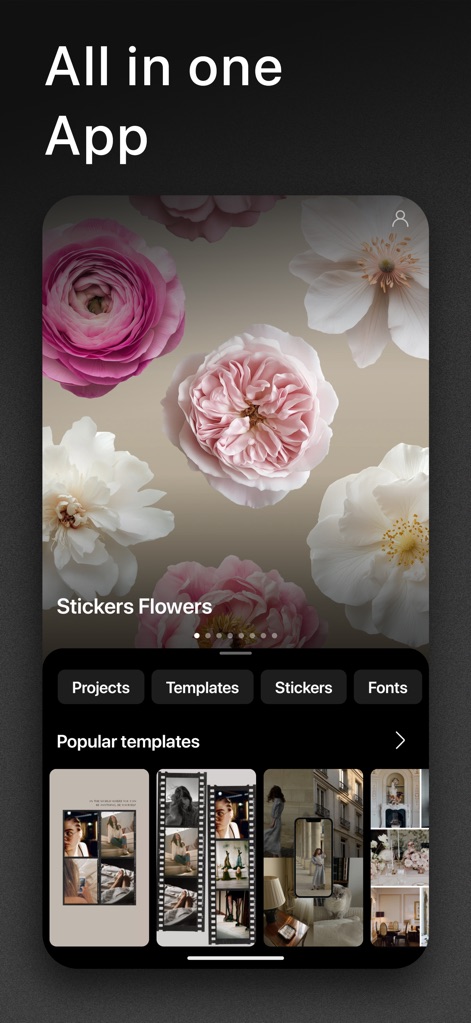
이 앱은 '프로젝트', '템플릿', '스티커', '폰트'를 한곳에서 관리하는 '통합된 콘텐츠 제작 환경'을 제공하며, '인기 템플릿 섹션'에서 최신 디자인 영감을 얻을 수 있습니다.
올인원 크리에이티브 허브
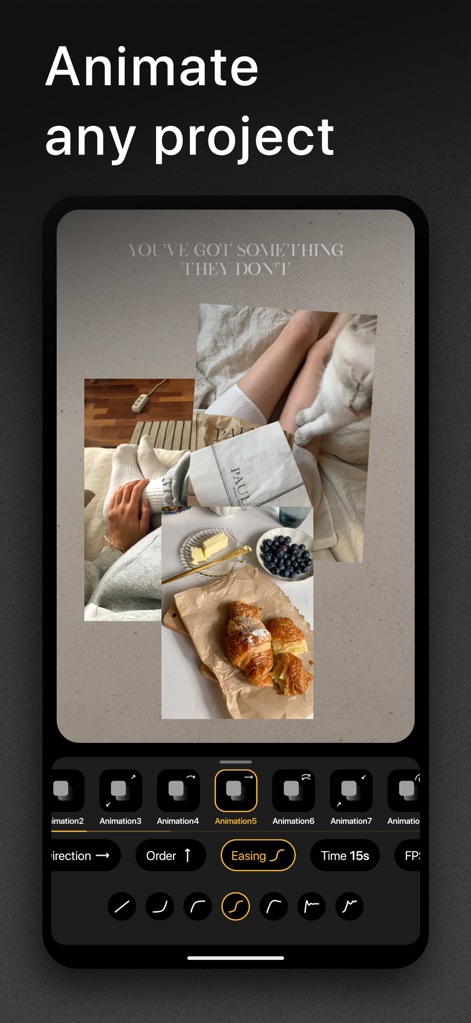
이 앱은 '다양한 애니메이션 효과'를 제공하여 정적인 콘텐츠에 생동감을 불어넣고, '방향, 순서, 이징'과 같은 정교한 제어 기능으로 사용자가 원하는 움직임을 정확하게 구현할 수 있도록 합니다.
역동적인 애니메이션 효과
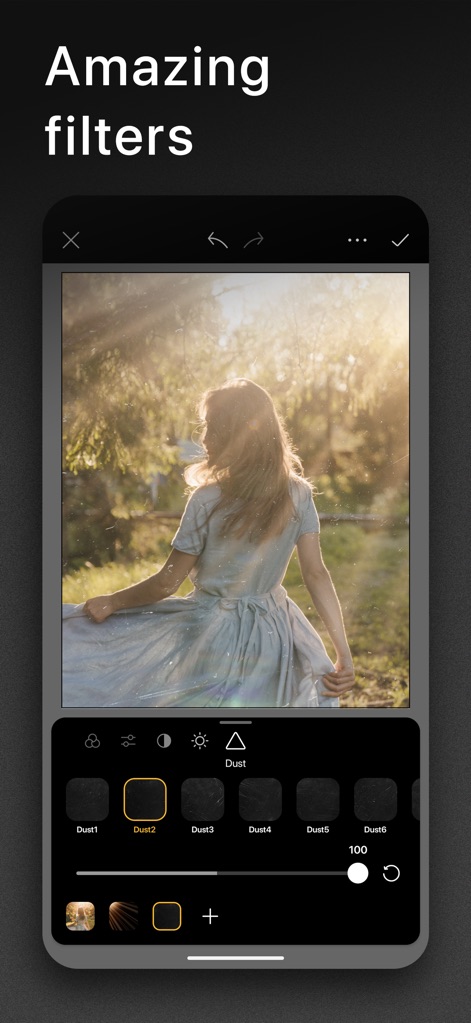
사용자는 이 앱의 '매력적인 필터 컬렉션'을 통해 사진에 독특한 분위기를 더할 수 있으며, 필터의 '세밀한 강도 조절' 기능으로 원하는 시각적 효과를 정교하게 적용할 수 있습니다.
놀라운 비주얼 필터
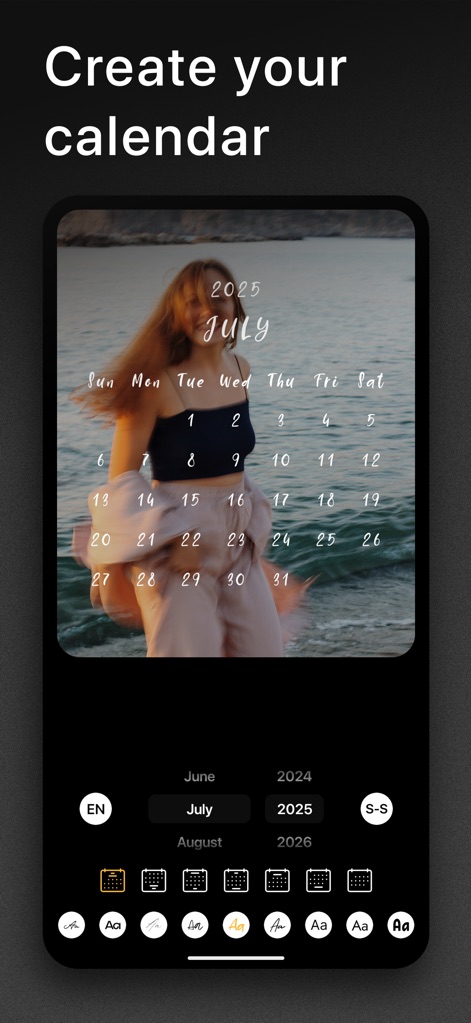
이 앱은 사용자가 이미지 위에 '개인화된 캘린더'를 손쉽게 디자인하고, '연도 및 월 선택' 기능을 통해 특정 기간의 캘린더를 유연하게 생성할 수 있도록 지원합니다.
나만의 캘린더 디자인
설명
Download
비슷한 앱
유사한 기능과 사용자 경험을 가진 앱

Wink: Video Enhancer & Editor
Xiamen Meitu Technology Co., Ltd.
Instories: AI Photo & Video
Ylee Studio LTD

秒剪 - 视频创作 & Live 实况制作
Tencent Technology (Shenzhen) Company Limited

Vids AI - Reels Video Editor
Viral Vision Ltd
Reels Maker for Instagram BEAT
Onelight Apps CY Ltd

Mojo: AI Video & Reels Editor
Archery Inc.

Unfold: Reels & Story Maker
Squarespace, Inc.
Reels Editor, AI Video: inMelo
APPBYTE PTE. LTD.
Reelsapp: reel & video editor
Rustam Achilov
이 페이지는 앱이나 개발자의 공식 페이지가 아니며, 정보 제공 및 논평을 목적으로 작성된 독립 편집 간행물입니다. 명시적으로 달리 언급되지 않는 한, 해당 앱이나 개발자는 MWM, Apple, Google Play, 앱 퍼블리셔 또는 앱 개발자와 제휴, 보증, 후원, 승인 또는 공식적으로 연결되어 있지 않으며, 이 페이지의 어떤 내용도 해당 앱이 MWM의 서비스를 사용하여 개발되었음을 의미하지 않습니다. 모든 상표, 로고, 스크린샷 및 기타 콘텐츠는 해당 소유자의 자산입니다.