
이 페이지는 앱이나 개발자의 공식 페이지가 아니며, 정보 제공 및 논평을 목적으로 작성된 독립 편집 간행물입니다. 명시적으로 달리 언급되지 않는 한, 해당 앱이나 개발자는 MWM, Apple, Google Play, 앱 퍼블리셔 또는 앱 개발자와 제휴, 보증, 후원, 승인 또는 공식적으로 연결되어 있지 않으며, 이 페이지의 어떤 내용도 해당 앱이 MWM의 서비스를 사용하여 개발되었음을 의미하지 않습니다. 모든 상표, 로고, 스크린샷 및 기타 콘텐츠는 해당 소유자의 자산입니다.


HealtheLife
의료 시스템의 불투명성에 더 이상 갇히지 않습니다. 이 앱은 사용자에게 의료 기록에 대한 직접적인 시야와 통제력을 부여합니다.
다운로드
1M+사용자 평점
총 평가 수
958개발사
카테고리
Medical지원 언어
2최신 버전
102.1.24크기
42.3 MB출시일
2014년 12월 21일주요 기능 및 영향력 평가
HealtheLife 앱 분석
의료 정보 접근
이 앱은 알레르기, 검사 결과, 건강 문제, 예방 접종, 약물 등 사용자의 최신 의료 정보를 안전하게 제공하여 사용자가 자신의 건강 상태를 완벽하게 이해할 수 있도록 돕습니다.
의료진과 안전한 메시징
이 도구는 사용자가 자신의 의료진과 안전하게 메시지를 주고받을 수 있는 기능을 갖추고 있어, 질문을 하고 진료 관련 논의를 할 수 있게 해줍니다.
진료 예약 관리
이 앱은 사용자가 다가오는 진료 일정을 편리하게 확인하고 관리하며, 필요한 경우 예약을 재조정할 수 있도록 해줍니다.
여러 기관 포털 접근
이 앱은 사용자가 여러 의료 기관의 온라인 포털에 접근할 수 있도록 지원하여, 다양한 의료 제공자의 정보를 한곳에서 통합적으로 관리할 수 있는 편의를 제공합니다.
자주 묻는 질문
에 대해 알아야 할 모든 것 HealtheLife
How do I access the HealtheLife app?
Users access the HealtheLife app by signing in with their Cerner Health username and password. Access requires prior setup by their healthcare organization, which grants portal access.
What health records can I view in HealtheLife?
HealtheLife provides access to medical information, including allergies, laboratory results, health issues, immunizations, medications, and other health documents.
Can I message my doctor through HealtheLife?
Yes, HealtheLife enables users to securely message their provider. The app features a "New Message" screen for direct communication. Do not use for urgent medical matters.
Does HealtheLife allow me to schedule appointments?
Yes, HealtheLife allows users to schedule and manage upcoming appointments. The app includes a "Schedule Appointment" interface with options to search by reason, provider, or specialty.
Can I view lab test results in HealtheLife?
Yes, HealtheLife displays laboratory results, such as Sodium Level and Chloride. The app also includes an option to filter results by a specific date range.
How can I check my medications in HealtheLife?
Users check their medications in HealtheLife through the "Medications" section. This screen lists prescribed drugs, their start dates, and provides a "Refill/Renew" option.
Can I pay my medical bills using the HealtheLife app?
Yes, the HealtheLife app includes a "Pay Your Bill" feature. This functionality allows users to manage and complete their medical service payments directly within the application.
Can HealtheLife connect to multiple healthcare portals?
Yes, HealtheLife allows users to view multiple participating healthcare organization portals. Users access all connected portals through the app if they have multiple accounts.
Where do I get support for my HealtheLife account?
For assistance with an existing HealtheLife account, users visit their specific healthcare organization's website. The app description directs users to these support options.
Is messaging providers secure in HealtheLife?
Yes, HealtheLife offers secure messaging with providers. The app advises against using this feature for urgent matters; call 911 for medical emergencies.
다음 스크린샷과 설명은 앱의 공식 스토어 목록에서 직접 가져온 것이며 앱 개발자의 자산입니다.
앱 스토어
스크린샷
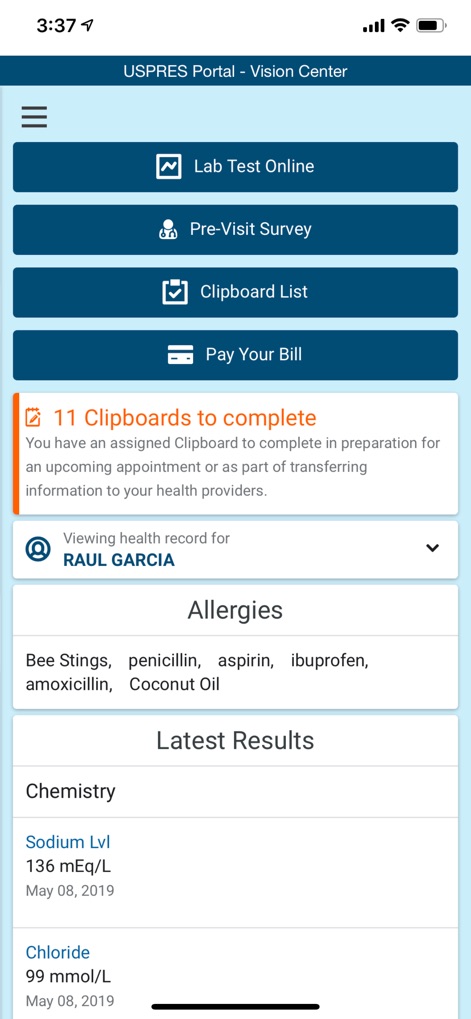
사용자는 이 화면에서 자신의 알레르기 목록과 최신 검사 결과 같은 핵심 의료 정보를 한눈에 확인할 수 있습니다.
건강 정보 요약
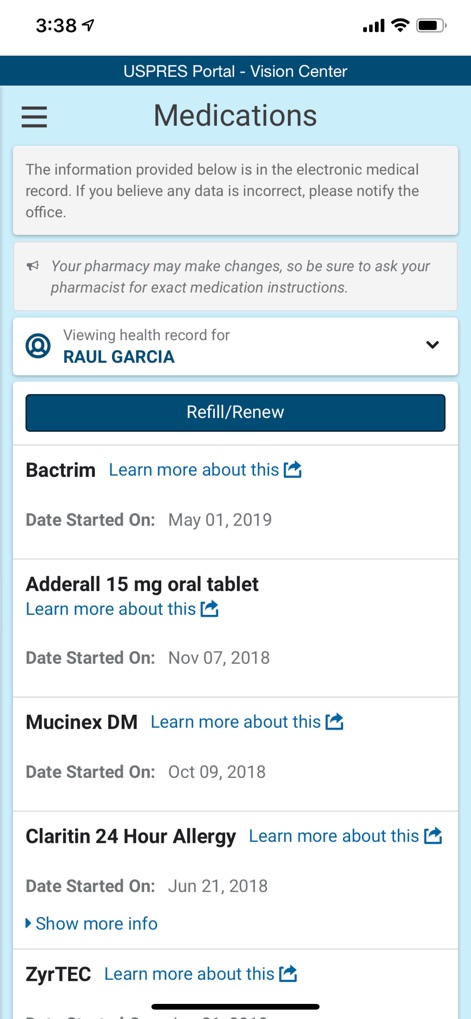
이 화면은 복용 중인 약물 목록을 표시하며, 사용자는 '리필/갱신' 기능을 통해 약물 처방을 편리하게 관리할 수 있습니다.
내 복용약 관리
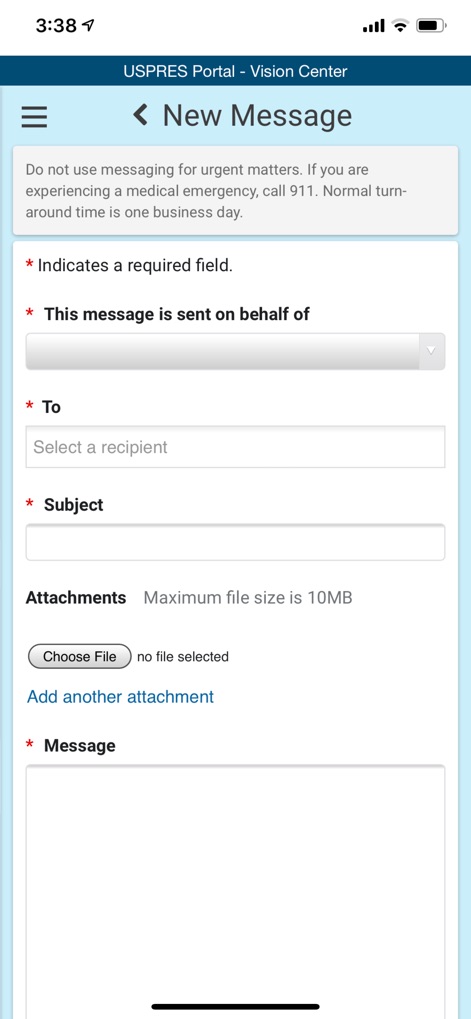
사용자는 이 인터페이스를 통해 의료진에게 메시지를 보낼 수 있으며, '받는 사람'을 선택하고 필요한 경우 '파일 첨부'도 가능합니다.
의료진에게 문의
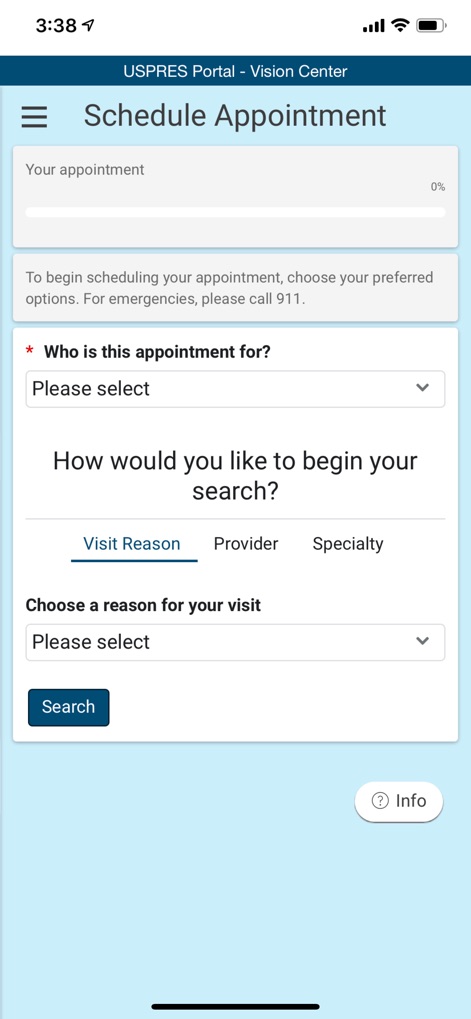
이 화면은 진료 예약을 돕는 도구로, '방문 목적'을 선택하거나 '의료진'을 기준으로 검색하여 편리하게 약속을 잡을 수 있습니다.
진료 예약 간편하게
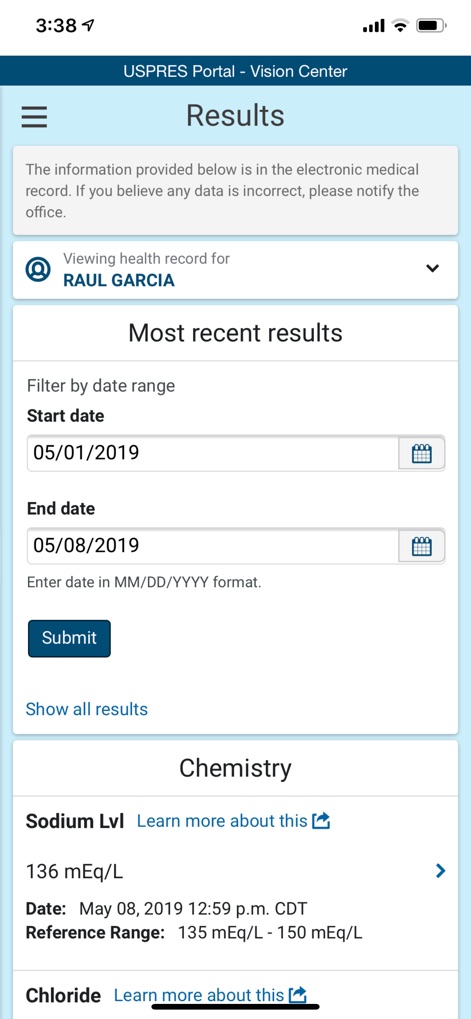
사용자는 이 화면에서 '날짜 범위' 필터를 사용하여 검사 결과를 조회하고, '나트륨 수치'와 같은 상세한 검사 항목을 확인할 수 있습니다.
상세 검사 결과
설명
Download
비슷한 앱
유사한 기능과 사용자 경험을 가진 앱

SimplePractice Client Portal
SimplePractice LLC

athenaPatient
athenahealth, Inc.

Kaiser Permanente
Kaiser Permanente

One Medical
One Medical Group, Inc.

Saudi German Health
Saudi German Hospital

NowServing by SeriousMD
LeapFroggr Inc.

Providence
PROVIDENCE HEALTH & SERVICES - WASHINGTON

Mediclinic - ميديكلينيك
MEDICLINIC MIDDLE EAST MANAGEMENT SERVICES FZ LLC

NMC - MyHealth
NMC HEALTHCARE LTD
이 페이지는 앱이나 개발자의 공식 페이지가 아니며, 정보 제공 및 논평을 목적으로 작성된 독립 편집 간행물입니다. 명시적으로 달리 언급되지 않는 한, 해당 앱이나 개발자는 MWM, Apple, Google Play, 앱 퍼블리셔 또는 앱 개발자와 제휴, 보증, 후원, 승인 또는 공식적으로 연결되어 있지 않으며, 이 페이지의 어떤 내용도 해당 앱이 MWM의 서비스를 사용하여 개발되었음을 의미하지 않습니다. 모든 상표, 로고, 스크린샷 및 기타 콘텐츠는 해당 소유자의 자산입니다.