Hudway Go: Navigation with HUD
다운로드: App Store

이 페이지는 앱이나 개발자의 공식 페이지가 아니며, 정보 제공 및 논평을 목적으로 작성된 독립 편집 간행물입니다. 명시적으로 달리 언급되지 않는 한, 해당 앱이나 개발자는 MWM, Apple, Google Play, 앱 퍼블리셔 또는 앱 개발자와 제휴, 보증, 후원, 승인 또는 공식적으로 연결되어 있지 않으며, 이 페이지의 어떤 내용도 해당 앱이 MWM의 서비스를 사용하여 개발되었음을 의미하지 않습니다. 모든 상표, 로고, 스크린샷 및 기타 콘텐츠는 해당 소유자의 자산입니다.


로고: Hudway Go: Navigation with HUD
다운로드: App Store

Hudway Go: Navigation with HUD

전방을 주시하면서 미래형 3D 내비게이션을 경험하세요. 스마트폰만으로 구동되는 전투기 조종사들의 콕핏 기술을 활용하여 안개, 비, 어둠 속에서도 더 안전하게 운전하세요.

주요 수치

다운로드

1M+

사용자 평점

3.2/5

총 평가 수

800

개발사

HUDWAY LLC.

카테고리

Navigation

지원 언어

9

최신 버전

6.0.3

크기

58.3 MB

출시일

2016년 6월 14일
기능

업그레이드된 당신의 앞 유리

대시보드를 하이테크 커맨드 센터로 변신시키세요. Hudway Go는 미래 지향적인 전투기 기술과 현대 운전자를 위한 핵심 안전 기능을 결합했습니다.

전방 주시 안전

경로를 앞 유리에 직접 투영하여 주의 분산 요소를 제거하고 전방 도로에 집중하세요.

저시정 주행 마스터

야간 내비게이션에 최적화된 고대비 3D 디스플레이를 통해 짙은 안개, 폭우 또는 칠흑 같은 어둠 속에서도 자신 있게 운전하세요.

다음 스크린샷과 설명은 앱의 공식 스토어 목록에서 직접 가져온 것이며 앱 개발자의 자산입니다.

앱 스토어

스크린샷
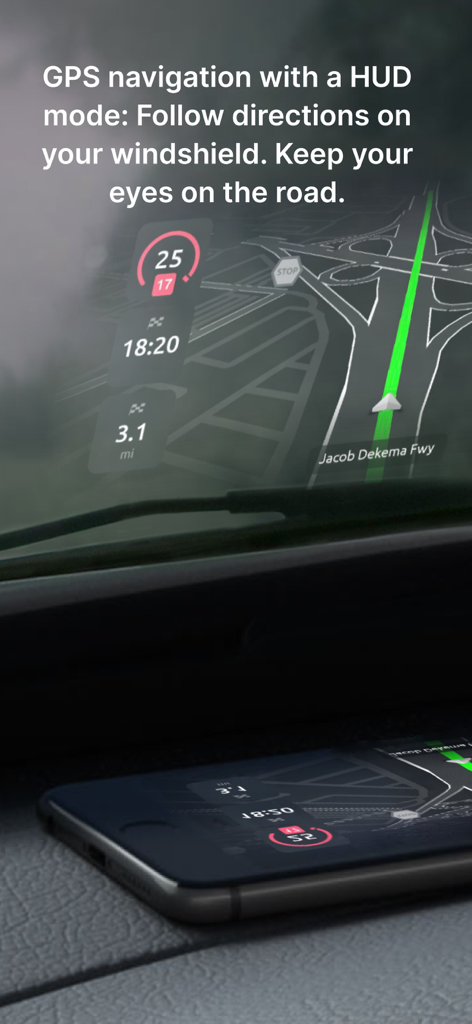
Hudway Go: Navigation with HUD - 더 안전한 운전을 위해 HUD 모드에서 Hudway Go GPS 내비게이션을 차량 앞 유리에 투영하는 스마트폰
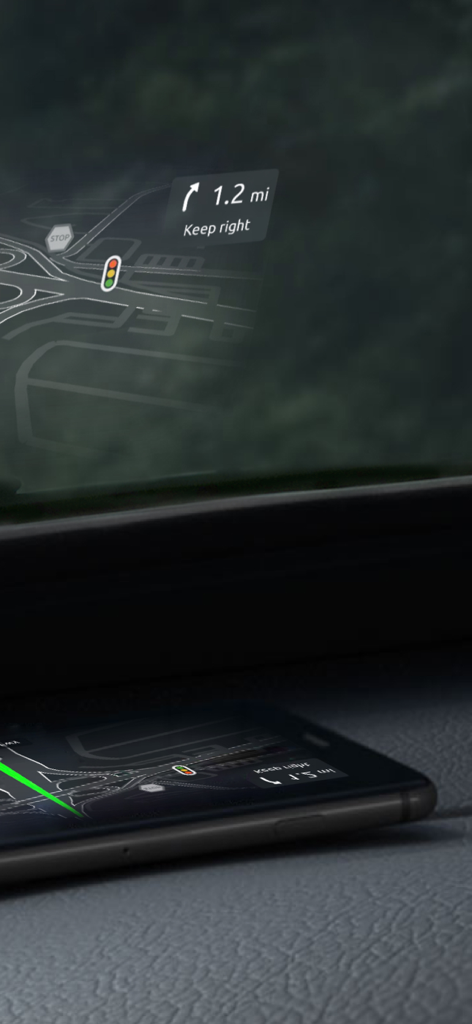
더 안전한 운전을 위해 HUD 모드에서 Hudway Go GPS 내비게이션을 차량 앞 유리에 투영하는 스마트폰

Hudway Go: Navigation with HUD - 도로 방향과 교통 표지판을 보여주는 내비게이션 헤드업 디스플레이를 앞 유리에 반사하는 자동차 대시보드 위의 스마트폰
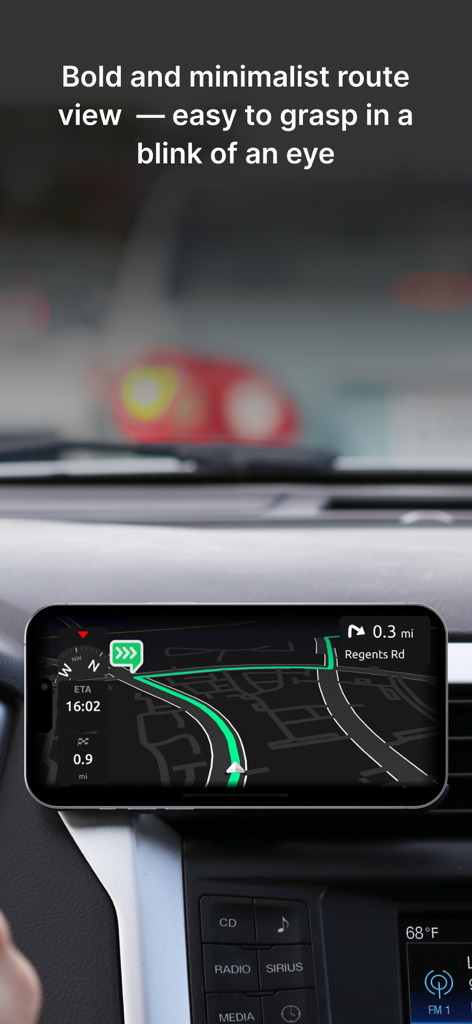
도로 방향과 교통 표지판을 보여주는 내비게이션 헤드업 디스플레이를 앞 유리에 반사하는 자동차 대시보드 위의 스마트폰

Hudway Go: Navigation with HUD - Hudway Go의 미니멀한 3D 내비게이션 경로를 표시하는 자동차 대시보드에 장착된 스마트폰
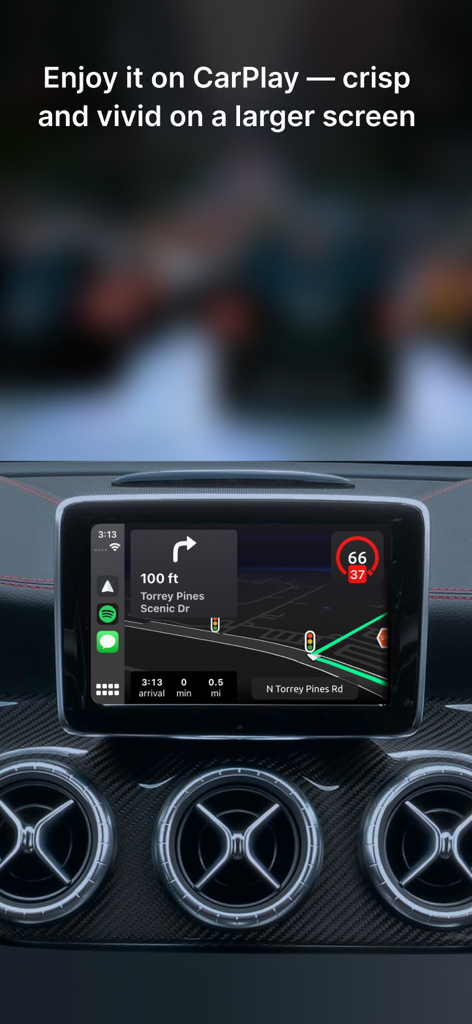
Hudway Go의 미니멀한 3D 내비게이션 경로를 표시하는 자동차 대시보드에 장착된 스마트폰

Hudway Go: Navigation with HUD - Apple CarPlay를 통해 자동차 대시보드에 표시된 Hudway Go 내비게이션 인터페이스
Apple CarPlay를 통해 자동차 대시보드에 표시된 Hudway Go 내비게이션 인터페이스

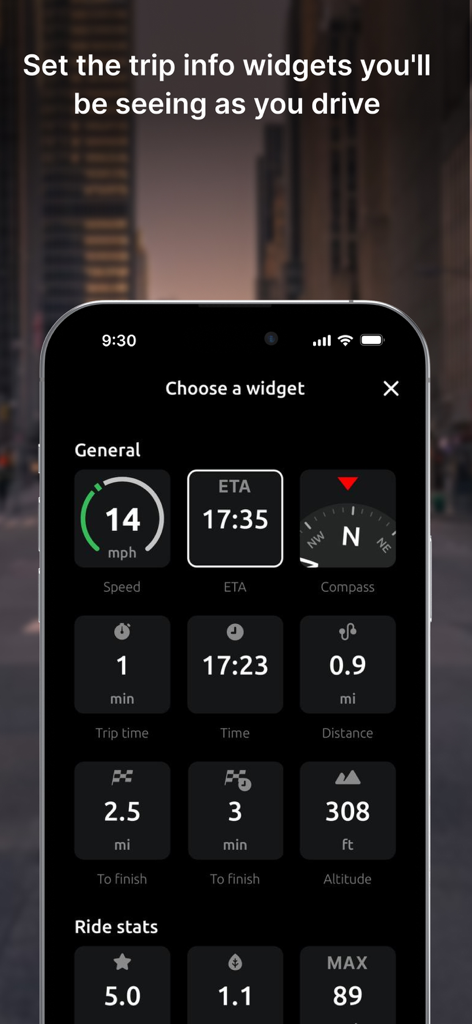
Hudway Go: Navigation with HUD - 속도, 도착 예정 시간, 나침반, 고도와 같은 주행 위젯을 선택하기 위한 Hudway Go 앱 메뉴를 표시하는 스마트폰 화면
속도, 도착 예정 시간, 나침반, 고도와 같은 주행 위젯을 선택하기 위한 Hudway Go 앱 메뉴를 표시하는 스마트폰 화면

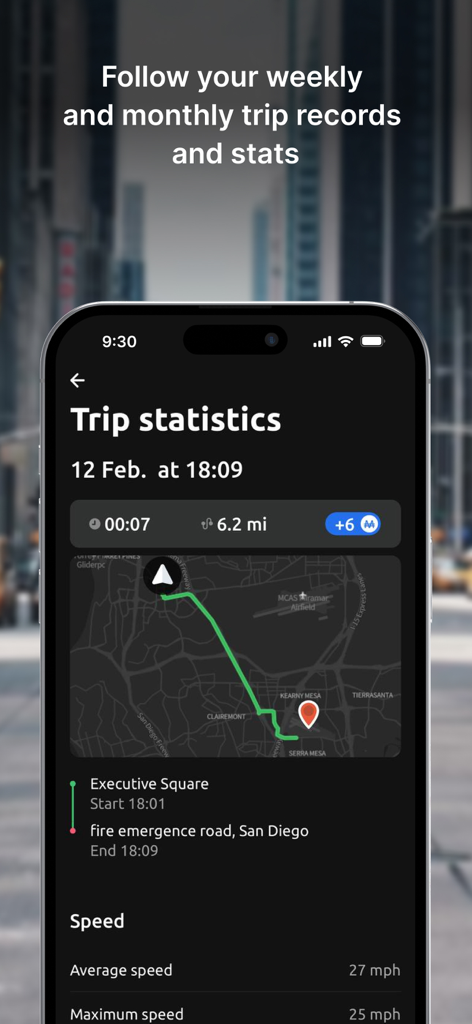
Hudway Go: Navigation with HUD - 경로 지도와 주행 속도 데이터가 포함된 주행 통계를 보여주는 Hudway Go 앱 스크린샷
경로 지도와 주행 속도 데이터가 포함된 주행 통계를 보여주는 Hudway Go 앱 스크린샷

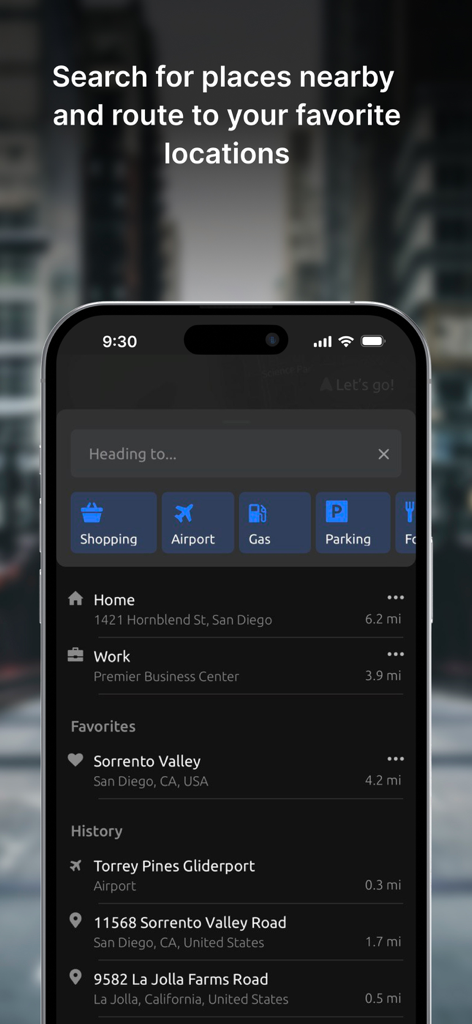
Hudway Go: Navigation with HUD - 즐겨찾기 및 최근 장소와 함께 주유소 및 주차장과 같은 목적지 카테고리를 표시하는 Hudway Go 앱의 검색 인터페이스
즐겨찾기 및 최근 장소와 함께 주유소 및 주차장과 같은 목적지 카테고리를 표시하는 Hudway Go 앱의 검색 인터페이스

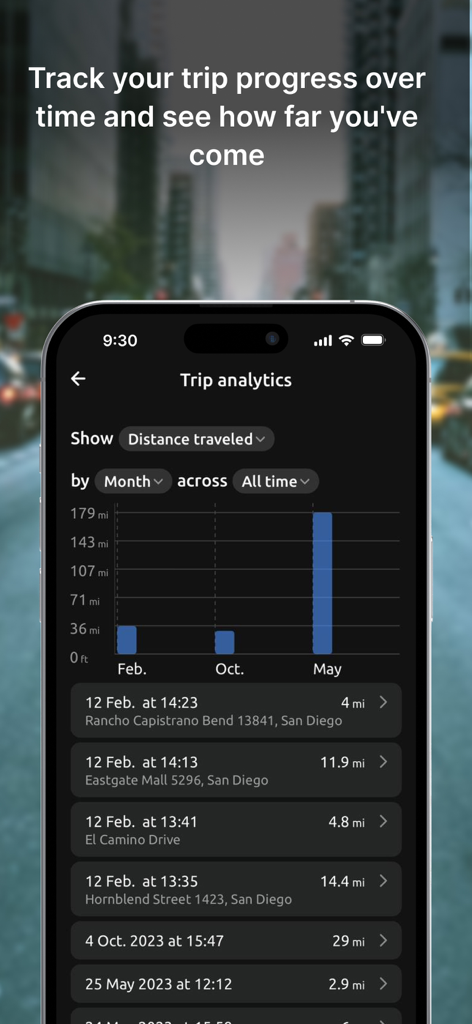
Hudway Go: Navigation with HUD - 주행 거리 막대 그래프와 상세 주행 기록 로그를 보여주는 Hudway Go 앱 주행 분석 대시보드
주행 거리 막대 그래프와 상세 주행 기록 로그를 보여주는 Hudway Go 앱 주행 분석 대시보드

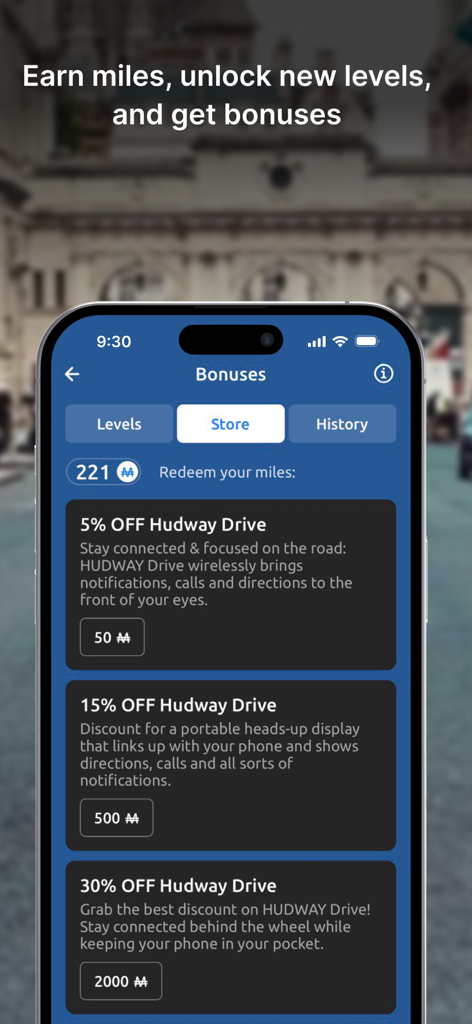
Hudway Go: Navigation with HUD - 사용자가 적립한 마일리지를 하드웨어 할인으로 교환할 수 있는 리워드 스토어를 보여주는 Hudway Go 앱 보너스 화면
사용자가 적립한 마일리지를 하드웨어 할인으로 교환할 수 있는 리워드 스토어를 보여주는 Hudway Go 앱 보너스 화면

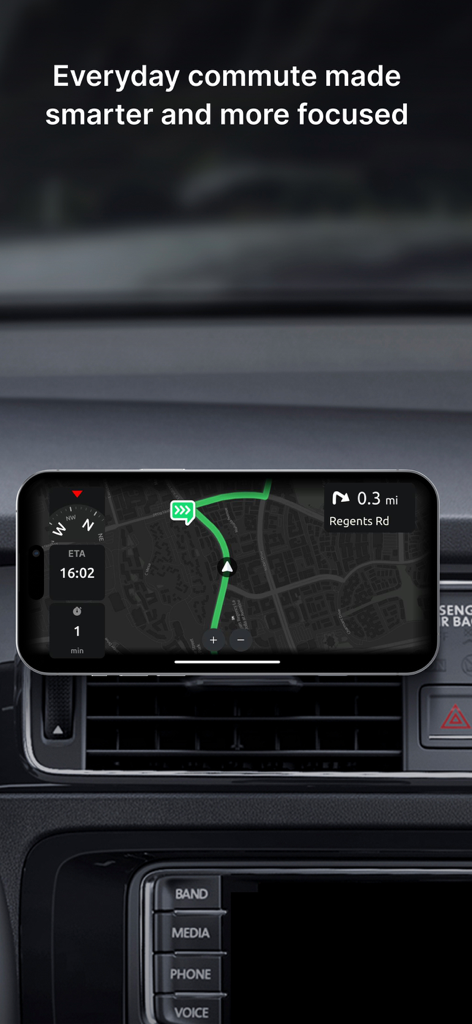
Hudway Go: Navigation with HUD - 자동차 대시보드에 장착된 스마트폰의 Hudway Go 내비게이션 앱 인터페이스

자동차 대시보드에 장착된 스마트폰의 Hudway Go 내비게이션 앱 인터페이스

설명

HUDWAY Go is a GPS navigation app which turns your smartphone into a heads-up display. Enjoy driving any car with a HUD powered by just your phone. *** "Hudway Go is one of the cleverest driving apps we've seen" — CNET "Hudway Go is unbelievably cool for one special reason: It actually lets you see your directions and route right on your windshield" — USA Today "Hudway HUD tools will remind you nothing less than a science fiction movie that you watched recently" — crazyengineers.com "HUDWAY Go turns your windshield into a jet fighter cockpit" — digitaltrends.com *** HUDWAY Go helps you drive safer in fog, rain, heavy snow, in dusk and darkness. Set your destination, select the route and place your phone on the dash — to see the route reflected on your windshield. Keep your eyes on the road and know in advance what’s ahead — a straight run, or a sharp turn. The dark windy unknown roads become more predictable this way. Features: - Easy-to-follow 3D route view - Classic map view - Heads-up (HUD) mode available for both the map and the 3D route iews - Customizable voice assistant - Speed limits and speed cam alerts - A sum-up of fuel consumption and cost for each trip - A selection of trip widgets, like ETA, speed, distance traveled, directions on the next manoeuvre, etc. - Alternative routes and stopovers - Favorite locations, personal records, driving score, weekly and monthly statistics, and more Note: Any issues found or suggestions you're willing to share — shoot us an email right from the app. We have auto-renewing subscriptions for the premium features in the app. And here's how they work: — We have 1-month, 3-months, 6-months, 1-year and lifetime subscriptions. — Your iTunes account is charged at confirmation of purchase — If you want to cancel the renewal, be sure to do it 24-hours before subscription expires: within 24-hours prior to the end of the current period your account is automatically charged for renewal — You can actually cancel the auto-renewal right after you've purchased the subscription: the subscription you've paid for won't cancel, but you won't be charged for the next period when it ends. We thought you'd like to know that: 1. On a clear day, your phone screen may not be able to produce a legible reflection. This is when you can use the app in a regular mode with the phone fixed in a mount. At night, in dusk, or in dull weather the reflection is normally well-discernible. 2. When driving, make sure that your smartphone or tablet is firmly fixed, and doesn't obstruct your view of the road. 3. Just as any other other navigation app, HUDWAY Go extensively uses GPS which may quickly drain your phone battery. If you're willing to get yourself a HUD that works day&night, shows your speed, directions, messenger notifications and incoming calls — all while your phone stays in your pocket, check out our HUDWAY Drive device at hudway.co/drive Privacy Policy hudway.co/privacy Terms of Use hudway.co/terms

Download

다운로드: App Store

이 페이지는 앱이나 개발자의 공식 페이지가 아니며, 정보 제공 및 논평을 목적으로 작성된 독립 편집 간행물입니다. 명시적으로 달리 언급되지 않는 한, 해당 앱이나 개발자는 MWM, Apple, Google Play, 앱 퍼블리셔 또는 앱 개발자와 제휴, 보증, 후원, 승인 또는 공식적으로 연결되어 있지 않으며, 이 페이지의 어떤 내용도 해당 앱이 MWM의 서비스를 사용하여 개발되었음을 의미하지 않습니다. 모든 상표, 로고, 스크린샷 및 기타 콘텐츠는 해당 소유자의 자산입니다.