HumidCalc
HumidCalc
다운로드: App Store

이 페이지는 앱이나 개발자의 공식 페이지가 아니며, 정보 제공 및 논평을 목적으로 작성된 독립 편집 간행물입니다. 명시적으로 달리 언급되지 않는 한, 해당 앱이나 개발자는 MWM, Apple, Google Play, 앱 퍼블리셔 또는 앱 개발자와 제휴, 보증, 후원, 승인 또는 공식적으로 연결되어 있지 않으며, 이 페이지의 어떤 내용도 해당 앱이 MWM의 서비스를 사용하여 개발되었음을 의미하지 않습니다. 모든 상표, 로고, 스크린샷 및 기타 콘텐츠는 해당 소유자의 자산입니다.

로고: HumidCalc
다운로드: App Store

HumidCalc

WBGT, VPD, 엔탈피를 포함한 15가지 필수 공기 물성을 과학적인 정밀도로 계산하세요. 엄격한 Wexler–Hyland 정확도와 원활한 SI/야드파운드 단위 변환이 필요한 HVAC 기술자, 재배자 및 엔지니어를 위해 설계되었습니다.

주요 수치

다운로드

72K+

사용자 평점

3.2/5

총 평가 수

0

개발사

yoshihito sakagami

카테고리

Weather

지원 언어

3

최신 버전

1.2.0

크기

10.6 MB

출시일

2016년 7월 19일
기능

정밀 환경 분석

엔지니어, 상업용 재배자 및 건강에 민감한 전문가를 위해 설계된 전문가 수준의 도구로 단순한 예보를 넘어선 분석을 경험하세요.

과학적 정확도

Wexler–Hyland 방정식과 수치 분석을 활용하여 산업 표준 정밀도로 15가지의 다양한 공기 물성을 계산합니다.

농업 최적화

현대적인 온실 관리에 필수적인 습도 부족분(HD) 및 포차(VPD)를 추적하여 작물의 건강과 수확량을 극대화하세요.

다음 스크린샷과 설명은 앱의 공식 스토어 목록에서 직접 가져온 것이며 앱 개발자의 자산입니다.

앱 스토어

스크린샷
HumidCalc - 전문가용 습도 및 대기 계산을 위한 HumidCalc 앱 인터페이스를 표시하는 스마트폰 화면.
전문가용 습도 및 대기 계산을 위한 HumidCalc 앱 인터페이스를 표시하는 스마트폰 화면.

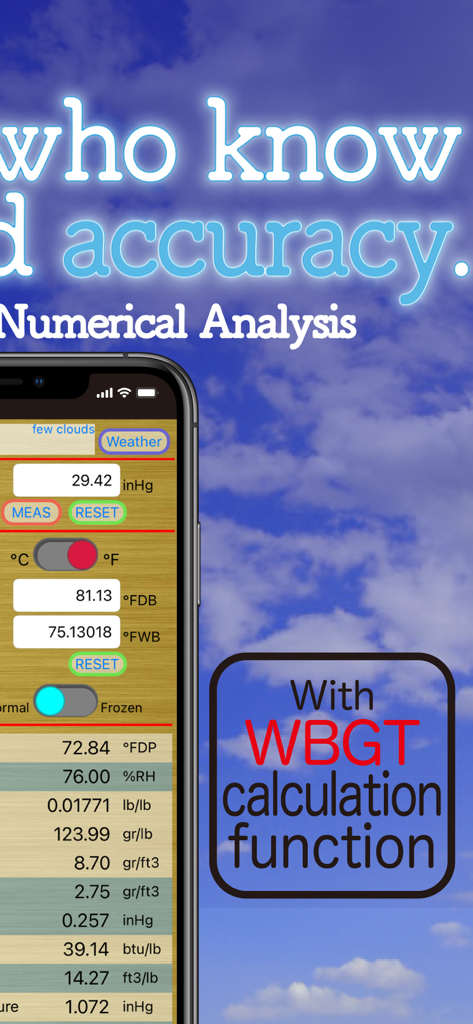
HumidCalc - 고정밀 날씨 데이터 및 WBGT 계산 기능을 표시하는 HumidCalc 앱 인터페이스
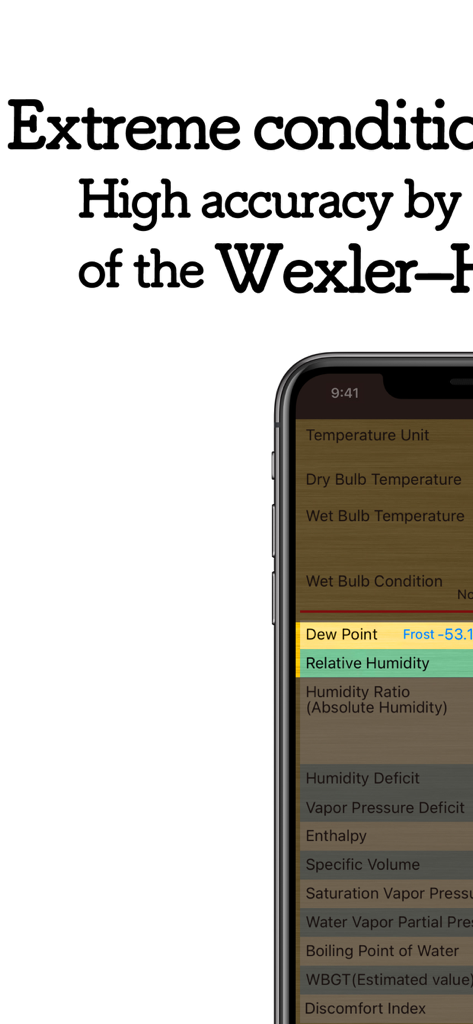
고정밀 날씨 데이터 및 WBGT 계산 기능을 표시하는 HumidCalc 앱 인터페이스

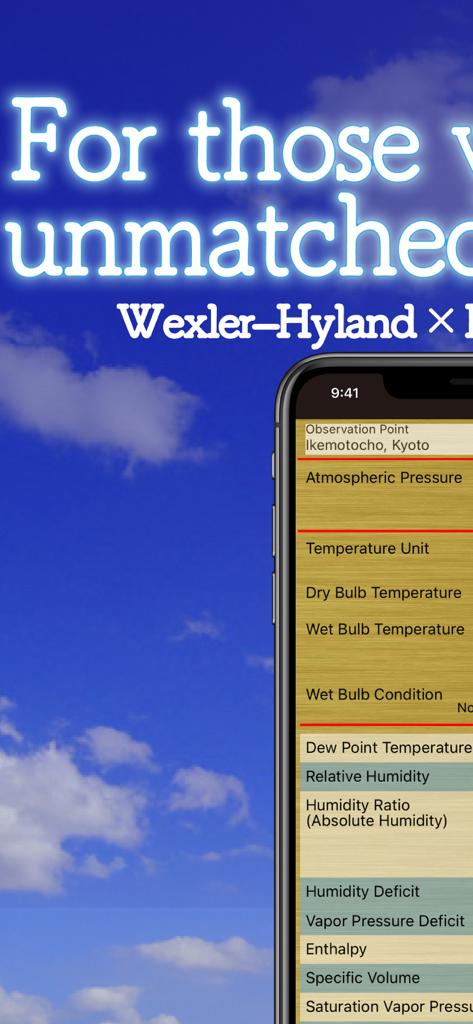
HumidCalc - 다양한 환경 및 습도 계산 지표가 있는 HumidCalc 앱을 표시하는 스마트폰 화면
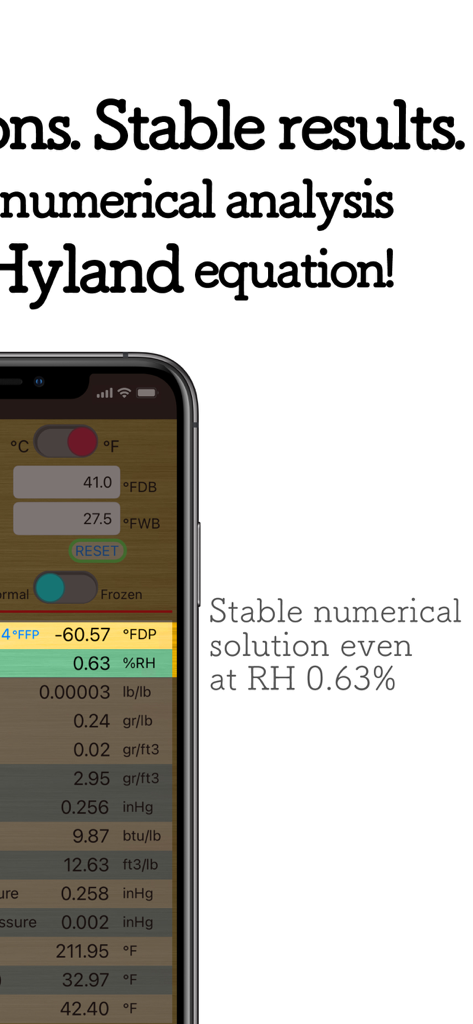
다양한 환경 및 습도 계산 지표가 있는 HumidCalc 앱을 표시하는 스마트폰 화면

HumidCalc - 고급 습도 지표 및 과학적 계산을 표시하는 HumidCalc 앱 인터페이스
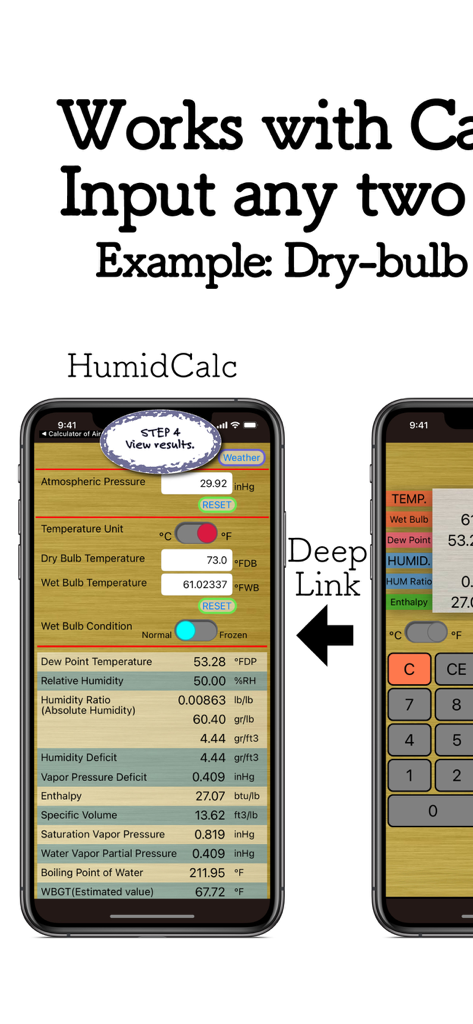
고급 습도 지표 및 과학적 계산을 표시하는 HumidCalc 앱 인터페이스

HumidCalc - 습도 및 온도 계산 결과를 표시하는 HumidCalc 모바일 앱

습도 및 온도 계산 결과를 표시하는 HumidCalc 모바일 앱

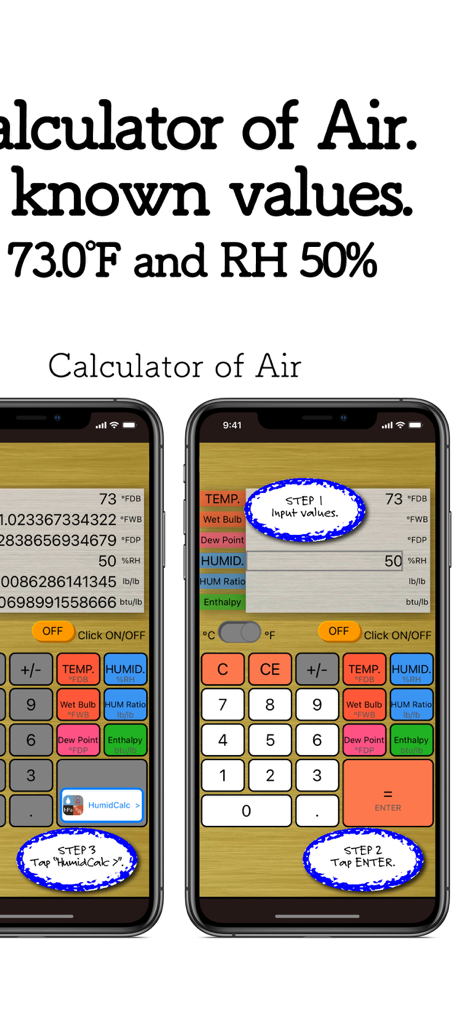
HumidCalc - Calculator of Air 컴패니언 앱에서 HumidCalc로 온도 및 습도 데이터를 전송하는 방법을 보여주는 3단계 시각적 가이드
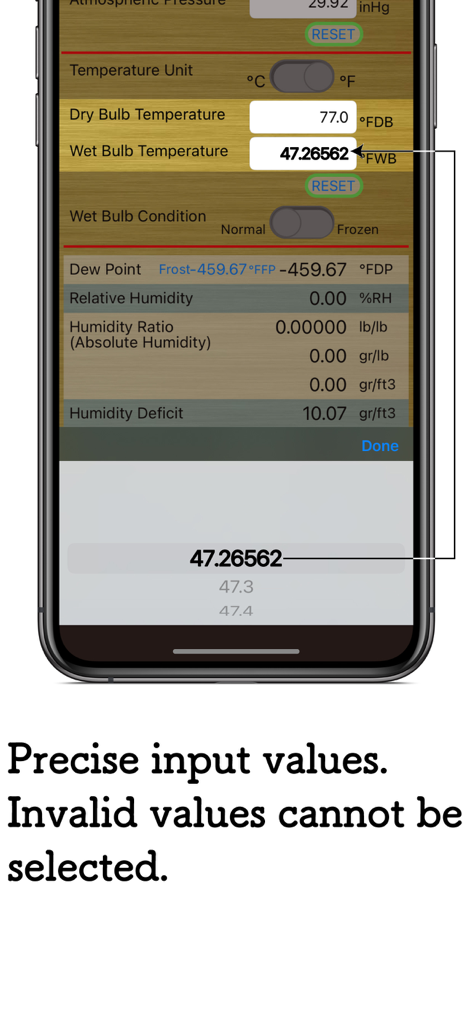
Calculator of Air 컴패니언 앱에서 HumidCalc로 온도 및 습도 데이터를 전송하는 방법을 보여주는 3단계 시각적 가이드

HumidCalc - 온도 계산을 위한 고정밀 입력을 보여주는 HumidCalc 앱의 인터페이스
온도 계산을 위한 고정밀 입력을 보여주는 HumidCalc 앱의 인터페이스

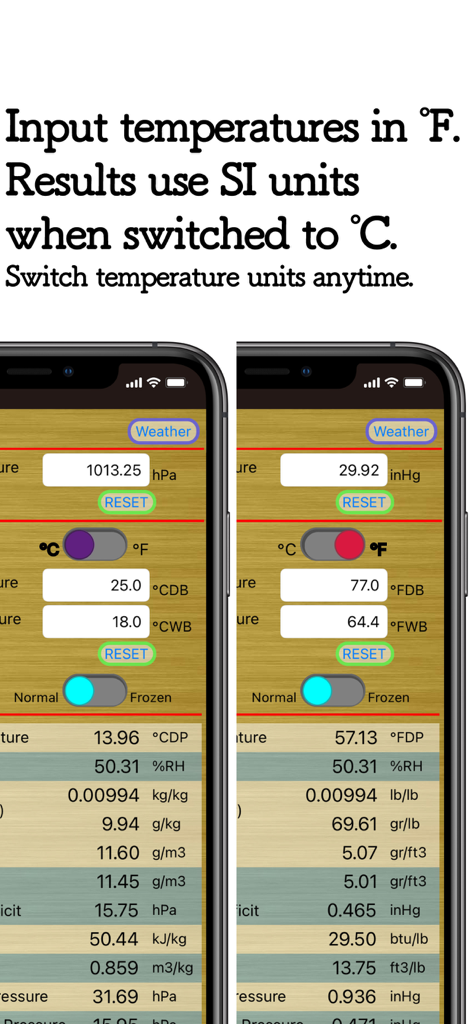
HumidCalc - 미터법과 야드파운드법 간의 단위 변환을 보여주는 HumidCalc 앱의 인터페이스
미터법과 야드파운드법 간의 단위 변환을 보여주는 HumidCalc 앱의 인터페이스

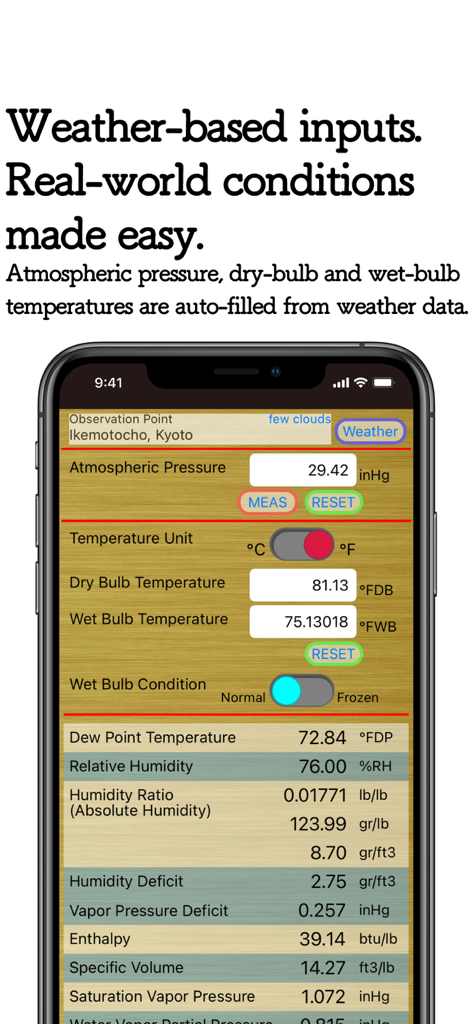
HumidCalc - 기압 및 온도 계산을 위해 자동 채워진 날씨 데이터가 있는 HumidCalc 앱을 표시하는 스마트폰 화면.

기압 및 온도 계산을 위해 자동 채워진 날씨 데이터가 있는 HumidCalc 앱을 표시하는 스마트폰 화면.

설명

*Weather data supported* A versatile humidity calculation app for everyone from general users to engineers — also suitable for agricultural applications. This app allows you to easily calculate indicators such as the Discomfort Index, WBGT (estimated heat stress index), Volumetric Absolute Humidity (an important indicator for influenza prevention), and Humidity Deficit (HD) used in agriculture, using weather data. You can also calculate a wide range of air properties from dry-bulb temperature (normal air temperature) and wet-bulb temperature obtained from ventilated psychrometers such as the Assmann psychrometer.
Atmospheric pressure can be entered manually. The app supports 11 indicators across 15 calculation items, and unit conversion between Celsius/Fahrenheit and SI/Imperial units can be performed instantly by switching the temperature unit setting. ■ High-Precision Calculation Engine This app uses the Wexler–Hyland equations combined with numerical analysis, enabling highly accurate and stable calculations across a wide range of environmental conditions. ■ Calculable Indicators * Dew Point Temperature * Frost point temperature * Relative Humidity * Humidity Ratio(Absolute Humidity) * Mass-based absolute humidity * High-resolution mass-based absolute humidity * Volumetric absolute humidity * Humidity Deficit (HD) * Vapor Pressure Deficit (VPD) * Enthalpy * Specific Volume * Saturation Vapor Pressure * Water Vapor Partial Pressure * Boiling Point of Water * WBGT (Estimated value) * Discomfort Index (DI) Supplementary Notes on WBGT & Discomfort Index Outdoor WBGT is defined as: WBGT = 0.7 Tnw + 0.1 Td + 0.2 Tg (°F) Since globe temperature (Tg) is not an input parameter, it is estimated from dry-bulb temperature (Td) using: Tg = 1.45 Td − 27.162 (°F) Td and Tg show a strong correlation (n = 17,376, R² = 0.919). Natural wet-bulb temperature (Tnw) is obtained by converting the measured wet-bulb temperature from an Assmann psychrometer to natural conditions, assuming a wind speed of 0.5 m/s (1.64 ft/s) or less. Details of this conversion algorithm are omitted. The Discomfort Index (DI) is calculated as: DI = 0.4 × (Td + Tw) + 15 (°F). ■ Weather Data & Sensors By tapping the Weather Data button, you can obtain current atmospheric pressure, dry-bulb temperature, and wet-bulb temperature. On devices equipped with a barometric pressure sensor, pressing the MEAS button allows direct pressure measurement. Wet-bulb conditions can be set to Normal or Frozen (effective below freezing). Corrected values can also be displayed for non-ventilated psychrometers such as the August psychrometer (ventilated types recommended for accuracy). ■App Ecosystem Integration You can directly receive calculated dry-bulb and wet-bulb temperatures from the companion app “Calculator of Air”. (Please note that calculations must be performed in Calculator of Air before data can be transferred.) By combining HumidCalc with Calculator of Air, you can, for example, derive multiple air properties from known dry-bulb temperature and relative humidity values. ■Input Ranges * Dry-bulb & wet-bulb temperature: −30°C to 50°C (−22°F to 122°F) * Atmospheric pressure: 600 hPa to 2475 hPa (17.72 inHg to 73.09 inHg) ■Data Source This app uses OpenWeatherMap data (CC BY-SA 4.0). ■Notes When using an August psychrometer, calculations assume an air velocity at the sensing element of 0.5 m/s or less. As a result, calculated values may differ from those listed in humidity tables included with commercial August psychrometers. ■Disclaimer 1. Please use values within reasonable temperature ranges (approximately 0°C to 40°C / 32°F to 104°F). Extremely unusual inputs may produce inaccurate results. 2. While every effort has been made to ensure high precision, minor errors may occur due to floating-point limitations. 3. The developer assumes no responsibility for any damages resulting from the use of this app.

Download

다운로드: App Store

이 페이지는 앱이나 개발자의 공식 페이지가 아니며, 정보 제공 및 논평을 목적으로 작성된 독립 편집 간행물입니다. 명시적으로 달리 언급되지 않는 한, 해당 앱이나 개발자는 MWM, Apple, Google Play, 앱 퍼블리셔 또는 앱 개발자와 제휴, 보증, 후원, 승인 또는 공식적으로 연결되어 있지 않으며, 이 페이지의 어떤 내용도 해당 앱이 MWM의 서비스를 사용하여 개발되었음을 의미하지 않습니다. 모든 상표, 로고, 스크린샷 및 기타 콘텐츠는 해당 소유자의 자산입니다.